Christopher Barry
Veteran
Exactly. Thanks for exploring and posting the tests.... i'm trying to squeeze in sorting them out in between actual real life work

Follow along with the video below to see how to install our site as a web app on your home screen.
Note: This feature may not be available in some browsers.
Exactly. Thanks for exploring and posting the tests.... i'm trying to squeeze in sorting them out in between actual real life work
Resolve doesn't scale anything if the source is interpreted and imported as data levels; what you see is what you have in the file, no need to pull down whites there is nothing else up there. If it is interpreted and imported as video levels the source range is expanded from 16-235 to 0-255 (0-1023 in scopes); that's also what your two last screenshots show - the video levels import increases contrast due to the expansion of the legal range. And in the case of video levels interpretation of a source you can indeed have invisible whites and blacks (below 0 and above 1023 on the scopes). I'd say Resolve handles the video/data levels thing in a robust and predictable way unlike other applications.
Curious to see the DPX files though.
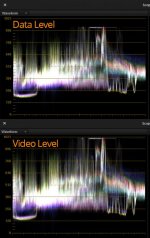

This is a version not gained in any way.
View attachment 88931
So why does the data version not go to 1023 and shows an even more raised black level?
Is there any overall project setting i've not found?
One of the reasons i don't use Resolve is that the scopes are showing a dithered image, it does this automagically whereas SpeedGrade will show the banding and quantisation in the waveform. Sadly SG doesn't like XAVC otherwise i'd be doing it in there and i'm not so convinced of the transcode to get it there.
In SG if you gain up an image you will see the banding immediately. In Resolve you won't. It's dithering it. Pretty damn useless IMHO...
cheers
Paul
This is just a question from the back of the class from a guy who's doing his best to follow a discussion that's a little over his head ...
Looking at Paul's waveform I see blacks are at 128 (what unit is this ... 128 whats?), but the image also clipped a little near the middle-right side. Does this mean this shot should have had a lower exposure--to make use of 0-28 and avoid clipping?
It is all acting as expected in Resolve.
The data levels version has the real values as they are in the file. It is not that the data levels version has raised blacks, rather the video levels version has the blacks lowered after import: the video levels interpreted version has the range scaled on import, thus decreasing blacks and increasing whites.
I suggest you shoot a severely overexposed image so that we have the white clip level established without doubts. And then maybe shoot a pure black image (with the lens cap on), for the black level.
Paul,
By chance are you seeing less banding in the HDMI signal versus the XAVCS?
It's difficult for me to tell because as i mentioned Resolve is auto dithering.
I will shoot XAVC vs DPX, and i will try to transcode the XAVC into something i can get into Nuke or SpeedGrade then i can tell about the banding differences.
In truth you will only really see the banding if you apply an Slog2 LUT to get the dynamic range back into scene linear. Afterall that is the point of Slog, it's a scene linear representation of the, well, scene
cheers
Paul
THanks for taking some time out to test, man. Everyone's really helpful, either straight up knowledge or dropping examples.
I'm doing something wrong, on my end, because I can't seem to find a balance between banding in shadows/low end and maximizing DR. =[ It's also banding that I can see right on the LCD, and so far what I see there sits in the XAVCS file.
I did actually manage to get the Decklink 4K card into my new tower yesterday, after many hours, so I can finally try to pull a 4K signal out of the camera. Going to do that today for sure.
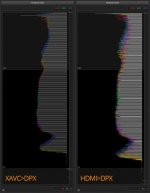
What i'm struggling with is data levels don't really have a meaning for YUV source. They only really mean something if the underlying data is RGB.
By the look of it we are saying that actually the range of values for Slog2 off this camera is 219 discreet steps? *if* data levels are showing us what's in the file? I don't think this is the case. In after effects when this XAVC is imported i get super brights - the data level waveform suggests that there are no superbrights (otherwise it would go to white). Yes that is clipping, or at least should be. Whether Resolve is automagically trying to reconstruct anything i don't know.

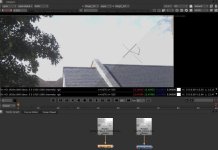
What is interesting is that the XAVC is exhibiting a bit more range, you're looking at 13.2 stops vs 12.4 in the HDMI DPX, this can be seen in the sky at the edge of the clouds. I've adjusted my viewer exposure down 5 stops to see the sky properly.
You can think of the data/video levels setting as a setting that governs the coefficients of the YUV->RGB transform matrix (and that's what it is in reality).
Maybe the DPX files for a clipped/crushed image will shed more light on what's in the source image data and where are the clipping points.
I am not sure the transcode from XAVC to DPX (done in AE or wherever) can be trusted? [As in, not sure how AE handles superbrights, etc.]
You should see more precision in the DPX HDMI because you have both more color info (less chroma subsampling) and no compression; blocks compression tends to kill some tonality.
I think it can be trusted in this case, it seems to be about right from what i can tell.
If quicktime is involved then all bets are off, if you want to see how much of a nightmare it is: http://bit.ly/1gJMlCu
I'm still unsure why the unbending of the YUV-RGB is 16-235 for data levels. Why isn't it 0 to 255 then?
cheers
Paul
(XAVC, default s-log2 settings)

