GH4 A fully logarithmic color space for Cinelike D and V-Log L

Thank you Balazer. I'm looking for a technical LUT (V LOG) to load it in my Atomos Shogun .
I don't know exactly how the Shogun uses LUTs, but give this a try:

In DaVinci Resolve, add my V-Log-L-to-log LUT to a corrector node, and a log-to-Rec.709 LUT (with or without highlight roll-off) to a second corrector node in series. Then right click the clip and click Generate 3D LUT (Cube). It should generate a Cube file that your Atomos will load, and it will be the equivalent of the two corrector nodes in DaVinci. You can even apply exposure compensation in the second corrector node, if you want, and have that included in the exported Cube file. Without any exposure compensation, V-Log L has about a third of a stop more highlight range than my Rec.709 [highlight roll-off] color space.
 
Just wanted to say thanks to Balazer for his recent wave of LUTs. I have to make my Vlog footage look like stuff my partner shot with a GX7, and the usual LUTS just weren't close enough. They tended to give me greys instead of blacks and not-very-vibrant colors. But Balazer's log-to-709 LUTs got me to a place where I could adjust the curves to get very, very close.

(I tried to make LUTs in Photoshop, but they just wouldn't work in PP. Would be nice to have LUTs so that the GH4 could emulate the GH2 or GX7.)
 
Leeming takes a different approach. For that LUT the footage needs to be exposed a certain way and you need the right white balance in the camera. It doesn't enable color correction the way mine does. And I believe his is hand tuned to create a pleasing image. Mine is not hand tuned. (aside from the highlight roll-off, which I did hand tune based on a sampling of images) Mine is based on the Rec.709 standard and mathematical transformations between color spaces.
 
Update on the above comment. Balazer's LUTs are a big help because they have a wider dynamic range, but I've found that they can be much darker than the standard GH4 LUT. But they're a huge help.
 
Leeming takes a different approach. For that LUT the footage needs to be exposed a certain way and you need the right white balance in the camera. It doesn't enable color correction the way mine does. And I believe his is hand tuned to create a pleasing image. Mine is not hand tuned. (aside from the highlight roll-off, which I did hand tune based on a sampling of images) Mine is based on the Rec.709 standard and mathematical transformations between color spaces.
Just to clear up any misunderstandings:

1. White balancing the camera is done to maximise the amount of dynamic range in each of the R, G and B channels. If you shoot in tungsten light with daylight balance set, for example, you are going to severely limit the blue channel's dynamic range, and therefore increase noise substantially, not to mention giving yourself less colour bits to work with in that channel (hence more banding possibilities). With any non-RAW camera, you need to white balance properly before your shots to center each channel's levels as a uniform colour resolution starting point.

2. My recommended settings IN CAMERA are designed as the starting point that maximises dynamic range (Cinelike D, -5 -3 -5 0 0, 0 everything else, 0-255).

3. Exposure is done via ETTR principles because that's how you maximise dynamic range and colour precision/bit depth usage. These principles apply to any digital camera. Fill the bit bucket (but don't overfill) for the most dynamic range and colour resolution.

4. Leeming LUT One is designed to get you to Rec.709 as a starting point, by correcting the issues of Cinelike D, while retaining all the dynamic range advantages, be it at 8 bit or 10 bit.

5. My overriding principle has been to make a proper Rec.709 image (correct colours) while making sure skin tones are "correct" and "pleasing". Yes, Rec.709 gives correct colours. And yet Rec.709 in many cameras, GH4 included, doesn't address what we find most appealing about good skin tones, or what we consider "filmic". I have hand adjusted the colours of Leeming LUT One to both comply with Rec.709 exactly (less than 1% deviation at most, verified by others), while giving you that filmic skin tone rendition and lower colour noise.

In short, my LUT is designed to enable colour correction from an accurate Rec.709 starting point, while maximising dynamic range of the GH4 sensor in the shooting phase through the best set of settings (figured out through lots of testing).

You can see in more detail how I recommend shooting with the GH4 here (PDF manual), or in the Leeming LUT One thread of course :)

HTH!

Cheers,

Paul :)
 
I'll use audio as an analogy. When you record audio, if you set the gain too high on your recorder, you will have distortion (clipping). If you set the gain too low, you'll have added noise. Somewhere in the middle is a gain setting that minimizes the noise while avoiding clipping. That's the setting that maximizes the dynamic range. If you really want to maximize the dynamic range, you'll make frequent and careful gain adjustments. ("ride the gain") But that's not always practical or necessary. The usual practice is to set the gain in a way that gives you some headroom. You just set the gain such that the noise is not too high, while allowing some room for the signal to get louder without clipping. Then you bring your recordings into an audio editing application and adjust the amplitude of each clip so that they have the loudness you want and they all match.

That approach does not optimize the dynamic range. It does not minimize the noise. But it gives a lot more flexibility: gain doesn't need to be set perfectly in the recorder. Imagine if your audio editing application didn't have a way to adjust the amplitude. Imagine if setting the gain on the recorder was the only way you had to achieve the correct loudness of each clip in the final output.

That's basically the situation for normal video shooting, because normal video is recorded in a color space that does not enable accurate gain adjustment. Your video editing application does not have sliders labeled "exposure compensation" or "white balance correction" that really do what they say. That's the problem I'm trying to fix. I transform the video into a color space that is logarithmic, so that an offset operation can be applied to accurately adjust the gain. Offset operations in the logarithmic color space are mathematically identical to the kinds of operations that a camera does to its raw sensor values when you change the ISO setting or the white balance in the camera. As far as color correction goes, correcting in the log space is almost as good as having a camera that shoots raw.

It doesn't mean you don't need to set the exposure and the white balance in the camera. It doesn't give you unlimited dynamic range. If you overexpose by too much, there will be clipping. If you underexpose by too much, there will be noise. (and same thing for white balance, except the noise and clipping will happen differently in each of the color channels) There's only 8 or 10 bits in each sample, not the 16 or 24 bits that we usually get with audio. So you absolutely do need to set the exposure and the white balance in the camera. But they don't need to be set perfectly. You have some latitude. There is a range of settings that will deliver good results. And that range is substantial, about 1-2 stops, depending on your camera. That means you can underexpose or overexpose by roughly half a stop to a stop and still effectively correct it in post. And that correction in post becomes trivially easy. You just drag some sliders until the exposure and white balance look right. The results will be nearly as good as if you'd set the exposure and white balance perfectly in the camera at the time of shooting.

I think Paul has a lot of experience with cinematography. He knows how to set the exposure and the white balance perfectly in the camera. I don't. That was always a struggle for me. I can spend a lot of time tweaking those settings until the image looks just right in my camera's eyepiece. But when I get back home and bring the footage into my computer, most of the shots aren't quite right and none of them match. In the log space I can correct them very easily and quickly.
 
Hi Balazer,

Thanks for your awesome work.
I read about it when you first posted, but did not have Adobe CC or used any of the other software. Have been toying around with DaVinci since 12 came out and decided yesterday to give your LUTs a spin. I was blown away!

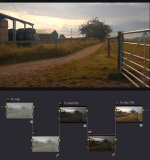
My setup is basically three nodes. First one to log, second one to gamma and third one to Rec.709. Next I add two in-between nodes.

BalazerLUT_in_DaVinci.jpg
Today -now I knew the basics of your LUTs- I wondered if AE 5.5 might work with your LUTs after all …and it turns out it does!

For those who like me thought it wouldn’t work with versions prior to Adobe CC here is my basic setup.

AE 5.5

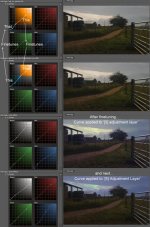
5 layers, bottom layer contains footage next four layers on top are Adjustment layers with ‘Effect>Utility> Apply Color LUT’ effect. LUT’s are taken from the folder ‘Adobe Cube LUTs’ which can be found in ‘Balazer GH4 log LUTs v0.14’
Adjustment Layers from bottom to top:
-[1] Adjustment Layer > Panasonic GH4 Cinelike D 0-255 [expanded] -to- log (v0.140)A.cube
-[2] Adjustment Layer > log -to- gamma 1D (v0.14)A.cube
-[3] Adjustment Layer
-[4] Adjustment Layer > gamma -to- Rec.709 [highlight roll-off] (v0.14)A.cube
-[5] Adjustment Layer

Apart from Adjustment Layer [1] ‘curves’ are used on all other layers. I used Color Finesse(simplified interface), should work with whatever curve you have at hand. Pictures are a bit too small to read but the fine tune part is about the curves for the adjustment layers 'to gamma' and 'to Rec.709' , applies to Davinci as well.
BalazerLUT_in_AE.jpg
Big thanks to Umii for “sharing” a jpg in the Leeming LUT thread of farmland as it really showed the strength of Balazer LUTs.

Someone mentioned it before but this really feels like having a new camera. I played yesterday -in Davinci- for at least an hour with the curves, creating different kinds of sunsets, in disbelieve that something like that was even possible.

So once again a big thank you!

Cheers,

bunk

Oh and when I applied the Vlog version to some footage of an old lay I shot through a window it felt almost as if my monitor had became that window ...awesome!

[Edit]
Turns out that the Vlog version doesn't work AE 5.5
Image breaks up almost as if editing a .gif
 
Last edited:
To the few people who were using my old log LUTs for the GH4, I have extended the concept with support for more video apps, more cameras, and more rendering transforms: Logarist
 
Back
Top