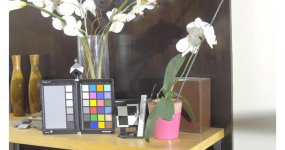
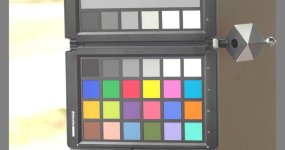
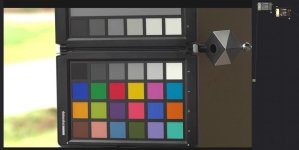
GH4 A fully logarithmic color space for Cinelike D and V-Log L

V-LOG L > LOG > 709
CINED)LOG)709.jpg

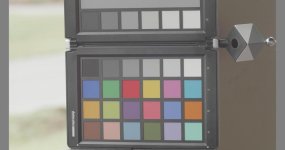
Again, resultant image is way off. This preview actually minimizes the issue (must be crushing colors to sRGB. I'll post the full range 16-bit PNG.)
 
Hi, joe12south. Thanks for running those tests.

The V-Log L looks o.k. to me, except for the oversaturation that V-Log L does, and that it it overexposed. If you don't apply any exposure compensation, the LUTs will just map middle grey of the input to middle grey of the output. Panasonic defines middle grey in V-Log as 42.1%, and I set middle grey in Rec.709 at 38.4%. Unless you are using a grey card to set exposure in V-Log L, you will likely require some exposure compensation in post.

Something looks very wrong with the Cinelike D test. I suspect that the levels are not being mapped in the way that the LUT expects. The LUT expects black at 0.0 and white at 1.0. What was the luminance range set to in the camera? Which software are you using to read the video file? Did you use a scope to verify that the black and white levels were mapped in the expected way by your video software before applying the LUTs? If you'd care to post the source video files, I can validate your test.

The whole point of my approach is to make basic color correction very easy. When you bring a raw image into Lightroom and you see that the image is overexposed or underexposed, you apply some exposure compensation. You should do the same thing with my LUTs. If you don't apply any exposure compensation, the LUTs are just going to map middle grey of the input to middle grey of the output. Cinelike D and V-Log L both have more highlight range than Rec.709. So unless you apply some exposure compensation, the result will probably be overexposure and clipped whites, depending on how you exposed the image.

The V-Log and Cinelike D color spaces are not display referred. That means you can't judge exposure for them just by looking at their images on the camera's monitor. The images will have unnaturally low contrast and won't look right no matter how they are exposed. You need additional tools to set the exposure, and/or exposure compensation in post. Cinelike D is closer to Rec.709, so you can usually ballpark the exposure just by looking at the camera's monitor. Then you use exposure compensation in post to make fine adjustments of brightness and get it exactly where you want.
 
Last edited:
Scene was exposed for the grey card. Luminance range was 0-255. Processing done with FCPX. Yes, ranges scope as expected.

I like the idea of mapping V-LOG L to standard log...cause that opens up the use of a lot of good LUT's...but I guess my question is what is the point if it seemingly intentionally does not map V-LOG L to either correct exposure or saturation, and the hue is basically the same as Panasonic's 709 LUT? I don't understand how this is supposed to make color correction "easier"? The only net affect I see is having to take multiple additional steps to get to the same place. What am I missing?
 
Is your grey target visible in the test images?

Can you please verify that if you take an RGB color value of (0.42, 0.42, 0.42) and apply the V-Log to log LUT, and then the log to Rec.709 LUT, it yields a color value of (0.38, 0.38, 0.38)? That's what you should be getting. It's definitely what I'm getting.

The color correction is easy if you actually do it. You didn't do any. If you don't do any color correction, the LUTs should render the image in a totally neutral way: middle grey will be mapped to middle grey and neutral colors will stay neutral. But the real value of what I'm doing is that you don't need a grey card to expose and you don't need a white card to set white balance. You can be approximate about exposure and white balance in the camera, and then correct them in post. It's just like Lightroom. In Lightroom, the first things you should do for every photo are exposure compensation and white balancing. When you shoot raw and correct in Lightroom, you get much better results than you can get if you had shot JPEG files and corrected in Photoshop. Photoshop doesn't have white balance and exposure compensation sliders, and JPEGs are typically not in a color space that makes those corrections easy. Same thing for V-Log L and Cinelike D.

The saturation is interpreted according to Panasonic's V-Log/V-Gamut specification. If the saturation is wrong, then it's because the Panasonic GH4's V-Log L does not conform to the V-Log specification. It's possible to create a profile of the GH4's V-Log L output, but that's not what I did here. It's just an interpretation of V-Log, exactly per the specification.
 
Last edited:
Here's another example:

V-LOG L > Panasonic 709 LUT
vlogl-pan709.jpg

V-LOG L > LOG > 709
vlogl-log-709.jpg

If were to push it down to not appear overexposed, it would appear underexposed.
 
joe12south, something is wrong with that processing. Without source files or seeing what FCPX is doing, I can't begin to guess where the problem is. The Panasonic V-709 LUT image and the one made with my LUTs both have middle grey mapped incorrectly.
 
joe12south, something is wrong with that processing. Without source files or seeing what FCPX is doing, I can't begin to guess where the problem is. The Panasonic V-709 LUT image and the one made with my LUTs both have middle grey mapped incorrectly.
This wasn't exposed to put middle grey exactly on, it was ETTR. Regardless, the LUT's are applied to the same image. Panasonic's yields a fairly accurate curve from shadows through highlights. Yours begins to deviate around the midpoint and blows out quickly. To use your LUT, in practical terms, not only would one need to stack two LUT's to get to a naturalistic image, but they would also have to mess around with curves and possibly saturation. I just don't see how that makes for "easier" color correction.

When I get a chance, I'll try in Resolve and Premiere to see if it behaves differently.
 
resolve.jpg
Same result in Resolve. Am I doing this fundamentally wrong? First node applied the LOG LUT. Second node applies the LOG to 709 LUT.

edit: I shouldn't say same result, it's better, but still overexposed and oversaturated.
 
Sure, try Resolve, because something is wrong with that FCPX workflow. You don't need curves at all to correct exposure in log - just an offset operation.
 
Same result in Resolve. Am I doing this fundamentally wrong? First node applied the LOG LUT. Second node applies the LOG to 709 LUT.

edit: I shouldn't say same result, it's better, but still overexposed and oversaturated.
The image is overexposed. You need to apply negative exposure compensation. If you put V-Log to log in the first node and log to Rec.709 in the second node, you should apply an offset in the second node. Don't make any corrections in the first node.
 
The image is overexposed. You need to apply negative exposure compensation. If you put V-Log to log in the first node and log to Rec.709 in the second node, you should apply an offset in the second node. Don't make any corrections in the first node.
If I knock down the exposure to protect the highlights, from midtowns down are underexposed. And in either case, saturation is kind of off the charts.
 
If I knock down the exposure to protect the highlights, from midtowns down are underexposed.
That's Rec.709. It's not compressing the highlights at all, so it just doesn't have very much highlight range. If you want to preserve more highlights, your options are to underexpose the entire image, or to compress the highlights.

My Rec.709 LUTs with a highlight roll-off are a suggested way of compressing the highlights. Every kind of highlight compression represents some trade-off. Too little compression can leave more clipping than you want. Too much compression makes for unnaturally low contrast in the highlights. There's no single way of compressing the dynamic range that's going to be best for every image. It's up to you to decide on the best approach for each image. If you don't like my highlight roll-off, you can make your own with a curves filter in the log space or in the gamma space.

Edit:
A little more about Rec.709: Rec.709 is the standard way of rendering images for HDTVs. Rec.709 doesn't have much highlight range because HDTVs don't have much highlight range. The TVs cannot reproduce super bright whites. If you shoot with a white card and nothing in the scene is brighter than that white card, Rec.709 will do a totally fine job and nothing in the scene will be clipped. That's how a TV studio would be set up. If anything in the scene is much brighter than the white card, Rec.709 would clip those things harshly. Harsh clipping on anything except specular highlights looks nasty, so for those types of scenes with a large highlight range, you probably don't want to use standard Rec.709. You probably want some variant of Rec.709 that compresses the highlights, so that fewer things clip and the clipping is less harsh. Virtually every consumer camera's standard output is some variant of Rec.709 that compresses the highlights. My Rec.709 w/ highlight roll-off is a variant of Rec.709 that compresses the highlights in a special way: it alters only the luminance, preserving chromaticity. So there is no hue shift or saturation shift in the highlights.
 
Last edited:
My Rec.709 LUTs with a highlight roll-off are a suggested way of compressing the highlights.
Gonna be out shooting all week in Yosemite. I'll try the roll-off version when I get back. It's fairly important to ETTR with V-LOG L (to avoid nasty shadow noise) so I doubt the straight version is of much use to the average shooter.
 
It's important to expose correctly on the GH4, period. The camera doesn't have very good dynamic range. V-Log L doesn't change the camera's dynamic range significantly. It just makes it a lot harder to set the exposure because you don't have a what-you-see-is-what-you-get image on the camera's monitor that you can use to judge exposure from. Cinelike D, too, is a little harder to use than a standard profile because of the low contrast image.

Expose *what* to the right? There are all different manner of highlights, some brighter than others. Some should be exposed to the right and some should be clipped.

I know of three reliable ways to set exposure on the GH4:
  1. Grey card targeted at a certain color value
  2. Set exposure using a standard photo style, and then switch to the photo style you want to record in. (for V-Log L, also switch to an ISO 1 stop higher to maintain the same noise performance and highlight range)
  3. External monitor with a LUT
 
It's important to expose correctly on the GH4, period. The camera doesn't have very good dynamic range. V-Log L doesn't change the camera's dynamic range significantly. It just makes it a lot harder to set the exposure because you don't have a what-you-see-is-what-you-get image on the camera's monitor that you can use to judge exposure from. Cinelike D, too, is a little harder to use than a standard profile because of the low contrast image.

Expose *what* to the right? There are all different manner of highlights, some brighter than others. Some should be exposed to the right and some should be clipped.

I know of three reliable ways to set exposure on the GH4:
  1. Grey card targeted at a certain color value
  2. Set exposure using a standard photo style, and then switch to the photo style you want to record in. (for V-Log L, also switch to an ISO 1 stop higher to maintain the same noise performance and highlight range)
  3. External monitor with a LUT
The only way to expose any digital camera for the best image quality, is Exposing To The Right.

Sure, you can maybe let things like practical lights clip without worrying, and maybe out of focus specular highlights, but by and large, if you hold the image as far to the right without clipping any channel, you will get the best quality and highest dynamic range the camera is capable of.

Don't switch profiles to judge exposure, as different profiles react differently.

For my own LUT, ETTR in Cinelike D -5 -3 -5 0 0 gives the highest dynamic range of any profile, equal to V-Log L, but you need to use ETTR to make sure you have the highest quality starting point. Do that, and you will have a reliable and consistent experience (the histogram, zebras etc all work as expected) with the best image quality the camera is capable of.

Using a grey card to expose might well result in losing the stops at the top end if it's a low key scene, for example, wasting the highest precision bits and generating a noisier picture, than if you expose to the right, and reduce the exposure back down in post.

Cheers,

Paul :)
 
1. Grey card targeted at a certain color value
Often problematic in high DR scenes.
Set exposure using a standard photo style, and then switch to the photo style you want to record in.
Bad idea as exposure changes from profile to profile...significantly with V-LOG L.
External monitor with a LUT
Nice, but a luxury for many users.

ETTR is tried and true, and other the V-LOG L's screwed-up histogram (not *fixed* in 1.4 ... just differently screwed-up) it's the most reliable way to get a consistently usable image out of the GH4 in less than ideal circumstances. In any profile other than V-LOG L you can set one of your zebras to 105% and be confident in not to ruin an image. Overexposure (so long as information is not blown-out) is greatly preferable to underexposure.
 
Back
Top