40Mbps AVCHD High Reliability Patch

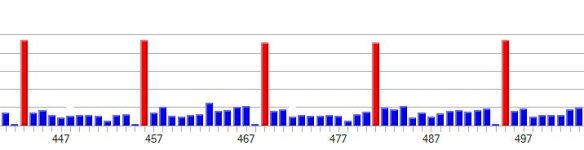
I have found that the Native 24p/25p mode does have problems even when it doesn't crash ar appear to be failing. For example, I have several files where the GOP lengths come out wrong (i.e. a GOP of 13 followed by a GOP of 11 when the GOP is supposed to be 12). This indicates that something went wrong - even if the clip is playable. If you look closely you'll find stuttering, pulsing etc... Without Native checked this absolutely never happens. I agree with you, though, that this isn't a bandwidth problem - it's a bug somewhere.

Chris
 
Here's an example of a Native 25p PAL clip. The GOP is supposed to be 13. You'll notice that there is a GOP of 12 followed by a GOP of 14. The clip appears to play fine but it does exhibit pulsing if you look closely. Almost every Native mode clip I've looked at does this GOP skewing thing at some point. Clearly something is wrong and eventually there will be freezes etc...

Chris
 

Attachments

  • BadGOP.jpg
    BadGOP.jpg
    21.1 KB · Views: 0
Well, now that we know, is there a way to fix this via the route we (or Vitaliy) are going or is it a hopeless case?
 
This is the current focus of the research being done right now. Hopefully a solution will be found; but it's not possible to predict when that might happen.

Chris
 
Here's an example of a Native 25p PAL clip. The GOP is supposed to be 13. You'll notice that there is a GOP of 12 followed by a GOP of 14.
I also notice that in the two "good" GOP's preceding the 12-frame GOP, the last P-frame of each GOP is suspiciously small. I suspect these may be NULL 192-byte frames that the encoder occasionally emits when it's under stress.

Perhaps in this case, it had just enough time in its time-slice to write a NULL P-frame at the end of the first two GOP's, but ran completely out of time to even write the last P-frame of the 12-frame GOP? It appears that it then attempted to patch in an extra P-frame in the 14-frame GOP to make up the omission, but there again it lacked enough time to write anything more than a NULL P-frame at the end of the GOP...
 
Last edited:
Yeah, somebody sent me that clip as an example of "pulsing". The interesting thing is that you see these tiny 192 byte frames fairly frequently with native checked and they are rare otherwise. I totally agree with your assessment. Native mode does produce more color data. I wonder if buffer allocations, etc... don't account for this extra data that exists when the stream is parsed into TS packets.

Chris
 
FWIW, I was messing with different GOP settings on my GF1.

I had PAL GOP set to "5" and also enabled 25fps mode, shot some high detail footage and while no errors were reported and the video played back fine, I noticed the same issue where the last P frame of each GOP was 192bytes.

So, the GF1 is also susceptible to this anomaly.
 
Hey Guys,

Just wondering if the Limiting Bitrate has been pulled from the latest version of PTool, I've been trying to find it. Is it not required any more?


Cheers


Edit:

Just found that limiting bitrate is now obsolete, now my question is: Why do these patches usually ignore the Video Bitrate H and Video Bitrate L? What to they do? High and Low?
 
Last edited:
Thanks Ipowell,

What sort of bit rates are you getting from the footage - just checked the INI file, what do the preset bitrates do? I noticed that you dropped them.
 
Maximum bitrate is fixed at 44Mbps. Average bitrate can reach 40Mbps in well-lit, highly detailed scenes. AVCHD bitrates naturally drop as light levels and image complexity decreases.

The Preset Bitrates determine the bitrate of the initial frame of each video. When using a Lumix stabilized auto-focus lens, the camera's processor has a lot to take care of at the very beginning of a video. I found that lowering the Preset Bitrate gives the camera a healthier safety margin to guard against occasional failures to start recording.
 
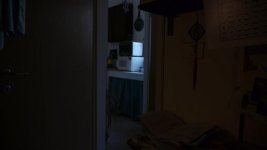
Try this patch five minutes ago. The result is two fail successively. Tripod and panasonic gold 10 on hight sharp scene. Very puty.
 
Is this is normal for this setting?

attachment.php


I have no idea if that is happening also in C settings, I need to check.
This is the setting, with patch to Pal.

File is resized to 720, but original is 1080, iso 100, kit lens, standard.

Ok, checked now, it also in setting C.

Yak...
 

Attachments

  • 00000.jpg
    00000.jpg
    21.4 KB · Views: 0
Last edited:
What are we supposed to see here? It just looks like a flat un-lit scene to me.

Chris

Can't you see the posterization?

The image is exposed according to the highlights areas, and all the shadows are full with posterization.
 
Can't you see the posterization?

The image is exposed according to the highlights areas, and all the shadows are full with posterization.


I see an underexposed photo that would look bad shot with a GH1/7D/HVX. Up your iso to at least 640 and report back.

Why is this exposed for the highlight areas? It's not a hard rule to expose for highlights, it's more important to expose for subject in a scene, which isn't the highlights.
 
I see an underexposed photo that would look bad shot with a GH1/7D/HVX. Up your iso to at least 640 and report back.

Why is this exposed for the highlight areas? It's not a hard rule to expose for highlights, it's more important to expose for subject in a scene, which isn't the highlights.

That is not the issue (and not the place - I thought that this settings cause it so I asked here)


In this kind of scene, like when shooting an open window from a dark room, you will get the same. I can think of many examples.

This is the exposure I want, I want the white toaster oven to be well exposed, and the rest to stay dark.

The same image take with stills works great, this is a codec issue and nothing else.

BTW, in mpeg with high bit rate it much better.
 
Back
Top