24p/25p Native Patch - is 23.971 fps a problem?

svecher

Well-known member
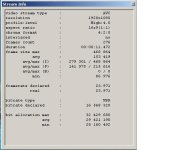
I would like to start researching this topic to find out if there are any problems (or hopefully not) with progressive AVCHD files produced with "Native 24p/25p Patch" enabled in PTool.

It has been reported, that FCP has "issues" with 23.971 fps produced in NTSC mode (NTSC standard is 23.976 fps, which is what the common "24 fps" refers to).

So, what is your experience with integrating GH13's native material into a 24 fps workflow, of special interest if mixed with 24 fps footage produced by other combo-cams capable of cinematic framerates, such as 7D?
 

Attachments

  • streameye native patch stream info.JPG
    streameye native patch stream info.JPG
    30.7 KB · Views: 0
My experience so far.

1080 24pN checked
Macbook Pro late 2009 15 inch model
FCP 6.0.5
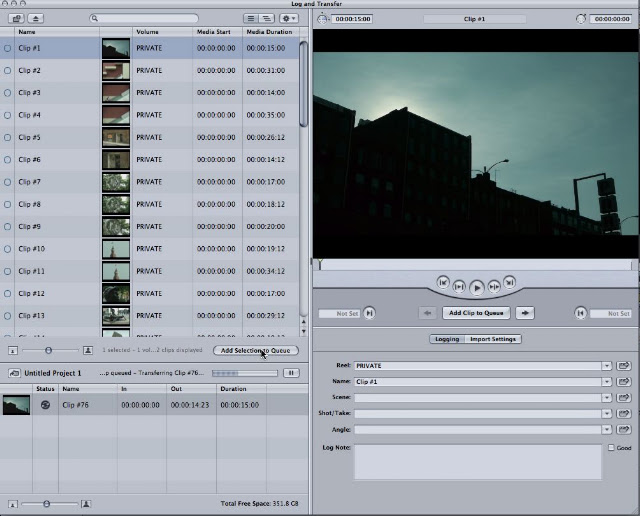
Shoot FHD video > Log and transfer > Prores422 > place in timeline with no issues
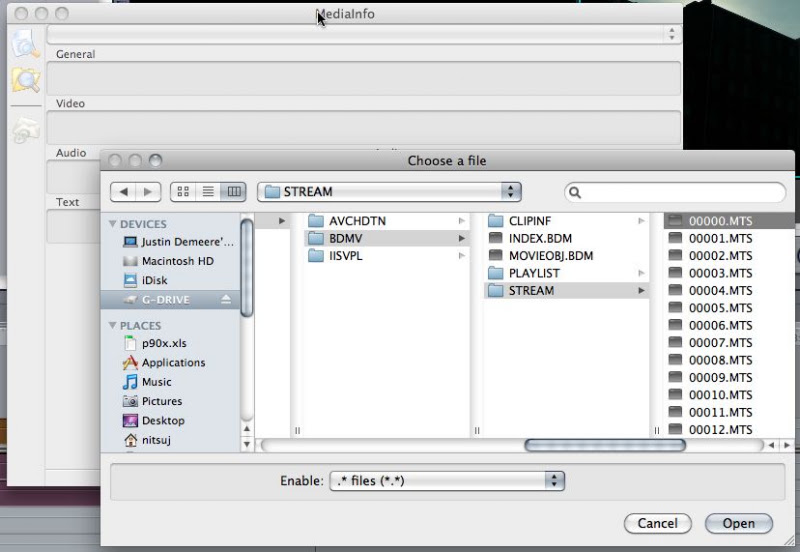
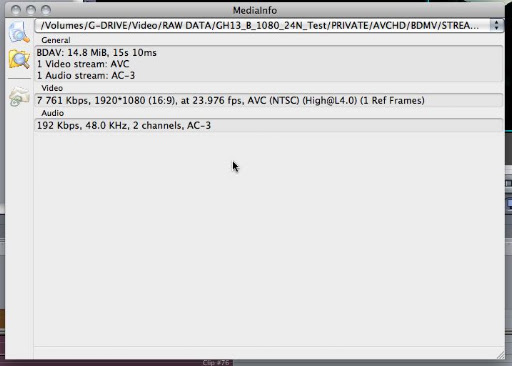
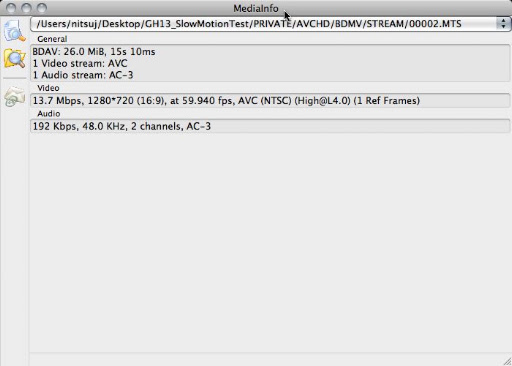
Checked the mts file and it reads 23.976 using Mediainfo from http://mediainfo.sourceforge.net/en
The prores file also says 23.976
Editing works fine and exporting using compressor also seems to have no issues.

I was expecting 24pN to give me issues like it seems a lot of people are having but for some reason I had none with the latest ptools version. Maybe the people having these issues are on different versions of FCP? Maybe different version of ptools? But that is my setup and experience for what it's worth.
 
My experience so far.
Shoot FHD video > Log and transfer > Prores422 > place in timeline with no issues
What program do you use to log and transfer into ProRes?

Checked the mts file and it reads 23.976 using Mediainfo from http://mediainfo.sourceforge.net/en
The prores file also says 23.976
Editing works fine and exporting using compressor also seems to have no issues.
Does FCP export to an AVCHD format? If so, can you upload a resultant file somewhere?
 
Log and Transfer in FCP.

FCP nor compressor will export to AVCHD. Least not my version. I will be getting the newer CS5 soon which is supposed to have even better support for AVCHD. Not sure if it exports though. Its mostly for recording and playing. So I guess it could for blue-ray but not sure why one would choose that option.
 
Log and Transfer in FCP.

FCP nor compressor will export to AVCHD. Least not my version. I will be getting the newer CS5 soon which is supposed to have even better support for AVCHD. Not sure if it exports though. Its mostly for recording and playing. So I guess it could for blue-ray but not sure why one would choose that option.
What frame rate does FCP report when opening MTS file, before it is converted to ProRes format?

The reason why I wanted to see a sample of FCP-produced AVCHD file was to examine it at low level and see how different settings compare to GH13's AVCHD files. There is a lack of knowledge about AVC coding and MPEG containers at the moment, so perhaps contrast and compare will dig up something until the light shines and everything become illuminated :)
 
What frame rate does FCP report when opening MTS file, before it is converted to ProRes format?

The reason why I wanted to see a sample of FCP-produced AVCHD file was to examine it at low level and see how different settings compare to GH13's AVCHD files. There is a lack of knowledge about AVC coding and MPEG containers at the moment, so perhaps contrast and compare will dig up something until the light shines and everything become illuminated :)
Fcp can't open mts files, they must be brought in through log and transfer.
 
Fcp can't open mts files, they must be brought in through log and transfer.
It's been reported elsewhere (can't find it at the moment, as this forum is getting a bit cluttered) that the only real problem with this is that one frame in every (someone insert correct number here) will not be properly compressed and will carry some (insert technical words for a poorly compressed frame here). This problem, has been more or less dismissed as a minor one that only a very serious pro would ever notice. I've yet to bump into a complaint on the threads that is more major than being alarmed at seeing the wrong number in the fps section.
Full disclosure: I'm not using the 24pN patch yet as I was waiting for it to be perfect, but after seeing the recent photos that Pappas posted, am reconsidering.
 
I'd assume the Log And Transfer process sees the frame rate as the source so it would be 23.976. MediaInfo shows the raw mts file as 23.976 as well. I wonder if people having issues with the frame rate are using PC's? Or maybe it is the software being used to determine the frame rate? Every snap of the frame rate I have seen so far has been on PC software. Could be something to do with that.
 
I'd assume the Log And Transfer process sees the frame rate as the source so it would be 23.976.
Can you show a screenshot of that please?

As to the question of whether it's software or not, the Macs are always wrong.

Just kidding. It would be very helpful to analyze either a file from another camera or an AVCHD file produced by FCP as an export just to see what each software reports.
 
Hmmm I ran that media info on my native files and it said 23.976 as well.... so does sony vegas 9d. Before.... I was getting 23.971

I'm on win 7
 
Hmmm I ran that media info on my native files and it said 23.976 as well.... so does sony vegas 9d. Before.... I was getting 23.971

I'm on win 7
I was always getting 23.976 in MediaInfo (on PC). 23.971 was/is reported by StreamEye. Where did you see 23.971?
 
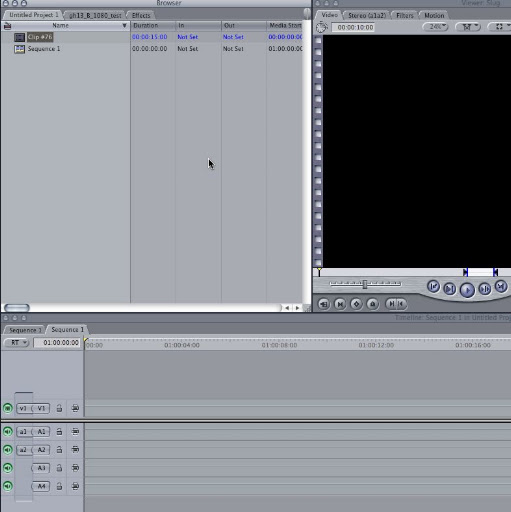
Step 1
Step7.jpg


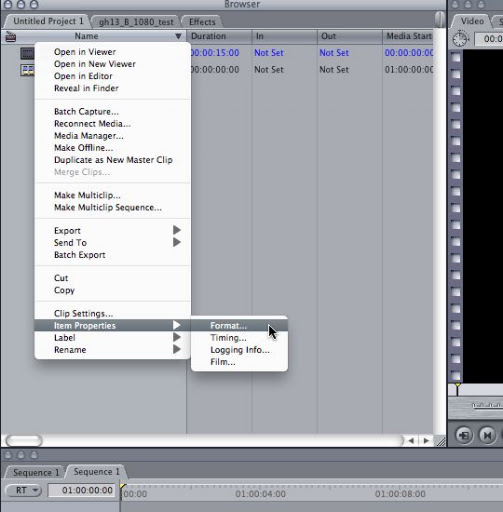
Step 2
Step8.jpg


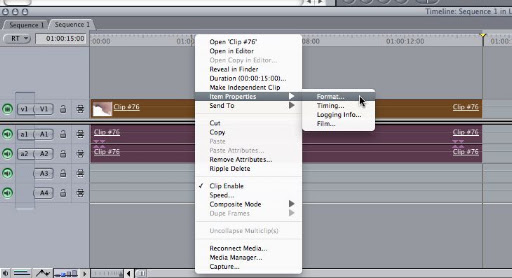
Step 3
Step1.jpg


Step 4
Step2.jpg


Step 5
Step3.jpg


Step 6
Step4.jpg


Step 7
Step5.jpg


Step 8
Step6.jpg


Step 9
Step5.jpg
 
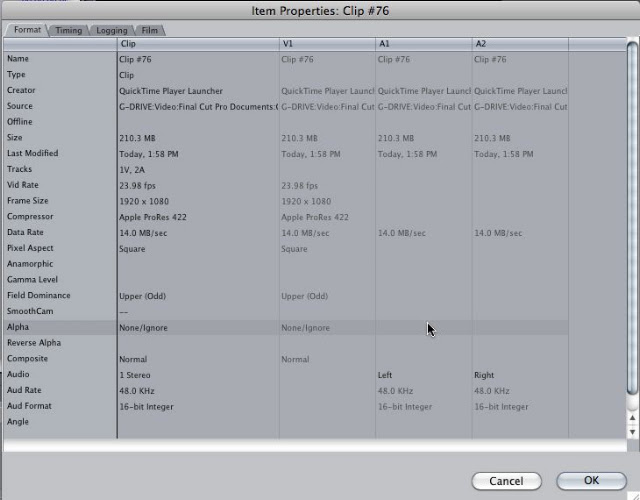
Thanks, a picture is worth a thousand words!

So, I can see that MediaInfo is reporting 23.976 fps frame rate on AVCHD footage. FWIW, I'm not certain if MediaInfo reports framerates correctly. For example, open a 720p/60fps file and it shows 119.880 fps frame rate. Yeah, not very trustworthy.

It's interesting that Final Cut does not report any information about source footage in "Log and Transfer" screen. Wouldn't one want to know just what exactly they are importing?

Info in Steps 7 and 9 is for ProRes format, so that's after transcoding.
 
Thanks, a picture is worth a thousand words!

So, I can see that MediaInfo is reporting 23.976 fps frame rate on AVCHD footage. FWIW, I'm not certain if MediaInfo reports framerates correctly. For example, open a 720p/60fps file and it shows 119.880 fps frame rate. Yeah, not very trustworthy.

It's interesting that Final Cut does not report any information about source footage in "Log and Transfer" screen. Wouldn't one want to know just what exactly they are importing?

Info in Steps 7 and 9 is for ProRes format, so that's after transcoding.

I haven't had that problem using MediaInfo. This is why I'm starting to suspect something about the win os. That is if you are using the win os.

720pMediainfo.jpg


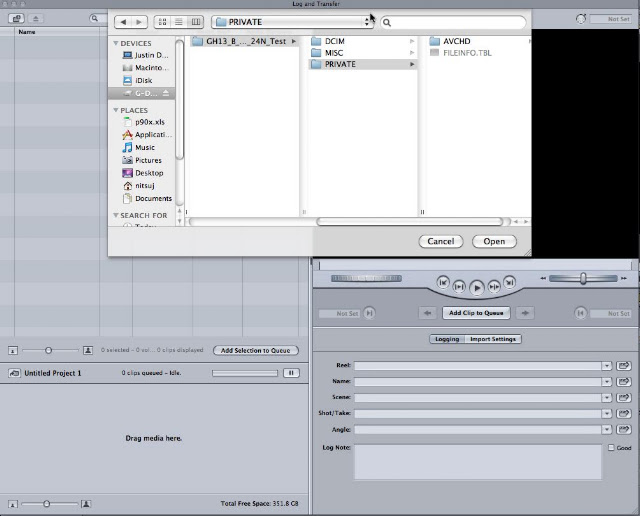
Well importing AVCHD is done using the Private folder in FCP. I don't know if the latest FCP is capable of importing direct mts files.

I don't know why you would want to import the direct mts file instead of using the Private folder structure. You wouldn't do that with P2. And you wouldn't edit using AVCHD. I'd much rather convert to a higher quality codec when doing CC. Once I get CS5 I will see if there is a difference in the methods. I believe there are but will have to learn them myself.
 
Media Info, Final Cut, and Quicktime Movie Inspector all show the correct frame cadence on my system. I think the Upper field dominance is just an anomalies. You can manually change it to none or just leave it. It hasn't affected my footage at all.

That said I'm not currently using 24P native because I have yet to get a 100% reliable camera when using it. I get frequent card write errors on class 6 cards, even on the "B" settings. When not using native I have yet to get a card errror no matter how hard I stress the camera. I could possibly fix the problem by stepping up to class 10 cards but I have tons of class 6 cards and I don't want to buy more SD cards.

I value stability over features but I would sure like to see the native 24P fixed as it's nice not having to unwrap my clips.
 
That still shows Field Dominance as "Upper (Odd)" when it should be "None" or "N/A" or whatever FCP puts in there for progressive.

Yeah that is a known issue with the firmware. It's just FCP doing that. I think it is just the metadata when doing log and transfer. It is for certain progressive. There has been no issues with 24pN on my FCP / macbook setup. I ran it through JES and just checked remove upper field just to test and sure enough the upper field info is gone after but the image is the same. That makes me think it is just metadata. The GH1 probably never had any metadata setting to input progressive.
 
Media Info, Final Cut, and Quicktime Movie Inspector all show the correct frame cadence on my system. I think the Upper field dominance is just an anomalies. You can manually change it to none or just leave it. It hasn't affected my footage at all.

That said I'm not currently using 24P native because I have yet to get a 100% reliable camera when using it. I get frequent card write errors on class 6 cards, even on the "B" settings. When not using native I have yet to get a card errror no matter how hard I stress the camera. I could possibly fix the problem by stepping up to class 10 cards but I have tons of class 6 cards and I don't want to buy more SD cards.

I value stability over features but I would sure like to see the native 24P fixed as it's nice not having to unwrap my clips.

Yeah the card problem seems to be intermiten. I have a C6 Patriot 16GB card that does not get any write errors with settings B and 24pN. However somebody else had the exact same card with the errors. I think that is still a mystery at this point. I didn't try changing to settings C with 24pN off but I have a hunch I would be able to run settings C with no write errors. I might give that a try but I am really loving to not have to remove pulldown right now.
 
Back
Top