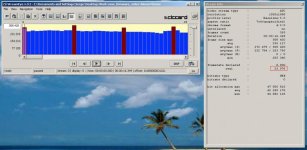
24p/25p Native Patch - is 23.971 fps a problem?

That said I'm not currently using 24P native because I have yet to get a 100% reliable camera when using it. I get frequent card write errors on class 6 cards, even on the "B" settings. When not using native I have yet to get a card errror no matter how hard I stress the camera. I could possibly fix the problem by stepping up to class 10 cards but I have tons of class 6 cards and I don't want to buy more SD cards.

I value stability over features but I would sure like to see the native 24P fixed as it's nice not having to unwrap my clips.
This is well known problem with native patch that has been fairly extensively documented http://www.dvxuser.com/V6/showthread.php?t=213908. Faster cards seem to mask the issue by raising the breakdown barrier to higher bitrates. At that level, the third value (how detail heavy is your scene) comes into play.

In this thread, let's stick with figuring out if there are any problems with 23.971 frame rate. So far, it seems that most NLEs are able to use footage as is. However, if I understand reports correctly, these are mostly for short test clips. Has anyone tried longer shots (an hour or more)?
 
I haven't had that problem using MediaInfo. This is why I'm starting to suspect something about the win os. That is if you are using the win os.
Yes, I'm on Windows 7 and XP. It is quite possible that MediaInfo does not work correctly on this platform. We need better tools for this project ...

Well importing AVCHD is done using the Private folder in FCP. I don't know if the latest FCP is capable of importing direct mts files.

I don't know why you would want to import the direct mts file instead of using the Private folder structure. You wouldn't do that with P2. And you wouldn't edit using AVCHD. I'd much rather convert to a higher quality codec when doing CC. Once I get CS5 I will see if there is a difference in the methods. I believe there are but will have to learn them myself.
What I was saying is that it is surprising that FCP does not show any information (video format, native/progressive interlacing, dimensions, frame rate, audio format) on footage being transcoded in "Log and Transfer" (this is really what's happening in this screen) before it is transcoded. You can get plenty of information after transcoding, but then we can't be sure that it is not FCP's log and transfer process that's responsible for any oddities (like "Upper Field Dominance") that may be present on transcoded ProRes stream.

Again, we need better tools.
 
Contrary to what someone posted earlier, I am having some slight issues with the 23.971 footage in Adobe CS4. If I use the 24p AVCHD preset, the frame rate is set at 23.976, however the GH13 shoots at 23.971.

When I'm editing in the timeline, I keep getting tiny gaps between clips every now and then (these gaps are <1 frame). Also, if I do not turn frame blend off for every single clip, I get a lot for frame blending ghosting on export (and when previewing in the timeline).

So, my process right now is to edit, go in and find all the gaps. Usually I can close them by grabbing the ends of the clips and extending them the .1 frame (assuming there is sufficient media).

Then I select all the clips and turn frame blending off.

I export at 23.976 fps and for the most part I don't see anything wrong after I've performed these steps, but I have to imagine that every minute or so there is a repeated frame. Not really any kind of issue at all, but more of an issue is going back and making sure all the edits are in the right places.

Should I reinterpret the footage as 23.97? Any other tips? Anyone else having any issues with 24p native footage in CS4?
 
Contrary to what someone posted earlier, I am having some slight issues with the 23.971 footage in Adobe CS4. If I use the 24p AVCHD preset, the frame rate is set at 23.976, however the GH13 shoots at 23.971.

When I'm editing in the timeline, I keep getting tiny gaps between clips every now and then (these gaps are <1 frame). Also, if I do not turn frame blend off for every single clip, I get a lot for frame blending ghosting on export (and when previewing in the timeline).

So, my process right now is to edit, go in and find all the gaps. Usually I can close them by grabbing the ends of the clips and extending them the .1 frame (assuming there is sufficient media).

Then I select all the clips and turn frame blending off.

I export at 23.976 fps and for the most part I don't see anything wrong after I've performed these steps, but I have to imagine that every minute or so there is a repeated frame. Not really any kind of issue at all, but more of an issue is going back and making sure all the edits are in the right places.

Should I reinterpret the footage as 23.97? Any other tips? Anyone else having any issues with 24p native footage in CS4?

This post was brought to my attention by Svecher.

I currently use CS5 and I am having no other issues aside from normal AVCHD things, aka needing to render because playback gets choppy at full resolution.

I should also state that my GH1 24pN footage is coming in at 23.976, not 23.971. Right clicking the footage in the media browser shows me frame rate 23.976.
 
Kholi, what version of Ptool did you use? Maybe the version of Ptool is making a difference.

EDIT: Could it also be the difference between using the kit lens (or any other m4/3 lens that the camera generates metadata for) vs. say a non-m4/3 lens with an adapter (like a Zeiss or Cooke prime)?
 
So let me get this straight Svecher. You take a 3 day old post from me, cut out the first half of the posting that related to the OP's topic, quote the second half out of context, and then have the nerve to chastise me for posting off topic? If you are going to quote one of my postings, post the whole thing next time.
To chastise as in "inflict punishment" or perhaps "censure severely"? I reread my post and don't get that impression. In any event, my intention was to channel discussion into appropriate "issue" threads. Thanks for your report.
 
I should also state that my GH1 24pN footage is coming in at 23.976, not 23.971. Right clicking the footage in the media browser shows me frame rate 23.976.
This is interesting. I analyzed several samples of native files taken with various versions of PTool, including 3.37D (latest) and they all have 23.971 frame rate at base level. Could you post a short original MTS file somewhere for analysis?
 
I just made few videos with the latest firmware hack using "C" (with 24pN) setting and PTool 3.37D and all files report correct frame rate. See the attached output from MediaInfo.

Maybe something is fixed in Ptool that we don't know about ?
 

Attachments

I just made few videos with the latest firmware hack using "C" (with 24pN) setting and PTool 3.37D and all files report correct frame rate. See the attached output from MediaInfo.

Maybe something is fixed in Ptool that we don't know about ?
MediaInfo is reporting frame-rate incorrectly.
 
I am on PC and Edius Neo 2 and I am having problems with the native 24p. What I do is I drop the .mts clips (without any import procedure) straight into a 1080p23.98 timeline and every 4th frame is repeated (i.e. equal to the third). Strangely though, Edius correctly reports progressive 23.98p footage if I go to "properties" of the .mts files.

BUT if I use the AVCtoHQ converter utility from Edius, which converts AVCHD into the Canopus HQ codec, and drop this file into the same timeline, everything is fine, smooth 24p frame by frame.

Hence, there must be something wrong which leaves some room for interpretation (Edius Neo vs. conversion utility from the same company).

No big deal for me, as my hardware is too slow for native AVCHD editing, hence I would need to convert in any case.
 
...And you know this how? Every tool I use on the Mac shows a 23.976 frame rate. Others have pointed out they are showing the same thing in Vegas and Premiere. The only people seeing this are on a PC using Streameye. Have you contemplated that maybe Streameye is mis-reporting the frame rate?
I know this because I've read AVC specs and verified it for myself
Frame rate is 23.971 fps at low-level. I did some manual calculations here (http://www.dvxuser.com/V6/showpost.php?p=2033047&postcount=29)

...And even if it isn't, what was the point of starting this thread? Your original question was whether 23.971 is a problem, more specifically within Final Cut. Everyone has said no. I personally have had no problems. You mention "issues" being reported by FCP users in your OP. Who? Where? Haven't seen it.
These initial reports prompted further inquiry and creation of this thread
http://www.dvxuser.com/V6/showpost.php?p=2016404&postcount=327
http://www.dvxuser.com/V6/showpost.php?p=2021384&postcount=551
http://www.dvxuser.com/V6/showpost.php?p=2023685&postcount=53
http://www.dvxuser.com/V6/showpost.php?p=2019182&postcount=471

Not everyone said no.
 
Back
Top