C500: 1D-C Users

  • Thread starter Thread starter Guest
  • Start date Start date
What kind of settings have you guys been using?

I left all button config untouched, turned off all NR and lens correction.

By the way here is a photo of a setup a few months ago, it was a casual interview:
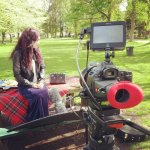
IMG_20130516_142053.jpg

I should say that the ARRI baseplate and rod support for 1D C is very handy! the whole rig won't compromise 1D C's mobility at all.
 
Although, I still haven't got into the C1,C2,C3 much. Though, that is one of my to-do's this week.

That's probably the first thing I do when I get a new camera: configure the custom modes. It's extremely convenient do pre-set frame size, ISO, picture profile, sound and what not. Same goes for stills. If I get surprised by something interesting that is moving I'll want to be in servo mode. That is normally not the mode I shoot stills in. I'd probably also want a higher ISO than normal to freeze action and maybe a certain AF-point setup. There's no way I'm going to start to fumble with all the settings in a fleeting moment so they need to be ready and waiting.

Same with 60fps. It's nice to have the profile setup with a 1/120 shutter so that you don't miss that in the heat of the battle...

Lot's of reasons to use the C's.
 
The last short fireworks clip I uploaded to Vimeo is a good example. I went in and out of stills/video shooting mode all the time with various settings. Extremely convenient with C1, C2 and C3.

 
I like your settings (like having a 60p 1/120th setup). I will try copying them for a bit. Then I will be on a 4k only setup.

Unfortunately, I cannot see vimeo nor youtube videos without a VPN. China has a firewall against many media generating sites from other countries.

The 1d-c has some inconvenient menus, but once you get down to it, with all the direct access buttons and presets, it flies through settings.


I just started using it, but I do like the DoF preview button being start/stop rec. It reminds me of the front button on ENG cameras. =)
 
I left all button config untouched, turned off all NR and lens correction.

By the way here is a photo of a setup a few months ago, it was a casual interview:

View attachment 73508

I should say that the ARRI baseplate and rod support for 1D C is very handy! the whole rig won't compromise 1D C's mobility at all.


Which model setup do you have under there? I am working on a custom rig. Going with something I have been working on for a while. But I am always interested in what other people are doing, incase that ends up suiting me better.
 
Last edited:
1dc c user presets

1dc c user presets

Hit a snag. I can only get C1 to activate. According to the manual, pressing the M-fn button will cycle through the C settings each time it is pressed.


Also, why in the World did they bundle the C settings button with the record button? Wouldn't C users like to be able to cycle through the user presets in movie mode?????? Dang! Sometimes I almost forget I have an enhanced 1D-X. haha. Canon really? (I am looking for a way to get the C setting on another button, but they all seem to be for AE lock, and activating leveling and such. )
 
Last edited:
When the DoF preview button is set to "Start/Stop Rec", even when movie mode is not active, once it is depressed it activates movie mode and starts recording. Seems a split second faster than any other way to start recording.


(while sharing button functions is definitely not good practice in the muscle memory department, one work around for the C-presets+record button tragedy, may be to have the DoF button as a record, that way when you exit movie mode to switch between C's you can press the DOF preview button and be back recording a split second later. Definitely not ideal, and not necessary in all situations.)

I will write to Canon and see what they have. If nothing else, I hope they can update the Mfn2 button or the * button to cycle through C presets in movie mode.

EDIT: Just imagining if Red or Arri told their users they were going to give the "Rec" button multiple functions. I do not mind the rec button being user programable, but just not liking the sharing the functions, even when separated by different modes.
 
Last edited:
Hit a snag. I can only get C1 to activate. According to the manual, pressing the M-fn button will cycle through the C settings each time it is pressed.

In order to get all the C-modes active you have to turn them on in the menus: C-Fn2:exposure. The item says "Restrict shooting modes". Once you enter that menu you can tick all the modes you want active on the camera. The idea is that if you only use M, Av and C1, C2, C3 (as an example) you can turn all other modes off, so that you don't have to scroll past them all the time when changing modes.

You then change between the C-modes just the same way you change between any other mode: press MODE top left and then scroll through them with the wheel under your index finger on the top right.
 
In order to get all the C-modes active you have to turn them on in the menus: C-Fn2:exposure. The item says "Restrict shooting modes". Once you enter that menu you can tick all the modes you want active on the camera. The idea is that if you only use M, Av and C1, C2, C3 (as an example) you can turn all other modes off, so that you don't have to scroll past them all the time when changing modes.

You then change between the C-modes just the same way you change between any other mode: press MODE top left and then scroll through them with the wheel under your index finger on the top right.

Thanks! I will try that right away. Canon replied about this function (giving the same advice as you, but not nearly as well worded as you, meaning I didn't quite understand them, and understood your advice even at a glance), but Canon mentioned nothing about mapping the function to an alternate button. I did like the idea of one handed toggling Custom modes. So, I hope they can get a firmware update on that, but at least for now, I will just disable the C-modes on the M-fn button and use the two handed operation for modes, it is still a great short cut. Being able to disable all the other auto/help modes is awesome.
 
1Dc c-log versus vs picture style editor

1Dc c-log versus vs picture style editor

To whom it may concern....

(EDIT: it appears C-Log is underexposing to recover highlights. Still testing this theory (July12,2013)


Even custom picture styles clip earlier than C-Log.


In an effort to get a picture style with a normal black point, yet nice long highlight roll off, I started playing around with the PSE again. But no matter how you tweak it in PSE, it does not allow you to get into the highlight data as I would like. The picture styles even clip before the sensor needs to. Which is not news, but interesting to see...

In this setup, I shot video in C-Log and took a raw image directly after, using the same settings.

Here is standard (default settings):

Screen Shot 2013-07-09 at 2.39.43 PM by onesielaff, on Flickr
 
Last edited:
Here is Neutral -4 contrast and an extreme flat curve:


Screen Shot 2013-07-09 at 2.38.05 PM by onesielaff, on Flickr

Here is faithful -4 contrast and an impractical extreme curve (that is the most highlight recovery possible in the PSE):

Screen Shot 2013-07-09 at 2.07.41 PM by onesielaff, on Flickr

And here is 1080 IPB frame in C-Log in PP with a curve applied to emphasize highlight info present:

Screen Shot 2013-07-09 at 2.08.11 PM by onesielaff, on Flickr

Once the curve in PSE is pulled to unusable limits, the highlight info is similar to C-Log, but is still less, and that is from raw, while c-log is compressed IPB.

for reference here is 1080 IPB frame of hlaflost (neutral 0,-2,-2,0)


lamp_halflost by onesielaff, on Flickr


Compressed C-Log video is showing more highlight info than the RAW in PSE. The results between what is seen in PSE and how the footage comes out of the camera is comparable in my experience.
 
Last edited:
While the custom picture styles are using raw data before compression, they are not using the raw to the extent we might wish. Compressed C-Log video is showing more highlight info than the RAW in PSE. The results between what is seen in PSE and how the footage comes out of the camera is comparable in my experience.

If C-log is not enabled, Canon applies a video gamma curve (with variations according to your contrast setting) before compression. The usable dynamic range is less than 10 stops with this gamma curve. I remember those experiments I did with Alex from ML, if you hack contrast setting to -5 or other non-present value, the image gets funky. Highlight Tone Priority is another gamma curve which can squeeze a little more dynamic range depending on specific scene.

From the tests I've done, C-Log offers about 1.5 to 2 stops more DR than any picture styles.
 
I have started playing around with the video X picture style. It is flatter than Neutral. Since it also has a normal black point, I was hoping it might have the recipe I was looking for... nope.

-4 contrast in Video-X is nasty. Just bad. I prefer Neutral to video-x at this point. But based on my recent tests, I am going to just stick with C-Log.
 
It has been my own internal consensus for a while that Canon Log does in fact involve a version of highlight tone priority. That is, when shooting at ISO400, the camera is using ISO100 for an effective under exposure of 2 stops and the image is then pushed in profile according the Log curve.

This would explain why Log 'needs' ISO400 or more and it would also explain where the increased dynamic range "magically" comes from. It would also explain why Canon feels that Log should be exposed at a relatively low IRE (for middle gray) and why they are actively warning us that pushing the exposure even further in post might introduce noise.

Log on C100/300/500 is also native at ISO850 or a gain of about +2.5 if I remember correctly. But thanks to the new sensor there, it is possible to use Log at lower ISOs with success, probably thanks to newer sensor technology and design.

While HTP is mostly frowned upon for stills, when you have raw as an alternative, it might actually not be that bad for a burned in codec. IF Canon is using some trickery along these lines, that would also explain why Canon Log is so much better than Technicolor CineStyle that, to me, renders extremely flat and plasticky skin.

Anyway... that would also explain the phenomenon (Canon lingo) where, when you set ISOs below 400 in Log, you see the practical max white clipping point slide down the IRE ladder. At ISO100 for instance, signal clips at about IRE80 (roughly).
 
It has been my own internal consensus for a while that Canon Log does in fact involve a version of highlight tone priority. That is, when shooting at ISO400, the camera is using ISO100 for an effective under exposure of 2 stops and the image is then pushed in profile according the Log curve.

This would explain why Log 'needs' ISO400 or more and it would also explain where the increased dynamic range "magically" comes from. It would also explain why Canon feels that Log should be exposed at a relatively low IRE (for middle gray) and why they are actively warning us that pushing the exposure even further in post might introduce noise.

Log on C100/300/500 is also native at ISO850 or a gain of about +2.5 if I remember correctly. But thanks to the new sensor there, it is possible to use Log at lower ISOs with success, probably thanks to newer sensor technology and design.

While HTP is mostly frowned upon for stills, when you have raw as an alternative, it might actually not be that bad for a burned in codec. IF Canon is using some trickery along these lines, that would also explain why Canon Log is so much better than Technicolor CineStyle that, to me, renders extremely flat and plasticky skin.

Anyway... that would also explain the phenomenon (Canon lingo) where, when you set ISOs below 400 in Log, you see the practical max white clipping point slide down the IRE ladder. At ISO100 for instance, signal clips at about IRE80 (roughly).

Interesting.
 
that would also explain the phenomenon (Canon lingo) where, when you set ISOs below 400 in Log, you see the practical max white clipping point slide down the IRE ladder. At ISO100 for instance, signal clips at about IRE80 (roughly).

Hmm, that sounds familiar - like the 1D-C? Where some say one needs to overexpose in C-Log to get a better looking 'digital negative'?

Apropos of all these contra-indications, 'Negative Gain' in Sony cameras saw clipping in the shadows, and I (wrongly) assumed the same would be for Canon. But the charts and collateral didn't seem to make sense. I could only 'square the circle' if this was not the electronic equivalent of 'push processing' but, in fact, 'pull processing'. Wouldn't make sense in chemical terms, but if you're just mapping photon accumulation on a sensor to points on a gamma curve? So 'negative gain' (or lower-than-standard ISO) just a LUT cheat?
 
Back
Top