
Navigation
Install the app
How to install the app on iOS
Follow along with the video below to see how to install our site as a web app on your home screen.
Note: This feature may not be available in some browsers.
More options
You are using an out of date browser. It may not display this or other websites correctly.
You should upgrade or use an alternative browser.
You should upgrade or use an alternative browser.
Is my exposure off? Noisy FX9 in SLOG3
- Thread starter seanadl
- Start date

cyvideo
Veteran
Hi all,
I'm experimenting with using SLOG3 to record in. Using a Rec709 lot to monitor I thought I had set the exposure correctly in camera (at least for the face). However, looking at the footage in the edit, it's really noisy. I know log can be quite noisy, but this seems a bit excessively so.
The set is quite dark (lots of black surfaces) - so wondering if this is causing the noise problem to be highlighted. Attaching a still taken from Resolve: https://www.dropbox.com/s/49pu2i0ix0sdg7t/Untitled_1.1.1.tif?dl=0
For any of us to have a proper look, you would need to post a short S-LOG clip somewhere for download. If that's not possible, at least an S-LOG TIF. My first observation on the Resolve timeline with your image is that the blacks are far more crushed than I personally like. They are totally crunched on the bottom of the waveform monitor. Personal choice, I guess?
Chris Young
morgan_moore
Major Contributor
to expand a little.
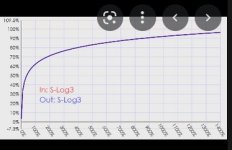
a digital camera is collecting luminance (brightness) data and mapping it to a digital set of numbers
if you look at a data curve, one will understand that the steeper the curve the smaller adjustment in light level will crete a large change in recorded number.. this translates to an image with good fidelity
what the curve does not show is that the bottom maybe 20% is infected with random noise (the s/n ratio)
the curve also show that highlights are retained at cost of lowering the gain for a smaller adjustment in light level - no clipping but lower fidielity in image accuracy over 70%
so you are noise free above 20% and high fidelity capture to about 70%
so to make the best file have a lump in your wfm between 20 and 70 as laid out in my first post
---
as for log being hard to learn.. not really.. log shows all the camera can capture and luts ot looks allow you to use that data in a manner that works for the project. learning with a camera that has some of its cababilities clipped out is far more confusing.
---
a digital camera is collecting luminance (brightness) data and mapping it to a digital set of numbers
if you look at a data curve, one will understand that the steeper the curve the smaller adjustment in light level will crete a large change in recorded number.. this translates to an image with good fidelity
what the curve does not show is that the bottom maybe 20% is infected with random noise (the s/n ratio)
the curve also show that highlights are retained at cost of lowering the gain for a smaller adjustment in light level - no clipping but lower fidielity in image accuracy over 70%
so you are noise free above 20% and high fidelity capture to about 70%
so to make the best file have a lump in your wfm between 20 and 70 as laid out in my first post
---
as for log being hard to learn.. not really.. log shows all the camera can capture and luts ot looks allow you to use that data in a manner that works for the project. learning with a camera that has some of its cababilities clipped out is far more confusing.
---
Attachments
morgan_moore
Major Contributor
the fact that above 60-70 we are getting a low fidielity image in exchange for highlight retention shows that using a steeper curved prfile that mabe clipped at 200% would enable one to record with a higher fidielity as long as you were in an environment that you could control the highlights like a studio.
"I think I can offer some advice that you may find helpful."
I don't recall having seen a more detailed, constructive, thoroughly helpful post on any forum anywhere. Amazing.
EDIT: Mind you, CY comes close! We're lucky to have you both. Thanks.
Wholeheartedly agree. Tis the only reason I still visit this place. There are occasional gems found if one is patient enough to mine through the rubbish.
Doug, How one sets backlights to me starts to move into a questions taste and style. What is critical is that in a shot like this backlights are needed. Sometimes you are simply limited in where you can put them . Taste wise - I personally hate a backlight directly behind talent, especially if its not a broad source. However I guess I don't like it because it feels like artificial TV studio type lighting - which in this case might be perfectly apt. . If I can I will always place 2 backs on either side and they may or may not also function as kickers. sometimes you can just bounce into a card, or If I can only use one, sometimes just one from the off key side will do the job but it all depends on the situation. This guy certainly needed backlight though.
Jim's suggestion just to hire a pro and have that person teach her how to do it next time is really the smartest idea, but only if that person really is good.
The problem with using Slog if you're a beginner, is that now you have to understand post color as well as lighting & shooting instead of just learning your camera and getting a good shot in the first place, and that is the same skill it takes to get a good slog shot anyway, so unless there is something to gain from log, why add the complication of post? From what I see on the web a lot of people using log are lousy colorists and many youngsters underestimate how much lattitude they still have to adjust a normal 709 shot unless they've really screwed it up.
Jim's suggestion just to hire a pro and have that person teach her how to do it next time is really the smartest idea, but only if that person really is good.
The problem with using Slog if you're a beginner, is that now you have to understand post color as well as lighting & shooting instead of just learning your camera and getting a good shot in the first place, and that is the same skill it takes to get a good slog shot anyway, so unless there is something to gain from log, why add the complication of post? From what I see on the web a lot of people using log are lousy colorists and many youngsters underestimate how much lattitude they still have to adjust a normal 709 shot unless they've really screwed it up.
Last edited:

bobtronic
Member
Just my 2 cents on the log vs 709 shot debate. As analogy I think everyone who has experienced the difference between editing a raw image vs a baked in jpg/tif can appreciate the latitude of freedom log gives you. Especially with today's grading tools and a proper S-log to Rec 709 LUT there is not much difference in grading log footage vs. Rec 709 footage in terms of complexity. The advice on lighting and exposure holds true for both workflows. It's always best to get the most in camera no matter if S-log or Rec 709.
cyvideo
Veteran
Especially with today's grading tools and a proper S-log to Rec 709 LUT there is not much difference in grading log footage vs. Rec 709 footage in terms of complexity. The advice on lighting and exposure holds true for both workflows. It's always best to get the most in camera no matter if S-log or Rec 709.
Agreed! If people are new to grading or just want a very quick and simple way to grade either LOG or 709 footage pretty accurately without the use of LUTs try following some of the simpler ways to Nirvana shown in the following clip. This also works for LOG, but with the addition of a couple more nodes, Saturation and Color Boost in Resolve. I've been using these methods for simple, quick edit jobs since Resolve v11. It was good to see someone outline the process in a simple-to-follow video.
Chris Young
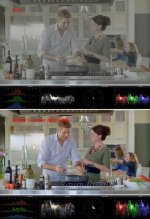
Sample LOG image (downloaded from web) using the processes in the YT clip.
Attachments
Hi seanadl,
Thanks for the additional information. I think I can offer some advice that you may find helpful. This assumes the camera is basically on the default settings and there isn't a lot of stuff that has to be undone.
First, forget about S-LOG. It is over your head right now and there will be plenty of time to play around with it after you have already mastered other aspects of the FX9. As they say, learn to walk before you run.
Second, set your camera for S-Cinetone and you'll automatically be 90% of the way to a nice look right out of the camera with no heavy grading in post and no messing around with the other paint menus or dialing-in someone else's scene file. No LUTs to fart around with either. Again, you can explore the paint menus later when you have more experience under your belt.
Third, you say you already set the camera for 25P, and that is a good choice because you are in the UK. And 180 degree shutter is also a good choice. Keep those settings.
Bonus: If the screen on the monitor in the background is flickering or rolling, change the Shutter speed mode to ECS and then adjust the ECS Frequency until the screen looks normal.
Fourth, go into the menus and make sure the camera is set to show GAIN rather than ISO. Put the Gain switch on LOW and and then verify the Gain is on 0db. if not, change it in the menus.
Fifth, go into the menus and turn off Zebra1 and turn on Zebra2. Set the value of Zebra2 at 85.
Sixth, have your talent sit in position and adjust the composition and blocking exactly how you want it.
Seventh, get your key light and fill light roughed-in so you are getting the the look you want, but don't worry about exposure yet.
Eighth, if you want a shallow DoF look, then open your lens to the widest aperture. If you want the background to be a little more in focus, then choose the f-stop that gives you the creative look that you want. You should always choose your f-stop creatively rather than having your hand forced by the intensity of the lighting.
Ninth, have the talent hold a white card in front of their face while you adjust the dimmer on the key light so there is just a touch of zebra on the card. Depending on the power and placement of your lights, speed of your lens, and other parameters, you may find it useful to turn on the Variable ND of the FX9 and use it to adjust the exposure up or down until you see just a touch of zebra on the white card. I almost always have the ND turned on for an interview or a headshot like this. It just gives you so much more leeway when you start dimming the lights to get the look you want.
Tenth, once the key light it set and the exposure is set, now adjust the rest of your lights (backlight, kicker, fill) to get the look you want on the talent. You may have to double-check the exposure again and make adjustments as you change the lighting, it depends on how flat you are going with the key/fill ratio. BTW, in the image you posted earllier you really, really, need add a good backlight directly behind the talent's head and above the frame. It would make all the difference.
Eleventh, now that the lighting is done, put the white balance switch on Memory A. Aim the camera at a white card being held where the talent will sit,and fill the viewfinder with the card. You may have to zoom in or physically move the camera closer and then put it back at the original location when you are done. You may have to iris-down the lens to a darker exposure in order to get a good white balance. No problem, just remember where you had the iris and put it back again when you are with the next step. Press the WB Set button to set the white balance so it matches the color temperature and tint of you lighting. Put the camera back into position.
That's it. Now you are ready to shoot after you have setup and adjusted your audio settings.
In post, you may want to fine-tine the look of S-Cinetone, but that can be done with the color tools in your NLE. Unlike S-LOG you will not need to run the footage through Resolve.
I hope that helps.
Thank you very much for all of this information. It's really helpful and I'll put it into practise this afternoon when I'm next in the studio. A few days ago I did film an additional video, before these responses, still in SLOG - but rated the camera at 800 EI - increased the key and fill light in front of the talent - which really helped.
Today I'll film in S-Cinetone and expose using Zebra2 set at 85, with a backlight.
I have a question about key/fill. At the moment because I don't have a truss or a proper rig to hang the lights on, the key and fill are both on C-tands in front of the desk on either side of the talent. I'm setting them to be roughly the same brightness to get the face to light as evenly as possible. So when setting the exposure using the white card - i should have both of these turned on shouldn't i as essentially the key/fill are both doing the same thing in this set-up?
Would there be any benefit on me throwing some light over the black areas of the set? The bottom of the set is a glossy black, as is the floor.
I'll post some pics of the results this week.
Very Very good advice. I use the zebras differently . I set one at 100 and the other at 60 aiming to make sure some of the 60 zebra is on a caucasian face but that takes some finessing to know how to adjust fro someone who isn't caucasian because 60 IRE may be too bright for them . That's particularly valuable if you're in a situation where you can't be running a round with a white card or your following action that is changing . However Doug's method is very accurate. Absolutely follow his advice about using "gain" instead of ISO. Otherwise you ned to know what the ISO's are for every gamma and that will drive you nuts and lead to mistakes.
Your backlight doesn't need to be directly behind , it can also be from the side or from both sides which I prefer but you usually need backlight for separation especially for someone with dark hair.
Incidently you did underexpose the Slog a bit by rating it at 1000 on base 800 and then you further underexposed the shot itself by not using a waveform to get his face bright enough. That's why its noisy . After adjusting your exposure in post ( get his face up to around 60-65 IRE) then you can get rid of the noise with a plug-in called "NEAT Video" that does wonders with noise. I think its around $100 now for most editing systems .
Thanks for responding. Yep, that original video was underexposed. I actually filmed a follow-up video shortly after that and rated the camera at 800 EI and increased the key/fill lights and it looked much better (still noisy in the dark areas of the set behind the host though).
Up until this point i've been using false color for exposing the face. I have a SmallHD Cine 7 monitor mounted on the FX9 and I have been using that to measure exposure. I'll be switching to Zebra's as Doug suggested.

Doug Jensen
Carbonite Member
I have a question about key/fill. At the moment because I don't have a truss or a proper rig to hang the lights on, the key and fill are both on C-tands in front of the desk on either side of the talent. I'm setting them to be roughly the same brightness to get the face to light as evenly as possible. So when setting the exposure using the white card - i should have both of these turned on shouldn't i as essentially the key/fill are both doing the same thing in this set-up?
Yes, that is exactly correct.
Up until this point i've been using false color for exposing the face. I have a SmallHD Cine 7 monitor mounted on the FX9 and I have been using that to measure exposure
I find this interesting. I wish all false color were standardized, as i dislike learning new patterns between different formats, but still, with even/flat news anchor style lighting this should be accurate.
Hopefully Zebras and a white card work out better. If you get good results from that, go back and look at your false colors and waveforms and see what the new values are. Might be interesting.
bobtronic
Member
False colors of course really depend on what kind of log you are using. S-Log3 and LogC are fairly similar in terms of the log curve, other log formats can have their values in totally different places though. You need to make sure for what kind of log curve the false colors have been designed to get an accurate exposure reading.
False colors of course really depend on what kind of log you are using. S-Log3 and LogC are fairly similar in terms of the log curve, other log formats can have their values in totally different places though. You need to make sure for what kind of log curve the false colors have been designed to get an accurate exposure reading.
true, also if an mlut is applied then that will have an effect on the third party monitor, as well.
Doug Jensen
Carbonite Member
It seems a couple of people have made it their life's mission to overcomplicate the simplest things.
seanadl
I suggest you ignore these last few posts. You don't need LOG. You don't need LUTs. And you certainly don't need false color. Some people just get their jollies from posting non-stop on thread after thread, whether they have anything worthwhile to add to the conversation or not.
seanadl
I suggest you ignore these last few posts. You don't need LOG. You don't need LUTs. And you certainly don't need false color. Some people just get their jollies from posting non-stop on thread after thread, whether they have anything worthwhile to add to the conversation or not.
It seems a couple of people have made it their life's mission to overcomplicate the simplest things.
seanadl
I suggest you ignore these last few posts. You don't need LOG. You don't need LUTs. And you certainly don't need false color. Some people just get their jollies from posting non-stop on thread after thread, whether they have anything worthwhile to add to the conversation or not.
you make log and lut’s sound scary.
You made a very good and clear step by step post that should be a sticky, but at the same time, some of us prefer slog3, and we don’t find false color or other things confusing. we’re actual working adults that deliver content that meets broadcast standards. i’m sorry it is different from what you understand, but it is using methods that date back to before you were born.
Doug Jensen
Carbonite Member
you make log and lut’s sound scary.
You made a very good and clear step by step post that should be a sticky, but at the same time, some of us prefer slog3, and we don’t find false color or other things confusing. we’re actual working adults that deliver content that meets broadcast standards. i’m sorry it is different from what you understand, but it is using methods that date back to before you were born.
I don't care what YOU think you understand or HOW you claim to work . . . if you actually do any shooting at all, which I highly doubt. I'm thinking of the OP's questions and her desire to get better results. YOU are not helping by muddying the waters with information that is unnecessary and clearly over her ahead. Nobody cares if an armchair shooter like you thinks he understands S-LOG or not because that's not the point. Show some of your work. Don't have any? Yeah, that's what I thought. Keep dreaming.
Last edited:
I don't care what YOU think you understand or HOW you claim to work . . . if you actually do any shooting at all, which I highly doubt. I'm thinking of the OP's questions and her desire to get better results. YOU are not helping by muddying the waters with information that is unnecessary and clearly over her ahead. Nobody cares if an armchair shooter like you thinks he understands S-LOG or not because that's not the point. Show some of your work. Don't have any? Yeah, that's what I thought. Keep dreaming.
seanadl is more capable than you know.
You have been trying to discredit me since i showed you don’t understand how t-stops and gamma curves work. Despite that, i won’t discredit your understanding of zebras and basic exposure. i’m more with you than against you, as i feel your recent post should be a sticky, it is just hard to see you work towards all of this.
Doug Jensen
Carbonite Member
Oh, that's rich!! You showed that I don't know how T-stops and gamma curves work? You are delusional. Sad and pathetic. Please, you are embarrassing yourself.seanadl is more capable than you know.
You have been trying to discredit me since i showed you don’t understand how t-stops and gamma curves work.