Navigation
Install the app
How to install the app on iOS
Follow along with the video below to see how to install our site as a web app on your home screen.
Note: This feature may not be available in some browsers.
More options
You are using an out of date browser. It may not display this or other websites correctly.
You should upgrade or use an alternative browser.
You should upgrade or use an alternative browser.
Best Compression for 50min DVD
- Thread starter SurJones
- Start date
It's not the media, that's just a bunch of 1's and 0's that are the same regardless of brand. If there is a problem with the media, you'll get read errors, skips, failures to recognize the disk, but not a soft picture.
It is possible that your project set the brightness too high and the video is blooming, causing a washed out look. I would take the DVD to the nearest Best Buy or Circuit City and play it on a combination of devices to see if you can reproduce the problem.
It is possible that your project set the brightness too high and the video is blooming, causing a washed out look. I would take the DVD to the nearest Best Buy or Circuit City and play it on a combination of devices to see if you can reproduce the problem.

SurJones
Veteran
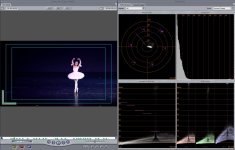
I actually check my FinalCut to Compressor Export against the frame of the editing timeline image, and they are almost identical. NOW, When I pop in the DVD, Differnt stary. Night an day on softness. Color and brigthenss is actaully brighter, and blurrier. Brigtheness is not night and day, I wish there was a way to take a snap shot of my DVD, but it says I can when DVD player is open. So to me, it seems as if DVDSP is doing something to it.
Attachments

THoff said:It's not the media, that's just a bunch of 1's and 0's that are the same regardless of brand. If there is a problem with the media, you'll get read errors, skips, failures to recognize the disk, but not a soft picture.
This is absolutely NOT TRUE Patrick.
Media plays a part and Memorex is, from my anecdotal experience, among the worst.
Not every piece of blank recordable DVDs has the same quality controls, quality dye, etc.
Do you believe that CompUSA's generic is the same as the most expensive Verbatim?
I don't even walk within 20 feet of Memorex.
Taiyo Yuden or Verbatim is all I use.
SurJones
Veteran
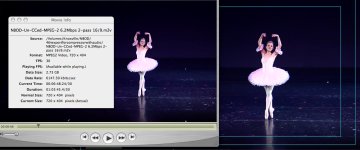
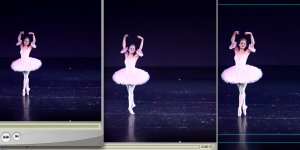
Okay so here is the FC to compress Export, VLC (middle) and FC Edit Timeline. You can clearly see the difference, Then when you go full screen imagine. Of course it doesnt look horride, But imagine when the camera is not zoomed in as wel. Very bad.
I will try to find those DVD at CompUsa. And run a test. Do you recremend - or + DVD
I will try to find those DVD at CompUsa. And run a test. Do you recremend - or + DVD
Attachments
Last edited:
Verbatim -Rs are great.
Another question
Is the original footage 23.98 progressive?
Another question
Is the original footage 23.98 progressive?
Last edited:
SurJones
Veteran
Thanks David.. Going to CompUSa in about an 2 hours. I will let you see and know my results. Also someone also sggested on the Apple fourms that,
"Try chnaging NTSC to SD (Automatic) and seeing if helps with the compression (may not help with the brightness problems)"
What do you think?
"Try chnaging NTSC to SD (Automatic) and seeing if helps with the compression (may not help with the brightness problems)"
What do you think?
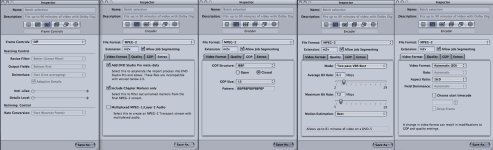
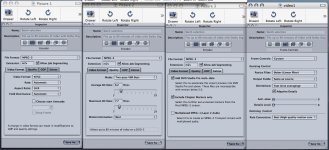
When I dropped progressive footage into Compressor, it immediately defaults to progressive and doesn't give me an option to set the frame controls.
Also 7.7 maximum is too high. If Compressor spikes, and it sometimes does, it might create a data rate that will cause issues.
I would drop it back at the top end to about 7.2 highest.
Also 7.7 maximum is too high. If Compressor spikes, and it sometimes does, it might create a data rate that will cause issues.
I would drop it back at the top end to about 7.2 highest.
I'm not saying all media is the same. I'm saying that a movie on a DVD is a series of 1s and 0s that are always the same regardless of the brand of media that you use, and that one brand of media can't make the picture look soft. That's not the same as all media being of the same quality.David S. said:This is absolutely NOT TRUE Patrick.
Media plays a part and Memorex is, from my anecdotal experience, among the worst.
Not every piece of blank recordable DVDs has the same quality controls, quality dye, etc.
Do you believe that CompUSA's generic is the same as the most expensive Verbatim?
I don't even walk within 20 feet of Memorex.
Taiyo Yuden or Verbatim is all I use.
Read errors manifest themselves in other forms, such as skips, picture corruption (digital fruit salad), and disks that can't even be recognized.
Regarding Memorex media, they don't even make their own blank optical media. They, like most other companies including Verbatim, buy disks from one of the few optical media manufacturers and sell them under their own label. Without knowing the media code (or at least the country of manufacture), you can't make more than an educated guess about the media's quality. A spindle or cakebox of Memorex or Verbatim media you buy today may be Ritek, and next month it may be CMC media.

Ike615
Well-known member
when I compress 60p footage to 29.97 it always seems to come out a little strobey (not a word). Does anyone know why the look of it changes when going from 60p to 29.97. I don't think it's Compressor because it does the same thing in FCP. And when I go the opposite way in FCP, 29.97 to 60p I get a lot of interlaced lines. Anyone have ideas on how to fix this?

Segarza
Well-known member
I'm guessing here, but seems like there's two ways to get 60p (or 59.94p) into 29.97fps. One would be to drop half the horizontal resolution of each 60p frame and interlace them to get 60i (or 59.94i @ 29.97fps). The other would be to drop every other frame and that gets you at 29.97 progressive (or 30p).
Segarza
Well-known member
You'd be better off shooting both in 30p. Unless 60p was absolutely necessary I'd shoot 60p with the HVX and 60i with the DVX, then run the DVX footage through a plugin called FieldsKit from RevisionFX and deinterlace the footage to get 60p (image quality could be seriously compromised tho).
As for the interlacing method, AE probably can do it on its own...I'd use FieldsKit as well.
As for the interlacing method, AE probably can do it on its own...I'd use FieldsKit as well.