XF Utility won't show an image. It plays the footage and sound is coming out, but image part of the app is black. It worked just a few days ago. I suspect the latest update to Mac OS, 12.2. Updating to 12.2.1 didn't fix it. Any tips on how to get that image back in Canon XF Utility? Hardware is M1Max.

Navigation
Install the app
How to install the app on iOS
Follow along with the video below to see how to install our site as a web app on your home screen.
Note: This feature may not be available in some browsers.
More options
You are using an out of date browser. It may not display this or other websites correctly.
You should upgrade or use an alternative browser.
You should upgrade or use an alternative browser.
XF Utility disabled by latest Mac OS update?
- Thread starter Parrot
- Start date


cyvideo
Veteran
Just be aware that this may be some kind of OS upgrade issue. I doubt it's related but you can never be too sure. Fuji owners are reporting some strange goings-on with their files on both M1 Macs and Intel Macs.
Chris Young
https://www.cined.com/fujifilm-came...-due-to-macos-file-issue-firmware-fix-coming/
Chris Young
https://www.cined.com/fujifilm-came...-due-to-macos-file-issue-firmware-fix-coming/
Working here on MacOS 12.2. What version of XF utility? Latest seems to be 3.9.0
Using XFUtility 3.9.0 on MacOS 12.2.1 First noticed the issue after updating to 12.2, then tried to update to 12.2.1, but that didn't help. Clip will play and sound will come out, but there is no image. Changing Thumb nail works, for some reason. Tried to uninstall and reinstall the app. Will try that again and make sure all traces are cleaned out before I reinstall. Edit: Tried again with full clean out and ditching all preferences. App installed, but same issue.
Attachments
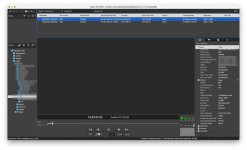
Last edited:
Would you like to upload a clip [somewhere] so I can check for you on my end with a M1 and 12.2?
Thanks for the offer. But I doubt it's the clip. Clips play fine in all Adobe apps and VLC. It's also all recordings, new and old, and on internal and external drives and directly off the cards.
Called Canon Cinema EOS Support. They said these apps are not supported on Apple Silicon. They were surprised it would even install on my M1Max. It did work for a while, and aygie has it working now. But I guess we could all be in for some black screens until Canon updates these apps for Apple Silicon based Macs.
Called Canon Cinema EOS Support. They said these apps are not supported on Apple Silicon. They were surprised it would even install on my M1Max. It did work for a while, and aygie has it working now. But I guess we could all be in for some black screens until Canon updates these apps for Apple Silicon based Macs.
Thats interesting but I would take that with a pinch of salt. Canon had updates to support M1 with numerous apps (Cinema RAW development has M1 as an option for graphics card whereas it didn't in previous versions). Perhaps the info hasn't made it down the support chain.
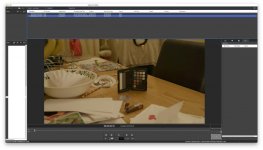
As an FYI I just updated to 12.2.1 and it still works (photo attached). Also a thought, you don't need MXF Utility to playback MXF files, its built into the OS so you can just quick look the files in the finder, does that work for you? It might be a FCP / ProApps supplement download that you need to get. I'll look for it...but perhaps MXF utility isn't at fault here?
Attachments
Thats interesting but I would take that with a pinch of salt. Canon had updates to support M1 with numerous apps (Cinema RAW development has M1 as an option for graphics card whereas it didn't in previous versions). Perhaps the info hasn't made it down the support chain.
As an FYI I just updated to 12.2.1 and it still works (photo attached). Also a thought, you don't need MXF Utility to playback MXF files, its built into the OS so you can just quick look the files in the finder, does that work for you? It might be a FCP / ProApps supplement download that you need to get. I'll look for it...but perhaps MXF utility isn't at fault here?
CinemaRAW shows as Universal app in System Profiler. XFUtility is listed as Intel app. My footage plays everywhere else than XFUtility. Also in Quick Look. I have Compressor installed with latest update, so I do have the ProVideo Formats installed. It's just XFUtility that won't play my clips.