T2i Would you consider this low-light banding & noise normal?

Iudex

Well-known member
Hello everybody, I've been reading several threads in this forum and I'm just checking if my known-issue is at a normal level. I've read some people took their cameras to Canon because the patterns were to high and they got reduced.

I was running some ISO tests and I was actually very happy with the results, but I noticed some very heavy vertical banding on a low-lit yellowish wall. Canon 50mm 1.4 wide open, ISO 200. As a side note, the higher the ISO, the less noticable the pattern was.

I use Neutral, with sharpness and contrast all the way down. Saturation only one notch down.

Would you consider my camera normal? Thank you! This can also serve as a reference for other people.

http://rapidshare.com/files/415554400/MVI_1823.MOV

PS. by the way, any advice on which de-noiser software to get and with what settings? Something that works well with this camera of course!
 
Table of illumination chart says that ISO 200 at F1.4 would give about 12.5 footcandles for proper exposure. Looks to me like you're about two stops under, so this probably should have been shot at ISO 800. That puts the light in the room at about 3 foot candles.

Normal levels for film are about 25-50 footcandles, and broadcast TV is closer to 100-150.

I've shot ISO 640 in about 3FC of light. In fact, I do it every week now. And yea, it generally looks like garbage. There's nothing wrong with your camera. You have about 1/10 the light typically used to make an adequate exposure.
 
The best denoiser available is light. Use more of it as required.

Options in post range from Neat Video, to Mercalli, to whatever some of your NLE options are. I am quite pleased with the denoiser included in my NLE.
 
As always, thank you Perrone.

That wall, of course, was the underexposed section of my test footage (i cut it with the camera). I'm planning to shoot a lot of available light night street scenes, so I'm very interested in knowing if the garbage I will see is normal!

The point is, my subject was well exposed. You will always have low lit sections in any low-key lightning situation, ergo they will always look like garbage - am I arriving to a wrong conclusion here?

In an illuminated situation, I was thinking of lifting the shadows and crushing them in post to solve the problem, but this should also have an effect on properly exposed subjects I guess... it will make their faces look very contrasty. Am I wrong? Maybe the solution revolves around using a lot of light fill lights? I'm sorry, I actually know very little about photography.

What do you think?

By the way, I use CS4 and I'm about to upgrade to CS5... is there a new NR option?
 
As always, thank you Perrone.
That wall, of course, was the underexposed section of my test footage (i cut it with the camera). I'm planning to shoot a lot of available light night street scenes, so I'm very interested in knowing if the garbage I will see is normal!

I disagree. The wall was the worst of the underexposed footage. The entire room was underexposed. By 2 stops minimum. If you intend to shoot with the current camera and lens you used for this, in similar lighting conditions, then yes, your footage will always look like this. And yes, it is perfectly normal.


The point is, my subject was well exposed. You will always have low lit sections in any low-key lightning situation, ergo they will always look like garbage - am I arriving to a wrong conclusion here?

I disagree. Your subject was poorly exposed, and you have the noise, grain, and banding to prove it.

In an illuminated situation, I was thinking of lifting the shadows and crushing them in post to solve the problem, but this should also have an effect on properly exposed subjects I guess... it will make their faces look very contrasty.

Setting correct exposure levels has nothing to do with contrast ratios. Set the shadow side of the face at a level that will not give noise in the camera. Then set the highlight side at the desired contrast to the shadow side.


Am I wrong? Maybe the solution revolves around using a lot of light fill lights? I'm sorry, I actually know very little about photography.

The solution revolves around lighting with adequate levels. Enough levels to avoid noise. Here is a rule of thumb. Set your aperture before you turn on any lights. This should be based on what you want your depth of field to be. Set your ISO to 100 or 200 (on the T2i). Turn on your key light if you're using one. If you are just using existing light that's ok too. You should just about need to use an ND filter if you've got the lighting exposure right.

What do you think?

I think you are going to continue to have very poor results if you keep trying to shoot in less than 10 footcandles of light.

By the way, I use CS4 and I'm about to upgrade to CS5... is there a new NR option?

No idea. Hopefully, somone familiar with CS5 can respond. But I can tell you this. If you're in need of NR, you messed up in the camera. I have NEVER needed any NR on a narrative piece.
 
I'm sorry it seems I haven't expressed myself correctly... what I did was expose for my human subject that was somewhere else, than I looked around with the camera. You see only that underexposed portion because I cut it in camera to upload a small file with only the portion that I wanted you to judge.

There wasn't even a light on over there lol... I was trying to see how non-lit spaces would look in my night street scenes.

My point is that in low-key situations there will always be low-lit portions of the frame including banding, noise and artifacts. The left part of the histogram...

So then, for low key situations, I proposed lighting to get shadows lit and crush them in post, but I was worried that faces would get a little bit crushed as well. I guess one would have to be very careful to set the footcandles in the to-be-crushed sections separated enough from the footcandles in the faces, right?

That is, of course, on controlled lighting shootings... in my case - available light night street - I'm pretty much screwed, right? Or is there a possible solution to avoid banding and noise in the dark areas?
 
There's no light there, what do you expect? Footage looks terrible to me. I would suggest ALWAYS having an on camera LED Light, ALWAYS
 
What do you mean? Like a huge filler led light? For my night scenes that would be a really big light haha!
 
Iudex,

I want you to take a VERY careful look atthe following two images. Both are VERY low key. I want you to look for banding like you saw in your images. Look for noise and grain.

38948_430614672896_511227896_4842955_5957048_n.jpg


38212_431191462896_511227896_4857979_7704588_n.jpg


And when you get done with them, I want you to go look at the originals.


http://i666.photobucket.com/albums/..._430614682896_511227896_4842956_3371581_n.jpg

http://i666.photobucket.com/albums/..._431191477896_511227896_4857980_1786964_n.jpg
 
I see! Thanks for posting...

It's a little bit difficult to judge from a low res jpg still... I was wondering, did banding & noise appeared, for example, to the right of the seating subject? Based on my tests it should have no matter what the ISO was.

If it appeared, I'm sure it was totally gone though because your graded stills are very crushed. The thing is, if we don't want to crush it so much, is there a viable way to get rid of it?
 
It's a little bit difficult to judge from a low res jpg still... I was wondering, did banding & noise appeared, for example, to the right of the seating subject? Based on my tests it should have no matter what the ISO was.

Yes, I was trying to find the full sized ones for you, but I don't have them handy. But just to let you know, there is no banding anywhere. These were shot at ISO 320 on a 5D. ISO 100 on a 550D or a 7D is cleaner.

If it appeared, I'm sure it was totally gone though because your graded stills are very crushed. The thing is, if we don't want to crush it so much, is there a viable way to get rid of it?

There wasn't any. Look at the original. Look at the shirt of the young man standing to the left of the photo. In the original, there is so much light on him, we nearly blew it out. This illustrates my point about using the ISO you need, but then having so much light at that ISO that you nearly need an ND.

I set a base stop for this shoot of F4. I didn't want it any more shallow than that. I set a max ISO of 640 and I stayed away from 640 in all but a single shot.

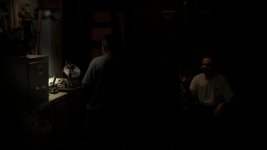
You don't need to crush this as much as I did. There is no banding in the original either. I crushed it to the directors intent (4 stops) and then painted the light back onto the actors and background. I could have taken it dow on stop or two and it would be just as clean.
 
Let's see if this works better...

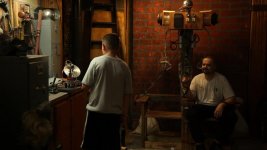
Ok, so we have the original untouched image

The grade to the directors intent

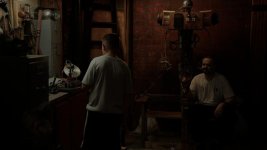
And one I knocked down 2 stops so you could see it.
 

Attachments

  • 1153_ungraded.jpg
    1153_ungraded.jpg
    52.9 KB · Views: 0
  • 1153_BasicGradeA.jpg
    1153_BasicGradeA.jpg
    20.1 KB · Views: 0
  • 1153_minus_2_stops.jpg
    1153_minus_2_stops.jpg
    35.1 KB · Views: 0
i'm learning alot :)

Perrone could u explain more about "painting" the light back in post and how its done. I'm assuming it means after u crush it then u single out the portions u want to bring up again. (like their faces ect). but i duno how to do that? Also i duno if thats what u meant.
 
Thank you for your time Perrone, I will try to shoot always 100 ISO in controlled situations, but I guess my night street scenes will always end up looking like garbage! I'll run a lot of tests during preproduction to see what's the best option. Maybe in some months I will post here again.

Thank you!
 
Thank you for your time Perrone, I will try to shoot always 100 ISO in controlled situations, but I guess my night street scenes will always end up looking like garbage! I'll run a lot of tests during preproduction to see what's the best option. Maybe in some months I will post here again.

Thank you!


well i have shot under street lights with F1.4 lens at 640 ISO and it was acceptable. Not ideal clearly....but ok.

edit: on the 7d
 
Thank you for your time Perrone, I will try to shoot always 100 ISO in controlled situations, but I guess my night street scenes will always end up looking like garbage! I'll run a lot of tests during preproduction to see what's the best option. Maybe in some months I will post here again.

Thank you!


They don't HAVE to look like garbage. But you have to learn how to shoot them. A part of Cinematography is the magic of directing the eye. So we want to direct the eye AWAY from things in the frame that aren't pleasing.

If you are doing a street, walk and talk, try to do it in an area where there is heavy car traffic if you can. The passing headlights of the cars will do a LOT to help light your subject. If this is not possible, try to shoot near an area with bright lamps, like a park, or storefronts with large windows. They will provide enough exposure for you to get some decent fill light, then you can just use a small handheld light for a key.

You don't have to accept poor lighting, but you DO need to be creative about how to get reasonable and believable lighting. In this scene I have here, I had 2 lights to work with. One fluorescent over the bench, and an overhead in the corner. I painted the overhead fixture to give me the color of light I wanted. I could have painted it white to reflect more light if I had needed it, but I didn't. I replaced the 40w bulb that was in it, with 2 120w compact fluorescent lights. That was bright enough to light that entire corner. I then replaced the fluorescent tubes over the work bench with high output models. If fact, it gave us too much. I had to use ND and diffusion to take it down some, and still didn't get it down enough.
 
i'm learning alot :)

Perrone could u explain more about "painting" the light back in post and how its done. I'm assuming it means after u crush it then u single out the portions u want to bring up again. (like their faces ect). but i duno how to do that? Also i duno if thats what u meant.


That is exactly what I meant. How it's done is really dependent on the tool you are using to work. I now use Magic Bullet because it's cheap, and very flexible. Essentially, I'll knock my levels down to the point the darkest parts of the image are where I want them to be. Then I start placing lights where I would have wanted them if I had full control on the set. I can give them color (like I was putting gel on them, I can flag them, and I can do all manner of things. I can reset the contrast ratio of what I actually shot, I can add diffusion, and all kinds of things.

You want to try to do as much as you can on set. This particular set was in an old warehouse. There was no air conditioning. It was 110F in there. I had ONE 15amp plug outlet to use. So I couldn't do much lighting. So I shaped my light as best I could with the limited power I had, and essentially, re-lit in post where I had complete control.
 
They don't HAVE to look like garbage. But you have to learn how to shoot them. A part of Cinematography is the magic of directing the eye. So we want to direct the eye AWAY from things in the frame that aren't pleasing.

If you are doing a street, walk and talk, try to do it in an area where there is heavy car traffic if you can. The passing headlights of the cars will do a LOT to help light your subject. If this is not possible, try to shoot near an area with bright lamps, like a park, or storefronts with large windows. They will provide enough exposure for you to get some decent fill light, then you can just use a small handheld light for a key.

You don't have to accept poor lighting, but you DO need to be creative about how to get reasonable and believable lighting. In this scene I have here, I had 2 lights to work with. One fluorescent over the bench, and an overhead in the corner. I painted the overhead fixture to give me the color of light I wanted. I could have painted it white to reflect more light if I had needed it, but I didn't. I replaced the 40w bulb that was in it, with 2 120w compact fluorescent lights. That was bright enough to light that entire corner. I then replaced the fluorescent tubes over the work bench with high output models. If fact, it gave us too much. I had to use ND and diffusion to take it down some, and still didn't get it down enough.

Of course!

Guerrilla shooting must be smart shooting!

Make it work creativetely we must!

:D
 
Back
Top