Words of advice: Backup your data to multiple sources

semajha

Well-known member
I just wanted to let yall know, for the ones who haven't backed up their data to do so, before you end up regretting it like me. Yes, you've already heard the importance of backing up your data but it can't be stressed enough to really BACK UP YOUR DATA TO MULTIPLE SOURCES! I failed to take heed of the warnings and now I've lost everything. :( All of my footages along with my music are gone... around 400gb worth. Sucks that I had to learn the hard way but it was a lesson learned. From now on I'll have at-least 2 sources to back up too...

ahhh man, I know I'm probably setting myself up for disappointment but is there still a chance of recovering my data?
 
from what company? so it's possible to be able to recover it myself instead of sending it to a specialist?
 
I still can't believe it's all gone. What really pisses me off, more than the hard drive failing, is myself. I had so much footage that needed to be edited and I kept telling myself that I would eventually get around to it. I had friends and family that wanted to see some of it and now I can't it to them... procrastination really did kick my ass this time. =/
 
One word DRIVERSAVERS

Give them a call for a free estimate, they are miracle workers, the last drive they saved for me was well worth cost.
 
My problem was that I never saved the original native files... When I load up FCP, files are converted to pro res and captured to my external hard drive. Everything on my SDHC card gets formatted each time after I capture footages to FCP.

And I honestly don't know what I could have done to jack up my harddrive. It's been running smooth since last year. The only thiing I had it do before it started failing(clicking) was capturing footage from my memory card to FCP. The harddrive gets plenty of ventilation, doesn't get moved much, and I always make sure to eject properly before turning it off.
 
Last edited:
Yep. I have a Graid in for recovery now. It is the third one that has failed me this year. One word...Lacie.
 
Really don't know which brand harddrive to trust.. I always hear something bad from every brand hd.
 
Really don't know which brand harddrive to trust.. I always hear something bad from every brand hd.

Basically hard drives fail because they become to hot. You need to place your hard drive in a properly fan cooled external.

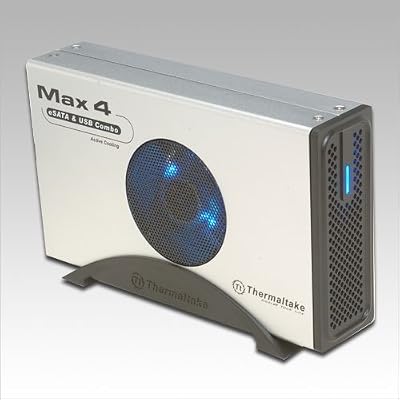
41Ltmu086gL._SS400_.jpg


This is what I use and it keeps your hard drive super cool. So basically buy a good 7200 rpm HD and place it into this enclosure and your problems will be no more ( 99% :thumbsup: )
 
This is what I use and it keeps your hard drive super cool. So basically buy a good 7200 rpm HD and place it into this enclosure and your problems will be no more ( 99% :thumbsup: )

Good advice, but hard drives fail for many reasons besides overheating.

So as the original poster stated, it's still best to keep your stuff in multiple locations or use a solid redundant backup system.
 
semajha,
Sorry about your loss. Thanks for posting the warning.

There are common steps to be careful using tapeless media and people are always tempted to take short cuts, but as you've seen it is incredibly dangerous. As they say - there are 2 types of people in the world. Those who've had a hard disk fail, and those who are going to have a hard disk fail.

Just for curiosity - what brand was the disk?

Incidently Cieloent, it is not at all neccessary to use a 7200 rpm drive for back-up, only for editing.
5400 rpm drives use less battery power if your backing up in the field from a laptop.

I've had great luck with drives from OWC. I would never ever trust a La Cie drive. Too many reports like Paul's. Its the only drive I've ever seen consistent failure reports about - and those reports are all over the web.

Lenny Levy
 
Yes hard drives fail for many reasons, I just can't explain why I have a half dozen Lacie's and never a failure and 3 G raids that have all failed.

The one that recently died, died not because of heat. It had been running for less than 10 minutes.
 
Yes you do not need a 5400 rpm Drive and yes Heat is not the only failure of an HD, BUT editing on an HD all day with heat building up and not having a properly fan cooled external will ultimately lead to a hard drive failure.

At the end of the day sorry this happened to you and this can happen to anyone, so we all need to be very careful and back our data up to at least 2 different drives
 
Yes you do not need a 5400 rpm Drive and yes Heat is not the only failure of an HD, BUT editing on an HD all day with heat building up and not having a properly fan cooled external will ultimately lead to a hard drive failure.

At the end of the day sorry this happened to you and this can happen to anyone, so we all need to be very careful and back our data up to at least 2 different drives

Amen brother!
 
We are currently shooting and editing at the World Cup in South Africa, and we ALWAYS keep two drives with all the camera masters, edited files etc. One goes into the Hotel room for safe keeping and the other is used for daily cutting.
 
I have a G-Raid 4TB RAID drive that's worked flawlessly for three years. In that time I've had two LaCie drives fail completely taking all data with them - fully backed up both times but still a mess.

I now buy Fantom Drive G-Force eSATA/USB 1TB drives for around USD$100 for working backup. When a project is done I offload it to another Fantom and put it on a shelf for archiving.
-a-
 
I used data rescue 3 and recovered all of my files from a failed LACIE 2tb drive. good luck
 
Look at it this way: your data doesn't really exist until it's in at least 2, and preferably 3, different places. Meaning different physical drives, or even different physical location, like a hard drive stored off-site or an online backup solution (not really feasible for video, I agree - hopefully bandwidth will catch up some day).
 
It's been running smooth since last year. The only thiing I had it do before it started failing(clicking)

Sorry to hear that. Is it the problem mechanical ? Do you hear a repeating click as the drive tries to read the data ? If that it is the case I am afraid there is no software that will solve the issue. The HDD needs to be open by professionals in a clean room.
Can you see the disk mentioned in the list during the booting while the BIOS is showing up ? That would give already an indication.
thx
 
Back
Top