AndreyBlanco
Active member
The picture says it all...

Follow along with the video below to see how to install our site as a web app on your home screen.
Note: This feature may not be available in some browsers.


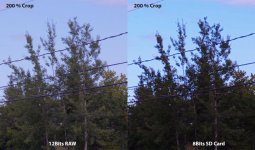
I recently compared some footage I shot on the Epic-W Helium in 8K compared to Amira footage shot at the same location with the same actress in 3.2K. My conclusion was the Helium looked sharper if you like to view your footage in 200% crop. Otherwise, the Amira looked better.
In other words, showing the difference between 200% crops is a faulty way of reviewing footage, as in most cases the end viewer is not going to be viewing the footage at a 200% crop.
Let's see the 100% crop samples for a better comparison.
Amira and Red are ungraded aside from a LUT which was already applied when I brought it into Premiere. For the C300 Mark II (shot in Canon Log 3 Cinema Gamut), the second shot of just the guy, I applied a Cinema Gamut C-Log 3 to Rec 709 LUT, along with 60 sharpness in Premiere, and for the first shot, that same LUT did not work (looked really bad, why does the LUT not work for all shots if it works for one?), so I graded it manually with Colorista color wheels.Can you share the full frame and crops you are referring to in order to help illustrate your point?
(I don't disagree or anything, I'm just curious.)


...In other words, showing the difference between 200% crops is a faulty way of reviewing footage, as in most cases the end viewer is not going to be viewing the footage at a 200% crop.
An end user may not know what those are, but an end user can always tell (consciously or subconsciously) the quality of an image presented, which is affected by many factors - lighting, codec, camera, color correction, etc. Some things are more noticeable to the end user than others. If they're watching the end video at a 100% crop, then what is only visible during a 200% crop will be irrelevant to them.Really stupid answer, sorry. An end user know nothing about raw, LUT, color correction, etc.
When I'm studying a codec quality I'm resizing picture size from 100% to 400% as I need, it depends on what I want view (noise, compression artifacts, etc). Both picture above give clear answer about technical quality of codec, not about art or feeling from picture. Something else would be to judge the distribution type of compression after all processing.
I'll have to try that out. There was a topic here recently about people going back to using Canon Log 2 after using 3 for awhile, so maybe I'll try Canon Log 2 again. I mostly shoot a flavor of Wide DR, but for more important projects I've been doing log lately. I guess you get an extra stop of dynamic range out of log 2, reportedly. So, I'm still figuring out the best way to grade log footage.I just stick with Canon Log 2, Cinema color and Production matrix (ARRI settings for C300 II), then PP CC ARRI LUT to 709: get repeatable results.
Was magenta push for style?
Before & after (WB adjustment (less magenta, lower color temp)):
View attachment 125997
View attachment 125996

i have a theory that when you use any filters above 7 stops, you will end up with color shift and sometimes IR pollution, have you experienced that with your C300 ii?
This is a well-known issue with cameras that's been commonly tested. For cameras without ND filters, it's been recommended to use up to .9 (3 stops) safely, maybe a bit more, without needing any additional IR cut. But anything above may start to affect the image and you'll have to counter to get back your true colors.
Cameras with built-in ND filters probably differ as you seem to be able to get away with more, but the IR filtration might also increase as you go up (I don't know).
But in general, too much of any kind of filtration should probably be monitored.
I assumed each piece of glass has a stronger IR cut. Is that what you mean or are you talking about some sort of software correction?