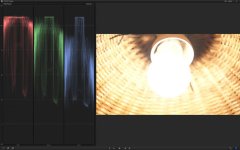
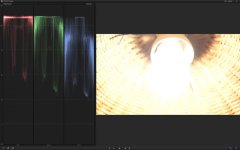
Why I think Knee and Slope settings are the Devil

Nice one Sam, you're using the "moving target" approach to discourse.

Those pictures are a millions miles away from shooting at a window with the subject with the subject backlit. The difference between backlit room to back lit in open field massive and incomparable.

I couldn't help myself laughing, do you really think you're letting the cat out of the bag with that technique? In the world outside Cornwall we call it rim lighting.

I was expecting you'd show us pictures where the highlights weren't blown.
 
We are not going down a good road here getting personal on either front _ I believe you know about cameras (particularly after your thought provoking comments on polarization and skin tone), I believe that I do too so lets leave it at that - becaue the topic is losing value

The general point - IMO is that in many situations there will be blown highlights as part of acceptable images - maybe specualar highlights in a forest , practicals in an INT- maybe whole windows- its not a failure in craft to include a blown white (when intended) as you imply

Including a whole blown window may not hit your personal aesthetic sweet spot - a position I could respect - but it is just a personal aesthetic standpoint not a unversal truth of creating images

Best

S
 
Last edited:
I posted this in a separate tread, just saw your guys are already over it:


Knee setting: 105% and slope +5 in combination with Cinegama 2 does a nice job here.

You pay for it with lowlight sensitivity and some noise.
But you don't have to shy away from highlights anymore and when you expose correctly, it´s fine.

Try this out if you want:

Black Level (variable - start at 0 and adjust to your scene)
Gamma: Cinetone2
Black Gamma High +7
Knee: 105% and slope +5
Colormode: Cinematone2 +8
Color Level -2
Colorphase 0
Depth: R+4, G+7, B+7, C+7, M+4, Y+7
WB-Shift R-B, R-7, B0
Detail: Level 0, Manual ON, BWType3, Limit4, Chrispening5,


Frank
 
I am writing the plugin with the Adobe SDK with Apple's IDE. It's really hacked. I stopped when I realized I was having problems with 4:2:0 and haven't started back up yet. I do plan on it though. Mostly I am writing an expander is what I would call it.

Like my example of pointing your camera at a car with headlights or tail lights, these situations the FS100 does horribly. This is nothing new mind you, when the camera came out, the big names testing the camera had the same feeling on what it was doing to the color. Mind you, this is with default settings.

I'm sorry, but it's not user error. I *know* that I am blowing out the camera as that is what I want it to do. That's like complaining your guitar amp distortion doesn't sound good and you telling me "Well duh, you need to lower your level" I *want* the distortion, it's on purpose, and I am trying to get a look that other cameras don't have the same problem with, ie: Alexa, Epic, F3, 7D, 5D, 5Dm3, C300, BM.

It would be different if I felt that the highlight handing was buying me something useful, but after months of work on this issue, I don't believe it does. I think it adds more headache for something that looks artificial.

If you want to control every lighting situation you use, hey, I'm not saying that is wrong, that's what works for you. But for me, a $5k or $9k camera should outperform the highlight handling of my $1200 7D and it doesn't, and it hasn't since the day I bought it. At least, not with the settings I have now.

Frank, I will try your settings and see how they work. Thanks for the settings!!!

I am still in the process of talking with some users of the FS700 to get more details about Cinegamma4 which apparently makes a HUGE difference, and, from the video Adam Wilt posted, *looks* like the highlight performance I am after. If that is the case, possible problem solved.

The people at the NAB booth aren't helpful, a person from my production group is there and asked them questions for me and the responses are definitely the "I don't know" response, which is typical of a lot of booth help anyways. What I really wish is I could talk to an engineer.

I watch A LOT of television shows, and I can tell you, I can see when they blow highlights. I can tell when 'Fringe' changed from film to the Alexa because the roll-off changed. When I started the first episode of season 4 I was like "Hmmm, something changed" and I went and saw that they switched to the Alexa. Film blowouts don't like like most digital blow-outs, but, some cameras are DEFINITELY a lot closer.
 
You pay for it with lowlight sensitivity and some noise.

Can you explain why the highlight roll off would alter lowlight sensitivity and increase noise please?

edit.
I assume that's because of cinegamma2 more than knee setting. Yeah, Cinegamma2 crunches the lower mid tones down to black quite rapidly.

A rule of thumb when setting knee with this camera, when you use a cinegamma go positive other curves go negative with slope setting.
 
Last edited:
Campared to Standard and ITU709 Gamma, the Cinecammas are a bit darker. Also you see some noise appearing in underexposed areas.
 
I am still in the process of talking with some users of the FS700 to get more details about Cinegamma4 which apparently makes a HUGE difference, and, from the video Adam Wilt posted, *looks* like the highlight performance I am after. If that is the case, possible problem solved.
.

Here is what I know about the 700 gammas Rick, maybe it helps a bit:

CINE1 Is decreasing dark area contrast and sharpening bright area tones
Its the equivalent of HG4609G33 with a dynamic range of 460%, withe limit of 109% and Video output with 18% gray card
(video input 20%) of 33%

CINE2 Almost the same effect as CINE1 but in a range within 100% of video signal.
Its the equivalent of HG4609G30 with a dynamic range of 460%, withe limit of 100% and Video output with 18% gray card
(video input 20%) of 30%

CINE3 Is more contrasty than CINE1 and CINE2, and crushes the blacks like the Cine1 on the FS100.

CINE4 Shadow contrast is a bit weaker than in CINE3 and the bright area contrast is stronger than STANDARD.

ITU709 Gamma curve that corresponds to ITU-709. with a raised gain of 4.5 in the shadows.

I shot "Man of Steel" in Cine 1 and 2.
 
I'm sorry, but it's not user error.

Well if you're right then that makes me wrong.

I don't see banding or halos that others report and believe me I've tried. I've pointed the camera at white hot walls, shiny hotspots and lights of every description.

So, I'll remain happy in my ignorance.
 
Here is what I know about the 700 gammas Rick, maybe it helps a bit:

CINE1 Is decreasing dark area contrast and sharpening bright area tones
Its the equivalent of HG4609G33 with a dynamic range of 460%, withe limit of 109% and Video output with 18% gray card
(video input 20%) of 33%

CINE2 Almost the same effect as CINE1 but in a range within 100% of video signal.
Its the equivalent of HG4609G30 with a dynamic range of 460%, withe limit of 100% and Video output with 18% gray card
(video input 20%) of 30%

CINE3 Is more contrasty than CINE1 and CINE2, and crushes the blacks like the Cine1 on the FS100.

CINE4 Shadow contrast is a bit weaker than in CINE3 and the bright area contrast is stronger than STANDARD.

ITU709 Gamma curve that corresponds to ITU-709. with a raised gain of 4.5 in the shadows.

I shot "Man of Steel" in Cine 1 and 2.

Thanks for the info Frank, I appreciate it.

From the "4 day test with the FS700" I saw he used CINE2 and he was getting a lot of color shift in the sky shots and the fire shots, not sure if you watched this video.

From the Adam Wilt test, with CINE4, the slow mo fire shots had a nice roll-off to white as the flame increased and did not red shift.

Your tests with the FS700 had very nice roll-off for the most part. I am not sure why "4 day" had such different results. I think what ultimately I may want to do is get my hands on one before I buy one to test this stuff out. I've got the cash now for an FS700, but I gotta be honest, I'm just not completely convinced yet.

Let me do some tests tonight though with your settings and see what happens.

Rick, if you do get a chance please post some bad examples, if it's of something that i can mimic then great. I probably haven't had the camera as long as you and certainly not put it through the same situations, but i've not experienced quite the same level of angst as you're having.

I guess you white balance accordingly? The only reason for asking is i see lots of highlight issues on the EX1 for example, with mixed lighting and white balance choices.

cheers
Paul
 
Well if you're right then that makes me wrong.

I don't see banding or halos that others report and believe me I've tried. I've pointed the camera at white hot walls, shiny hotspots and lights of every description.

So, I'll remain happy in my ignorance.

Maybe you have better settings that I do, maybe I've not found the right combination yet, as I've got to say, there is a million settings to adjust on this camera. I don't always see the problem and not all highlights end up with the issue, but, certain combinations pop out REALLY bad for me. The settings make a HUGE difference as my current settings minimize it more than what was happening out of the box, and that was horrible.

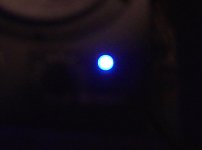
Here is a test image I created to show HL problems and one of the things I was using to tune my algorithm:

LED.jpg

Make sure you open the image so you can look at it closer. This is NOT the worst I have seen by far, as I have seen MUCH wider shifted color areas than this, but, I needed something easily reproducible in my studio to test the code. When shrunk down it hides the problem, but trust me, I've had it creep into my shots where it looks WAY worse.

Issues:

1) The cyan to white transition is harsh. There should be a gradient here between those two colors. And, the cyan region, given the gradient would be MUCH thinner.

2) The aliasing that gets introduced in these color shifted areas. Look how much you can see around the outside edge.

3) Look at the really dark ring between the blue glow and the edge of the cyan ring. If I try and correct this and expand the 3rd channel in the CYAN region, then the problem goes to that dark region not mixing in well with the blue halo that connects to it.

Remember, this shot is not intended to do anything other than show the issue. I see this happen on ALL kinds of shots where I want say a specular highlight to blow out on purpose. In some cases, that LED will be ALL CYAN if I shifted the LED intensity down a bit so it didn't max out in the center, which looks even worse AND not what was in front of the camera.

I was shooting a plunger in a scene and the highlights shifted yellow instead of white, and I could see white with my own eyes.

And these are with my better settings. Out of the box and it is MUCH worse.

Check out the hue distortion example here with the different modes:

http://provideocoalition.com/index....ony_nex-fs100_super35_lss_avchd_camcorder/P1/

(He mentioned the pictures are more saturated, and I agree, but it's the shifting that happens on overexposure, and again, this shows the problem)

Those shifts would not be so large and bad if the camera did a better job of expanding all three channels when getting ready to clip. Like I said, if I felt there was an advantage to their method, I'd understand, but even with the retention of detail in a color shifted area, it looks unnatural to my eyes and not something I would desire. TODAY, I shoot around it, I have no choice, but I'd love to not have to worry about it.
 
Your tests with the FS700 had very nice roll-off for the most part. I am not sure why "4 day" had such different results..

It´s a combination of gamma, knee, slope settings.
Especially knee and slope behaves drastically different if you throw them at a different gamma curve.
Than it´s a matter of shooting style - I set my skin tones somewhere between 35 and 45 IRE, brightest parts not more than 55 IRE and than adjust the rest with flags, lights, scrims andwhatnot.

I think one of the mayor problems is the nonlinear response of the sensor (probably more of the electronics behind it).
If you raise your shadows 10% your lights rise 25% and the red channel 35%.
What I´m trying to do is, to create a reverse curve in camera (after that it´s too late) to fight that problem and get a more linear response.
But there is only so much I can do with the PP settings. The Cine 1 and 2 gammas in the 700 can do 80% of that work out of the box.
There is hope I get an other 700 from Sony in a few days for further tests - I let you guys know.

Frank
 
It´s a combination of gamma, knee, slope settings.
Especially knee and slope behaves drastically different if you throw them at a different gamma curve.
Than it´s a matter of shooting style - I set my skin tones somewhere between 35 and 45 IRE, brightest parts not more than 55 IRE and than adjust the rest with flags, lights, scrims andwhatnot.
Frank

Did you use knee and slope when shooting cinegamma with the FS700? I thought knee should be turned off like on the F3 where you can´t even acess the knee funtion when using cinegammas.

How do you set your skintones to a specific IRE? I find that really hard to do with only zebras available going down to 70. Do you use a light meter?
 
Let me just say for the record, that I do love my FS100 in many many ways, and the reason this has become a bigger topic for me is if I am going to drop $8k-$9k on the FS700, for me personally, I want it to perform more along the lines of some requirements I have in a camera. Even if I didn't get the FS700, there isn't another camera I am looking at replacing it with because the FS series is SO CLOSE to what I want. I joined this discussion because knee/slope have had a lot of impact on the HL handling, and, I've spent a good 6 months trying to find easier solutions to fixing HL problems when they pop up.

As I said, they aren't always there. I've got shots of headlights on cars that look great! I have others where I am not happy with the results. If a light in a scene has any sort of color to it, then the problem usually pops out and becomes an issue. Lights in light with the white balance are going to be fine, but, that's not always the case for scenes with lots of different sorts of possible light sources in them.

For me, this issue is like Moire on the 7D. It's something that can be hard to see if I am using the built in LCD, and it's something that sometimes is a problem, other times it is not. That's what can make it frustrating.

Like all of us here, we just want the most out of our cameras, and I *really* enjoy the efforts of all of us to get as much from this camera as we can, Frank especially. His work is fantastic and really shows the FS100 shining.

With any camera we make sacrifices as to what freedoms we have. With the 7D, I cannot shot hand held easily with any lens over 30mm as the rolling shutter is awful. I cannot shoot in darker settings with F2.8 or higher on the 7D because it's just too noisy. With the FS100, the rolling shutter is fantastic and low light is absolutely amazing, which we've used.

I'm an independent filmmaker with a much tighter budget. Sometimes, we have to shoot in less than idea conditions and we try and make do as best we can. For this reason, I look to a camera that can handle a wider range of situations, and that is something that I have been working hard with the FS100 to do. I think it's close, and really, just want Sony to open up a little bit on our ability to make changes to more things in the camera as I believe we can make it shine even more. I mean, look at the work Frank has done, truly great work.
 
It´s a combination of gamma, knee, slope settings.
Especially knee and slope behaves drastically different if you throw them at a different gamma curve.
Than it´s a matter of shooting style - I set my skin tones somewhere between 35 and 45 IRE, brightest parts not more than 55 IRE and than adjust the rest with flags, lights, scrims andwhatnot.

I think one of the mayor problems is the nonlinear response of the sensor (probably more of the electronics behind it).
If you raise your shadows 10% your lights rise 25% and the red channel 35%.
What I´m trying to do is, to create a reverse curve in camera (after that it´s too late) to fight that problem and get a more linear response.
But there is only so much I can do with the PP settings. The Cine 1 and 2 gammas in the 700 can do 80% of that work out of the box.
There is hope I get an other 700 from Sony in a few days for further tests - I let you guys know.

Frank

Did you feel you got more linear with the FS700? So far all the shots look less red expanded than what the FS100 does out of the box. Or is that what the 80% means? And if you could, shoot some blown out stuff with CINE4 and see how the shifts look. If those regions like like Adam Wilts tests for most things, count me in on the 700.
 
Yeah, the 700 get´s it much more linear with little tweaking.
And yes, if I can get my hands on an other unit (and chances look good), I shoot something blown just for you Rick ;-)
 
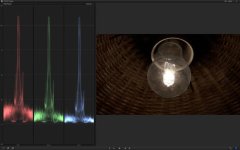
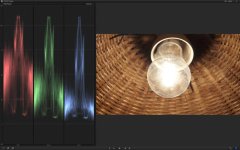
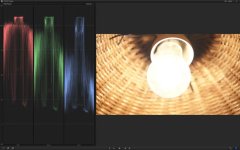
Here's a very quick test I did for you.

1,2,3 riding the aperture, 4 +6dB, 5 +12dB
 

Attachments

  • Exp1.jpg
    Exp1.jpg
    45.3 KB · Views: 0
  • Exp2.jpg
    Exp2.jpg
    59.7 KB · Views: 0
  • Exp3.jpg
    Exp3.jpg
    53.8 KB · Views: 0
  • Exp4.jpg
    Exp4.jpg
    49.7 KB · Views: 0
  • Exp5.jpg
    Exp5.jpg
    41.8 KB · Views: 0
Back
Top