Whitebalance - How are YOU doing it?

A beginners question on White Balancing with Primes

A beginners question on White Balancing with Primes

How is this done? I mean sure you hold a card on the subject and then AWB, but if you are say 12 feet back from the subject, and using a 50mm prime, then looking through the view finder you see way more than just the card. When using my 14-140, no problem, I just zoom in until the card completely fills the frame, and then AWB So, what is done here? Do you move the camera into the white card and handhold so that the whole frame is filled with the card, or is it best to use a tripod so there is no movement? or does it matter?

And another, how do you white balance an establishing shot of say a valley from the mountian top? Do you put a crane in the valley and attach a white card!!, or do you just use a preset and hope for the best?
 
How is this done? I mean sure you hold a card on the subject and then AWB, but if you are say 12 feet back from the subject, and using a 50mm prime, then looking through the view finder you see way more than just the card. When using my 14-140, no problem, I just zoom in until the card completely fills the frame, and then AWB So, what is done here? Do you move the camera into the white card and handhold so that the whole frame is filled with the card, or is it best to use a tripod so there is no movement? or does it matter?

And another, how do you white balance an establishing shot of say a valley from the mountian top? Do you put a crane in the valley and attach a white card!!, or do you just use a preset and hope for the best?

Yep, I take the rig off the head and march it right up to the talent holding the white or gray card until it fills the screen. I recently got a collapsible disk one which is bigger so a little easier.

For outside without helping light, I balance with the daylight where I am. It's the same element (sun) as long as it's the same time of day. I varies a lot from time to time though.
 
How is this done? I mean sure you hold a card on the subject and then AWB, but if you are say 12 feet back from the subject, and using a 50mm prime, then looking through the view finder you see way more than just the card. When using my 14-140, no problem, I just zoom in until the card completely fills the frame, and then AWB So, what is done here? Do you move the camera into the white card and handhold so that the whole frame is filled with the card, or is it best to use a tripod so there is no movement? or does it matter?

And another, how do you white balance an establishing shot of say a valley from the mountian top? Do you put a crane in the valley and attach a white card!!, or do you just use a preset and hope for the best?

Really? Just move to the card. If you're only twelve feet away this seems simple enough. Handheld is fine. Just make sure you balance the camera in the light that you're shooting in. If outside and the main focus of what you're shooting is in the sun then balance for full sun. If your shot is mostly in the shade then balance in the shade. If it's cloudy and the sun goes full then shady from going behind clouds take two balances and save them as presets so you can switch back and forth. Maybe you want a warmer tone so you balance in the shade and have a overall warmer look. Many options, but for true color always balance in the light you're shooting in and you don't need a crane to balance for the mountain top.

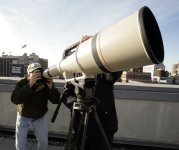
But you might need a 1200mm lens.


Big lens.jpg
 
So, how exactly does balancing to a gray card work?

I have grown accustomed to dialing it in manually, as I have found often times the AWB is really questionable. I'm pretty sure the scene file you are using has a lot to do with the AWB outcome...
 
Basically you're telling the camera how to balance the levels of the red, green and blue information that it's recording. Neutral grey is best for this. White is second. I don't trust dialing it in manually. Its safer to let the cameras electronics do the work for you, but you have to give the camera the right source to work with. Many people swear by manually dialing it in and if it works for you then great. You will need a calibrated monitor to do it manually or your results will not be true and will need to be fixed in post.
I pretty much always change the color in post anyway so if I get a good balance in the field then color correcting is easier for creative reasons.

More than you want to know about white balance.
http://www.pixiq.com/article/white-balance
 
Last edited:
Basically you're telling the camera how to balance the levels of the red, green and blue information that it's recording. Neutral grey is best for this. White is second. I don't trust dialing it in manually. Its safer to let the cameras electronics do the work for you, but you have to give the camera the right source to work with. Many people swear by manually dialing it in and if it works for you then great. You will need a calibrated monitor to do it manually or your results will not be true and will need to be fixed in post.
I pretty much always change the color in post anyway so if I get a good balance in the field then color correcting is easier for creative reasons.

More than you want to know about white balance.
http://www.pixiq.com/article/white-balance

Right, but do you just put the grey card in front of the camera and then AWB like you would with a white card?
 
Right, but do you just put the grey card in front of the camera and then AWB like you would with a white card?

That's it nothing different as far as technique goes. I don't believe the scene files have a effect on the white balance but I haven't tested the theory.
 
I dial in manually as well. That has never failed me. Depends on who you're trying to satisfy with the result I guess. Most of what I shoot I shoot for my own uses but if you're shooting and giving all the footage to someone else you'd want to make sure it's spot on and not leave any room for error.
 
Dialing in manually is ok BUT until panasonic gives us a two axis dial in similar to the GF1 warm- cool and magenta- green, you can be fooled in your white balance because while you are dialing in the warm cool axis you are completely powerless to affect the green magenta axis, and liable to dial in a compromised white balance.
 
You need a Color Temp Meter to "dial" in an accurate color temperature and if you also have to deal with color spikes within the color temperature...you need filters on the lights or CC filters on the camera.

A decent Color Temp Meter will tell you both the color temp and the spikes. It is very difficult (impossible) to do by eye ...especially in an uncontrolled situation.
 
Back
Top