
Navigation
Install the app
How to install the app on iOS
Follow along with the video below to see how to install our site as a web app on your home screen.
Note: This feature may not be available in some browsers.
More options
You are using an out of date browser. It may not display this or other websites correctly.
You should upgrade or use an alternative browser.
You should upgrade or use an alternative browser.
General White cards or 18% grey cards for white balance?
- Thread starter JoeJITSU
- Start date
WhiteMonkey
Well-known member
white cards for white balance and 18% grey for exposure

JoeJITSU
Veteran
I know how to set white balance...Now how do I set exposure? Is there a way to set both? Or you can only do one?white cards for white balance and 18% grey for exposure

I know how to set white balance...Now how do I set exposure?
Aperture, shutter speed, and ISO.
JoeJITSU
Veteran
Huh? Ok when I set white balance I set it with a white card and go to "custom". So My question is...people say the grey cards are for exposure. Someone please explain to this newb.Aperture, shutter speed, and ISO.
WhiteMonkey
Well-known member
I'm not going to explain it here, but you need to understand the "Zone System" of photography to understand exposure.
I wouldn't include shutter speed to get exposure. Shutter speed should be set to "180 degrees" or twice the frame rate, 1/50 for 24P and 1/60 for 30P.
Aperture is then set to set depth of field. Light your scene for a lower Iso and less noise.
More common is videography is a color chart:
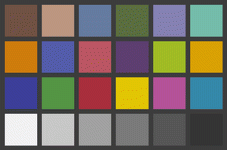
This is used to standardize color from scene to scene and shot to shot. You record an image of it before you start shooting to calibrate it later in Post.
I don't have much time this morning, I hope I've provided some answers.
I wouldn't include shutter speed to get exposure. Shutter speed should be set to "180 degrees" or twice the frame rate, 1/50 for 24P and 1/60 for 30P.
Aperture is then set to set depth of field. Light your scene for a lower Iso and less noise.
More common is videography is a color chart:
This is used to standardize color from scene to scene and shot to shot. You record an image of it before you start shooting to calibrate it later in Post.
I don't have much time this morning, I hope I've provided some answers.
WhiteMonkey
Well-known member
I know how to set white balance...Now how do I set exposure? Is there a way to set both? Or you can only do one?
Set WB after setting exposure. Save your setting if you're using a user defined setting, camera will lost the setting and revert to original setting once camera powers down.
You can set both separately.
Huh? Ok when I set white balance I set it with a white card and go to "custom". So My question is...people say the grey cards are for exposure. Someone please explain to this newb.
Here's the deal: your camera's metering wants to make everything 18% grey. So if the subject is white (like a flower, or a building, or clothing), exposing to the camera's meter is probably going to underexpose the image. If it's black, the image will be overexposed. Set the grey card in front of the camera (centered, to fill most of the frame), under the same lighting you'll have for your subject, and set the exposure.
WhiteMonkey
Well-known member
read online about the zone system. 18% grey is middle grey. You should know what this looks like. I believe the Canons have a spot meter while in movie mode, find an area in your image close to 18% "middle" grey or just use the card and hold the shutter button down halfway. Look on the meter at the bottom of the display and see if you are "over" or "under" exposing the 18% grey. Adjust accordingly.
If you're using a nuetral picture style, you want to underexpose your image by 1 stop. Read about the zone system and you'll understand stops. Try the wiki. Underexposing by a stop is a good rule for digital video since the highlights tend to clip so easily. Adjust the image in post.
If you're using a nuetral picture style, you want to underexpose your image by 1 stop. Read about the zone system and you'll understand stops. Try the wiki. Underexposing by a stop is a good rule for digital video since the highlights tend to clip so easily. Adjust the image in post.
WhiteMonkey
Well-known member
WhiteMonkey
Well-known member
Second base is reserved for boobies, Sir.
JoeJITSU
Veteran
LMFAO! I stand corrected.Second base is reserved for boobies, Sir.