



AC90: White Balance Problems??

jimith

Active member
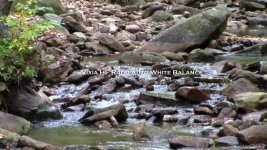
AC-90 Manual WB.jpgAC-90 Manual WB 02.jpgVixia Auto WB 002.jpgVixia Auto WB 003.jpgVixia Manual WB 001.jpgBack again. I posted a few weeks ago about filming in a barn and getting a yellow tint. Yesterday I was filming mountain streams. It was a perfect overcast day and no direct light. I filmed with my AC-90 and took along a Canon Vixia HF R400. I just got the Canon and wanted to mess with it to see how it shoots. I white balanced both cameras and set them side by side. The Canon looked a bit yellow green. I messed with some settings and then put it on auto white balance. When I got home I looked at the footage. I have posted some screen shots. My AC-90 again has a yellow tint to the footage. So did the Canon, but when I put the Canon on auto white balance the footage looks great. I didn't see this until I was home so I don't have any footage from the AC-90 on auto white balance. What is going on here? I thought you should never shoot in auto white mode. You can clearly see the Canon on auto white is correct and the manual white balance on both cameras look yellow.
 
How are you performing your manual white balance? You have to point the camera at something white, which is in the light under which you'd be shooting. So to get that forest shot to look right, you'd have to put a white card in the forest, and zoom in on it to fill the screen, and white balance on that. Is that how you're doing it?
 
I use bright white paper with a *98 brightness. I thought someone would ask if I was walking in the middle of the stream and zooming in to do a white balance. No it is a bite difficult to do that. I was doing the best that I could and that was holding the paper as far away as I could and doing a white balance. Even at that, doesn't the same light fall on the paper as it would say 30 feet away? How do you do a white balance if you can't find a reference of white far away?
 
As Barry states, filling the frame is crucial. I have found that using the wave form monitor to ensure a decent exposure of the white refence card helps to ensure accurate registration too.
Rod
 
In the great outdoors it's all the same light source, the sun, but the color temperature can vary substantially depending on whether you're in bright sunlight or in the shade, or whether it's early morning or high noon or late evening. White balance outdoors is rather tricky. Some folks will just go with the 5.6K preset and make any necessary corrections in post. I'm not a big fan of that, although I certainly understand the timesaving that's involved.

Ideally you'd set up a shot, and then you'd put the white card out in the middle of your shot so it's being hit by the same light that's lighting up your scene, then you'd zoom in to fill the screen so that the viewfinder is 100% white, and then take a white balance at that point. Then remove the white card, zoom out, and shoot -- and you should get excellent results.
 
Thank You. By the way I am using scene 4. Is there any advice on a better setting for nature colors to look their best?
 
Last edited:
I know how difficult it is at times to find/get someone to hold up a white card. One thing you can do is put your tripod at the place you will be framing, and hanging a framework on the tripod at the appropriate height and angle (propping up the card at ground level will not do it), then move the tripod back to where you will be doing the recording. I use the zoom/optical magnifier to ensure that the camera only sees the card, then do a white and a black balance. If you change the angle of your recording, re-do the balance, if you change venues, re-do the balance. It's tedious but I always try to do it, but when you have to, settle for at 5.6K. I have had no success on my AG-AC160A with auto-white balance. I wonder how much extra mileage I could get from doing a white balance and then sticking a color wheel in the scene for a few frames? I often find even after white balancing, that I have to load a white balance effect and click on something in the scene that is white. It does not seem you can do much of anything except remove a bit of blue or green and there does not seem to be much you can do with contrast either.
 
When I first got my 130, a lot of footage had that feel, but mine veered red. Turn the saturation down. I have to crank my down significantly to get nice color (and reds still really pop).

Some of your examples look pretty overexposed (Same with your last thread). Use your WFM and think about filling the screen with the wave, but stay clear of the top. A lot of this issue looks like too much saturation mixed with too much exposure.

The vixia shot doesn't look wildly different, other than it's not exposed as hot and is a bit less saturated.

And a "white piece of paper" can be anything... a lot of white consumer products have some amount of blue, which "feels" whiter to the eye. Others can read warm. Get an actual gray card from a good company.

I'll WB on anything in a pinch, but when there's actual setup time, I have gray cards tucked away in several cases.
 
Oops. I have a white/grey card that I bought from B&H. White on one side, grey on the other. I have always used the white side. Are you saying you actually use a grey card same as still photographers apparently do?
 
I've played with it both ways and don't see any difference. But coming from a stills background, I must have a "grey card" priority somewhere in my brain. That, and white cards seem to get scuffed and smudged faster than gray.

But if you need to grab an emergency WB, you can't trust "found object gray" - it can be about anything... but if white looks white, it should get you pretty close to correct, blueing aside.

On a busy capture-the-event shoot that starts in the early AM or runs til dusk (or moves indoors or into different rooms), I prefer to manually balance every time I get a second... every 20 mins. or so outside since the light changes so fast. The last morning shoot I did, I balanced off a banner, a golf cart hood, someone's shirt, etc. I do find I get cleaner colors for those morning hours when I update my WB often the first couple hours.
 
I have a golf event to film in portugal with a quick turnaround in 24 hrs (idea being i capture all the funny bits and screen it the next day). Is it quicker to use the auto function as i need to catch my footage quick and fast or should i use a grey card to set the manual white balance and work that way until the sun goes behind a cloud.. Im assuming the pro's are able to do this with ease with the expensive pro equipment.. any advice here would help? PS I have the ac90
 
If you manual white balance for your 'funny golf bits' you'll likely miss stuff. Relocating, setting up, getting sound levels and framing will take all your time.
Use auto, especially if there's a crowd of spectators around you.

Cheers.
 
You might also check your WB settings. My cam is a 130, so yours may be a bit different, but I see this problem when someone has locked in a WB preset without realizing it. Unlocking the preset would solve that problem. Any reasonably white source (white paper, white card) should give you a good white balance. I generally WB the camera (using my white card at full-frame), and then I include my WB card (at less than full-frame)at the beginning of each shot. It gives me a white target that I can use to fine tune the WB in post.
 
I've shot hundreds of live events with DVX, HMC, and AG-AC. I've never, ever used auto white balance. It's too easy to get a fresh balance, especially on the HMC's and AG's with the WB button where it's easy to find without looking. YMMV.
 
Back
Top