FS7: Urgent FS7 / 7Q slow raw problem - It's all gone a bit 80s Michael Mann

I've downloaded and tested these LUTs. On RAW footage, they work great. The ProRes footage still has the problem of clipping shadows, and, while the LUT can't bring them back, it does bring the remaining footage back to a close SLOG3 approximation.
 
Last edited:
Absolutely once you've lost information with the Pro Res recording on the current 7Q firmware it's hard to get it back, but it still works wonders compared to what it was like before. And as you say about Raw, it's near enough a fix, as opposed to a workaround. Can't wait for the next logicial profession of this stuff being implemented while recording.
 
So nice to find this discussion and know I'm not going mad. I've had two weeks of back and forth messages with support at CD who suggested the color was due to my using incorrect settings in Resolve.

I'm not sure why the 7Q+ doesn't record Sony RAW instead of DNG sequences. CD's other RAW licenses create ArriRAW and Canon RAW. Any thoughts?

Thank you, Nick, for the workflow and LUTs. Looking forward to whenever there's a firmware fix.
 
CD records what Sony was willing to license to them as well as what recording capabilities Odyssey had. Sony RAW to the AXSR5 (with the intermediate IFR box for fs7/700) is a proprietary compressed mxf-wrapped file. Sony chose to license CinemaDNG.

Ned Soltz
 
Sony FS RAW is a dead end. Nothing supports it. Sony's recorder system transforms the FS RAW into a different Sony RAW format, the same as used by the F5/F55/F65. Sony does not license the use of this second kind of RAW, so we instead convert to the Cinema DNG format, which is open use.
 
I for one would love if the cinema DNGs were wrapped in an MXF file or something. just saying... probably off topic here!
 
Very pleased with Nick's LUTs in bringing back FS-7 raw to SLog3. All I had to test was a 240fps 2K shot. Don't have my FS7 and Odyssey at the moment but when they come back, I'll run additional tests.

Ned Soltz
 
The ProRes footage still has the problem of clipping shadows, and, while the LUT can't bring them back, it does bring the remaining footage back to a close SLOG3 approximation.
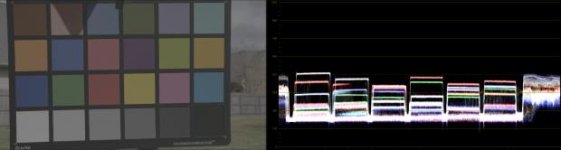
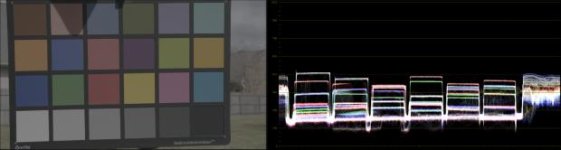
Can anybody post an example of the clipping, so I can see if I can tweak the LUT? I would need a locked off shot (preferably of something like a Chroma Du Monde, with grey-scale ramps) recorded as both RAW->ProRes and RAW->DNG. A DPX recorded from the camera's built in S-Log3 output would also be useful, and also an internal S-Log3 recording to cover all the bases.
 
Last edited:
Is there any solution that doesn't require resolve? I have a shoot next week and I'm expecting to burn through quite a lot of data with 240FPS Raw. I will need to hand off the data everyday to our DIT, and I don't think he's going to be happy if I have to step him through this.
 
Nick,
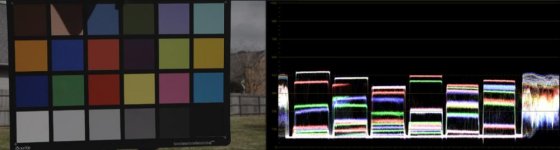
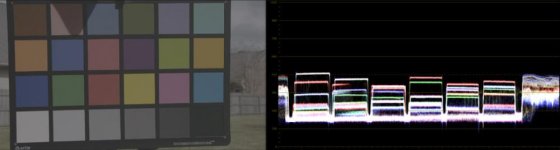
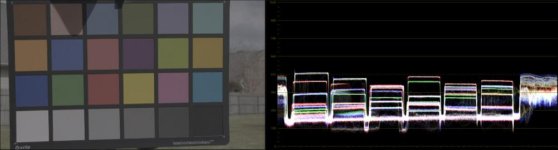
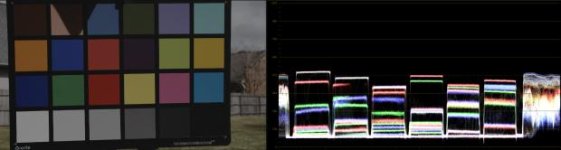
It's not exactly what you asked for, but while testing I shot these of an X-rite chart. I have an over-exposed, properly exposed, and underexposed image with both internal recording and ProRes. I've exported a single frame of each from resolve for you.

https://www.dropbox.com/s/dzlot70r5hspvkz/Stills.zip?dl=1

The problem can be seen best in the under exposed image:
ProRes
ProRes.jpg

ProRes+LUT
ProRes+LUT.jpg

Internal
Internal.jpg
 

Attachments

  • ProRes.jpg
    ProRes.jpg
    16.4 KB · Views: 0
  • ProRes+LUT.jpg
    ProRes+LUT.jpg
    14.1 KB · Views: 0
  • Internal.jpg
    Internal.jpg
    14.4 KB · Views: 0
Is there any solution that doesn't require resolve? I have a shoot next week and I'm expecting to burn through quite a lot of data with 240FPS Raw. I will need to hand off the data everyday to our DIT, and I don't think he's going to be happy if I have to step him through this.
You will require something to process the Raw data. Uncompressed raw files are not ideal for editorial, so I would always suggest transcoding to something "lighter". You don't have to use Resolve to do the transcode, but if you use something else, you would have to create your own procedures and LUTs. Your DIT ought to be comfortable with Resolve, or they shouldn't really call themselves a DIT. Even for somebody who doesn't have much Resolve experience, my guide gives a pretty easy to follow step-by step.

It's not exactly what you asked for, but while testing I shot these of an X-rite chart.
Thank you. That is very helpful.
 
I'm curious how you're getting 240 FPS when on page 115 of the manual, it indicates 180 FPS as the max frame rate for S&Q recording.
 
Convergent Design have now published my LUTs and workflow guide on their website:

https://convergent-design.com/odyssey7q-knowledge-base.html?kbartid=28


I'm wondering how to get your LUTs to work in the Shogun. I've edited out the 1D LUT stuff in the header, because Shogun choked on that as an invalid file, but then halfway through loading the modified LUT, it says the 3D size is too small. I assume this is an integer value from 2-256. So I opened up the LUT in an editor that could count lines, minus the comments/header, and found 40,0033 lines. So I took the cube root of that which is 24.20892121 and so on out to two dozen digit places and put in the decimal with four places after the dot. But it appears that the system only understands integers, and it said 34 was too small. 35 comes back with an error that it's too big. I think I'm close, but yet so far from successfully loading this LUT in the Shogun.

Here is my reference material for understanding the structure of the .cube file:

http://www.sidefx.com/docs/hdk14.0/_h_d_k__i_o__l_u_t.html

http://http.developer.nvidia.com/GPUGems2/gpugems2_chapter24.html

It's a bit complicated, but the spec is there, and Adobe has a PDF which I downloaded which comprehensively defines it. But I'm at a loss as to why there's no number that is the RIGHT size for this 3D LUT.
 
240fps is the max recording raw with the 7q


But the camera is limited to 180 FPS, according to the manual, so is he really getting 240 fps, or actually 180 fps?

And you have to have a $2,000 adapter on the FS7 to get that RAW output.
 
Why are you trying to put them on the Shogun?

they are 7Q (and this firmware revision) specific in terms of what they are addressing.
 
But the camera is limited to 180 FPS, according to the manual, so is he really getting 240 fps, or actually 180 fps?

And you have to have a $2,000 adapter on the FS7 to get that RAW output.

I am getting 240fps and I do own the unit. The camera isn't complete without the extension unit for my uses.
 
Why are you trying to put them on the Shogun?

they are 7Q (and this firmware revision) specific in terms of what they are addressing.

LUTs are a fairly new concept to me, but since I'm contemplating the purchase of a FS7, I'm looking for LUTs that will allow the S-LOG to appear close to graded result, but on the Shogun. I would think Sony would provide them, since they know what the S curve is like, but it seems that some folks are making them on their own. At this point, I'm experimenting with various downloaded LUTs for different cameras, but have none for the FS7 that work in the Shogun. I realize they may not provide a perfect match, given the differences between the gamma and gamut of the OLED monitor vs. the IPS panel, but was mentally challenged to try and see if I could hack the files to work in the Shogun. Curse me, I'm an engineer. :-)

So 240FPS is possible with the $2,000 extention unit. That's good info for future reference. Your demo is really getting my juices flowing. If Sony comes back with a good audio test result at my request, then I am going to buy this camera.
 
The LUTs Nick made available in this thread and on the CD site are specifically made to address issues with footage coming out of the raw output of the extension unit and going into the 7Q and 7Q+. Trying to use them for anything else could lead to all sorts of issues. .

The standard S-Log2 and 3 LUTs are availble from Sony or I believe from Alistair Chapman's website, along with a bunch of LUTs to convert Slog to lots of flavours of 'as graded' REC709 looks.
 
Extension Unit + Odyssey+ Unlock FS Raw can do 2K 240fps. Extension Unit + Shogun will do Raw when Atomos releases Raw (sometime mid-year based upon their roadmap). I would doubt that Shogun could do 240fps. Odyssey must raid both of its SSD's to sustain the data rate necessary for 240fps. SInce Shogun only has 1 drive, we don't know yet what speed it will sustain.

Ned Soltz
 
Back
Top