FS7: Urgent FS7 / 7Q slow raw problem - It's all gone a bit 80s Michael Mann

I'll have to check out those other sources for LUTs.. I could have sworn I downloaded Allistair's LUTs but they were for other cameras.


I'm aware that the Shogun is limited to 120 FPS. That's why I stated that the Oddyssey has that one advantage. The FS7 can probably do 180 FPS in S&Q mode on it's internal media, just like the XDCam does S&Q on internal media, so if I need anything faster than 120, just record internally.
 
I'm wondering how to get your LUTs to work in the Shogun. I've edited out the 1D LUT stuff in the header, because Shogun choked on that as an invalid file, but then halfway through loading the modified LUT, it says the 3D size is too small. I assume this is an integer value from 2-256. So I opened up the LUT in an editor that could count lines, minus the comments/header, and found 40,0033 lines. So I took the cube root of that which is 24.20892121 and so on out to two dozen digit places and put in the decimal with four places after the dot. But it appears that the system only understands integers, and it said 34 was too small. 35 comes back with an error that it's too big. I think I'm close, but yet so far from successfully loading this LUT in the Shogun.
As Ben has said, my LUTs are specifically created to transform a Resolve BMD Film decode of the DNG into S-Log3/S-Gamut3.Cine. As technical LUTs, designed for one specific purpose, they are of no use in any other situation.

As for your interest as an engineer in the structure of the LUT file, I can completely empathise with that! But your maths is wrong. The cube root of 40,0033 is 73.68265613441355. But in fact my LUT files are in two parts, a 4096 line 1D input LUT and then a 33^3 cube which is 35937 lines. 4096 + 35937 = 40033 (you have an extra zero in the middle).

So as an intellectual exercise, if you wanted to just take the cube part of my LUT, you would need to remove the 4096 lines of the 1D table, as well as the 1D header. But the LUT you would end up with would not be useful for anything. My transform is the concatenation of the 1D LUT and the 3D LUT. Without the 1D LUT, the 3D LUT is meaningless.
 
I dropped a '0' when I typed that number into the calculator--so THAT'S why it didn't work!

But thanks for explaining the uniqueness of the LUT you are using.

One day, I'll find the LUTs I need. I don't even have the camera yet (B&H says it's coming soon), but hopefully, if Sony's audio test results show that it's as good as my PMW-EX3, and as long as the HDMI can output 4K without the back adapter for RAW (B&H says it can't, but they could be wrong).
 
I cannot get Nick's LUTs downloaded for the life of me. The Zip from CD keeps turning into a .cpgz? what the heck is that? Any other source for the LUTs?
 
Nevermind, I got it! I ended up using a different program to open it. It didn't work in several others, though. Not sure why that is.
 
Nick's LUTs are for use with the Odyssey7Q & Odyssey7Q+. That's it.

FS7 can output 4K & UHD over HDMI. In that configuration, the Odyssey7Q+ can record 4K24p, and UHD24p, 25p, & 30p.

The internal recording on the FS7 has a max speed of 180fps in HD resolution. Using the XDCA back and recording RAW on the Odyssey7Q or Odyssey7Q+, the top frame rate is 240p in 2K RAW.
 
Nick's LUTs are for use with the Odyssey7Q & Odyssey7Q+. That's it.
Even more specific than that. The Raw LUTs are for material recorded on an Odyssey 7Q or 7Q+, decoded in Resolve. The LUTs are designed for Blackmagic Film input, and only Resolve will decode the DNGs to that format.
 
The FS7 without an external back can output both 4k DCI or UHD via HDMI. It's a little tricky to setup that output; you have to turn it on in a few different places in the menus, but it definitely works. Be aware, you can only shoot 24p at 4k (UHD will allow 24 and 30p) so no off-speed.

Also after doing a shoot this past weekend dual recording in XAVC-I 4k (internal) and ProRes 4k (Odyssey 7Q+ via HDMI), I was shocked at how good the internal footage looked. I was expecting a much larger delta in the quality.
 
The FS7 without an external back can output both 4k DCI or UHD via HDMI. It's a little tricky to setup that output; you have to turn it on in a few different places in the menus, but it definitely works. Be aware, you can only shoot 24p at 4k (UHD will allow 24 and 30p) so no off-speed.

Also after doing a shoot this past weekend dual recording in XAVC-I 4k (internal) and ProRes 4k (Odyssey 7Q+ via HDMI), I was shocked at how good the internal footage looked. I was expecting a much larger delta in the quality.


So B&H is in error when they told me:

"
I understand you want to know whether the HDMI output on the Sony PXW-FS7 sends 4K signal out so a Shogun recorder can capture it, without the XDCA.

Unfortunately there is no 4K out of the HDMI or HD-SDI on the Sony PXW-FS7. The 4K signal goes to the XDCA from a mulitpin connector that is attached. Thank you. "
 
So B&H is in error when they told me:

"
I understand you want to know whether the HDMI output on the Sony PXW-FS7 sends 4K signal out so a Shogun recorder can capture it, without the XDCA.

Unfortunately there is no 4K out of the HDMI or HD-SDI on the Sony PXW-FS7. The 4K signal goes to the XDCA from a mulitpin connector that is attached. Thank you. "
Yes, that is incorrect. I'm surprised it came from B&H as they are generally quite good at being accurate with such information.
 
Nick, spoke with our DIT on the shoot and he wanted to send his thanks to you for saving him the headache.
Curious to know if there is any solution in the works to address this? Thanks!
 
Nick, spoke with our DIT on the shoot and he wanted to send his thanks to you for saving him the headache.
Curious to know if there is any solution in the works to address this? Thanks!
Sorry, I don't understand the question. Address what? The magenta happening in the first place?
 
If the "addressing" it solution refers to the color shifts inherent in the signals coming out of the FS7, then be aware that the camera is due a firmware update very soon. You may find that the issue is mitigated somewhat, but you may also find that Nick's LUTs and workflow are the most appropriate solution.

Otherwise, I also don't really understand what it is your DIT is referring to. A signal comes out of the camera and we have now provided an appropriate workflow and settings for that signal. What else do you want?
 
Mitch,


I was under the impression that the LUT solution was a temporary stop-gap. Is this incorrect? While the LUT does bring the RAW footage back to correct color, it has some weird artifacts and doesn't create an image that is superior to the internal XAVC-I.


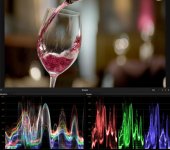
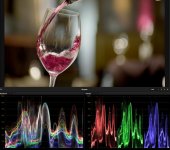
See the images below of something we shot recently in 2k RAW and XAVC-I. You can see a weird stepping in the waveform and parade of the RAW clip (specifically in the green channel).
RAW

RAW.jpg

XAVC-I
XAVC-I.jpg
 
Mitch,


I was under the impression that the LUT solution was a temporary stop-gap. Is this incorrect? While the LUT does bring the RAW footage back to correct color, it has some weird artifacts and doesn't create an image that is superior to the internal XAVC-I.

Same.
 
Gentlemen, What I can tell you is that the LUT correction was for color matrix issues that led to a magenta color cast. What you are seeing appears to be shadow banding issues in the 2K RAW data stream. We are looking into this to see if there is anything we are missing or that Sony is improperly sending to us, but this is a separate issue.

I can tell you that 2K RAW from an FS7 (or an FS700 for that matter) will ALWAYS be a compromise format for a variety of reasons. You will always have better, cleaner imaging from 4K RAW sampled in post down to 2K. Of course that tops you out at 60p, but there are numerous issues involved in the process of turning the 4K sensor into a 2K one while maintaining the field of view. As to why there is an apparently superior result in the camera's internal XAVC recording we will continue to analyze, but we do find that Sony adds various compression and other video tricks into the signal before recording it.
 
Back
Top