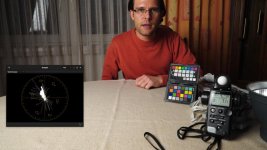
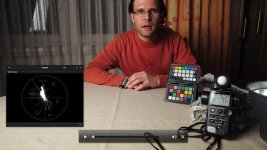
Trying to get natural skin tones from Sony A7s S-Log2 footage using PPCC 2015 Lumetri

Most of the other image people have posted have skintones that look way too red or orange to me. This looks a bit more realistic I think.

I'm sorry but those skin tones are straight up red. They don't fall anywhere near the skintone line on a vectorscope.

b0zFIwV.png


Perhaps what you didn't like about my grade was the saturation. Here's your exact grade with nothing but a qualifier on the skin, adding a slight amount of green to the gamma and a touch of red to the gain until the skin lined up on a vectorscope. This remedies a lot of what I'm noticing with S-Log 2 footage I've found (don't own an A7s myself) is that underexposed skin shifts magenta and overexposed skin shifts yellow. Saturation was reduced just slightly to compensate. No other changes have been made. By now, we've recompressed this image several times, so the quality is dropping a bit:

PqEVAw8.png


The image to me seems a little too saturated and orangy for my taste, but perhaps mine doesn't have enough saturation.
After re-evaluating, I can see that mine had a bit too much. The grade below has about 25% of the saturation dialed out.

Power windows will work but you shouldn't have to resort to them for a standard "look" just to get your skin tones back.
That amount of work would kill you on any project where time or money was not budgeted for.

It was more of a stylistic thing than a necessity. The grade below has no power window. No other changes besides the saturation as mentioned above.

N2WQvR0.jpg


And the accompanying vectorscope reading.
O1zOVJY.png
 
I'm sorry but those skin tones are straight up red. They don't fall anywhere near the skintone line on a vectorscope.

b0zFIwV.png


Perhaps what you didn't like about my grade was the saturation. Here's your exact grade with nothing but a qualifier on the skin, adding a slight amount of green to the gamma and a touch of red to the gain until the skin lined up on a vectorscope. This remedies a lot of what I'm noticing with S-Log 2 footage I've found (don't own an A7s myself) is that underexposed skin shifts magenta and overexposed skin shifts yellow. Saturation was reduced just slightly to compensate. No other changes have been made. By now, we've recompressed this image several times, so the quality is dropping a bit:

Not everyone has skin that matches markings on a vectorscope...

I will admit mine may need a few points more green. It may be my monitor but yours still looks strangely orange to me, a lot like some Canon DSLRs render skin in an oddly plastic-y orange. I may be responding more to what seems like an unrealistic looking tonal gradation or saturation, though.
 
The light in itself is probably most of the issue. Im not a huge fan of the AS7 for skin tones - don't get me wrong, I think it does a lot of things well outside its size and cost.

I took the original clip into Resolve and applied about 6 corrections in about 3 minutes. No power windows. Haven't tried to grade to any specific "look". I had to correct the initial exposure values first up.

FACE_1.1.1.jpg
 
Not everyone has skin that matches markings on a vectorscope....
Apparently they do..... Though I admit I found it very hard to believe when I first learnt about this - and still do.

I heard it first in a lecture when Larry Jordan came to London, and he illustrated the technique with (very convincing) examples.

He's got this - https://larryjordan.com/articles/color-correction-make-people-look-normal/ - online, and at the bottom of the page gives vectorscope and w/f examples for differing skin colours. What's remarkable to me is how consistent the colour phase is for differing skin colours - expect differences of only about 2 degrees or so over a wide range.

Yes, there will additionally be differences in overall level and saturation - which is why people look different!! - but for phase as shown on a vectorscope it's very little. I can't believe simply tweaking until a vectorscope display is correct is the full story, but it can certainly be a very good starting point to correct footage which has obviously been mis colour balanced.
 
The light in itself is probably most of the issue. Im not a huge fan of the AS7 for skin tones - don't get me wrong, I think it does a lot of things well outside its size and cost.

It has issues for sure.

100% the light created this in the first place though, there's just a bunch of wavelengths missing and this camera really does pick up on that. IMHO Remote phosphor is the only way to go these days.

But the colour work of the camera still needs to be tamed. I can get excellent skin in stills with some custom ICC profiles. But mimicking that across a range of scenarios in ProRes has been tough, and not fixed yet.

One area i am considering is that in Slog2 with the desaturated colours this may be part of the issue. You see if you dig into the YUV data, you can see a good 8 bit range in the luma but the UV channels are very very low because of this saturation. My feeling is that perhaps having very low UV channels in 8 bit is making the images 'thinner' than they should be. So when the YUV -> RGB conversion happens and the UVs are scaled and converted the source UV is basically banding.

I will be trying some tests out to see if this is partly the problem.

cheers
Paul
 
One area i am considering is that in Slog2 with the desaturated colours this may be part of the issue. You see if you dig into the YUV data, you can see a good 8 bit range in the luma but the UV channels are very very low because of this saturation. My feeling is that perhaps having very low UV channels in 8 bit is making the images 'thinner' than they should be. So when the YUV -> RGB conversion happens and the UVs are scaled and converted the source UV is basically banding.

Hi Paul,
I did a test on this myself since I found SL/S-Gamut to be really low saturated. If I shoot in S-Gamut now, I pump it up with Saturation +24. In Resolve I desaturate before linearizing S-Log, since the color space conversion afterwards increases the saturation to the proper levels. With this I have way less noise on my scopes (did trials of course).

BR
Michael
 
Hi Paul,
I did a test on this myself since I found SL/S-Gamut to be really low saturated. If I shoot in S-Gamut now, I pump it up with Saturation +24. In Resolve I desaturate before linearizing S-Log, since the color space conversion afterwards increases the saturation to the proper levels. With this I have way less noise on my scopes (did trials of course).

BR
Michael

It's balance because the point of the reduced saturation is to avoid clipping and it's very difficult to see colour clipping on the camera.

There's a chance that a normal cine would be a better approach, there's pretty much the same range in it. I find the A7s quite clipped in the highlights, even under Slog2, so the roll off of the cine might make more sense.

Also i'd have thought by saturating in camera you'd see more noise, especially in the shadows.

Good to know you've had success that way, do you have any comparisons you can share?

cheers
Paul
 
Hello everyone, just uploaded a new clip. I did several test shots on a mannequin head using my DSC Labs chip chart. None of these clips are color corrected though. First shot was in Picture Profile 0 mode, then PP4 and finally PP7, S-Log2 / Cinema color. Again lit with a single daylight balanced Ikan IFB 576. In all four shots, the lit part of the mannequin's face is overexposed by 2 stops (A7s displayed "MM 2.0"). Didn't think I should go beyond 2 stops.

Here's the link for anyone who might be interested in grading these shots, and thank you again for your feedback.

https://www.hightail.com/download/bXBZYlJmYWI5RlpMWE1UQw

PS: Interesting that in PP7/Slog2 (Cinema color mode), I'mseeing more magenta in the image. I didn't have any green gels handy that I could throw on the Ikan 576. In PP0 and PP4, the image seems better color balanced right out of the gate. It makes me now wonder whether I shouldn't perhaps stick to shooting talking heads with Picture Profile off. I understand that I'm giving up latitude doing so, but it might just be safer. I'm finding nailing skin tones in S-Log2 to be trickier than I initially imagined.
 
Last edited:
PS: Interesting that in PP7/S-Log2 mode, I'm seeing more magenta in the image. In PP0 and PP4, the image seems better color balanced right out of the gate. In makes me now wonder whether I shouldn't perhaps stick to shooting talking heads with Picture Profile off. I understand that I'm giving up latitude doing so, but it might just be safer.

Nicholas, again, try modifying the Color Mode in PP7 and set it to "Movie". Your life will be far easier...
 
Oops, I completely forgot to do that! Thanks for reminding me Michael. Will run another test shortly.

Actually I made a big mistake in my posting. The PP7 S-Log2 shots were actually done using "Cinema" color mode.

Michael, are you referring to "Movie" mode as in switching from S-Log2 to "Movie" as a Picture Profile, or just switching the color from S-Gamut to Movie?
 
Last edited:
Michael, are you referring to "Movie" mode as in switching from S-Log2 to "Movie" as a Picture Profile, or just switching the color from S-Gamut to Movie?

Just the color, you want to keep the lovely DR ;)

Cinema should already be much better, since it's in Rec709 space. The colors are a little "tweaked" though, thus the name. Movie is quite accurate on the other hand.
 
Good to know you've had success that way, do you have any comparisons you can share?

Here you go Paul!

Rather look at the noise on the curtain and on the vectorscope then my skin. I was coming from a sunny vacation, therefore I look a bit tanned :cheesy:
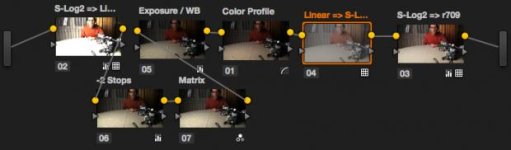
You can also see my node structure. I want to further explain how I do the color space conversion and color profiling with the color checker in a blog post, but this still has to be written :embarasse
FYI, I set saturation on the 1st node of the SG +24 footage to 30, which matches up the others perfectly as you can see.

This hopefully also ends the debate of color changes if you expose differently in S-Gamut...

If you want to look at the originals, here's a Dropbox link:
https://www.dropbox.com/sh/66rrzlqyqi0ip5u/AABGgKIB6pCyFmCMPh26tobma?dl=0

Nodes
00 SL-Chain.jpg

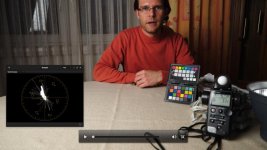
S-Log2 / Movie / +2 Stops (Camera rated as ISO800)
00 SL-Movie small.jpg

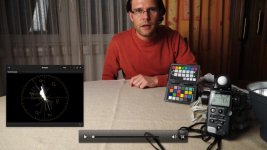
S-Log2 / S-Gamut / Saturation +24 / +2 Stops
01 SL-SG+24 small.jpg

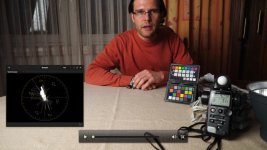
S-Log2 / S-Gamut / +2 Stops
02 SL-SG small.jpg

S-Log2 / S-Gamut / +1 Stop
03 SL-SG-1 small.jpg

S-Log2 / S-Gamut
04 SL-SG-2 small.jpg
 
Here you go Paul!

Rather look at the noise on the curtain and on the vectorscope then my skin. I was coming from a sunny vacation, therefore I look a bit tanned :cheesy:
You can also see my node structure. I want to further explain how I do the color space conversion and color profiling with the color checker in a blog post, but this still has to be written :embarasse
FYI, I set saturation on the 1st node of the SG +24 footage to 30, which matches up the others perfectly as you can see.

This hopefully also ends the debate of color changes if you expose differently in S-Gamut...

If you want to look at the originals, here's a Dropbox link:
https://www.dropbox.com/sh/66rrzlqyqi0ip5u/AABGgKIB6pCyFmCMPh26tobma?dl=

Michael,

Firstly thanks for taking the time to do this.

My first query would be in your first node, you're moving Slog2 to Linear, but how are you doing this? I ask because i've noticed the black point of this A7s slog to be lower, so in my workflow i've made allowance to scale the black to where it should be before assuming it is SLog2, otherwise you may clip into your shadows.

I'm looking at your +24 sat vs normal but the sharpness is quite different, different aperture? In which case was the base exposure the same for these?

Then you are matrixing, but from what to what? Resolves primaries are just sRGB correct? So are you matrixing from camera space to something in particular - i notice that you have a white balance operation after that and then a colour profile. So perhaps you're matrixing from camera space to XYZ, to white balance and then XYZ to another colorspace? That's tough because you can pull the camera matrix from RAW stills i don't know what process the movie output goes through. In theory you could go through pro photo and undo that to get back to camera primaries. Why? Well your skin (tanned though it may be) still looks like A7s movie skin and not A7s stills skin. That's the huge issue here.

I don't feel resolve is going to allow you to do this properly, not least that resolve dithers everything very subtly which makes observation and empirical testing really tough

It's difficult to tell with a graded final image, i would like to see this without the Rec709 at the end. I assume this is a crop of a 1:1? And to see in png or something uncompressed would be really useful.

Would it be possible to see the source movies (PM me if you want a dropbox to pop them in)?

I don't think there's any way in Resolve to get the raw YUV data out of the movie. There's usually a little bit more range available if you convert from YUV to RGB yourself.

cheers
Paul
 
Hi Paul,

you're welcome!
I had this lying around from my personal tests, so no worries ;)

My first query would be in your first node, you're moving Slog2 to Linear, but how are you doing this? I ask because i've noticed the black point of this A7s slog to be lower, so in my workflow i've made allowance to scale the black to where it should be before assuming it is SLog2, otherwise you may clip into your shadows.
I know what you mean but I didn't have this issue in Resolve. Here you can see how I do it exactly:
http://www.michaelfischer.at/blog/85-resolve-workflow

I'm looking at your +24 sat vs normal but the sharpness is quite different, different aperture? In which case was the base exposure the same for these?
Good catch! I used the AF for that and it was pumping unfortunately, therefore the focus point might not be the same on every shot :(

Then you are matrixing, but from what to what? Resolves primaries are just sRGB correct? So are you matrixing from camera space to something in particular - i notice that you have a white balance operation after that and then a colour profile. So perhaps you're matrixing from camera space to XYZ, to white balance and then XYZ to another colorspace? That's tough because you can pull the camera matrix from RAW stills i don't know what process the movie output goes through. In theory you could go through pro photo and undo that to get back to camera primaries. Why? Well your skin (tanned though it may be) still looks like A7s movie skin and not A7s stills skin. That's the huge issue here.
I'm matrixing from S-Gamut to sRGB/r709. I'm not doing XYZ or anything. The color profile is just to line up the colors on the color checker to their hue and sat. targets. You can grab a reference picture of the color checker with the intended values, convert it from sRGB to r709 and then overlay it as a still frame. Then you have references on the vectorscope where you can easily align the colors. I plan to do an article about that as well.

Still/RAW quality skin tones would be great but for that we would need a RED/Alexa/FS7+ IMHO. Let's not stretch 8 bit log too far :)
I shot a short film on saturday and had the occurrence of the "skin goes plastic" issue. Too flat of a lighting (bathroom mirror) combined with not enough gradation in the gamma (S-Log2) makes it hard even for a good codec (50 Mbit H264) to keep details. I have an example of the same shot with STD, where the issue doesn't occur. I wonder if 8 bit 4k downscaled to 10 bit HD would have helped...

Would it be possible to see the source movies (PM me if you want a dropbox to pop them in)?
I'll have a look when I'm at home. DPX or PNGs should be fine as well right?

BR
Michael
 
Last edited:
Hi Michael

I know what you mean but I didn't have this issue in Resolve. Here you can see how I do it exactly:
http://www.michaelfischer.at/blog/85-resolve-workflow

On your blog you start with a LUT that goes from Slog2 -> Linear. My observation is that if that is a 'standard' Slog2 to Linear LUT then it will be assuming the black point is at a certain point. The A7s black point (especially out of the HDMI and perhaps that's the difference) is lower. Therefore if you put the darker SLog2 footage through that LUT then the shadows will be clipped and you'll loose a bit of range. It's also important to understand whether your apps are clipping highlights too, i think resolve keeps them but you need to gain down to see them and in your node network i guess that may be missing. I'm sure you've checked though.

It is difficult to tell though - for example ProRes was always designed around video levels, yet various sources stuff full range in there. Well if an app is technically following Apples guidelines and assuming legal range then it could clip something that is done 'incorrectly'. The HDMI out of the A7s is full range and most recorders will just write that into the ProRes. So immediately that pipeline is non standard...

I've found that practise differs from app to app and platform to platform.

I'm matrixing from S-Gamut to sRGB/r709. I'm not doing XYZ or anything. The color profile is just to line up the colors on the color checker to their hue and sat. targets. You can grab a reference picture of the color checker with the intended values, convert it from sRGB to r709 and then overlay it as a still frame. Then you have references on the vectorscope where you can easily align the colors. I plan to do an article about that as well.

Again i feel that the SGamut out of this camera is non standard. In your network though you're compensating for that with aligning those colours. But i don't know what kind of colour shift Resolve is actually doing. If you look at alonso's A7s review (i think i linked it) he shows a very obvious issue with non standard colours. So whilst you're compensating for those colour chips, what about all those colours between? How do they move? Also you're compounding colour corrections, so you have to assume your initial SGamut->RGB is correct too for this camera. Why not shoot with another colour profile and avoid that step - i wonder if that would be better?

Still/RAW quality skin tones would be great but for that we would need a RED/Alexa/FS7+ IMHO. Let's not stretch 8 bit log too far :)
I shot a short film on saturday and had the occurrence of the "skin goes plastic" issue. Too flat of a lighting (bathroom mirror) combined with not enough gradation in the gamma (S-Log2) makes it hard even for a good codec (50 Mbit H264) to keep details. I have an example of the same shot with STD, where the issue doesn't occur. I wonder if 8 bit 4k downscaled to 10 bit HD would have helped...

My point is that if i take a RAW still via Lightroom i can get lovely Skin. Why can't i get the same skin via Movie. It's the same sensor!! The same source colours. I don't think it's just a case of 8 bit (and we're talking 8 bit YUV, not RGB, when you matrix YUV->RGB in a higher colorspace you won't get banding).

I have achieved great skin on occasion, proper light source for example. But even outdoors i've had odd colour artefacts and i can't understand where they are coming from. I see them in your example too.

I'll drop you a mail about those files

cheers
Paul
 
Back
Top