Trying to get natural skin tones from Sony A7s S-Log2 footage using PPCC 2015 Lumetri

Hello everyone,

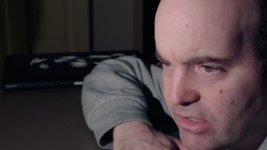
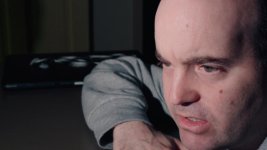
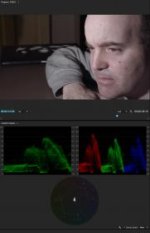
I thought I would post a few pics of my attempts to try to get natural skin tones out of the Sony A7s using the new Lumetri Color Panel in Premiere Pro CC 2015. Some of you who might have read my previous posts probably know that this remains an ongoing struggle for me.
I've been experimenting with different LUTs but to this day I'm still not able to get natural looking skin tones. I downloaded the Impulz and Osiris LUTs, but I'm still struggling. Surprisingly though, in the Premiere Pro CC 2015 Lumetri color panel, I seem to be getting better results using the Arri Alexa SL Profile than when I select Sony S-Log 2 which was what I shot my footage in.

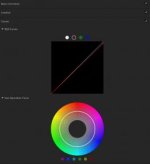
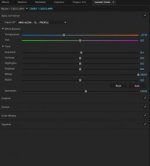
In this clip, the ungraded footage was shot in Picture Profile 7 S-Log2 with S-Gamut color. After applying the Arri Alexa SL LUT, my face still appears to skew too much towards magenta, so I dialed that down by shifting the color temperature towards blue and bumped up the saturation slightly. I also reduced the red color curve a little in the Curves panel.

My ongoing issue with A7s skin tones in S-Log2 is that in my shooting tests they always exhibit a yellowish jaundiced like appearance. I haven't yet found the most effective method to get natural looking skin tones with S-Log2 which I chose to shoot with for it's increased latitude.
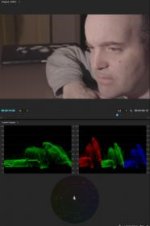
Screen Shot 2015-07-20 at 8.34.57 AM.jpgScreen Shot 2015-07-20 at 8.35.08 AM.jpgScreen Shot 2015-07-20 at 8.35.23 AM.jpgScreen Shot 2015-07-20 at 8.35.43 AM.jpg
 
Last edited:
Try Davinci Resolve - I've given up getting any kind of natural looking colours out of PP and Speedgrade with the A7s
 
Ha ha ha very funny, but let's be constructive here. How might I be able to grade this better? Do you know of a better LUT for A7s skin tones, than the one I used?

Thank you all in advance.
 
Hi Nicholas,

the issue with S-Log2 and S-Gamut is, that you have to do a color space conversion to Rec.709 if you want to grade it like this. Even after that, the colors are a bit off compared to the other color modes.

The fastest way to to the color space conversion is to generate a LUT via LUTCalc. Just set it to S-Log2/S-Gamut => S-Log2/Rec709 without any customizations. You might need to experiment with the LUT formats, as I don't know what Premiere CC accepts.
Another way would be to switch from S-Gamut to Movie or Pro. I'd like to stick with Movie, as it matches with "PP off".

BR
Michael
 
Sgamut is so large that bringing it back into rec709 can yield colour shifts. This doesn't help this thread but Sony has made it easier with Sgamut3.cine but that isn't available on the A7s.
 
I downloaded the clip and was able to get a very natural skin look in Resolve with a few quick adjustments. Your clip has a very strong warm WB and it helps to do a custom WB with these cameras before each scene. The function doesn't work in Slog so I assign a Custom Button to picture profiles and do the custom WB in PP6 and switch back to PP7 to start shooting. Also the vectorscope is a good tool for getting skin balanced right. Resolve really has opened my eyes to what is possible with this camera and how all grading software is not equal.
 
There is some serious magenta in the clip from what I see when I open it up and I can see why no LUT on this planet is going to really address the issue, the base is completely off to begin with. Could this be your specific A7s causing it or perhaps the lens you are using? Or maybe one of those cheap variable ND filters? What kind of lights did you use?

I'm a Davinci Resolve user but have just been playing around with Colorista III and by shifting the HUE setting able to pull out a lot of the underlying magenta.

Is this more like something you are after?

This is with no LUTs, no secondaries:

Screen%20Shot%202015-07-20%20at%207.32.26%20PM_zpsk4if9qvn.jpg


Screen%20Shot%202015-07-22%20at%206.08.02%20PM_zpsbgbvhgpn.png
 
Last edited:
I think Dennis has done a good job with the image here, making the skin tones feel natural, and also giving the entire image a filmic feel. and he's right. There is an abundance of magenta... which makes me assume WB wasn't spot on when shot, buts OK, i think it's pretty easy to fix that in post with this codec (but not ideal obviously).
here is one where i dropped my lut on top and just did a basic color corrector in premiere. it's hard to tell how pink or not his skin really is without seeing him, so i just dropped the lut on, white dropped something in the background that seemed like a highlight, and here it is:

skin_test_01.jpg
i think the skin tones feel natural, though i doubt you'd call this a final image (highlights are a little flat, and you might not want his skin that pink). i'm not sure what 'look' you're going for so i didn't stylize it, but i think quickly natural skin shows itself with a proper WB and a LUT designed for slog2.

here it is where i just added a bit of film stock on top to the image i just poted:
skin_test_02.jpg
 
Did this in about 45 seconds in Premiere 2015. I know my laptop veer's magenta compared to the edit system and I'm not sure what "corrections" to make it close to my screen when viewed in DVXuser, but here's the grab.
In Windows Photo Viewer the image has less saturation, and the "exposure" or gamma and gain are definitely brighter over Premiere, ie: Photo Viewer "on top" of Premiere, same screen same time, so...
If interested this is what I did:
Lumetri color:
basic correction:
temperature +19.3
tint +1.5
exposure -.1
contrast 71.5
highlights -9.8
shadows 0
whites 0
blacks -31.5
saturation 181.0

In the waveform the red channel was shifted, ie: the floor was +10 EI and the green and blue channel levels were down. I lowered the floor on the red channel, and I probably should have lowered the peak on the red channel too, but as mentioned, this is a 45 second grade. I then raised the peak on the green channel til I saw some yellow in the skin, and adjusted the blue channel til it looked sorta normal-ish. Looking at the waveform I should have raised the floor on the blue channel too.

BTW Resolve does give me a lot more control of the image, and of course the mattes, tracking etc are great and easy to use. But the Color panel in Premiere is basically the top page of Adobe Camera Raw, except now it does all sorts of formats easily. I find it extremely fast to work with, as I'm not a trained colorist and so so in Resolve. so this is a fast "dailies" 1 light type of grade.
 

Attachments

  • A7s-sampleCC3.jpg
    A7s-sampleCC3.jpg
    38.5 KB · Views: 0
This looks more natural on my laptop with the slight "magenta shift" built in.
Forgot to mention- after "basic correction" I do a quick pass in "curves". That's when I adjust the floor and ceiling in the RBG channels.
 
Hm, in that last one I do like the skin color itself but I think you have too much of the entire image going to orange. i.e. the highlights in the background are orange, the white parts of his eye, his teeth (okay maybe he's a smoker), etc..

My monitors are calibrated since I get a fair amount of colouring work, but I agree with what was said earlier that slog2/sgamut is pretty hard to grade. It's why for myself I've switched over to slog3/sgamut.cine on the other Sony cams.
 
Last edited:
Thanks so much everybody for all your help. I'll admit that I'm no expert when it comes to color correcting or grading and I'm sure that some of my initial settings may have been off. But here'e what I started with:

Starcentral: I used the Sony 24-70mm f/4 lens. ISO was 3200, and I believe the A7s was white balanced to 5600K. I was using a single light, the Ikan IFB 576 also color balanced to 5600K. I forget now why the initial image was so magenta looking, because usually I end up with skintones that look too yellowish-greenish. In the color temperature matrix menu, I just might have shifted the A7s color map towards blue-magenta prior to recording to offset the jaundiced skin tone look issue.

Shirozina, I have too agree that color correcting A7s footage seems to be a lot easier in Resolve than in PP's Lumetri Color Panel. I was able to get very natural looking skin tones from S-Log2 footage in no time at all in Resolve. I just need to find out why all my thumbnail clips in the media pool keep going black. The media hasn't moved, but after barely a few minutes, Resolve seems to no longer know where my media is. Will be calling BMD tomorrow about this issue.

Caseywilson and klk thank you both also very much for your efforts with this clip. It's actually me in the clip and I think the whole thing started off way too much skewed towards magenta as you correctly point out. I think again it might have had to do with the setting I made in the color temperature matrix menu.
 
I have the Ikan 1024 LED and it has a magenta colour cast I have to gel for. I would wager that the LED is adding magenta to your image.
 
Hm, in that last one I do like the skin color itself but I think you have too much of the entire image going to orange. i.e. the highlights in the background are orange, the white parts of his eye, his teeth (okay maybe he's a smoker), etc..

The skin is a little too orange/brown to me, but as mentioned this was a quick, under 1 minute grade of a shot. In Resolve it's much easier to isolate/ mask/track the face/skintone and neutralize the background- but that's extra time someone has to pay for. For quick turnaround and clients without the budget for a proper grade I'm finding PP2015 to be quite useful. (because I"m kinda slow working in Resolve)

The problem here is the LED light used- they are not full spectrum nor high CRI and they require extra work in the grade.

Good to know about slog3- I have little experience with current Sony cameras.
 
One thing I've found is that the built in SLOG2 input LUT in premiere/lumetri is no good. I get much better results using the Sony Slog2-Sgamut to Slog2-709 LUT which converts SGamut to 709 without changing the gamma. Use that as your input LUT and suddenly all the built in looks in Lumetri look way better, in some ways even better than Impulz etc.

Edit: Oh yeah here's a link to the LUTs: http://community.sony.com/t5/F5-F55/NEW-3D-LUT-s-for-F55-and-F65/td-p/135617 (it's LUT #3 in that zip)
 
I have the Ikan 1024 LED and it has a magenta colour cast I have to gel for. I would wager that the LED is adding magenta to your image.

It's why I still shy away from using LED's for any type of productions. It can be "okay" if its your only light source but if mixing lights I avoid them like the plague.


Good to know about slog3- I have little experience with current Sony cameras.

Long story, but it's not really gamma itself (ie. slog1, slog2, slog3) that is the issue, it's the actual color science (gamuts) that Sony has across their line of cameras. They are s-gamut, s-gamut3, and s-gamut3.cine. S-gamut in my opinion is the most difficult to grade and can easily end up looking bad color-wise. The newer s-gamut3.cine is ideal and quite easy to grade using only curves if you wanted to. A real dream to work with, especially if you want easy-grading without pulling your hair out.

Sony F3, A7s, probably the previous EX generation only has s-gamut.
FS7, F5, F55 additionally adds s-gamut3.cine, s-gamut3.

If you shoot RAW on the FS7, F5, F55 then you can just pick your color science in post, so that's the good news.


One thing I've found is that the built in SLOG2 input LUT in premiere/lumetri is no good. I get much better results using the Sony Slog2-Sgamut to Slog2-709 LUT which converts SGamut to 709 without changing the gamma. Use that as your input LUT and suddenly all the built in looks in Lumetri look way better, in some ways even better than Impulz etc.

Edit: Oh yeah here's a link to the LUTs: http://community.sony.com/t5/F5-F55/NEW-3D-LUT-s-for-F55-and-F65/td-p/135617 (it's LUT #3 in that zip)

For footage that I have shot in slog2/sgamut I found this 3D LUT, originally a beta 3D LUT by Sony for the F65, to work really well. In fact, to this day I still sometimes use it as a base before I start grading.

F65 slog2/sgamut beta 3D LUT by Sony:

http://www.starcentral.ca/forums/LUTs/slog2sg_to_rec709_v01 dat and cube files.zip
 
Last edited:
Back
Top