Nicholas Natteau
Veteran
Hello everyone,
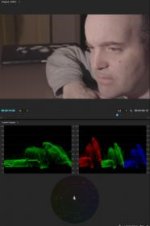
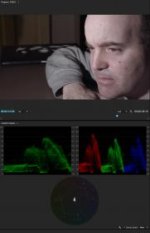
I thought I would post a few pics of my attempts to try to get natural skin tones out of the Sony A7s using the new Lumetri Color Panel in Premiere Pro CC 2015. Some of you who might have read my previous posts probably know that this remains an ongoing struggle for me.
I've been experimenting with different LUTs but to this day I'm still not able to get natural looking skin tones. I downloaded the Impulz and Osiris LUTs, but I'm still struggling. Surprisingly though, in the Premiere Pro CC 2015 Lumetri color panel, I seem to be getting better results using the Arri Alexa SL Profile than when I select Sony S-Log 2 which was what I shot my footage in.
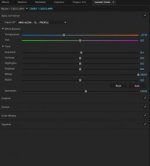
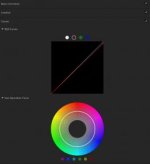
In this clip, the ungraded footage was shot in Picture Profile 7 S-Log2 with S-Gamut color. After applying the Arri Alexa SL LUT, my face still appears to skew too much towards magenta, so I dialed that down by shifting the color temperature towards blue and bumped up the saturation slightly. I also reduced the red color curve a little in the Curves panel.
My ongoing issue with A7s skin tones in S-Log2 is that in my shooting tests they always exhibit a yellowish jaundiced like appearance. I haven't yet found the most effective method to get natural looking skin tones with S-Log2 which I chose to shoot with for it's increased latitude.
I thought I would post a few pics of my attempts to try to get natural skin tones out of the Sony A7s using the new Lumetri Color Panel in Premiere Pro CC 2015. Some of you who might have read my previous posts probably know that this remains an ongoing struggle for me.
I've been experimenting with different LUTs but to this day I'm still not able to get natural looking skin tones. I downloaded the Impulz and Osiris LUTs, but I'm still struggling. Surprisingly though, in the Premiere Pro CC 2015 Lumetri color panel, I seem to be getting better results using the Arri Alexa SL Profile than when I select Sony S-Log 2 which was what I shot my footage in.
In this clip, the ungraded footage was shot in Picture Profile 7 S-Log2 with S-Gamut color. After applying the Arri Alexa SL LUT, my face still appears to skew too much towards magenta, so I dialed that down by shifting the color temperature towards blue and bumped up the saturation slightly. I also reduced the red color curve a little in the Curves panel.
My ongoing issue with A7s skin tones in S-Log2 is that in my shooting tests they always exhibit a yellowish jaundiced like appearance. I haven't yet found the most effective method to get natural looking skin tones with S-Log2 which I chose to shoot with for it's increased latitude.
Last edited: