GH3 Thread for Quick GH3 Questions/Responses

Ian, fwiw:
There is an [AF+MF]* setting in the custom menu.
The Auto ISO* max is chosen w/the front dial (other ISO's are set w/rear dial, or maybe vice-versa...).
[Dial Set]* allows swapping the functions for SS and aperture.

*(Note- in combination with what other modes/settings any of these will or Won't operate with, I can't say without camera in my hand, and sometimes even then... A big "trial & error" post for all this kind of stuff should be made; the manual often does not tell all.)


I currently have the camera set to "Movie M" mode. Has anyone else noticed that the ISO does not have an "Auto" selection available under this setting? For Run-N-Gun style shooting, it is nearly impossible to manually handle SS, Aperture, ISO, and Focus. I'm going to need to sacrifice one. I need help setting my camera to what I really need/want. Can someone please help me with the menu setting I need for the following:
1) I would like the ability to have the camera "auto" focus but still have the ability to manually overide. In the AFF/AFS/ACC settings, nothing changes when I turn the focus dial on the lens, even with the shutter pressed halfway.
2) I would like the abilty to manually control SS and Aperature, but have Auto ISO set with a maximum of 6400. I am working with the "Scenery" Picture Mode for Video to reduce noise since I shoot in a lot of low-light conditions.
Thanks!
 
Need help.
Is there an easy way to adjust the audio level while recording a shot?
I was recording last night and durng a speech, I wanted to boost my levels, but couldn't figure out how to do so without stopping the camera.
Is there a way to assign this to a custom button?
 
Is there an easy way to adjust the audio level while recording a shot?

...I normally do this in post, but the easiest to do this while you are shooting is to use an external mixer or a pre-amp like the JuicedLink Riggy RM222.

The GH3 audio level control is really an AGC-boost control, and does not produce great audio at the higher settings.
 
So I guess the answer is that you can't adjust audio levels while recording? I would like this ability during long speeches and other continuous shots where the audio varies within the same take. What if it starts clipping for example?
 
So I guess the answer is that you can't adjust audio levels while recording? I would like this ability during long speeches and other continuous shots where the audio varies within the same take. What if it starts clipping for example?

You can do it through the touch screen controls while recording.
 
So I guess the answer is that you can't adjust audio levels while recording? I would like this ability during long speeches and other continuous shots where the audio varies within the same take. What if it starts clipping for example?

This response is going to be a little more aggressive than my prior responses because I think it might help you to hear this.

The questions you are asking create a little bit of a negative impression about who you. When you ask questions which are quickly answerable by looking in the manual, it leaves an sense that you might be a bit lazy. I'm not saying you ARE lazy, just that you give leave that kind of impression. At first maybe that wasn't the case so much, but the more questions you ask that are answered in the manual, the more firm the impression becomes.

Thanks! I've read the manual cover to cover a few times, but it is easy to miss things when you are new to a camera and/or format!

I do understand that you're new to DSLR video, but don't use this as an excuse for asking questions that you can answer yourself. Instead, use it as the reason why you should be constantly going back to the manual as the first place to find answers when you don't understand how to do something with the camera.

I suggest you at least download the PDFs and use the search feature before posting a question.


  • You posted about (in a new thread) about not seeing video on you iPad after you hit record. In the manual on page 59.


  • A question answered by dan.carter, telling you the answer was in the manual on page 151.


  • The question I answered about exiting a menu without touching the screen, in in the manual on page 11.


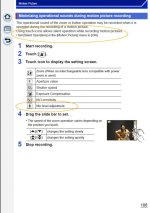
  • Audio levels while recording? Again, in the manual on page 186:

manual2.jpg


Anyway, good luck with the camera.

Cheers!

Edit:

Basic Manual:
service.us.panasonic.com/OPERMANPDF/DMCGH3.PDF

Advanced Manual:
service.us.panasonic.com/OPERMANPDF/DMCGH3_ADV.PDF
 
Last edited:
Thanks Keylight. I do have the PDF on my iPad, but I guess I am not that great at searching/finding what a need even though I always try there first. Manuals are a dime a dozen, but helpful experts like you are rare. I created this thread specifically for 'quickly answerable' questions, so if I am giving you an impression of being lazy, please ignore my posts. I do appreciate your help, however.
 
The questions you are asking create a little bit of a negative impression about who you. When you ask questions which are quickly answerable by looking in the manual, it leaves an sense that you might be a bit lazy. I'm not saying you ARE lazy, just that you give leave that kind of impression. At first maybe that wasn't the case so much, but the more questions you ask that are answered in the manual, the more firm the impression becomes.

Keylight: Please don't take what I say here as an attempt to be "argumentive", but perhaps offer some insight into inquiries like this.

In the 1970's when General Burns (the at the time new USAFSS commanding general) visited our unit in the far east he said this to the NCO's:

"We have a whole generation of people who have difficulty reading and understanding technical manuals, but if you will answer their questions and work with them they will amaze you at how well they will be able to do their jobs".

Some can easily read and understand what they need from tech manuals, others flat cannot.

I fall somewhere in the middle and mostly work things out by attempted intuition with the gear in hand.

My suggestion is to let folks who are not finding answers in the manual ask their questions, for the most part they do not seem lazy to me because I spent over half of my 20 years military service training and supervising personnel, many of whom needed things defined and explained in different terms from those in the "manuals".

So I'm willing to advise if I think I know an answer, otherwise I sit on the side and wait for someone else to provide the info. I often learn from that myself.
 
Keylight: Please don't take what I say here as an attempt to be "argumentive", but perhaps offer some insight into inquiries like this.

Very interesting and I think you raise a valid point that different people learn in different ways. I almost never read the manual when I get a new piece of gear. I retain so much more when I learn about capabilities through discovery, although I do eventually read the manual to pick up on the little things I've missed and reinforce things I've learned.

Where we differ I think is that the issue is less about reading a manual cover to cover (which the OP has done several times). It's about searching. Thanks to pdfs, searching is easy. To illustrate the point, take the OP's post yesterday:

Last night, I had a shoot using 2 GH3s. I had an unmanned camera near the front and I used my Ipad to view the screen from the back camera I was operating.
Curious if anyone else has had this issue:
While waiting for the event to start, I guess the front camera went to sleep. The screen went dark on my Ipad. When I tapped the screen, the camera woke up and I was able to hit record. The problem was that the image stuck to one frame. I didn't see any motion or movement in the image. I verified the camera was still recording, but I wasn't able to actually see the "live" feed.
I guess the moral is to not let the camera go to sleep!

First I'd like to note that the OP was at an event and tried to use a new feature on a new camera without first testing to make sure it worked (and it worked as expected). A lot of people make this kind of mistake at some point. I know I did until I learned to spend time testing, planing and preparing in advance of actually needing.

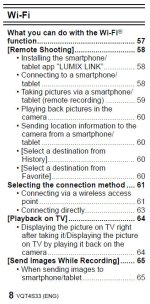
But the issue here is about search. After having found that a feature didn't work the way I anticipated, my first thought would be to search the pdf manual, trying "tablet" or "Lumix Link" (the name of the App). They both appear in the table of contents:

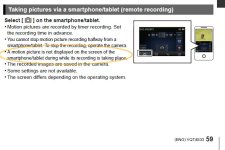
searching.jpg Then looking on Page 59: searching2.jpg

A motion picture is not displayed on the screen of the smartphone/tablet during while its recording is taking place.

It isn't the most grammatically correct sentence in the world, but I think it's easy enough to understand. And it took just a few seconds to find.

I recall reading a thread in the forums specifically about the Lumix Link app a while back so I did a search. I was surprised to see who the author was:

Now that the GH3 is shipping, any idea when the associated App will launch? I haven't seen it on the App Store.

The 2nd reply:

Not surprisingly it appears live monitoring of video is not possible over WiFi.

And the 3rd:

Maybe not surprising, but a huge disappointment nonetheless. There goes a nice director's ipad/monitor. This devalues the point of the whole Wi-Fi connectivity by about 95%... it just becomes a gimmick now. I held out hope that somehow Pana could pull out a miracle here with a firmware update, but it looks like the whole GH3 Wi-Fi feature was a stepchild in this camera. Oh well, maybe by GH5 they can get it right. Pity - major missed opportunity.

Finally, one thing I'm not clear about is how the recording for the OP actually turned out, because the Lumix Link App's default for the record timer is 3 minutes. And here the manual fails those who do a search because it's silent on the timer and how to change it. So if after hunting around in the app I wasn't able to discover it for myself, I would probably have posted a question here!

In summary.... Try --> Search --> Ask

Thoughts?
 
Key light, the recording continued the entire duration of the shoot...nearly 1.5 hours. I didn't change any default settings, so perhaps the record timer feature of 3 min is no longer the default? Like you, I'll be curious to find out the answer.
 
Key light, the recording continued the entire duration of the shoot...nearly 1.5 hours. I didn't change any default settings, so perhaps the record timer feature of 3 min is no longer the default? Like you, I'll be curious to find out the answer.

That's good to hear! Hmmmm.... Maybe the default is different for the Ipad and android apps.
 
I agree with Keylight and Ianscreations. I believe before posting a question, we should all FIRST consult the manual, then search the forums, and most of all experiment with the camera. And because I do not believe Ianscreations is doing these things, I ignore his posts.

It is such a shame, because the manual (PDF) is full of powerful, portable information which can be searched in seconds.
 
The manual fails to provide the detail or follow up that can be found on this board. For example, I later realized that the touch audio function is not available in all recording modes, which is why I couldn't find the option and posted here. It is available under Movie 'M' mode, but not others. The manual doesn't specify this, so I posted for help as I was shooting in 'S' mode at the time. I can only assure you that I search for my answers before posting, but if there are those that want to spend more time trying to discredit that or ignore my posts, so be it. There are far more helpful people that respond. If we are to ignore all duplicate posts or questions that are answered (even ever so remotely) in a manual, then we will rarely have any discussion or interaction. I don't know why people with such similar tastes and talents have to spend time and effort trying to tear down one another. Replies like yours are not supportive. And as much as you would like to think, they show you are not ignoring me or my posts.
 
I'm using FCP7 & once I drag the footage into a project, I'm having to render each clip once I lay it down on the timeline. I'm shooting w/ IBP 50mbps .MOV codec. Does anyone have a workaround to this as I never experienced this w/ GH1 & GH2. Also, when I shoot 60P I try & convert to 24P timeline in Cinema Tools & the option to do so is grayed out (won't let me) so I'm shooting w/ the in-camera slow-mo at 40% 24P. My FCP7 project settings are 1920 x 1080 Pro Res 422 (24P). Any thoughts, is this happening to others? Thanks!
 
Last edited:
I'm using FCP7 & once I drag the footage into a project, I'm having to render each clip once I lay it down on the timeline. I'm shooting w/ IBP 50mbps .MOV codec. Does anyone have a workaround to this as I never experienced this w/ GH1 & GH2. Also, when I shoot 60P I try & convert to 24P timeline in Cinema Tools & the option to do so is grayed out (won't let me) so I'm shooting w/ the in-camera slow-mo at 40% 24P. My FCP7 project settings are 1920 x 1080 Pro Res 422 (24P). Any thoughts, is this happening to others? Thanks!

Assume that with your GH1/2 you used Log & Transfer? If so, that transcodes to ProRes, which is FCP7-friendly. You'll need to also transcode your GH3 .mov files (H.264) to ProRes for best results. You can do so in QT Pro or Compressor. Not sure about the Cinema Tools question, haven't tried that yet.
 
The manual fails to provide the detail or follow up that can be found on this board.

Agreed. The manual isn't as comprehensive or clear as it could be for some things. However, even with the example you selected, the info is in the manual. But yes, it could be clearer. I do think it's a little disingenuous to pick this one example but ignore many of your other questions where the answers were quite clear and unambigously stated in the manual. That you didn't ask followups most times after being pointed to a page in the manual shows that the manual had clear answers most of the time. That's part of what helped create the impression that you weren't searching the manual.

But enough said about that.

I would like to go back to your post on the audio, because I've just realized that you're probably not understanding something pretty fundamental to shooting video on a dSLR (or at least this dSLR, or dSLM as Panasonic likes to call it).

For example, I later realized that the touch audio function is not available in all recording modes, which is why I couldn't find the option and posted here. It is available under Movie 'M' mode, but not others. The manual doesn't specify this, so I posted for help as I was shooting in 'S' mode at the time.

First, I'd just like to clarify that you didn't mention anything about being is S mode in your original post. Not knowing that (and knowing that now) makes a big difference. Here's why:

By S mode I assume you mean setting the top "Mode Dial" to S (Shutter Priority). When you select P, A, S, or M on the Mode Dial, it has no effect on recording video. The only things you can adjust is the focus mode. See pages 180-181. The chart on the bottom of 181 shows the recording mode for those 4 settings on the Mode Dial. If you want to adjust the Shutter or Aperture settings, you need to set the Mode Dial to the Creative Video Mode (the setting between M and C1) and then go into the Motion Picture Menu and set the Exposure mode to P, A, S, or M. In fact, it's would be a good exercise for you to compare the settings that are available in the Motion Picture Menu when the Mode Dial is set to Creative Video Mode vs the the Mode Dial being set to P, A, S, or M.

In a nutshell:

  • Creative Video Mode is the GH3's "Video Mode"
  • P, A, S, M (and all the other Modes) are the GH3's "Photo Modes" with an ability to quickly shoot "auto everything" video by using the red record button. (Do note the strange hidden exceptions in the chart on the bottom of Page 181. Still scratching my head on that decision.)

I personally wish Panasonic just skipped that red record button on the back of the camera. But they put it there so consumers (as opposed to pro-sumers or professionals) would have a quick and foolproof way to shoot video, regardless of what mode they happen to be in.

BTW, Page 84 of the Manual has a high level overview of the Mode Dial. Since most people think of P on the Mode Dial as being in the first place (reinforced by the order in which they list things on page 84) I don't understand why the Creative Video Mode is right in the middle of all the Photo Modes. IMO they should have put the Creative Video Mode on the Mode Dial either first or last (in either case that would be between iA and P). Oh those crazy bad UI designers!

I hope this helps to clear things up, and that you now understand why you can't adjust audio levels when you have the camera set to a still camera mode.

Just remember, the only mode you ever want (or should use) for shooting video is Creative Video Mode. The red record button is really just for consumers. (Of course, in Creative Video Mode it operates exactly as the Shutter button, so you can press either to start/stop.)

Finally, pages 184-186 all fall under the main heading, "Recording motion pictures with manually set
aperture value/shutter speed (Creative Video Mode)
". Panasonic really should have highlighted this section and been more clear that this is the important bit for people shooting video who want to control the settings for video. I think they failed to make this as clear as they could have, but I do have to say that ultimately, they did in fact tell you this in the manual. :D

Cheers!
 
Thanks for clarifying Keylight! I totally had that mixed up, so that is very useful infrmation. Panasonic (imo) also should not use "recording mode" as a description of the mode dial settings (page 84 of manual...what? I cited the manual!?!?!). I know techincally one is "recoding" an image, but using this term for both pictures and video caused my confusion. I have also tried to find this answer in the manual, but can't:
I have my focus set to AFS. This way, it doesn't constantly "hunt." I can overide/readjust by pushing the shutter halfway or by touching the screen. Here is my problem:
if I accidentally press the shutter to far, it stops the recording :( Is there a way to turn the "full press" function off so I don't accidentally stop a recording when trying to refocus? Is the only solution to carefully press or use the touch screen? I asked someone in a PM who owns the GH2, but I want to make sure this is the same for the GH3.
 
Thanks for clarifying Keylight! I totally had that mixed up, so that is very useful infrmation. Panasonic (imo) also should not use "recording mode" as a description of the mode dial settings (page 84 of manual...what? I cited the manual!?!?!). I know techincally one is "recoding" an image, but using this term for both pictures and video caused my confusion. I have also tried to find this answer in the manual, but can't:
I have my focus set to AFS. This way, it doesn't constantly "hunt." I can overide/readjust by pushing the shutter halfway or by touching the screen. Here is my problem:
if I accidentally press the shutter to far, it stops the recording :( Is there a way to turn the "full press" function off so I don't accidentally stop a recording when trying to refocus? Is the only solution to carefully press or use the touch screen? I asked someone in a PM who owns the GH2, but I want to make sure this is the same for the GH3.

I agree. They really should call the photo modes something like... "Photo Modes". And recording mode something like "Video Mode".

As for the re-focusing, you can't turn off the shutter release for start/stop. I'm on the fence about whether or not I wished they would let you turn it off, because I could see the benefit of having that as an option, but also the confusion it could create among consumers who accidentally turned it off. ("My camera is broken!")

Anyway, here's a little, partially undocumented trick if you want an alternative hardware based control to re-focus. You weren't asking for this kind of solution, but I thought I'd point it out in case you would find it useful.

You can use the Control Dial/Cursor Button. Just push it (I find left easiest, but right, up, and down work too). The first push will turn on the yellow focus area box but won't actually move the box. As soon as you give it that first push, the camera refocuses until it locks focus. At that point it won't re-focus again while the focus area box is still on the screen, unless you move the focus area box with a second push on the Cursor Button. The behavior of re-focusing without moving on the first press is the undocumented part, while moving the focus area using the cursor buttons is documented on page 147.
 
I agree. They really should call the photo modes something like... "Photo Modes". And recording mode something like "Video Mode".

As for the re-focusing, you can't turn off the shutter release for start/stop. I'm on the fence about whether or not I wished they would let you turn it off, because I could see the benefit of having that as an option, but also the confusion it could create among consumers who accidentally turned it off. ("My camera is broken!")

Anyway, here's a little, partially undocumented trick if you want an alternative hardware based control to re-focus. You weren't asking for this kind of solution, but I thought I'd point it out in case you would find it useful.

You can use the Control Dial/Cursor Button. Just push it (I find left easiest, but right, up, and down work too). The first push will turn on the yellow focus area box but won't actually move the box. As soon as you give it that first push, the camera refocuses until it locks focus. At that point it won't re-focus again while the focus area box is still on the screen, unless you move the focus area box with a second push on the Cursor Button. The behavior of re-focusing without moving on the first press is the undocumented part, while moving the focus area using the cursor buttons is documented on page 147.


Well....I experimented with this and can't figure it out. When I press the cursor button, the white square pops up, but not the yellow focus square you get when you touch the screen or press the shutter halfway. Also, it doesn't refocus...the white square remains in one place (even after pushing the cursor multiple times? And eventually disappears again. Any ideas what I a, doing wrong? I have on Movie M, M priority, and AFS.
 
Back
Top