The PTool Manual (WIP)

Tesselator

Active member
This is the ongoing manual assembly project for the PTool version 3.40d (Wined Mac Version Here: PTool_Wined.app) for the GH1.

CAUTION CURRENTLY SOMEWHAT OUTMODED!

Any features you have information on please post them in this thread and I will add them. And remember to check back here often.

Thanks!

  • Part One

    Feature Patch Name: Version Change
    • Function: Allows the GH1 to accept a firmware update by satisfying the camera's need for revision number iteration.
    • Usage:

      • Click the checkbox next to the feature,
        Enter a value (negative numbers lower the version string, 0 maintains current, positive values increment),
        Click the checkbox of any other feature patches you would like to set,
        Proceed to the Firmware Handling section (below).
    • Related: Version Compare Patch
    • Tested: http://www.dvxuser.com/V6/showpost.php?p=2021799&postcount=21
    • Stable: Yes.
    • Notes:
      1. No longer a requirement, this feature patch is only needed when overwriting firmware that the GH1 reports as being the same or higher version than the base firmware you customized.
      2. First time customizers should probably use the "Version Compare Patch" instead - especially if you intend to try different settings at a later date.
      3. See the notes for "Version Compare Patch".
    • Request For Information:


    Feature Patch Name: Version Compare Patch
    • Function: Allows the GH1 to recognize any firmware version a viable "upgrade".
    • Usage:

      • Click the checkbox next to the feature,
        Click the checkbox of any other feature patches you would like to set,
        Proceed to the Firmware Handling section (below).
    • Related: Version Change
    • Tested:
      http://www.dvxuser.com/V6/showpost.php?p=2020402&postcount=2589
      http://www.dvxuser.com/V6/showpost.php?p=2021799&postcount=21
    • Stable: Yes.
    • Notes:
      1. For all intents and purposes this feature patch essentially set's the Camera's firmware to version 0.0 thereby allowing the GH1 to accept any firmware image file either Panasonic original or customized by PTool.
    • Request For Information:


    Feature Patch Name: Third Party Battery
    • Function: Allows the GH1 to accept batteries manufactured by third party manufacturers regardless of authorization.
    • Usage:

      • Click the checkbox next to the feature,
        Click the checkbox of any other feature patches you would like to set,
        Proceed to the Firmware Handling section (below).
    • Dependencies: None.
    • Tested:
      http://www.dvxuser.com/V6/showpost.php?p=1991715&postcount=1413
      http://www.dvxuser.com/V6/showpost.php?p=1991891&postcount=1421
    • Stable: Yes
    • Notes:
      1. Panasonic DMW-BLB13 lithium-ion batteries have three kinds of protection built into them: Protection from overcharging, protection from over current (voltage regulation), and protection from over or hyper discharge. See: http://panasonic.jp/support/global/cs/info/dsc_battery.html Panasonic has developed a way to identify authorized (or fully compliant?) batteries and the camera will refuse to operate if detection is not satisfied. This feature patch disables that identification routine thereby allowing the camera to operate with any battery of the proper form factor.
      2. Some compliant 3rd party batteries do not need this patch in order to operate even though they are not officially authorized by Panasonic.
    • Request For Information:


    Feature Patch Name: Interface Language
    • Function: Allows you to select the GH1's user interface language.
    • Usage:

      • Click the checkbox next to the feature,
        Select the default language,
        Click the checkbox of any other feature patches you would like to set,
        Proceed to the Firmware Handling section (below).
    • Dependencies: None
    • Tested: http://www.dvxuser.com/V6/showpost.php?p=1987056&postcount=1211
    • Stable: Yes.
    • Notes:
      1. This allows you to select between: English, Deutsch, French, Spanish, Italian, *Chinese Simp, *Chinese Trad, Russian, Polish, Czech, Hungarian, Dutch, Korean, Thai, Turkish, Portuguese, Classical Arabic, Modern Arabic, French2, Finnish, Danish, Swedish, Portuguese 2.
      2. After applying this feature patch the GH1 will no longer allow multiple language selection if it did with the unmodified Panasonic firmware before. If the original language selection sets are desired simply uncheck this feature patch and reinstall.
        * = Some characters seem to be missing.
    • Request For Information:
      What are the differences between French and French2, Portuguese and Portuguese 2?
      Need confirmation on Note 2.


    Feature Patch Name: 30min. Limit Removal
    • Function: Allows recording of movie clips longer than 30min. in length - for PAL models of the GH1.
    • Usage:

      • Click the checkbox next to the feature,
        Click the checkbox of any other feature patches you would like to set,
        Proceed to the Firmware Handling section (below).
    • Dependencies: None
    • Tested:
      http://www.dvxuser.com/V6/showpost.php?p=1973354&postcount=319
      http://www.dvxuser.com/V6/showpost.php?p=1973427&postcount=355
    • Stable: Yes.
    • Notes:
      1. In some regions of Europe devices capable of recording video footage longer than 30 minutes (take length) are subject to higher tax rates. In order to not penalize it's customers Panasonic opted to restrict the recording length of GH1 cameras destined for those regions. This affected PAL models of the GH1 camera. This feature patch removes that limitation.
    • Request For Information:


    Feature Patch Name: Native 24p/25p
    • Function: Removes 60i/50i wrapper from FHD mode and enables writing native (from sensor) 24fps/25fps progressive stream to the MTS video file.
    • Usage:

      • Click the checkbox next to the feature name,
        Click the checkbox of any other feature patches you would like to set,
        Proceed to the Firmware Handling section (below)
    • Dependencies: None.
    • Tested: http://www.dvxuser.com/V6/showpost.php?p=2015009&postcount=2402
    • Stable: Yes, but using this feature patch results in the GH1 creating a non standard-compliant video file for those modes affected - See: Post #15 in this thread.
    • Notes:
      1. Affects 1080p wrappered video only.
      2. Normally the GH1's 24p (progressive) video recordings are stored in 60i (interlaced) "wrappers" while 25p footage is stored in 50i wrappers. This patch removes the ability of the GH1 to use wrappers (or "containers") and allows the GH1 to encode video in it's 24p/25p native sensor formats directly. This can be a real time-saver when editing video on your computer.
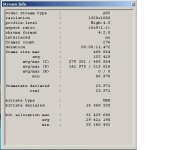
      3. 24p video stream f-rame rate is reported at 23.971 fps instead of the NTSC standard 23.976 fps. This is not a concern for most players or NLEs (Non Linear Editors), however issues have been reported in FCP. NTSC standard compliance requires recompression. For details see: http://www.dvxuser.com/V6/showpost.php?p=2017542&postcount=424
    • Request For Information:


    Feature Patch Name: PAL -> NTSC Conversion
    • Function: Changes the encoding system standards of the GH1 from PAL to NTSC.
    • Usage:

      • Click the checkbox next to the feature name,
        Click the checkbox of any other feature patches you would like to set,
        Proceed to the Firmware Handling section (below)
    • Dependencies: Only for PAL GH1 models.
    • Tested: Yes
    • Stable: Yes
    • Notes:
      1. 720p at 50fps becomes 720p at 60fps, 1080p at 25fps becomes 1080p at 24fps, etc.
      2. You MUST clear all PAL footage from your SD card.
    • Request For Information:


    Feature Patch Name: NTSC -> PAL Conversion
    • Function:Changes the encoding system standards of the GH1 from NTSC to PAL.
    • Usage:

      • Click the checkbox next to the feature name,
        Click the checkbox of any other feature patches you would like to set,
        Proceed to the Firmware Handling section (below)
    • Dependencies: Only for NTSC GH1 models.
    • Tested: Yes
    • Stable: Yes
    • Notes:
      1. 720p at 60fps becomes 720p at 50fps, 1080p at 24fps becomes 1080p at 25fps, etc.
      2. You MUST clear all NTSC footage from your SD card.
    • Request For Information:


    Feature Patch Name: MJPEG Encoder 30fps -> 24fps
    • Function:
    • Usage:
    • Dependencies:
    • Tested:
    • Stable:
    • Notes:
    • Request For Information:


    Feature Patch Name: MJPEG Encoder 30fps -> XXfps
    • Function:
    • Usage:
    • Dependencies:
    • Tested:
    • Stable:
    • Notes:
    • Request For Information:


    Feature Patch Name: Sensor Mode 4
    • Function:
    • Usage:
    • Dependencies:
    • Tested:
    • Stable:
    • Notes:
    • Request For Information:


    Feature Patch Name: Sensor m4 Adjustment 1
    • Function:
    • Usage:
    • Dependencies:
    • Tested:
    • Stable:
    • Notes:
    • Request For Information:


    Feature Patch Name: Sensor m4 Adjustment 2
    • Function:
    • Usage:
    • Dependencies:
    • Tested:
    • Stable:
    • Notes:
    • Request For Information:


    Feature Patch Name: Sensor m4 Adjustment 3
    • Function:
    • Usage:
    • Dependencies:
    • Tested:
    • Stable:
    • Notes:
    • Request For Information:


    Feature Patch Name: Sensor m4 Adjustment 4
    • Function:
    • Usage:
    • Dependencies:
    • Tested:
    • Stable:
    • Notes:
    • Request For Information:


    Feature Patch Name: Sensor m4 Adjustment 5
    • Function:
    • Usage:
    • Dependencies:
    • Tested:
    • Stable:
    • Notes:
    • Request For Information:


    Feature Patch Name: Sensor m4 Adjustment 6
    • Function:
    • Usage:
    • Dependencies:
    • Tested:
    • Stable:
    • Notes:
    • Request For Information:


    Feature Patch Name: Sensor m4 Adjustment 7sw
    • Function:
    • Usage:
    • Dependencies:
    • Tested:
    • Stable:
    • Notes:
    • Request For Information:


    Feature Patch Name: Sensor m4 Adjustment 8sh
    • Function:
    • Usage:
    • Dependencies:
    • Tested:
    • Stable:
    • Notes:
    • Request For Information:


    Feature Patch Name: MJPEG Size 1280m -> 1920m
    • Function:
    • Usage:
    • Dependencies:
    • Tested:
    • Stable:
    • Notes:
    • Request For Information:

Manual Revision 0.1
For PTool 3.40d with GH1 ROMs
 
Last edited:

  • Part Two

    Feature Patch Name: MJPEG E1 Quality
    • Function:
    • Usage:
    • Dependencies:
    • Tested:
    • Stable:
    • Notes:
    • Request For Information:


    Feature Patch Name: MJPEG E1 Table
    • Function:
    • Usage:
    • Dependencies:
    • Tested:
    • Stable:
    • Notes:
    • Request For Information:


    Feature Patch Name: MJPEG E2 Quality
    • Function:
    • Usage:
    • Dependencies:
    • Tested:
    • Stable:
    • Notes:
    • Request For Information:


    Feature Patch Name: MJPEG E2 Table
    • Function:
    • Usage:
    • Dependencies:
    • Tested:
    • Stable:
    • Notes:
    • Request For Information:


    Feature Patch Name: MJPEG E3 Quality
    • Function:
    • Usage:
    • Dependencies:
    • Tested:
    • Stable:
    • Notes:
    • Request For Information:


    Feature Patch Name: MJPEG E3 Table
    • Function:
    • Usage:
    • Dependencies:
    • Tested:
    • Stable:
    • Notes:
    • Request For Information:


    Feature Patch Name: MJPEG E4 Quality
    • Function:
    • Usage:
    • Dependencies:
    • Tested:
    • Stable:
    • Notes:
    • Request For Information:


    Feature Patch Name: MJPEG E4 Table
    • Function:
    • Usage:
    • Dependencies:
    • Tested:
    • Stable:
    • Notes:
    • Request For Information:


    Feature Patch Name: 720p 59.94fps -> 29.97fps
    • Function:
    • Usage:
    • Dependencies:
    • Tested:
    • Stable:
    • Notes:
    • Request For Information:


    Feature Patch Name: 720p 50.00fps -> 25.00fps
    • Function:
    • Usage:
    • Dependencies:
    • Tested:
    • Stable:
    • Notes:
    • Request For Information:


    Feature Patch Name: AVCHD 1080p 24/25fps -> 720p 24/25
    • Function:
    • Usage:
    • Dependencies:
    • Tested:
    • Stable:
    • Notes:
    • Request For Information:


    Feature Patch Name: Video Bitrate Adjustment FHD/SH Simplified
    • Function: Allows increased AVCHD codec bitrates thereby improving video quality for the GH1's FHD and SH rec. quality settings.
    • Usage:

      • Click the checkbox next to the feature,
        Either
        1. Pick same tier of Ptool letter-grade (A,B,C as displayed in the PTool interface) settings for all three AVCHD patches; start at A and work your way up to C; or
        2. If experimenting with your own numbers, make sure this value is lower than Overall Bitrate Adjustment.
        Click the checkbox of any other feature patches you would like to set,
        Proceed to the Firmware Handling section (below).
    • Dependencies: Overall Bitrate Adjustment , Limiting Bitrate Adjustment
    • Tested: http://www.dvxuser.com/V6/showthread.php?t=213082
    • Stable: Can be with the recommended settings of 38000000 - see above link for "Tested".
    • Notes:
      1. 3 levels of recommended settings are displayed in the PTool interface for all 3 interdependent feature patches.
      2. See page 106 of the printed manual.
    • Request For Information:
      If you know of any good low-level AVCHD/MPEG analysis tools or in position to donate licensing or testing time on production systems (for select members of development team) please report details to AVCHD Testing thread in the Development forum. Currently Elecard StreamEye is commonly used, which is available on a 30-day trial.


    Feature Patch Name: Video Bitrate Adjustment H
    • Function: Allows increased AVCHD codec bitrates thereby improving video quality for the GH1's H record quality setting.
    • Usage:

      • Click the checkbox next to the feature,
        Either
        1. Pick same tier of Ptool letter-grade (A,B,C) settings for all three AVCHD patches or,
        2. If experimenting with your own numbers, make sure this value is lower than Overall Bitrate Adjustment.
        Click the checkbox of any other feature patches you would like to set,
        Proceed to the Firmware Handling section (below).
    • Dependencies: Overall Bitrate Adjustment , Limiting Bitrate Adjustment
    • Tested: Yes
    • Stable: Yes.
    • Notes: See Page 106 of the GH1's printed manual.
    • Request For Information:


    Feature Patch Name: Video Bitrate Adjustment L
    • Function: Allows increased AVCHD codec bitrates thereby improving video quality for the GH1's L record quality setting.
    • Usage:

      • Click the checkbox next to the feature,
        Either
        1. Pick same tier of Ptool letter-grade (A,B,C) settings for all three AVCHD patches or,
        2. If experimenting with your own numbers, make sure this value is lower than Overall Bitrate Adjustment.
        Click the checkbox of any other feature patches you would like to set,
        Proceed to the Firmware Handling section (below).
    • Dependencies: Overall Bitrate Adjustment , Limiting Bitrate Adjustment
    • Tested: Yes
    • Stable: Yes
    • Notes: See Page 106 of the GH1's printed manual.
    • Request For Information:


    -------------
    Feature Patch Name: Overall Bitrate Adjustment
    • Function: Allows increased overall AVCHD codec bitrates thereby improving video quality by reducing the amount of compression required.
    • Usage:

      • Click the checkbox next to the feature,
        Either
        1. Pick same tier of Ptool letter-grade (A,B,C as displayed in the PTool interface) settings for all three AVCHD patches; start at A and work your way up to C; or
        2. If experimenting with your own numbers, make sure this value is lower than Limiting Bitrate Adjustment.
        Click the checkbox of any other feature patches you would like to set,
        Proceed to the Firmware Handling section (below).
    • Dependencies: Video Bitrate Adjustment Simplified, Limiting Bitrate Adjustment
    • Tested: http://www.dvxuser.com/V6/showthread.php?t=213082
    • Stable: Can be with the recommended settings of 40000000 - see above link for "Tested".
    • Notes: 3 levels of recommended settings are displayed in the PTool interface for all 3 interdependent feature patches.
    • Request For Information:


    Feature Patch Name: Limiting Bitrate Adjustment
    • Function: Allows increased limiting (or maximum) AVCHD codec bitrates thereby improving video quality by reducing the amount of compression required.
    • Usage:

      • Click the checkbox next to the feature,
        Either
        1. Pick same tier of Ptool letter-grade (A,B,C as displayed in the PTool interface) settings for all three AVCHD patches; start at A and work your way up to C; or
        2. If experimenting with your own numbers, make sure this is the highest value of all three patches (see Dependancies).
        Click the checkbox of any other feature patches you would like to set,
        Proceed to the Firmware Handling section (below).
    • Dependencies: Video Bitrate Adjustment Simplified, Overall Bitrate Adjustment
    • Tested: http://www.dvxuser.com/V6/showthread.php?t=213082
    • Stable: Can be with the recommended settings of 42000000 - see above link for "Tested".
    • Notes: 3 levels of recommended settings are displayed in the PTool interface for all 3 interdependent feature patches.
    • Request For Information:


    Feature Patch Name: 720p50 GOP Size
    • Function:
    • Usage:
    • Dependencies:
    • Tested:
    • Stable:
    • Notes:
    • Request For Information:


    Feature Patch Name: 720p60 GOP Size
    • Function:
    • Usage:
    • Dependencies:
    • Tested:
    • Stable:
    • Notes:
    • Request For Information:


    Feature Patch Name: 1080p25 GOP Size
    • Function:
    • Usage:
    • Dependencies:
    • Tested:
    • Stable:
    • Notes:
    • Request For Information:


    Feature Patch Name: 1080p24 GOP Size
    • Function:
    • Usage:
    • Dependencies:
    • Tested:
    • Stable:
    • Notes:
    • Request For Information:


    Feature Patch Name: Audio Encoding BPS
    • Function: allows increasing bitrate for AC3 audio stream
    • Usage:

      • Click the checkbox next to the feature,
        Select the desired bitrate from the list,
        Click the checkbox of any other feature patches you would like to set,
        Proceed to the Firmware Handling section (below).
    • Dependencies: None
    • Tested: Yes (no link)
    • Stable: No (see Notes 2 and 3).
    • Notes:
      1. lpowell, an engineer at Dolby Labs, comments on the use of this adjustment: http://www.dvxuser.com/V6/showpost.php?p=1999254&postcount=1652
      2. Applying this patch may allow the camera to record video clips which can not be played back in camera.
      3. Attempting to play back clips recorded with this patch applied may cause the camera to freeze requiring momentary battery removal in order to continue camera operation.
    • Request For Information:


    Feature Patch Name: Audio Sampling Rate
    • Function:
    • Usage:
    • Dependencies:
    • Tested:
    • Stable:
    • Notes:
    • Request For Information:


Manual Revision 0.1
For PTool 3.40d with GH1 ROMs


Currently: Inactive.


.
 
Last edited:
Firmware Handling - Getting Started

Firmware Handling - Getting Started

.


First time users:

  • Mac OS X Users:

    1. Read everything on this page first!

    2. In the camera menus select: MENU/SET --> SETUP --> RESET --> YES --> YES, in order to reset the camera to it's factory defaults.

    3. Either
      • download and install WineBottler from the links supplied in step 1 (just above) and save the "bottled" file to your desktop as "PTool_Mac.app", or
      • download the Mac ready self-contained "bottled" version supplied here or at the top of this thread (they are one and the same) and unzip it to your desktop.

    4. Place the "GH1__132.bin" file you downloaded from the page you read in step 1 (above), onto your desktop.

    5. Load and execute PTool_Mac.app by double clicking on it.

    6. Click the "Load Firmware" button (bottom left), navigate to your Desktop folder, and select the "GH1__132.bin" firmware file you downloaded from Panasonic's website in step one (above).

    7. Navigate the tree structure of Available Patches and make the desired changes.
      • You must click both on the Patch Name and also on the Patch's checkbox in order to activate, change, or enter values!
        (this is not a bug but is a result of how multitasking works by default in OS X.)
      • Read the manual (this thread) and the PTool_Mac's hot-help in order to understand how to set what you wish to set.
      • If there is conflict between the information presented in this manual and that displayed in the hot-help then the hot-help takes precedence. The manual here is an an open project compiled by PTool users while the hot-help is from the PTool developer directly.
      • If this is your very first firmware upgrade and the camera is running v1.31 or earlier then all you need to click of the versioning management options, is the "Prevent version compare". This actually jives with the hot-help as the developer is addressing users already at version 1.32 or higher.

    8. When all of the desired settings are entered correctly wait a few minutes and then go back over everything to double-check for correctness.

    9. Insert a healthy, freshly camera formatted SDHC memory card into your card reader or connected camera and wait for it to mount.

    10. Click "Save Firmware" in the PTool interface (bottom right), navigate to the root folder of your inserted memory card, and save as "GH1__132.bin"
      • notice the two "_" (underbar) characters, all uppercase filename with a lowercase ".bin" extension.

    11. Eject the mounted memory card volume.

    12. Turn off your camera.

    13. Make sure the memory card is inserted correctly in the camera and then turn on the camera.
      • !CAUTION! Use only a freshly charged battery! If the battery isn't at 90% or higher capacity the camera will refuse to perform the firmware update.

    14. After the camera is powered up and cleaning + initialization is complete (usually takes about 4 seconds) press the camera's "Display" button and follow the camera's on-screen instructions.

    15. After the firmware update is complete be sure to format the card once again before using the camera.

    16. Done.


  • Windows Users:

    • Due to political reasons regarding the Gates Foundation I don't wish to even turn on any of my windows machines until I can get everything to do with MicroSoft off of the drives (and then it won't be a windows machine any longer. :P) . As such I need a windows user to write up this section for us. Some of it may be similar enough to the OS X that you can just paste it and change a few terms.


.
 
Last edited:
Now, if I can just everyone who visits this thread to offer 1 entry this is going to be easy!


Feature Patch Name: Native 24p/25p
 
Remove the following patches, as they are no longer in PTool 3.36 (Rev. 20100615)

Feature Patch Name: Video buffer (seems to have not had any effect)
Feature Patch Name: Video Bitrate Adjustment (replaced by VBA Simplified)
Feature Patch Name: MJPEG Encoder 1280m -> 1920m (part of MJPEG Size 1280m -> 1290m patch)
 
Awesome guys! Thanks!

Keep'm coming.

BTW, I know a lot of this info is embedded in the PTool itself but I guess there will be many who won't ever get that far without reading a document like this one first. I know I didn't. :D I always want to know what's going to happen before I try it. :)
 
Problem with such manuals is that they can be confusing sometimes.

I really did not get anything about version change description here.
As current version have two patches related to this thing.
23.971 thing is also very confusing, as actual rate is exact 23,976 and no recompression is required.
Some NLE still have troubles with AVCHD footage, but it do not mean that any recompression is required in normal software.

I believe that Tesselator do not use firmware today?
If this is the case and no one want to maintain this manual I'll shut it down temporary before he'll try every patch he describe here personally.
 
I think a manual even if confusing is better than none. As long as a lot of tester's contribute to this it could be very helpful for a lot of users.
 
I think a manual even if confusing is better than none. As long as a lot of tester's contribute to this it could be very helpful for a lot of users.

I do not agree here.
Manual must be written by someone who know things and tried all this settings.
This is not the case here, as I understand.
 
He is collecting information, and testers are giving input. At the moment the information on this project is spread out in about five threads, and it will get harder to follow results and get definitive answers as each thread grows. As long as the thread is updated based on current tester information it will be useful. With the collective input and eyes of many there will be less chance for error.
 
Problem with such manuals is that they can be confusing sometimes.
Tesselator is employing a very structured approach to aggregating information in principle very similar to peer review. Such efforts typically reduce confusion levels, especially when the alternative is status quo.

I really did not get anything about version change description here.
Well, since you know best how it works please feel free to make corrections, if you have time.

23.971 thing is also very confusing, as actual rate is exact 23,976 and no recompression is required.
Confusing indeed. I wrote up that description based both on my own testing and what others reported (I refered to the post). Analysing my own footage as well as examples posted by others with StreamEye reveals that the actual rate is 23,971 fps (see attachment). There seem to be no issues playing such native footage back on a computer, posting on Vimeo or on BD players. But the rate is clearly a little off NTSC standard, so there might be issues when using footage in a broadcast environment. We just don't know at the moment.

I believe that Tesselator do not use firmware today?
If this is the case and no one want to maintain this manual I'll shut it down temporary before he'll try every patch he describe here personally.
He said he'll maintain it. I'm sure he is not making stuff up, as majority of descriptions are still blank. In addition, he is adding information from other testers. If something is wrong, then please offer corrections. It's an open project, like the patch project itself. Why talk about shutting things down?
 

Attachments

  • streameye native patch stream info.JPG
    streameye native patch stream info.JPG
    30.7 KB · Views: 0
Yup, I'll maintain it for at least a few years (health permitting - currently healthy as a horse!). At first my updates will be almost every day. Then when we all (and that includes Tester13 [Vitaliy Kiselev] - primarily!) feel generally satisfied I'll start revisiting (updating) it with each new release of PTool and as new information is posted in this thread or in some way comes to my attention.

Anyone with the privileges to do so please also feel free to enter or correct information in post #1 and #2 in this thread!

Also BTW, I am trying stuff as I go. At first I am only going as far as PTool use without actually burning the firmware on the camera! As soon as revision iterations are confirmed to no longer be an issue of any kind I will be burning and testing most functions as well.

As far as qualification goes I've written several manuals - probably the most famous among computerists would be the Lightwave 3D manual where I wrote one of the three books that ships with the NewTek product. I believe it's about 900 pages if memory serves. But I also helped to engineer that product. Tester13 [Vitaliy Kiselev] is right about it being very helpful to know the product well! If allowed to continue I'll do my best though and maintain a special diligence in being very meticulous about correctness.

I of course need help though. Especially from the Mods and from Tester13 [Vitaliy Kiselev] whenever they have or if they have, the time.

--
Thanks!
Jim
 
Feature Patch Name: Video Bitrate Adjustment Simplified
  • Function: Allows increasing AVCHD codec bitrate to improve footage quality.
  • Usage: Either 1) Pick same tier of Ptool letter-grade (A,B,C) settings for all three AVCHD patches; start at A and work your way up to C; or 2) If experimenting with your own numbers, make sure this value is lower than Overall Bitrate Adjustment
  • Dependencies: Overall Bitrate Adjustment , Limiting Bitrate Adjustment
  • Tested: http://www.dvxuser.com/V6/showthread.php?t=213082
  • Stable: Jobless's recommended settings (38000000)
    http://www.dvxuser.com/V6/showpost.php?p=2012634&postcount=1
  • Notes: If you know of any good low-level AVCHD/MPEG analysis tools or in position to donate licensing or testing time on production systems (for select members of development team) please report details to AVCHD Testing thread in the Development forum. Currently Elecard StreamEye is commonly used, which is available on a 30-day trial.
  • Request For Information:
Feature Patch Name: Overall Bitrate Adjustment
  • Function: Allows increasing overall AVCHD codec bitrate to improve footage quality.
  • Usage: Either 1) Pick same tier of Ptool letter-grade (A,B,C) settings for all three AVCHD patches; start at A and work your way up to C; or 2) If experimenting with your own numbers, make sure this value is lower than Limiting Bitrate Adjustment
  • Dependencies: Video Bitrate Adjustment Simplified, Limiting Bitrate Adjustment
  • Tested: see Video Bitrate Adjustment Simplified
  • Stable: Jobless's recommended settings (40000000)
  • Notes:
  • Request For Information:
Feature Patch Name: Limiting Bitrate Adjustment
  • Function: Allows increasing limiting AVCHD codec bitrate to improve footage quality.
  • Usage: Either 1) Pick same tier of Ptool letter-grade (A,B,C) settings for all three AVCHD patches; start at A and work your way up to C; or 2) If experimenting with your own numbers this is should be the highest value of all three patches.
  • Dependencies: Video Bitrate Adjustment Simplified, Overall Bitrate Adjustment
  • Tested: see Video Bitrate Adjustment Simplified
  • Stable: Jobless's recommended settings (42000000)
  • Notes:
  • Request For Information:
 
Last edited:
Thanks for the mammoth effort guys. Between you and those who are posting footage and settings, it's going to help everybody find what is workable.
 
Well, I couldn't stand waiting any longer and burnt me a GH13 custom firmware upgrade in order to find out how the reversioning (entry #1 and #2) actually work. It's actually completely logical and I have no idea what my problem was. :D I guess I had to see it to understand it.

Anyway basically it goes like this:

It your current firmware is anything less than 1.32 (like mine was 1.0 official!) then you do NOT need to use "Version Change" at all no matter what. Hacked, Official, it doesn't matter because you're writing a higher version when you write either the official or the hacked 1.32 for the first time. This was always the case I guess - peroid.

If you intend to test many different settings AND your current firmware is less than 1.32 then all you need to use is the "Compare Version Patch" switch - and you should use it everytime you write a custom firmware. You never need to use the "Version Change" under these circumstances.

Now, if you're trying to upgrade a camera that's already at 1.32 or higher then you need the Version Change iteration. But if the "Version Compare Patch" is set then after that image in burned you will never need to use the "Version Change" switch again. Assuming you always set the Version Compare ever after.

Once you have an image written with the Version Compare Patch installed you can also restore the camera to any of Panasonic's official patch releases. But of course you should only use 1.32 or later because of the different variables different firmware images store.

If you want to install or reinstall a GH13 custom image over the official 1.32 you then need to use the Version Change so that the camera recognizes the ROM image file as being an "upgrade" (new version). Although if you set the Version Compare Patch then you don't need the Version Change when you write it again after this.

The caveat? With the "Version Compare Patch" installed the GH1's "Version Display" screen reports a BODY FIRMWARE version of 0.0

No biggy, who cares about a version string?


Hehehe, what a fun manual entry! :Drogar-Kriz(DBG):
 
Last edited:
You had me thinking yes this is exactly the feature needed... up until:

The caveat? With the "Version Compare Patch" installed the GH1's "Version Display" screen reports a BODY FIRMWARE version of 0.0

So what is the body firmware version number before applying the version compare patch, and is there any way to have the ptool maintain the body firmware version number instead of it reporting 0.0?

I'm thinking purely from a "camera goes tits up" mentality and needs serviced and Panasonic take one look at it and say "what's this 0.0 number, we aint fixing your camera".
 
You had me thinking yes this is exactly the feature needed... up until:

:)


So what is the body firmware version number before applying the version compare patch,

It could be anything. 1.0, 1.45, just anything. Mine happened to be 1.0 the first time through.

and is there any way to have the ptool maintain the body firmware version number instead of it reporting 0.0?

You have two options with a Version Compare Patched camera reading out 0.0:

1) Place Panasonic's original unmodified firmware image on the card and update to that,
2) Use PTool's "Version Change" without the "Version Compare Patch" and call it anything you like. The Camera's "Version Display" screen will then display whatever you entered - as the BODY FIRMWARE version.

I'm thinking purely from a "camera goes tits up" mentality and needs serviced and Panasonic take one look at it and say "what's this 0.0 number, we aint fixing your camera".

Yup, that's what had me going too and why I thought I would wait till it was all sussed out before I tried the firmware. IMHO, this is as safe as it will ever get. As long as the camera can read the card you can now ALWAYS restore to an unmodified original Panasonic release. And that's a load off my mind in a very big way. :) Well, in a $400 way anyway... :P
 
Last edited:
Back
Top