
Navigation
Install the app
How to install the app on iOS
Follow along with the video below to see how to install our site as a web app on your home screen.
Note: This feature may not be available in some browsers.
More options
You are using an out of date browser. It may not display this or other websites correctly.
You should upgrade or use an alternative browser.
You should upgrade or use an alternative browser.
GH4 Thank you, panasonic!
- Thread starter wwjd
- Start date
filmguy123
Veteran
Keep having fun! Try playing around just for fun to match your footage and skin tones up with something hyper stylized here but not blowing channels and keeping balanced tones:
https://www.youtube.com/watch?v=yIUube1pSC0
I'm not suggesting you don't stylize, rather, that you have room to replicate higher end executions of such stylizing (no small task - there's a reason these teams have dedicated full time pro colorists). But as you said, always a path to getting better, better, better!
Keep it up!
https://www.youtube.com/watch?v=yIUube1pSC0
I'm not suggesting you don't stylize, rather, that you have room to replicate higher end executions of such stylizing (no small task - there's a reason these teams have dedicated full time pro colorists). But as you said, always a path to getting better, better, better!
Keep it up!
Very ambitious. I like it!..Keep making films.
Thanks, brdplaya1, I most definitely will continue!
Keep having fun! Try playing around just for fun to match your footage and skin tones up with something hyper stylized here but not blowing channels and keeping balanced tones:
https://www.youtube.com/watch?v=yIUube1pSC0
I'm not suggesting you don't stylize, rather, that you have room to replicate higher end executions of such stylizing (no small task - there's a reason these teams have dedicated full time pro colorists). But as you said, always a path to getting better, better, better!
Keep it up!
So, does that trailer NOT blow out color channels? Is there like a video color limiter plugin or something, like there is on audio?

Cary Knoop
Veteran
There is a reasonably (but not fully as the real vectorscope is 3D) accurate way to know if colors are within gamut using the Vectorscope. Draw straight lines between the small squares, if values go beyond that you may be out of gamut.So, does that trailer NOT blow out color channels? Is there like a video color limiter plugin or something, like there is on audio?
But that is not the only concern. For instance if you see a pattern like this:
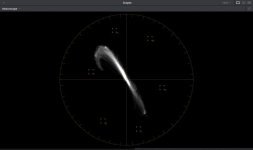
You can see that colors are within gamut but the inward curving shows that the color was pushed beyond its ability to maintain proper hue.
Is that a combination vector there, Cary? Mine don't look like that and are all over the map based on the differing scenes. Director wants TEAL and ORANGE... how would you get that on your version of the color gamut?
When you say pushed beyond, if no one SEES it, does it even matter? Is there some gear out there that can't deal with over pushed color? I would think it would simply max out and stay there until it changed.
When you say pushed beyond, if no one SEES it, does it even matter? Is there some gear out there that can't deal with over pushed color? I would think it would simply max out and stay there until it changed.
Cary Knoop
Veteran
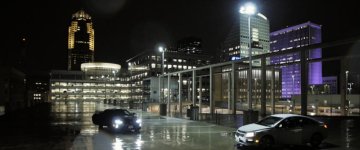
The key is to not color the black and white points. If you S-curve the Red channel, slightly raise the Green channel and inverse S-curve the Blue channel with the midpoint at 2/3 you get a teal-orange look.Director wants TEAL and ORANGE... how would you get that on your version of the color gamut?
For instance before:
After:
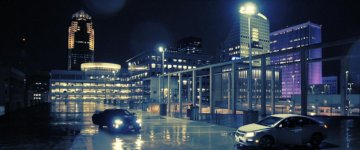
Of course, you can adjust the teal and orange strength to your liking. I personally like a more bluish tint.
And here is your version:
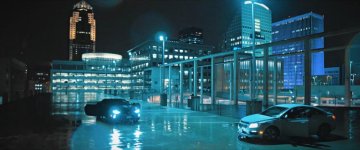
It's teal all right, all the way passed the midtones.
Last edited:
Cary Knoop
Veteran
In the end, it is all a matter of taste. Also, I think we can all learn from comparing!I prefer it brighter, but I REALLY DO appreciate your taking the time to mess around with it! Alternatives are always interesting.
So true!
Additionally, it was shot SORT OF flatter, expecting correction and grading, I used a Teal and Orange LUT but tamed it down a bit with much additional grading per clip, also used a video levels limiter to restrict to 20-230 range. This limiter is gentle roll-offs and NOT hard cutting at those limits. So, all that, probably adds up to non-typical scopes. My primary drive was getting the look I wanted WITHIN 16-235 range levels.
Additionally, it was shot SORT OF flatter, expecting correction and grading, I used a Teal and Orange LUT but tamed it down a bit with much additional grading per clip, also used a video levels limiter to restrict to 20-230 range. This limiter is gentle roll-offs and NOT hard cutting at those limits. So, all that, probably adds up to non-typical scopes. My primary drive was getting the look I wanted WITHIN 16-235 range levels.