Step-by-step instructions for the new GH1 Ptool hack: "GH17 Lenin" (2011 cameras)
Below are the procedures I used when doing the new hack “GH17 Lenin” on a Panasonic GH1 with a 2011 serial number. This will work, but if someone wants to point out something I should change or include, pm me or post in thread to let me know and I will re-edit the post.
Note: This will also work on GH1's made before 2011.
You can also, for those cameras made before 2011, visit a sticky thread created last year:
Ptool for beginners / Ptool FAQ
Regarding things like changing values - whether changing the patches/values within Ptool; native 24p, bitrate, etc. can be found at the Ptool site:
http://www.personal-view.com/
Information about patches created by lpowell can be found here at dvxuser.com:
http://www.dvxuser.com/V6/member.php?59441-lpowell
Thanks to Vitaliy Kiselev for the ground-breaking, awesome GH1 Ptool hack and to lpowell for the incredible patches and, of course, Panasonic for their innovative technology!
Donations to Vitaliy for the Ptool hack and his other projects can be made here:
http://www.personal-view.com./talks/discussion/148/ptool-3.55d-topic
Sources:
http://www.personal-view.com./talks/discussion/148/ptool-3.55d-topic
http://www.gh1-hack.info/wiki/PToolSoftware
http://www.dvxuser.com
____________________________________________________
____________________________________________________
The information in this first post are basics on how to execute the new GH17 hack.
Instructions for the new hack/Panasonic GH17 Lenin:
This color (teal) = required for hack
This color (yellow) = optional
This color (red) = caution
You will need:
- a Windows computer
- Panasonic original V1.32 firmware update
- PTool 3.55d: "Firmware manipulation tool"
- an SD or SDHC card dedicated just for the firmware
- a separate (class 6 /class 10 recommended) SDHC card to shoot video to
- a fully charged GH1 camera battery (don't use GH1 AC adapter/plug-in power)
- Panasonic GH1 camera
Steps...(click on images to open larger in new window):
1. Download "Panasonic original V1.32 firmware update":
http://panasonic.jp/support/global/cs/dsc/download/fts/dl/gh1.html
2. Download PTool 3.55d: "Firmware manipulation tool":
http://www.gh1-hack.info/ptool3d.zip
3. On your PC, create a folder in Windows and name it something to describe the settings you plan on using for the hack; "First Ptool Hack", "Hack with 40Mbps AVCHD High Reliability Patch", etc.
For the sake of these instructions, I will call it "Hack Folder".
4. Double-click on Panasonic downloaded V1.32 firmware update file and, when prompted, extract to your Hack Folder.
5. Right click on downloaded PTool file/choose "Extract all", then browse and extract the file to that same Hack Folder.
__________ v optional v _______________________
5a. (optional/not absolutely necessary to do the hack) If you are planning on adding patches other than what's in Ptool, then download the patch. Right-click on the patch, choose "Extract all" and then browse and extract the file to that same Hack Folder.
Once extracted the file will be called "set", followed by a letter. For example, the file from lpowell's 40Mbps AVCHD High Reliability Patch will be "setj". (See bottom of this post for links to lpowell's GH1 patches.) You can also adjust the patches included within Ptool (without clicking the letters, but you need to know what you are doing).
Firmware, Ptool and patch:

__________ ^ optional ^ ______________________
6. You will now have at least the two required files in your Hack Folder: Panasonic V1.32 firmware and Ptool (and a 3rd file if adding a patch).
Double-click on Ptool, click "Load Firmware".

The Panasonic GH1__132.bin will show as the only choice in the Hack Folder.
(If the location that popped up isn't your Hack Folder, then browse to it. Always go to the specific folder, in this example "Hack Folder", for each hack attempt - don't use the same folder every time you do a new hack - name a new folder something new when making new hack settings a separate time.)
Select that Panasonic GH1__132.bin file and then click open.
7. After selecting and opening the Panasonic bin file, the Ptool interface will now open.
Check the top three boxes:
x Version increment
x Prevent version compare
x New Body
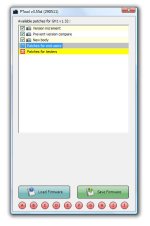
8. Double-click on “Version increment”
After clicking, about ¾ the way down on Ptool, this will appear:
Enter Increment
1
ORIGINAL > MODIFIED
Move your mouse cursor inside "1" and replace it with 10
__________ v optional v _______________________
8a. (optional/not absolutely necessary to do the hack) If you are adding a patch, then click the corresponding patch letter.
For example, lpowell's 40Mbps AVCHD High Reliability Patch
file is "setj". So, on the Ptool screen, go to the bottom and click the corresponding letter to the patch.
Go to the bottom of Ptool, click the letter J (for this example) in the circle.
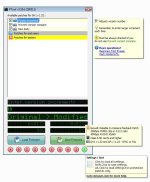
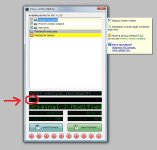
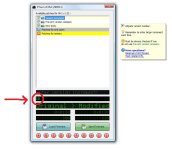
It will then say “settings loaded” and check all of the settings for you.
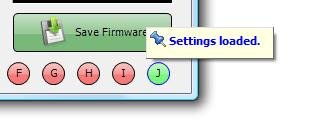
Note: After clicking the letter, the "Settings loaded" message (as seen in the above image) will only flash for a second and will not be permanently visible. You also won't see anything different about Ptool, on the surface, once you click the letter.
If you go through the "Patches for end users" settings (not necessary to go through this for a hack with a loaded patch); certain settings will be checked or unchecked. For example, depending on the patch, "Native 24p" or "Third party battery" boxes may be checked/unchecked. Just leave them be as the patch loaded them. You will not see the results of the hack until after you put the card into the camera and shoot some footage.
When you load a patch setting, "New body" may become unchecked.
If New body becomes unchecked, re-check the New body box after applying the patch settings.
__________ ^ optional ^ ______________________
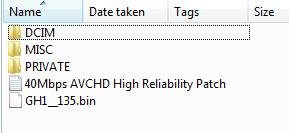
9. Click “Save Firmware”, and name it higher (or different) than the GH1__132.bin Panasonic firmware.
I named my first hack GH1__135.bin
Then save it to that same Hack Folder.
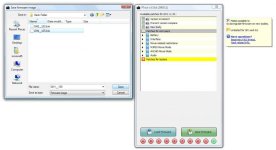
10. Take an SD or SDHC card that you will be using to save the firmware to and format the card while it’s in the Panasonic GH1.
After it is formatted, turn the camera off, take that card out and put it in a card reader connected to your PC.
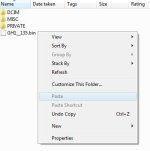
11. In your Hack Folder on your PC; right-click on the new firmware file GH1__135.bin and choose “copy”.
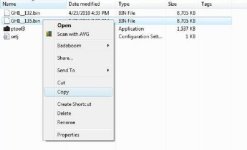
Open your SD card and, right at the first level where you see folders, then "paste" the GH1__135.bin file.
Eject card from the PC.
12. Put the card in the Panasonic GH1, then turn on the camera. (Make sure, before the hack, that the automatic EVF viewfinder/LCD function that turns on/off the LCD when you are near the eyecup - IS SET TO OFF BEFORE THE HACK as it may interfere with the update.)
13. Press the play button on the camera and hold it for 5 seconds/or until a message appears. When it prompts you whether you want to up the firmware version, use the cursor button to select “YES“ then press set button to confirm.
LET THE PROGRESS BAR ON THE LCD SCREEN GO ALL THE WAY TO THE END WITHOUT TOUCHING ANY BUTTONS. DON’T TURN OFF THE POWER OR ANYTHING UNTIL IT’S DONE OR YOU COULD SCREW UP THE CAMERA!
If you held the play button on the GH1 and nothing happened, you probably did something wrong; for example, didn't change the increment number from 1 to 10 or other setting you may have missed.
If so, reformat your firmware card in the camera, go back to step 3 and try again.
14. When it is done updating, turn the GH1 off, then take the card out.
You can label your SD card case for that particular firmware version/hack; for example; lpowell's "40mbps AVCHD High Reliability Patch" on a sticker on the outside of the case (don't put a sticker on the actual card) or however you want to label the card case.
You can use this hack again at another time. You can leave the folder on your PC and copy the file again to the same or another card.
You can also format the card again in the camera and put a different hack version on it or have different firmware hacks on different cards, including the original Panasonic GH1__132.bin original firmware on a separate card if you want to, at some point, revert back to it.
15. Put a different card in the GH1 that you will be using to shoot the video to, then turn camera on.
Class 6 SDHC/preferably Class 10 SDHC.
Sandisk Extreme Class 10 strongly recommended for use with the GH1 hack.
Sandisk Extreme Class 6 suitable for most hacks - but go with SanDisk Class 10 if possible; most suitable for the higher bit rate hacks, i.e. 100mbps max.
Other brands like "Lexar/Class 10" or other Class 10/Class 6 cards may not be usable for the higher bit rates.
Please research your card options before purchasing.
____________________________________________________
____________________________________________________
You may go through the GH1 menu and look at/adjust settings before shooting video.
After you shoot and transfer the files to your computer, you can use a program to see file information; for example, the bit rate.
MediaInfo:
http://mediainfo.sourceforge.net/en
Stream Parser:
StreamParser Install.zip
If, in the future, you do a hack again after this one; name the new, hacked firmware version a different name and place it in a new, different folder: for example, GH1__136.bin and the one after that GH1__137.bin , etc.
GH1 patches created by lpowell for ALL previously unhackable cameras:
* Reliable In-Camera Playback Patch - version 2
* Blackout-Powell Native 24p Patch - version 2
* 100Mbps Max Latitude Native 24/25p Patch
Below are the procedures I used when doing the new hack “GH17 Lenin” on a Panasonic GH1 with a 2011 serial number. This will work, but if someone wants to point out something I should change or include, pm me or post in thread to let me know and I will re-edit the post.
Note: This will also work on GH1's made before 2011.
You can also, for those cameras made before 2011, visit a sticky thread created last year:
Ptool for beginners / Ptool FAQ
Regarding things like changing values - whether changing the patches/values within Ptool; native 24p, bitrate, etc. can be found at the Ptool site:
http://www.personal-view.com/
Information about patches created by lpowell can be found here at dvxuser.com:
http://www.dvxuser.com/V6/member.php?59441-lpowell
Thanks to Vitaliy Kiselev for the ground-breaking, awesome GH1 Ptool hack and to lpowell for the incredible patches and, of course, Panasonic for their innovative technology!
Donations to Vitaliy for the Ptool hack and his other projects can be made here:
http://www.personal-view.com./talks/discussion/148/ptool-3.55d-topic
Sources:
http://www.personal-view.com./talks/discussion/148/ptool-3.55d-topic
http://www.gh1-hack.info/wiki/PToolSoftware
http://www.dvxuser.com
____________________________________________________
____________________________________________________
The information in this first post are basics on how to execute the new GH17 hack.
Instructions for the new hack/Panasonic GH17 Lenin:
This color (teal) = required for hack
This color (yellow) = optional
This color (red) = caution
You will need:
- a Windows computer
- Panasonic original V1.32 firmware update
- PTool 3.55d: "Firmware manipulation tool"
- an SD or SDHC card dedicated just for the firmware
- a separate (class 6 /class 10 recommended) SDHC card to shoot video to
- a fully charged GH1 camera battery (don't use GH1 AC adapter/plug-in power)
- Panasonic GH1 camera
Steps...(click on images to open larger in new window):
1. Download "Panasonic original V1.32 firmware update":
http://panasonic.jp/support/global/cs/dsc/download/fts/dl/gh1.html
2. Download PTool 3.55d: "Firmware manipulation tool":
http://www.gh1-hack.info/ptool3d.zip
3. On your PC, create a folder in Windows and name it something to describe the settings you plan on using for the hack; "First Ptool Hack", "Hack with 40Mbps AVCHD High Reliability Patch", etc.
For the sake of these instructions, I will call it "Hack Folder".
4. Double-click on Panasonic downloaded V1.32 firmware update file and, when prompted, extract to your Hack Folder.
5. Right click on downloaded PTool file/choose "Extract all", then browse and extract the file to that same Hack Folder.
__________ v optional v _______________________
5a. (optional/not absolutely necessary to do the hack) If you are planning on adding patches other than what's in Ptool, then download the patch. Right-click on the patch, choose "Extract all" and then browse and extract the file to that same Hack Folder.
Once extracted the file will be called "set", followed by a letter. For example, the file from lpowell's 40Mbps AVCHD High Reliability Patch will be "setj". (See bottom of this post for links to lpowell's GH1 patches.) You can also adjust the patches included within Ptool (without clicking the letters, but you need to know what you are doing).
Firmware, Ptool and patch:
__________ ^ optional ^ ______________________
6. You will now have at least the two required files in your Hack Folder: Panasonic V1.32 firmware and Ptool (and a 3rd file if adding a patch).
Double-click on Ptool, click "Load Firmware".
The Panasonic GH1__132.bin will show as the only choice in the Hack Folder.
(If the location that popped up isn't your Hack Folder, then browse to it. Always go to the specific folder, in this example "Hack Folder", for each hack attempt - don't use the same folder every time you do a new hack - name a new folder something new when making new hack settings a separate time.)
Select that Panasonic GH1__132.bin file and then click open.
7. After selecting and opening the Panasonic bin file, the Ptool interface will now open.
Check the top three boxes:
x Version increment
x Prevent version compare
x New Body
8. Double-click on “Version increment”
After clicking, about ¾ the way down on Ptool, this will appear:
Enter Increment
1
ORIGINAL > MODIFIED
Move your mouse cursor inside "1" and replace it with 10
__________ v optional v _______________________
8a. (optional/not absolutely necessary to do the hack) If you are adding a patch, then click the corresponding patch letter.
For example, lpowell's 40Mbps AVCHD High Reliability Patch
file is "setj". So, on the Ptool screen, go to the bottom and click the corresponding letter to the patch.
Go to the bottom of Ptool, click the letter J (for this example) in the circle.
It will then say “settings loaded” and check all of the settings for you.
Note: After clicking the letter, the "Settings loaded" message (as seen in the above image) will only flash for a second and will not be permanently visible. You also won't see anything different about Ptool, on the surface, once you click the letter.
If you go through the "Patches for end users" settings (not necessary to go through this for a hack with a loaded patch); certain settings will be checked or unchecked. For example, depending on the patch, "Native 24p" or "Third party battery" boxes may be checked/unchecked. Just leave them be as the patch loaded them. You will not see the results of the hack until after you put the card into the camera and shoot some footage.
When you load a patch setting, "New body" may become unchecked.
If New body becomes unchecked, re-check the New body box after applying the patch settings.
__________ ^ optional ^ ______________________
9. Click “Save Firmware”, and name it higher (or different) than the GH1__132.bin Panasonic firmware.
I named my first hack GH1__135.bin
Then save it to that same Hack Folder.
10. Take an SD or SDHC card that you will be using to save the firmware to and format the card while it’s in the Panasonic GH1.
After it is formatted, turn the camera off, take that card out and put it in a card reader connected to your PC.
11. In your Hack Folder on your PC; right-click on the new firmware file GH1__135.bin and choose “copy”.
Open your SD card and, right at the first level where you see folders, then "paste" the GH1__135.bin file.
Eject card from the PC.
12. Put the card in the Panasonic GH1, then turn on the camera. (Make sure, before the hack, that the automatic EVF viewfinder/LCD function that turns on/off the LCD when you are near the eyecup - IS SET TO OFF BEFORE THE HACK as it may interfere with the update.)
13. Press the play button on the camera and hold it for 5 seconds/or until a message appears. When it prompts you whether you want to up the firmware version, use the cursor button to select “YES“ then press set button to confirm.
LET THE PROGRESS BAR ON THE LCD SCREEN GO ALL THE WAY TO THE END WITHOUT TOUCHING ANY BUTTONS. DON’T TURN OFF THE POWER OR ANYTHING UNTIL IT’S DONE OR YOU COULD SCREW UP THE CAMERA!
If you held the play button on the GH1 and nothing happened, you probably did something wrong; for example, didn't change the increment number from 1 to 10 or other setting you may have missed.
If so, reformat your firmware card in the camera, go back to step 3 and try again.
14. When it is done updating, turn the GH1 off, then take the card out.
You can label your SD card case for that particular firmware version/hack; for example; lpowell's "40mbps AVCHD High Reliability Patch" on a sticker on the outside of the case (don't put a sticker on the actual card) or however you want to label the card case.
You can use this hack again at another time. You can leave the folder on your PC and copy the file again to the same or another card.
You can also format the card again in the camera and put a different hack version on it or have different firmware hacks on different cards, including the original Panasonic GH1__132.bin original firmware on a separate card if you want to, at some point, revert back to it.
15. Put a different card in the GH1 that you will be using to shoot the video to, then turn camera on.
Class 6 SDHC/preferably Class 10 SDHC.
Sandisk Extreme Class 10 strongly recommended for use with the GH1 hack.
Sandisk Extreme Class 6 suitable for most hacks - but go with SanDisk Class 10 if possible; most suitable for the higher bit rate hacks, i.e. 100mbps max.
Other brands like "Lexar/Class 10" or other Class 10/Class 6 cards may not be usable for the higher bit rates.
Please research your card options before purchasing.
____________________________________________________
____________________________________________________
You may go through the GH1 menu and look at/adjust settings before shooting video.
After you shoot and transfer the files to your computer, you can use a program to see file information; for example, the bit rate.
MediaInfo:
http://mediainfo.sourceforge.net/en
Stream Parser:
StreamParser Install.zip
If, in the future, you do a hack again after this one; name the new, hacked firmware version a different name and place it in a new, different folder: for example, GH1__136.bin and the one after that GH1__137.bin , etc.
GH1 patches created by lpowell for ALL previously unhackable cameras:
* Reliable In-Camera Playback Patch - version 2
* Blackout-Powell Native 24p Patch - version 2
* 100Mbps Max Latitude Native 24/25p Patch
Attachments

Last edited: