SONY FS700 + ODYSSEY 7Q SLog2 color issues

attambur

New member
I'm color grading Sony FS700 + 7Q footage using Slog2. i'm getting a strange purple / magenta cast on skin tones on files from 7Q (ProRes HQ).
Clip screenshot on the left is using AVCHD codec and at right is the ProRes HQ file.
I graded this scene to evidence the issue: skin tones from 7Q exhibits magenta tone/banding.
I'm recording with 7Q latest firmware (4.10.100)
I'm recording 4k-> PRORES HD

Any ideas whats happening? Any Missing Settings?

Thanks!
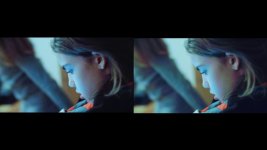
CLIP0000400_000.00_01_54_00.Still002.jpg
 
Last edited:
In this case used FilmConvert (7Q SLog2 camera profile). But I can see the same problem in ungraded images or if i use Colorista II (on premiere CC).
 
I noticed the same thing in 4K-> UHD footage I shot recently. I haven't updated the 7Q to latest firmware ( I'm on the version just prior). I also used Filmcomvert Pro 7Q Slog2 profile but, like you said attambur, it's in the ungraded footage.

At at first I thought I was seeing things. Then I thought maybe the subject had a rash. Now I'm thinking something wonky is afoot.
 
I submit a Trouble Ticket to Convergent Design and uploaded the 2 files. As I have some information will post here.
 
Color temperature in this case is 2600K. I know the picture is quite underexposed using available light. But the problem is the difference between AVCHD internal camera processing compared with O7Q raw image processing from camera sensor.
 
Perhaps it's something to do with the color temperature? The Sony RAW was primarily designed for the F5/F55/F65 which have presets for 3200k, 4300k and 5600k, and I remember hearing once something about RAW being recommended for use only at 3200k or 5600k. Maybe the Sony's implementation of RAW or CD's interpretation of that RAW isn't really designed for continuously adjustable color temperature and has particular problems handling low color temperatures? Whereas the AVCHD pathway can handle all those things since the camera is fundamentally designed for that output?
 
Okay, but is there something that can be done about this now, to prevent the issue? When can the fix be expected? Thanks!
 
This is an active project and delays are technical in nature but are due to something that I am not at liberty to say at this time. We hope to be able to release something soon.
 
This is an active project and delays are technical in nature but are due to something that I am not at liberty to say at this time. We hope to be able to release something soon.

Is there some workaround for this at the moment? Or at least information on why it is happening or what modes or settings are affected? Lately I'm a bit scared to shoot in 4k prores since I keep hearing reports like this that there are significant problems that could arise from it. Do I just not use m 7Q+ to shoot 4k prores? Are 4k recordings from HDMI input affected by the same issue?

I feel like CD does this a lot, addresses issues by saying yeah we know it's a problem, we are working on it and giving no other information. Ok of course you can't fix it right away but it would really help us users if you could give us all the information you have on the issue as it might help us figure out if there is a workaround or whether the issue is a dealbreaker or not for our next project and need to plan accordingly for an alternate recording method.
 
I suspect this is an issue with low kelvin settings, below 3200K. I've never seen this happen using 3200K or 5600K, anyone else?
 
I cannot expand on the statement because such things are not so cut & dry. There are many ways to skin the cat, but in cases like this it is also a moving target. Shooting at preset color tempts will certainly mitigate the issue, and for some people completely solve it.
 
I also have this problem and I consider this a major issue. You should really fix this fast. Its impossible to get nice skintones at the moment. This messed up a lot of my recent work as you don't see this when recording as slog2 is so flat.
 
My experience is that there often are some magenta cast also when recording internal AVCHD. At least sometimes. Maybe it's a camera thing rather than an O7Q thing?
 
Before you criticize and complain, may I suggest you download our new firmware (now on our website) and test it out for yourself?
 
Back
Top