FS7: Sony FS7 purple fringing - any fix?

CP2 is not real cine glass - just a Zeiss ZF rehoused and the worst CA I have ever seen was on a ZF 35mm f1.4.

Well people are saying it shows on sharp stills glass, the Canons and CPs are rehoused stills glass.

Either way it is not CA which has an opposing blue fringe, it is, I guess, using my limited technical knowledge, an issue of attempting 4k from a 4k sensor. As we know to make 4k you need a 6k sensor and a stronger AA filter.

Im guessing live with it or pony up for an F65.

S
 
Much as I loved their character, my old Leica R set had outrageous CA sometimes...

I believe the CP2s have different coatings and different irises (14 blade vs 9) to the stadard ZE/ZF range.
 
I was a muppet to change frame but beleive me it was there.

The left frame look at his mustach frame right of his mouth, the right frame Ive desatted the magenta and it is gone.

S

Okay, if I pixel peep the crap out of it a high resolution. Yeah.

Mind you... what I'm looking at there is stuff that's 1 and 2 pixels wide. Which... makes me wonder. Could be a 4:2:2 color space issue. 422 color space defines one color value to two pixels, with individual luma (brightness) values. The combination of a bayer sensor interpolation and a 422 color space recording with very sharp and fine elements could cause issues like this maybe.

The math gets a bit wonky to describe. The sensor is looks like this:

GRGRGRGRGRGRGRGRGRGRGRGRGRGRGRGR
BGBGBGBGBGBGBGBGBGBGBGBGBGBGBGBG
GRGRGRGRGRGRGRGRGRGRGRGRGRGRGRGR
BGBGBGBGBGBGBGBGBGBGBGBGBGBGBGBG

To make an individual 4k video pixel it uses four values:
GR
BG

But to keep things practical, every photosite is used to make 4 different pixels (Watch the YELLOW G):

G-R-G
-1--2-
B-G-B
-3--4-
G-R-G

Each of those 4 numbers is a mapped video pixel. If you saved them to a 444 file, each of the four would have a Red,Green, and Blue value attached. But with 422 encoding, each pair (horizontally paired) shares a color chroma (UV), while having separate luma (Y/brightness) components. The shared chroma value is typically an average of the two chroma values.

Because the potential error in color is only one pixel wide, it tends not to show up when subjects aren't resolved very sharply, and don't have tight patterning. However, with sharp enough resolution, and a subject that changes chroma significantly over a single pixel, you can end up with unusual colors that don't represent either pixel accurately. When the subject is dark (low luma) this doesn't go noticed, because we don't visually perceive it.

I'm not saying this is the extent of the problem, but could be a factor, given some of the descriptions given here.
 
Okay, if I pixel peep the crap out of it a high resolution. Yeah.

Im just saying it is there - not if it matters, and also pointing out that it is fairly easy to kill.

Certainly it is a factor of 'moire' of some nature where the image resolution hits the pixel resolution giving the effect you describe - odd colours.

Clearly using a lens with 3.5k resolution does the trick I guess.

I dont think it is lens artifacting in a way that CA is.

S
 
Longitudinal CA (lots of names for this) does not have blue fringing on the opposite side. It is green-magenta, just infront and behind the focus point. Idid have one lens that was CTO/CTB instead and much less objectionable.
 
Longitudinal CA (lots of names for this) does not have blue fringing on the opposite side. It is green-magenta, just infront and behind the focus point. Idid have one lens that was CTO/CTB instead and much less objectionable.

Yes. I have a lens where the longitudinal CA (AKA spherochromatism) is CTO / CTB - it is an old Pentax Takumar preset. It does not excite those electronic looking fringes in camera, perhaps there is not enough red in the original fringe to trigger it in the red channel.
 
Longitudinal CA (lots of names for this) does not have blue fringing on the opposite side. It is green-magenta, just infront and behind the focus point. Idid have one lens that was CTO/CTB instead and much less objectionable.

Im sure you are correct. But it seems to be questioned if this is lens or camera - Im suggesting to get purple in the middle of a telephoto ( 2014 canon 'cine' glass) shot from a it is most unlikely to be the lens.

CA usually shows up.. in my nikkor 14 at the edges.. ie in wides.

It is the OPLF strength or some process issue not glass .. I guess.

S
 
Im sure you are correct. But it seems to be questioned if this is lens or camera - Im suggesting to get purple in the middle of a telephoto ( 2014 canon 'cine' glass) shot from a it is most unlikely to be the lens.

CA usually shows up.. in my nikkor 14 at the edges.. ie in wides.

It is the OPLF strength or some process issue not glass .. I guess.

S

It is not necessarily lens or camera. Actually, it is almost most certainly both.
 
Well if lens A used with camera A shows a problem but lens A used with camera B does not show the problem I'd blame the camera.

of course lens B with camera A might avoid the problem
 
Ok. I just played with FS7 looking at the color fringing phenomenon. Very very unscientific test. I'm posting it in hopes that it saves some time whoever test it too (hopefully more scientifically). I'm sorry I don't have videos to illustrate my findings, maybe I'll put something together later. The below observation is based on what I was seeing in the EVF, I did not actually shoot anything nor did I watch it on a bigger monitor. However, my previous experiences tell me that the internal recording is consistent with what is seen in the EVF. Lens used is Carl Zeiss in C/Y mount, 50mm f/1.4. Tested at f/2.8 . Here are my findings:

1. The degree of how the camera accentuates the longitudinal CA in lenses varies from setting to setting. I suggest that everyone who is concerned with the issue puts the camera on sticks, picks a lens which has a tendency to create the issue and tests various gammas and LUT's in CINE EI as well as the gamma / matrix settings in CUSTOM mode. It is quite incredible how big the differences are! The same lens goes from being borderline unusable at given f-stop to exhibiting no issue at all! I was scratching my head because at first I could not replicate the issue.
2. One thing that seems consistent is that the more saturated the LUT or matrix the more pronounced the fringes are. Makes sense.
3. Same thing with contrast (type of gamma), again, makes sense.
4. The warmer the image the more visible the magenta / reg fringes are. This also makes sense as the warmer the image gets the greater dominance of the red channel is. I wonder if the same is true the opposite way - are blue fringes more visible when image becomes cooler in temperature?
5. This one is interesting: the red fringing becomes much more visible when camera is in UHD or 4K mode compared to HD. The fringe becomes jagged and look more offensive. I was surprised because I was expecting the opposite. The difference can be caused by how the signal from the sensor is processed before being sent to EVF / scaled compared to HD so in this case this may or may not be consistent with what is being recorded. I have to test further.
 
Last edited:
Ok. I just played with FS7 looking at the color fringing phenomenon. Very very unscientific test. I'm posting it in hopes that it saves some time whoever test it too (hopefully more scientifically). I'm sorry I don't have videos to illustrate my findings, maybe I'll put something together later. The below observation is based on what I was seeing in the EVF, I did not actually shoot anything nor did I watch it on a bigger monitor. However, my previous experiences tell me that the internal recording is consistent with what is seen in the EVF. Lens used is Carl Zeiss in C/Y mount, 50mm f/1.4. Tested at f/2.8 . Here are my findings:

1. The degree of how the camera accentuates the longitudinal CA in lenses varies from setting to setting. I suggest that everyone who is concerned with the issue puts the camera on sticks, picks a lens which has a tendency to create the issue and tests various gammas and LUT's in CINE EI as well as the gamma / matrix settings in CUSTOM mode. It is quite incredible how big the differences are! The same lens goes from being borderline unusable at given f-stop to exhibiting no issue at all! I was scratching my head because at first I could not replicate the issue.
2. One thing that seems consistent is that the more saturated the LUT or matrix the more pronounced the fringes are. Makes sense.
3. Same thing with contrast (type of gamma), again, makes sense.
4. The warmer the image the more visible the magenta / reg fringes are. This also makes sense as the warmer the image gets the greater dominance of the red channel is. I wonder if the same is true the opposite way - are blue fringes more visible when image becomes cooler in temperature?
5. This one is interesting: the red fringing becomes much more visible when camera is in UHD or 4K mode compared to HD. The fringe becomes jagged and look more offensive. I was surprised because I was expecting the opposite. The difference can be caused by how the signal from the sensor is processed before being sent to EVF / scaled compared to HD so in this case this may or may not be consistent with what is being recorded. I have to test further.

The fact that it's more apparent in 4K/UHD supports my thinking that this is related to how the camera generates 4:2:2 from the Bayer sensor. When the camera downscales to 1080p, it can average together more photosites, resulting in more predictable and accurate color, at the expense of losing luma resolution. Also, the fact that you're seeing it more when using more saturated gammas/custom matrix indicates again that this is related to color channels clipping unevenly. This is also supported by your finding that white balance affects it - seeing as white balance is an operation of modifying relative gain of the color channels. Essentially, you're hitting a clip limit for the internal codec implementation.
 
I just tried a quick test - also no recording or stills. First what I was observing is standard longitudinal CA - magenta or green fringing outside of very high contrast edges where one side is a bright object and next to it is something dark.I don't see anything red - only magenta when slightly in front of the focus plane, and green when its behind. I looked at the ceiling lamp with a Zeiss ZF at 1.4 .

It did seem more pronounced on UHD, and much less on Slog3 CINE EI. However the CINE EI was much less contrasty , desaturated and the white never went much past 70% in my screen, so it may have simply not shown up as as much . As soon as I put a LUT on the Slog3 the CA was back, and it was more pronounced in 709 800 than it was in LC709 type A.

I could be wrong, but personally I'm not too inclined to see all kinds of clipping of the sensor involved. Just looks to me like lens CA that gets more or less apparent depending on the contrast and saturation of the look in the camera. Nothing unique to this camera.

Lenny Levy
 
Thinking about my test yesterday it was true that by the time I added the LUT in Cine EI the white area was clipping again, so if it was a camera/sensor issue then I can think of 2 tests to make.
1- find an image that shows definite fringing in Custom and then record it in CiONE EI Slog without a LUT. Add the LUT in post and see if it reappears.
2- Look at the same image with other cameras- preferably something high quality like a RED or Alexa

The first test should be very easy for someone here.
 
Just quick observation i made on the speed booster as i bought it and tested it with 50mm cp.2 at t4 on my fs700 with raw, there was a green CA kinda cast all over the picture and as it turned out later the backfocus on the speedbooster was a little off. However sadly i did not rerun this test cause i decided never to use the speed booster due to other issues it caused. It made added contrast to shadow to the part where the shadows roll to black, removing the smooth blackish gradient transfer to black and instead just jumping from shadow to black and making the image look bad. The CP.2s have more contrast than for example brownish canons so the issue might not be that visible with canon glass. Also the geometric distortion was another issue, so I never used the speed booster after that forst test, just kept it for rental purposes.

So combining the speed booster that has CA with a camera that might suffer from this kinda issue might not be a good idea.

I really hated the test comparing the crappy canons with the fs7 and not telling what setup and settings were used. This issue propably does not arrise with leica lenses?

Just a personal note, I had to do a shoot with fs7 while my f55 was under repairs at sony and totally hated using the fs7, for starters for the fact that it is using the menu system/adjustment interface as f55 and f5 without the side screen. There was also a lot of noise in the shadows even though i rate the camera at 800 iso, due this noise i had to add way more contrast to shadows than i was plannin on adding.
 
I shot one of those events with a man and a woman that no one mentions at the weekend.

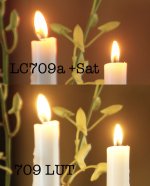
Checking some candle flames which have red edges with certain luts eg 709 and 709a

certainly those edges can be calmed with a few post skills as they are not too strong in the core log image

S
 
I did my first (and last) one of those 2 weeks ago for an old friend. Really is a perfect camera for that sort of thing. Never again though... shudder...
 
Just quick observation i made on the speed booster as i bought it and tested it with 50mm cp.2 at t4 on my fs700 with raw, there was a green CA kinda cast all over the picture and as it turned out later the backfocus on the speedbooster was a little off. However sadly i did not rerun this test cause i decided never to use the speed booster due to other issues it caused. It made added contrast to shadow to the part where the shadows roll to black, removing the smooth blackish gradient transfer to black and instead just jumping from shadow to black and making the image look bad. The CP.2s have more contrast than for example brownish canons so the issue might not be that visible with canon glass. Also the geometric distortion was another issue, so I never used the speed booster after that forst test, just kept it for rental purposes.

So combining the speed booster that has CA with a camera that might suffer from this kinda issue might not be a good idea.

I really hated the test comparing the crappy canons with the fs7 and not telling what setup and settings were used. This issue propably does not arrise with leica lenses?

Just a personal note, I had to do a shoot with fs7 while my f55 was under repairs at sony and totally hated using the fs7, for starters for the fact that it is using the menu system/adjustment interface as f55 and f5 without the side screen. There was also a lot of noise in the shadows even though i rate the camera at 800 iso, due this noise i had to add way more contrast to shadows than i was plannin on adding.

Now if you didn't have an F5/55 and someone said you could have an FS7 for £6,500, or you could pay an extra £5,000 to have the F5 with side screen?
 
I was fourth operator just picking out funny kids and GVs stuff - pretty mellow really.

Anyway looking at these candles is pretty interesting if you are a sad peeper.. the LUT can have a huge influence.

BTW I guess I shot HD CustomSlog3 at 2000 or 4000.

The LCA709a LUT plus a bit of (needed) saturation does bad things, odd bad things, the regular 709 lut is pretty smooth...

candle.jpg
 
I have this mental image of the editor wading through the 'funny kids and GVs' reel and there's nothing but various close ups of candles using different shooting modes.
 
Would the old Sgamut be the culprit since your shooting in custom? Wonder if Sgamut3.cine would make a difference in how the luts performed. Of course the noise would be off the charts so its a no go at 40000 ISO but I'm just wondering if the gammut makes a big difference of how the luts perform.
 
Back
Top