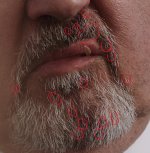
FS7: Sony FS7 purple fringing - any fix?

To answer Lenilenapi's question,

The fringing is visible "live" you can see it in the EVF, you can magnify the view and clearly see it. With some lenses in certain conditions it can be severe. Not something that I see for the first time - this type of chromatic aberration in lenses is common (specifically spherochromatism - a type of CA where edges of high contrast objects exhibit magenta and green fringing depending whether they are in front or behind the focus plane) and happens on any system but FS7 seems to somehow make it more pronounced (read my first comment in this thread, I have a speculation about why it is happening). Yes, if there is no chromatic aberration to begin with then there is no issue. It is important to understand it as a complex phenomenon (complex not in a sense that it is impossible to overcome or a deal breaking but simply complex, something that should be discussed in a context of a system - not just lenses or just the camera). It's been reported that the camera does not respond to the CA when shooting RAW the same way, it does not make it more visible.

I did not post in this thread to complain about the camera and (as some suggest) dismiss optical causes of the phenomenon - I too think this can possibly and likely be solved on the optics side of things BUT in order to solve it this way the understanding of what is going on on the camera side is important. In example, if it turns out that this is caused by insufficient effect of OLPF on red channel, then maybe one possible solution would be to use a slight diffusing filter on the lenses to lose a bit of lens' resolution. As observed by myself and Sam Morgan Moore it is actually the high resolving lenses that cause the problem the most - which leads me to believe that the problem is associated with aliasing (and possibly later with debayering and compression). One thing that contradicts it is that there seems to be no difference between 4K / UHD and HD modes (if the problem was associated with aliasing, I would expect to see more of it in HD where OLPF is not as effective as in full resolution) but it is probably more complex than we all think. Since the OP was asking about the fix of the issue, I think it is fine that we investigate it with attention to detail. I'd also like to hear more about Sam's post solution in Resolve.
 
Not to go all English major on you

Great post Viddovation!

Im not an english speaker. To me the sentence still gives meaning. I am talking about selling the FS700 as something that will happen really soon, and it will. Got a buyer lined up, but i can still retreat.

And yes, the FS7 is more of a sidegrade/downgrade if anything at the moment. Hoever, the FS700+Odyssey7Q is way too large, and for me as a solo shooter doing my personal projects, its just too hard to work with when you have that huge external recorder/monitor to move around. Especially in the mountains when there is wind, rain, snow, thunder, you name it. So fast & light brings me to the FS7.

Thanks all for your help.

The thing that concerns me the most is natural highlights in the nature, as they appear. I cant do anything about them. I cant expose lower. That gives me a say, 70% black image with noise levels through the roof when i bring it all back up. So things like the sun, reflections in water, moon, and so on, has to be over exposed. Theres no way around this.

So is the purple fringing avoidable when overexposing?
 
Great post Viddovation!

Im not an english speaker. To me the sentence still gives meaning. I am talking about selling the FS700 as something that will happen really soon, and it will. Got a buyer lined up, but i can still retreat.

And yes, the FS7 is more of a sidegrade/downgrade if anything at the moment. Hoever, the FS700+Odyssey7Q is way too large, and for me as a solo shooter doing my personal projects, its just too hard to work with when you have that huge external recorder/monitor to move around. Especially in the mountains when there is wind, rain, snow, thunder, you name it. So fast & light brings me to the FS7.

Thanks all for your help.

The thing that concerns me the most is natural highlights in the nature, as they appear. I cant do anything about them. I cant expose lower. That gives me a say, 70% black image with noise levels through the roof when i bring it all back up. So things like the sun, reflections in water, moon, and so on, has to be over exposed. Theres no way around this.

So is the purple fringing avoidable when overexposing?

Understood on the language issue. I'm slowly working on Spanish myself, and I know it's easy to miss nuances. Just go easy on us if we misunderstand you. Your sentence wasn't wrong, by the way - it just was ambiguous - meaning it didn't clearly indicate whether or not the action had already occurred.

Okay. I understand your concern about exposure. Have you tried the S-Log2 recorded in 10bit to the O7Q? The other gammas on the FS700 definitely require you to sacrifice highlights in the situations you're describing, but S-Log 2 recorded to 10bit should allow you to retain highlights by exposing middle gray much lower. Doing this in 8bit to the internal cards doesn't confer the same advantage, since you don't have as much to work with in post.

So, using the FS7 with S-Log 2 or S-Log 3, you should be able to expose middle gray lower, retain highlights, and then grade to taste in post. That's what it's designed for. If you haven't shot the FS7 like this yet, or at least shot the FS700 in it's S-Log to 10bit 422, I'm not sure you get how much latitude there is to play with.
 
"it is actually the high resolving lenses that cause the problem the most - which leads me to believe that the problem is associated with aliasing (and possibly later with debayering and compression)."

I don't know about aliasing and compression etc, but Optically it associated with higher resolving lenses for sure. Also it is far more frequent in DSLR lenses than true cinema PL lenses. You get what you pay for.
I'll need to do some testing myself to see if it really is different in Custom vs CINE EI modes and thus a camera specific issue. However it is certainly true that posts on the website make its sound far worse than it is.
 
Now that we're all being nice again, I don't know of many cameras (maybe the Canons have inbuilt compensation for Canon lenses?) that wouldn't struggle with stills glass wide open - in this case on a speedbooster - in bright sunlight in a super high contrast scene. Now, the extent to which the problems are visible may be down to many factors and debayering and downsampling may contribute in either a positive or negative way to that extent, but the surely first thing to look at is how to avoid or minimise those conditions to start with, which in turn will minimise work needed to be done in post down the line.

There's a reason not many big budget movies with all the tools and skilled people at their disposal very rarely shoot a daylight high contrast wide scene at T1.5 (without a mattebox ;) ). It is a recipe for problems.
 
Last edited:
Now that we're all being nice again, I don't know of many cameras (maybe the Canons have inbuilt compensation for Canon lenses?) that wouldn't struggle with stills glass wide open - in this case on a speedbooster - in bright sunlight in a super high contrast scene. Now, the extent to which the problems are visible may be down to many factors and debayering and downsampling may contribute in either a positive or negative way to that extent, but the surely first thing to look at is how to avoid or minimise those conditions to start with, which in turn will minimise work needed to be done in post down the line.

There's a reason not many big budget movies with all the tools and skilled people at their disposal very rarely shoot a daylight high contrast wide scene at T1.5 (without a mattebox ;) ). It is a recipe for problems.

It would probably help if we could forget about the specific example shown here by OP for a moment. The phenomenon is present in less extreme situations too. No speed booster, mattebox (yes!), decent lens, stopped down, no overexposure. It is still there. Honestly, some of the situations are completely "proper", nothing extreme about them. Sure, you could just change everything, lens, distance, f-stop, get rid of contrasty objects, etc, but maybe there are other solutions - it is worth exploring. As mentioned, it is actually when you are stopped down a bit that the issue is more troubling: when you are wide open the CA is there but the lens is softer, the fringing is there the strongest optically but camera does not pick on it as much. Stop down a bit - a bit of CA is still there BUT now the lens resolves better and it seems to be driving the camera crazy - it strongly emphasizes the fringes. Stop down even more - no CA optically, no problem but the DOF is that of an ENG camera and diffraction kicks in.

When you had a problem with banding in shadows in RAW recording with Odyssey, how many people told you that you were not exposing "properly" and that it was an operator error?
 
Could you post an image from that sort of setup as an example to work from?

As for banding in raw shadows with the FS7 and 7Q, to be honest once it became obvious that it was a limitation of Sony's raw implementation I stopped using raw completely.
 
Could you post an image from that sort of setup as an example to work from?

As for banding in raw shadows with the FS7 and 7Q, to be honest once it became obvious that it was a limitation of Sony's raw implementation I stopped using raw completely.

I don't have an obvious example of the phenomenon recorded that I can think of, mostly because I usually find a way of avoiding it one way or the other. It often means not being able to use specific focal length or particular lens that I would otherwise use which I find limiting. If I wanted to illustrate it I'd show both the footage but also a shot of an EVF and how at certain level of defocus the fringes "snap" to being most noticeable, unfortunately I don't have such illustration available.
 
It would probably help if we could forget about the specific example shown here by OP for a moment. The phenomenon is present in less extreme situations too. No speed booster, mattebox (yes!), decent lens, stopped down, no overexposure. It is still there. Honestly, some of the situations are completely "proper", nothing extreme about them. Sure, you could just change everything, lens, distance, f-stop, get rid of contrasty objects, etc, but maybe there are other solutions - it is worth exploring. As mentioned, it is actually when you are stopped down a bit that the issue is more troubling: when you are wide open the CA is there but the lens is softer, the fringing is there the strongest optically but camera does not pick on it as much. Stop down a bit - a bit of CA is still there BUT now the lens resolves better and it seems to be driving the camera crazy - it strongly emphasizes the fringes. Stop down even more - no CA optically, no problem but the DOF is that of an ENG camera and diffraction kicks in.

Okay. I haven't had this problem in my footage, not noticeably anyway, and that seems to be the case with some others here as well. Which, if we approach this logically, indicates that either there is a quality control issue with the hardware, wherein some of the cameras of this model line are more susceptible than others, or that there are indeed operator and rig variables at play here. I don't say that to diminish the validity of your concern, but to clarify discussion.

With that in mind, can you provide concrete examples, preferably both screencaps and a listing of the lens and adapter used as well as, to the extent recalled, the lens settings for the shot in question? Telling me it's a decent lens isn't really useful to troubleshooting, since there are drastically diverse opinions on what qualifies as a good lens, and many of the measures are more subjective than technical.

By the way, some are pointing out that it's high resolving DSLR lenses where the most issues are being seen, and that high resolving cinema lenses aren't having the same degree of issue. I would point out that cinema glass uses coatings and materials that reduce things like this. Also, if people are using DSLR glass, they may be using Speedboosters, which adds an extra optical element known to cause issues with CA.

So, if possible, some detailed examples.

EDIT: Wrote this without seeing your statement of not having examples. Perhaps you could shoot some the next time you see it in the field?
 
But what this fundamentally means is - something in the image was overexposed. Because this purple fringing is a clipping issue, it can be avoided entirely if you don't overexpose. The histogram and zerbras will help you do this. Don't trust the LCD screen alone - it may not be calibrated correctly, and the scopes/zebras are far more useful for verifying exposure.

Having overexposed specular highlights is often unavoidable simply because the contrast ratio of such scene is way wider that the dynamic range of the camera. In fact, the specular highlights are almost always clipped. You'd have to add tons of light which often times is impossible because of the nature of the scene or the shoot.
 
Some further thoughts..

Shooting for a day with the Canon cine glass made me think.. hmm that was sharp! Which has made me want to re-evaluate some of my really battered nikkors - I can now see up and downsides to super crisp glass.

Most a/c's laugh at my capless dusty nikkors which I always tell them gets the Cooke look for £75 - maybe truer than I thought!

Also when evaluating and not buying the F5 I observed a lot of purple - in that case my FS100 had my wonkiest nikkor and the F5 had a CP2

FS100/nikkor vs F5-CP2.. (note the edge of the gaffa tape on the F5)
https://dl.dropboxusercontent.com/u/33167160/ouch.jpg
 
I was a muppet to change frame but beleive me it was there.

The left frame look at his mustach frame right of his mouth, the right frame Ive desatted the magenta and it is gone.

S
 
Just an an example on the flip side..

Old Contax 28-85mm with 30 year old coatings on a Camdiox speedbooster on the FS7

XCAR Hatches Golden Hour by Ben Scott, on Flickr

There's a tiny bit of CA but no massive fringing or anything. I knocked down the exposure and brought back the shadows in post.

And another

XCAR Golden Hour by Ben Scott, on Flickr


Same again, on an incredibly bright day, but just exposed to compensate.

Xcar Mini JCW 150fps slomo by Ben Scott, on Flickr
 
Having overexposed specular highlights is often unavoidable simply because the contrast ratio of such scene is way wider that the dynamic range of the camera. In fact, the specular highlights are almost always clipped. You'd have to add tons of light which often times is impossible because of the nature of the scene or the shoot.

Yes, I understand that principle. And obviously you can't expose for specular highlights in uncontrolled environments. I didn't mean my advice to be construed to that extreme. I am not sure that the OP has fully explored S-Log though, and his concerns appeared to be over more than specular highlights.

If you're in a situation where you must overexpose more than specular high lights, than you should desaturate your highlights in post.
 
CP2 is not real cine glass - just a Zeiss ZF rehoused and the worst CA I have ever seen was on a ZF 35mm f1.4.
 
Back
Top