FS7: Sony FS7 purple fringing - any fix?

Would the old Sgamut be the culprit since your shooting in custom? Wonder if Sgamut3.cine would make a difference in how the luts performed. Of course the noise would be off the charts so its a no go at 40000 ISO but I'm just wondering if the gammut makes a big difference of how the luts perform.

Indeed there may be some gamut mismatch. 4000 is fine not 40000, can you see any noise? this is a big crop.

My general observation is that is is possible to generate that horrid chainsaw/stepping effect in post if you do the wrong thing.

It is nice to see that in this case it was not burned in by the camera, not a function of the compression or a function of sensor overflow or suchlike. It was a function of post.

S
 
I'm a bit confused by this issue. I've been assuming that its standard longitudinal CA which is generally magenta/green but is seen in front of and behind the point of focus not at the focus plane. Is that what you guys are seeing? All of these posts are Red which I have never seen and I never see any posts with green fringing.

So if you are talking about something else, what do I have to do to replicate it it?
 
I was fourth operator just picking out funny kids and GVs stuff - pretty mellow really.

Anyway looking at these candles is pretty interesting if you are a sad peeper.. the LUT can have a huge influence.

BTW I guess I shot HD CustomSlog3 at 2000 or 4000.

The LCA709a LUT plus a bit of (needed) saturation does bad things, odd bad things, the regular 709 lut is pretty smooth...

View attachment 104119

The example shown pretty much confirms my observation that certain gamma / lut / color temperature combinations seem to make the issue much more visible. It is ok when you are not burning the LUT but when you are, it is a problem. My observation is these jagged edges are far worse in UHD and 4K resolution.
 
So its better to burn the LUT in post then? I can definetly live with that in most projects.

Just placed my final order for the FS7, delivery next week. Im super stoked for a simpler, easier to work with package that pretty much does the same fireworks as FS700+O7Q. Albeit more expensive considering all the extras you have to buy.

I got $8100 for my old system with little extras in the sale, and i consider that a good price. Allthough down from 14-15.000 USD i originally paid for everything, the USD to NOK currency has gone up around 35-40% since i bought the FS700 and the O7Q, so that saved me a lot of money.

I guess i have paid around 105.000 NOK for the system, and got back 82.000,- NOK. So actual loss in my own currency equals 2875 USD, as the actual cost for 3 years ownership of FS700, and 1,5 years of Odyssey 7Q. All hail the currency rates.
 
So its better to burn the LUT in post then? I can definetly live with that in most projects.

Earlier in this thread you discussed how important high dynamic range is for your uncontrolled outdoors shoots. Burning a LUT into the master footage will drastically cut your dynamic range. So never use a burned in LUT when you need max dynamic range recovery in post.
 
Earlier in this thread you discussed how important high dynamic range is for your uncontrolled outdoors shoots. Burning a LUT into the master footage will drastically cut your dynamic range. So never use a burned in LUT when you need max dynamic range recovery in post.

Thats what i meant in my confirmation seeking question - burning the LUT in post aka shoot with flat s-log profiles and grade later with for example LUTs. I can live with that, if it solves the fringing more or less.

I understand CineEI works in this way? Compose with a viewing LUT in EVF, and record with flat s-log, and then apply LUT in post?
 
Earlier in this thread you discussed how important high dynamic range is for your uncontrolled outdoors shoots. Burning a LUT into the master footage will drastically cut your dynamic range. So never use a burned in LUT when you need max dynamic range recovery in post.


Wasn't aware of this but it explains a LOT. I shot an entire feature in SLOG CINE EI without burning in the LUT and the range was astounding. Yesterday I went out to shoot an ordinary business profile and set the camera to burn in the LUT to make things easier in post. The shoot was in an upscale bar near dusk, with the sun streaming in the windows. The patrons in the sun stream were somewhat blown out compared to the rest of the crowd. Couldn't figure out why based on previous performance, now I know.
 
Wasn't aware of this but it explains a LOT. I shot an entire feature in SLOG CINE EI without burning in the LUT and the range was astounding. Yesterday I went out to shoot an ordinary business profile and set the camera to burn in the LUT to make things easier in post. The shoot was in an upscale bar near dusk, with the sun streaming in the windows. The patrons in the sun stream were somewhat blown out compared to the rest of the crowd. Couldn't figure out why based on previous performance, now I know.

That was the little bit of luck you needed to shoot your feature.
 
Burning a LUT into the master footage will drastically cut your dynamic range. So never use a burned in LUT when you need max dynamic range recovery in post.

This is news to me. My understanding is that burning the correct LUT in camera (LC709A or an extended version of LC709A) will maintain the full dynamic range of SLog3 . Isn't that the point of burning a LUT instead of shooting in Custom? Of course you do need to expose properly .
 
Same here on info of loosing dyn range when burning in...
To prep for a recent shoot, I tested 5 different scenarios shooting a fairly wide dynamic range on sunny exterior....
SLog3Cine
Slog3Cine w/ ext 709A lut burned in
Slog3Cine w/ AA Alexa lut burned in
Custom w/ Slog 3
Custom w/ HG8
I was looking to see which "look" I preferred... but also didn't notice any difference in dynamic range between the first two (after applying same or even other Luts in post instead of burning in).
 
This is news to me. My understanding is that burning the correct LUT in camera (LC709A or an extended version of LC709A) will maintain the full dynamic range of SLog3 . Isn't that the point of burning a LUT instead of shooting in Custom? Of course you do need to expose properly .

I think what he means, is that by shooting with burned in look you are committing to a specific exposure more tightly, you can't recover highlights if you wanted to, there is less flexibility. So he is talking about latitude really, not dynamic range. Those terms are often incorrectly used interchangeably. http://www.xdcam-user.com/2013/11/whats-the-difference-between-latitude-and-dynamic-range/
 
Last edited:
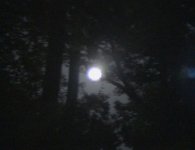
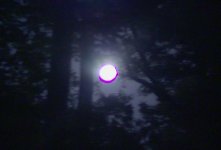
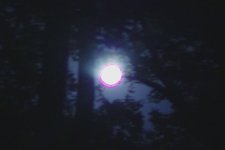
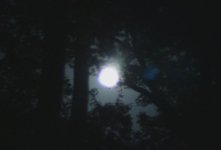
The images below were grabbed from the same record clip. The one on the left was Cine EI mode, the one on the right was Custom mode.
As you can see, there is a pronounced magenta ring around the moon in the Custom shot. These images are cropped.


302_0209.MXF.01_20_22_14.Still001.jpg302_0208.MXF.01_19_41_20.Still001.jpg
 
Basspig - to me the Cine EI version clearly has the same magenta ring but its highly desaturated. Add your LUT to it and I'll wager it gets more saturated. BTW what lens were you using and where was you focus set on this shot?
 
Basspig - to me the Cine EI version clearly has the same magenta ring but its highly desaturated. Add your LUT to it and I'll wager it gets more saturated. BTW what lens were you using and where was you focus set on this shot?

Not necessarily because the difference is what the codec needs to compress. In this case, in CUSTOM mode it deals with much more saturated colors it has to compress.

Basspig, if the examples show two different modes, how can it be from the same clip?
 
Mitakon f/.95 35mm prime lens used to capture that moon. I could see the difference on an external monitor before recording.
 
What were your settings in Custom and what does the cine EI look like after a LUT is applied. What if you get them to have the same amount of saturation.
Just saying Custom could mean a huge range of settings.
what f stop was the lens at and were you focused on the moon or something else?
 
Holy moly. Its horrible in custom mode, but i can also see it in CineEI mode. Its there.

Or is it? Looks like its something else in CineEI. The shape is vastly different. More of a heavenly purple glow, while in custom mode its just a pink blob destroying your footage.
 
The custom settings were pretty much factory defaults. I did have the S-Log3 curve selected as the gamma, but otherwise pretty neutral settings. The lens aperture I am not sure of as it is manual and no metadata in the file. I doubt that I had it wide open for this shot as too much light, but I can't rule it out.

Here they are with REC709 LUTs applied (cropped):

302_0191.00_05_43_06.Still012.jpg302_0191.00_06_21_00.Still011.jpg

With the LUTs, the blue sky became apparent, and some of the magenta fringe has moderated a bit.
 
I don't know what default settings are but if you shot slog3 with a std custom matrix you are over saturating like crazy (at least for post if you extend the contrast ) and problems can result. Its a known No No .

To be honest I haven't seen a genuinely simple clear test here from anyone that shows the so-called red fringing problem . Its all little closeups from some shots they had a problem with and vague statements about the lenses, focus point, settings etc. I can't tell if this is just garden variety CA or something peculiar to this camera. I would like to know though.

If its such a serious problem someone ought to really document it and it shouldn't be hard. I can't tell what the heck is going on with your moon shot but it looks like classic longitudinal green magenta fringing. If your lens was at f.095 I 'd be stunned if you didn't get it. If you shot with an over saturated setting it would be magnified.
 
Back
Top