F3: Sony F3 Resurrection - The New Chapter

Well to me 90% of Slog material looks, well, wooden (aka total crap) - which is a lack of contrast in the skin.

The milky grey look - it may be fashionable for a bit of arthouse but ultimately it is a bit crap!

So to me skin is all.

Recovering highs and lows is the next step and seem to be touched on by my 'flow in post 26.

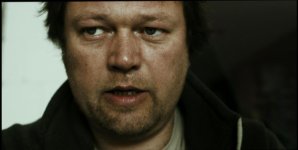
'Man' is to some extent a complex shot in that (if you view the WFM) you will see that there is enough contrast to render the skin 'not wooden' but also those highlights are held - and recovering them through without too much ear burn is not straight-forward.

Ive been selfie shooting this morning and have basically concluded that a lot of my material is under exposed - seems like 55% zebra on the forehead is about right.. I have not been hitting that.

S
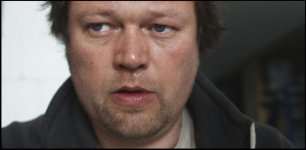
 
try the slog to cineon lut posted on page 1, add node for grade, then add node for arri c log to rec709 and see what you get. post pic. :)
 
sam, if you go from slog to cineon and then apply a simple/standard REC709 lut, the contrast will be normal, log images are NOT to be used without a lut applied
BUT the skin tones should be better than using the gammas from sony
 
There are a few links to images following this process but it's been mostly in development for the F35. But F35 and F3 use exact same slog, so we'd like you to test your images with the cineon LUT for slog and see what you can get out from it, and what you think.

You can download: https://dl.dropboxusercontent.com/u/13362047/F35 slog to cineon.zip then place it in your LUTS folder for resolve.

Create node #1: pick "slog to cineon" LUT
Create node #2: do your grading here
Create node #3: and add "arri c log to REC709" LUT

Main thing is keep your first node as "slog to cineon", and last one as "arri c log to REC709". You can do anything you want in-between.

Give it a whirl, you might be pleasantly surprised. It makes all Davinci controls actually adjust appropriate tones of the image, etc..
 
Seems like many way to get to the same place?

Really I think it is hard to comment unless the images are of very specific things (gretag card) and at very specific exposures.

Rock on Davinci11 which has that lock to card facility..

S
 
sam, if you go from slog to cineon and then apply a simple/standard REC709 lut, the contrast will be normal, log images are NOT to be used without a lut applied

Nonsense. I spend my life correcting LOG images. You do not need a LUT to do this, and absolutely the same if not better results can be achieved by simply using your scopes and understanding how to color correct or use a control surface. LUT's are shortcuts, that's all. You will still need to tweak an image after you apply them.
 
Resolve is not really designed to grade images in a super-hyper-gamma ie. slog, clog, log C, without use of input transform curves. No one said it isn't possible, only that IDT or in this case LUT in absence of IDT for slog makes it a lot easier to get 90% "there" in terms of image.

This thread was not so much about using LUTS to grade/create style as it was to improve controls in Davinci and get better starting point for slog footage.

If anyone here is comfortable grading slog from scratch no one is asking them to change their methods. Many of us just seem to have had a hard time with it and still learning the many ways to get to the end.
 
Last edited:
Yes and No.

I agree these 'homebrew' luts are nothing but 'inspiration'

One should be able to create a LUT that has a proper 709 gamma, contrast and colour, but it would be a very technical thing to do and certainly specific to a camera. Such a LUT would be a great start point to a grade.

Resolve11 will do the colour bit with a single click.

S
 
LUTS are also widely misunderstood with their meaning and uses. Shifting across different encoding modes are perfect reason to use LUT, as is using a destructive LUT for simple viewing log on monitors... there are many types of LUTs...
 
LUT's will never provide you more information than is already in the image. People tend to believe that they are a table with a set of mathematical numbers plugged in to optimize every aspect of an image. They are not. They are curves. The numbers are used to build curves, but they must remain curves in order to have smooth transitions. The problem with LUT's is that they are objective. Your content is not. Once you know how to properly equalize highlights and shadows using your scopes, 90% of the "objective" work is done. Pushing around your mids is where much of the art is. No LUT is ever going to do that in a way that corresponds to the subjective nature of your content. That is what YOU are there for. In the end the amount of time saved, is relatively minor compared to where the real grading happens. Often they can actually create more work because they push the highs and lows off the scale or put the mids in weird places on one image while working fine on another. Thus they need to be corrected back just to start off from the proper place. I have found over the time that is just as easy, often easier to simply start with the base "milky" image, because at least I know where I need to go starting out with an image, which is to begin by adding more contrast in a controlled way.

By the way, most of what Sam is referring to as "wooden" is actually just people who have not properly equalized their hghtlights and shadows. In short, the vast majority of newcomers to Resolve do not know how to read a scope.
 
Last edited:
It is entiely possible to fill the scope (have blacks and whites) and still look wooden.

709 is what 7 stops? and if you shoot with a 10stop camera and fill the scopes the image is not going to represent proper contrast but 7/10 of the 'real' contrast

One needs to ramp the contrast till the slope is 7/7 (aka 1/1 aka linear*) - but this will clip something, highs lows or both.

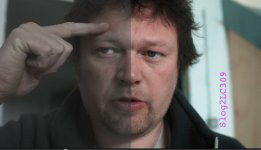
What im trying to do in post 26 is get a linear slope over the skin area of the image and then bring back those other three stops either using secondaries or qualifiers

Im finding layered nodes is giving me the best control to do that.

That does not mean there are not other ways, there are.. it is just finding methods that are fast and repeatable.. even with varying exposure of the idiot camera operator (me)

S

*actually images with real punch are often steeper than this
 
I hear what you are saying but you said it yourself, you spent a lifetime grading log images directly and assumingly so got real good at it. Sure many colorists might laugh at using LUTS but I am not a professional colorist of several years either.

Many of us here don't have or want to spend a life time learning to grade slog. Many of us have graded images from RED and other cameras without a lot of pain, for one reason or another slog from the F3 tends to be a bastard to work with so if an IDT or LUT is going to get us in that direction sooner/faster/easier then that's the path some of us might want to take.

I'm curious to see Sam try the process that MacGregor and now I have outlined in this thread to see how he makes out with it. hint hint :)
 
Last edited:
I have tried it. As far as I can see it is another route to the same ballpark.. (and very useful therefore)

lut.jpg

The main lesson I am taking away from evaluating the footage from my last short is that there is not much latitude and I must nail better exposure and contrast ratios.
(lattitude is bend-ability - not DR)

S
 
Last edited:
Good to hear your feedback.

Regarding exposure, Sam I know you will curse at me but once you calibrate your F3 to a grey card using a waveform monitor and light meter you can know precisely how much light is needed to nail your exposure without having to use your camera and its related tools.
 
Last edited:
It does not take a lifetime to learn how to deal with S-LOG, it takes an afternoon with a colorist.
Filling the scopes is only part of the ballgame, it is where YOU choose to put the bump in the curve that counts when it comes to faces, the mids and the rest.
No LUT is ever going to do that for you, except in a haphazard occasional way.
Witness how many folks are still looking for the "right" LUT curve here.
It is searching for a holy grail that does not exist.
Almost all colorist's create there own curves for a variety of different situations. They are shortcuts because they all know that they will still have to do some correcting behind. That is why it is called "color correction".
In any case, statement like the one I responded to, that
log images are NOT to be used without a lut applied
are pure FUD. I would like to see how this user thinks people correct RAW images, if he finds LOG that difficult?
LOG will create more noise in your shadows and restrict certain aspects of your grey scale. A LUT can expand that scale backwards out, but whatever information has been lost in the LOG process will reman lost. No LUT will ever get it back.

As I said before LUT's are only shortcuts along the way to get you where you need to go. They are not the holy grail some are making them out to be.

As Sam has stated the process of equalizing by hand is another route towards the same goal. My experience remains that most LUT's are more time consuming than not having them applied, because most content makers do not control their shots enough for it to be worthwhile. A serious feature production hands over content so consistent and well exposed that LUT's make sense. They actually work for the vast majority of the shots. However, for the people who need them the most, in less controlled shooting environments they actually can be problematic. The results can be so unpredictable that you end up going on a search and recovery mission to try and get back the values which the LUT produced when you applied it to that shot which just happened to get away while you were busy chatting up the scripte girl at 1am in the morning... in the parking lot of that last amazing location which the director just had to have.
 
Yep all good fun. Now I dont have a WFM (when shooting) Im learning the zones on the SmallHD, the lesson being that it is sensitive to exposure change.

As for the grade - well that is a really interesting process, because, well, it has to meet the emotional journey of the film and seeing the images out of context sort of does not work..

Bottom line - no wood?

four.jpg
 
Back
Top