Sony A7sII Initial Impressions

A few test shots from the yard.
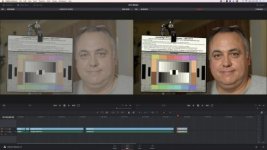
Slog3 with Still color profile. I like how easy it was to grade and also the Still Color Profile seems to be the most accurate as far as colors hitting the target.

Watch it on Youtube in UHD.


Sony Slog3 Profile.jpg

I didn't color correct this only brought the levels in line. This is Slog3 with Still Color Profile.
Bigger image on my Flickr site
 
I thought that this was an interesting comparison: https://www.youtube.com/watch?v=EyLCLVldUHk&feature=youtu.be&t=4m44s

They make no mention of the lenses used, but the focal lengths appear to be pretty close to my eye. I had no idea that OSS lenses (and probably Canon IS lenses) offered so much more stability than Sony's IBIS.

It's nearly impossible to form an opinion on this subject using this video -- especially without any concrete information regarding the lenses that were used at any one moment in time. However, IBIS is not designed to provide, nor can it provide, a gimbal-like experience. The range of motion of the sensor mechanism is just too limited. That being said, the combination of a Sony OSS lens and IBIS provides an impressive amount of stabilization that reduces smaller ranges of movement.
 
It's nearly impossible to form an opinion on this subject using this video -- especially without any concrete information regarding the lenses that were used at any one moment in time. However, IBIS is not designed to provide, nor can it provide, a gimbal-like experience. The range of motion of the sensor mechanism is just too limited. That being said, the combination of a Sony OSS lens and IBIS provides an impressive amount of stabilization that reduces smaller ranges of movement.

Like I had said, some information is missing. I think you're right though, the stabilized lenses have more room to "float" and thus more room to iron out camera shake.
 
Hi All. Just wanted to chime in with some more anecdotal data on overheating. I had not been following chatter on the A7RII before picking up the A7SII, and was not aware that overheating was a "thing". But I soon discovered this when the A7SII mysteriously shut down on an interview shoot. I was not watching the screen so I didn't see the hi temp message. In fact it wasn't until I ran a few tests at home, filming the screen with an iPhone (which is rock solid for really long clips, btw), when I caught it. In my case, the camera succeeds in recording an entire 29 minute clip, then cuts out anywhere from 10-15 minutes into the next clip. This is in a nice, cool 70-degree room with no lights hitting the camera.

As a test, I ran the same setup but allowed for a two-minute break between clips. In that case, I was able to get three full 29-minute recordings and nearly fill up a 64GB card. If your shoots allow for some flexibility, where you might be able to spare a brief coffee break every 29 minutes, this may work for you. As usual your mileage may vary, so I'd test this workaround yourself, preferably under a variety of representative temperature conditions.

A note on battery life during the tests: I have the battery grip, and on two fully-charged batteries, the first two 29-minute recordings left 2 or 3 percent on the initial battery, and a full charge on the remaining one. After the third recording I believe I still had 80+% or so on the remaining battery.

Now, while I have you, a newbie question. I'm upgrading from a hacked 5D2 here (finally!) and numerous C100/300 rentals, so I'm just getting used to Sony operation. I've scanned the manual for this and can't find an answer, and I've done the requisite Googling and can't find it either. Here goes: In movie mode, after you're done filming a clip, the LCD will black out after a certain amount of time. This much I expect. But when you want to film another clip, how do you turn "live view" back on? I know that sounds silly but... I just can't figure out how to do it. Simply hitting the movie record button won't do it. Nothing happens. Hitting the scroll wheel where it says "Disp" doesn't do anything either. In the Canon world obv we've got a dedicated live view button. On the A7SII, I've resorted to hitting the "menu" button, waiting for the menus to display, then hitting "menu" again to dismiss them. That seems to activate live view. This can't be the only way?

Thank you!

Was this in 4K or HD? Thanks for posting your findings!
 
The A7rII arrived today.
And I tried to do the same overheat test with it under the same conditions I did for the A7sII.
This time I have recorded in crop mode (by error, but it would make sense if you want a full sensor read out).
I have been able to record 29.50 minutes, then I immediately pressed the rec button again.
It recorded another 4 minutes and then suddently turned off with a written message "internal temperature high, please allow it to cool".
Weird thing is that (unlike the A7sII) the high temp warning message was never displayed on my screen, it just suddently shut down.

As a side note, I recorded two weddings in 4K recently with the A7sII and everything was flawless. I just took the precaution to stop recording every now and then for very brief moments.


Non-scientific overheating test:
4K 25p 100Mbit. Battery grip with two fully charged batteries, IBIS on, 55mm f1.8 native Zeiss lens, with AF on.
For the most part of the test the camera was firm with a static image, but every now and then I picked it up in my hands and used it like if I were doing handheld video, (look through the viewfinder, AF off, zoom in to manual focus, rack focus, go through the display menu, move the camera around etc.). I had a 64GB card in and my target was to fill it with footage.
The camera has recorded the first 29.50 mins flawlessly, then I immediately pressed the rec button again.
It has recorded another 29.50 mins but around 26 mins an overheat message was displayed. Without turning the camera off, another press of the rec button and it went on recording for 2mins and 38 before shutting down. I waited for a couple of minutes and pushed the rec button again. The camera body was cooler, and it went on recording without overheat message until the card was full (another 10-12 mins of footage). By then the first battery in the grip was completely drained, and the second one was at 87%.
In my opinion it is very acceptable.
I will do the same experiment with the A7Rii in the following days (I don't have the camera yet), just out of curiosity.
 
Even with missing information, it's still a very interesting test. Thanks for posting it.
Agreed.

I tink a lot of it has to do with the form factor and weight... the fs5 being bigger and heavier makes it smoother to hold. He may have been holding the a7s2 with one hand so most of the shake comes from just the wrist.
 
I might be weird or mistaking, but i am under the impression that i can handhold a camera better when it is lighter!!?? But everyone is the opposite of me it seems lol.
 
I might be weird or mistaking, but i am under the impression that i can handhold a camera better when it is lighter!!?? But everyone is the opposite of me it seems lol.

guess not, we're on the same page :)
When I had to shoot with the 7D was a pain, with the A6000 is a breeze.
 
I might be weird or mistaking, but i am under the impression that i can handhold a camera better when it is lighter!!?? But everyone is the opposite of me it seems lol.

Hand holding a smaller camera is certainly less taxing, and the minimized effects of fatigue do make it comparitively easier after long periods. However lighter weight cameras can also suffer greatly from any form of movement - a gust of wind, breathing, even a heartbeat can be enough to trigger jitters. Often it is a tiny, high frequency movement that you don't even notice when looking at the LCD screen, but everything looks like mush when you watch it back later.

Bigger, heavier cameras inherently offer more dampening of movements. Sure, they can be difficult to manage on longer shoots but the pay-off is steadier, smoother images.
 
Hand holding a smaller camera is certainly less taxing, and the minimized effects of fatigue do make it comparitively easier after long periods. However lighter weight cameras can also suffer greatly from any form of movement - a gust of wind, breathing, even a heartbeat can be enough to trigger jitters. Often it is a tiny, high frequency movement that you don't even notice when looking at the LCD screen, but everything looks like mush when you watch it back later.

Bigger, heavier cameras inherently offer more dampening of movements. Sure, they can be difficult to manage on longer shoots but the pay-off is steadier, smoother images.


Yup, this. It's also why you hear many operators still prefer the old ENG cameras over a poorly balanced but modern rig.
 
Anybody else had their camera stopped recording and lost a file? Today my A7SII stopped recording after two long takes back to back. It gave some kind of error message that the file was not written to database or damaged. The first take was 9 minutes long and imported fine to my NLE. The camera stopped recording about 15 minutes into the second take and had that error. I can see the file in the M4ROOT/CLIP folder, but it can't play back or be imported to NLE. First time A7 owner. Never had this happened with another camera.
 
Yes is happend to me on A7S on a Wedding (20 min take corrupted) after the battery is run out.
The only solution was this program http://grauonline.de/cms2/?page_id=5#download.
You must duplicate the filesize before to recovery the whole file (the Demo has only 50% recovery off a file) and maybe the audio is bad, that was in my case.

I would like to confirm that your file corrupted ONLY because your battery ran out. But no other reason other than that?
 
Anybody else had their camera stopped recording and lost a file? Today my A7SII stopped recording after two long takes back to back. It gave some kind of error message that the file was not written to database or damaged. The first take was 9 minutes long and imported fine to my NLE. The camera stopped recording about 15 minutes into the second take and had that error. I can see the file in the M4ROOT/CLIP folder, but it can't play back or be imported to NLE. First time A7 owner. Never had this happened with another camera.


Were you shooting in 4K? Which bitrate? What memory card were you using?
 
Back
Top