Sony A 6300 Overheating is a real problem

Ok chaps...mixed results

Yesterday I ran the a6300 recording 4k video XAVC for 3 and half hours back to back non stop with out any issues.
My only problems were running out of rechargeable battery power and memory on the SDHC card.
The camera was filming a TV screen to stress the codec and generate as much heat as possible.
I did a further 2 tests each approx an hour back to back and the camera kept recording with no temp alarms.

Room temp was 24C / 75F as it was inside there was no wind to assist cooling.

As well as running of an external battery I had also moved the memory card outside of the camera using a cheap SDHC cable extender. I was measuring the temp of the camera using a laser thermometer. The panel behind the sensor in front of the LCD display sat constantly at 32C or 89F.


So I was quite happy a solution had been found, sadly today after an approx hour back to back recording an temp alarm came on. room temp was again 24C / 75F

Considering the battery is now out and the memory card is also outside the camera still gets warm, max temp around the C1 button of 36C / 96F.
I liked this solution as it involved no moving parts or additional battery power.

Anyhow I will move on trying other fixes, I feel moving the card outside has helped but its not 100% reliable yet.
The problem I had while testing is the results are inconsistent. Something strange is going on that makes overheating somewhat random at times. I did a test one day and no overheating then the next day repeated the exact same test with same conditions and setting it would overheat in 17 minutes. it's like chasing your tail! I gave up. Sold the camera and bought a used a7rii. Now thats how I fixed the a6300 overheating issue :-D
 
A6300 fix - buy two A6300, shoot the first 15 mins on first A6300, then the next 15 mins on 2nd A6300 and let the first one cool down, switch and repeat :-)
 
I'm surprise that no one take apart the A6300, and mount the gut of the A6300 into another body
with the CCD Sensor sitting on a big heat sink - a customize A6300.
 
Shooting some gimbal work with the A6300 tomorrow in the morning hoping it doesn't overheat in the florida heat (though I will have the A6000 with me as a back up since I can't trust the A6300 and we dont have time to rig up the FS5 on the ronin)
 
A6300 fix - buy two A6300, shoot the first 15 mins on first A6300, then the next 15 mins on 2nd A6300 and let the first one cool down, switch and repeat :-)

I've got a better idea, place your A6300 in a waterproof enclosure, dunk it in a fish tank of filled with liquid nitrogen, and film through the glass, problem solved.
 
Gentlemen we have a solution.... thou not the most elegant

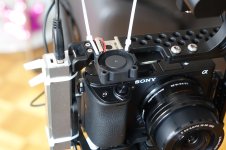
Right this does work but it involves a small fan and usb battery.

DSC01124.JPGDSC01125.JPG

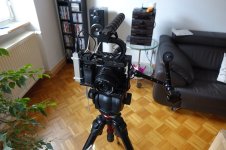
THE FRANKENSTEIN a6300

For long shoots I have my a6300 in a cage, the cage handle holds 2 larger rechargeable batteries giving me 4 times the standard Sony batteries duration.

The fan is a 5v fan designed for computer chip cooling, the battery is one of those 5v USB things used to boost your mobile phone etc. The battery is tie wrapped to the cage as is the fan plus some simple wiring.
This is a experimental rig and I will tidy it up.

I have been testing the camera and running off an external battery and external SDHC card the camera was still overheating after 40-50m min of back to back 4K shooting.
Using a laser thermometer the camera hot spot is beside the C1 button near the shutter button, once it reaches 36 C / 96 F the temp alarm appeared every time. This must be where the video codec chipset lives.

With the small fan running blowing cooler air over that area it hovers at 28 C / 82 F, I ran the camera for 3 hours back to back and the temp held at 28 C / 82 F.
The camera was filming a TV screen to stress the codec, lots of movement etc.
Ambient temp was 23 C / 73 F.

Audio - yes the fan it does make noise but its very quiet, I used a iPhone app that claims to measure dBA, in a quiet room 1 meter from the rig, camera only background noise 40dBA, fan on 43dBA, normal conversation 66 dBA
When using this as a B camera I can't see an issue if I mic the talent with a personal or a directional mic.

USB battery duration.. I got 3 hours from the battery I used though it was not fully charged.

The cost of the above bits fan and USB battery..maybe $20.


NOW - IMPORTANT

I love my a6300 I have taken it out shooting festivals and street stuff usually 5 min video clips and stills with NO issues No rig just a factory fit, its been on a pilot fly for various shots 5- 10 min with no issues.
If you do have overheating issues keep swapping the batteries perhaps every 20 min, a new cooler battery can act as a heat sink to drop the camera body temp.


Its just an issue for longer shoots, the interview that goes horribly wrong and takes 3 hours instead of 15 minutes but thats when it s on a tripod as a B cam so the rig and fan does not bother me.
 
Last edited:
Someone else posted a fan solution for the A6300 overheating about 1 month ago. They had the fan mounted on the back of the rig. I tested that set-up:


It worked pretty well! /s


+++

(Thanks for sharing! Just a small joke, and not aimed at you. Cheers!)
 
It is just a joke video. That is actually my Panasonic. I'm not sure what the noise is from.

Someone posted a picture of a fan mounted on a 15 mm rod on their rig. I figured that was the likely result. :)
 
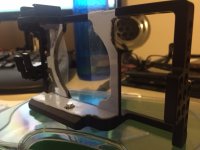
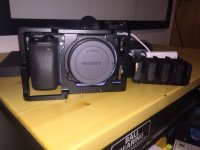
Added thermal pad to the cage..
IMG_2290a.JPGIMG_2291a.JPG

after that, I said to myself.. this is ridiculous, what am I doing... I have a volleyball tomorrow I was going to shoot some footage, my biggest draw back won't be heat. it will be no 5-axis. it might stay at home tomorrow.
 
Yeall these heat sinks just don't due it for me as its extra cost, weight, and size which are all reasons I picked up the A6300. That's just me though so not saying no one should do it. Just a shame though as the heat was an issue giving us multiple warnings throughout our shoot (first one showing up 17 minutes into it).
 
I admire you guys for still going at it with this...lots of different solutions but just no solid fix yet, right?

I just recently sold my second A6300 body, but keeping the first as the camera is just great when it doesn't overheat when using it as is. I am about to put an Atomos Ninja Flame up for sale in a bit (my second one that was for the second camera), but just briefly throwing it out here first if any fellow A6300 user is considering a recorder for their camera.
 
i have today first overhiting in HD mode,after 15 min in sunny 32 C this camera have a big problem..i hope this have problem only in 4K .. i record with external battery
 
Sony really needs to fix this issue. I had the camera for one day, indoors and had the warning pop up.
 
This guy modified his Sony a6000 to fix his over heating issue, I hope he does a video (with sound and graphics) for the a6300

a600o teardown

 
So my brother recorded an hour and a half interview yesterday without an overheat message or shut off inside but under hot lights. He thought he had changed it to HD but hadn't. Did he just got the jackpot with that particular camera?
 
There are a number of variables, room or outdoor temp, even a very gentle breeze or draft from an indoor ceiling fan can make all the difference.
 
This guy modified his Sony a6000 to fix his over heating issue, I hope he does a video (with sound and graphics) for the a6300

a600o teardown

At the very end of the video, he installed software that changed the 30 minute limit. I couldn't quite follow what was happening. Does anybody know anything about this?
 
Based on what I saw he just added a big thermal pad on the back of the board. I'm not one to to do a full camera teardown so this option isn't for me.
 
Back
Top