Michael Carter
Veteran
Well... shouldn't this be in an Audio thread? Maybe, but amongst all that talk of thousand dollar Schoeps mics and I-wish Lectrosonic rigs, something that's more DSLR-centric might get lost. And the DR does seem designed for DSLR shooting... so:
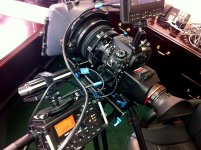
I've shot a bunch of gigs with the unit - here's some ins and outs:
Audio quality is really great, especially for $199 AND free PluralEyes software. I've dropped the files into ProTools and poked around. VERY nice sounding unit. Noise floor is nice & low.
The limiter is dynamite to my ears. Very unobtrusive. It won't totally kill a huge spike, but for general use, it does the job, no pumping, no breathing.
The meters read high. Don't be afraid to push towards the high end. The ability to record a 2nd set of tracks at -6DB is fantastic and gives you a great failsafe. That said, I've never had to use the -6 tracks, but y'know, there always comes a day - this could be a life saver.
Gain seems a little low - I almost always have the dial at 90% or full.
USE THE LINE OUT if your camera has a mic input. On the D7100, I run a scratch track from the DR to the camera, and get useable levels in camera. The DR has a physical wheel for line out volume (THANKS Tascam - not a menu item!) and the 7100 has audio in controls and meters. This not only gives you a clean scratch track without room delay, making synching faster and easier - if you setup your gain properly, your in-camera audio is useable. Not as clean (on my D7100) as the DR, but really pretty good.
THE BAD:
Batteries. Battery life isn't all that bad - rechargeable NIHMs work well. But, after a minute or so, battery meter drops from 3 bars to 2. Then stays at three bars for hours (not hours of constant recording, but your usual set-day). If you grab a set of older batteries that have, say, a half charge - sometimes the thing says "dead batteries" and won't power up. In fact, you can pull batteries that are currently working (with the meter on the low side), put them back in, and get the no-go. So... ALWAYS have extra batteries.
I'm guessing the battery meter and acceptance could be fixed in firmware. But a great solution (if you don't have a pinch rig or pro power setup) is a $30 Anker USB battery (the DR uses micro USB as a power input). Mounting it can be a problem, but after a 6 hour shoot day, my Anker still shows 4 bars. So load the DR up with NIHMs or alkalines, attach the Anker, and you're covered.
NOTES:
USE THE STOP BUTTON - if you don't want to confuse the heck out of Pluraleyes and editors. To record, pressing the red button puts you in recording standby, press again to record. Press again doesn't stop - it pauses. Do that three or 4 times, and instead of 4 tracks, you get one long track. So your slates will be throughout the track, not at the head of each separate track.
And, the two-touch recording, while not unusual, can be confusing on a busy shoot (am I recording?!??!) Make it a habit to watch the counter. I'm generally "Settle in please", hit camera record, hit the red button twice, wait for the counter to go from 00 to 01, and call "rolling" or "action". If you're running both camera and sound, it may be wise to use the same sequence - roll camera, roll sound, call "cut", cut sound, cut camera - in that scenario your footage will be head and tail a few frames longer than your audio. PluralEyes at least makes more visual sense to me with that habit.
(I don't know if there's a standard on-set way to do this - I assume the standard is somebody else is hitting the audio buttons though...)
LCD BACKLIGHT:
You can set the shutoff time for the backlight - I assume auto shutoff saves some battery power. Just tap the "enter" button to light it back up - this is safe, doesn't launch menus, etc.
FORMATTING CARDS:
Myself - and many web posters - have never successfully done the "full format". it spins and spins its graphics until you freak out 5 minutes later, pull the batteries and card, and try again. The "simple format" works just fine and takes seconds.
CARDS!!!
I bet you have a bunch of legacy slow-speed cards piled up somewhere - they work fine in the DR.
FIRMWARE
Firmware updates are quick and easy. They say (as everyone does) to not be on battery power... but since you're downloading firmware, just plug into your USB port for power.
The USB port also works for data transfer - I had a client with a dead card reader, and the files moved reasonably fast via USB to his system.
That's all I've got, feel free to add more scoop below - overall - this thing is kickass for the $$.
I've shot a bunch of gigs with the unit - here's some ins and outs:
Audio quality is really great, especially for $199 AND free PluralEyes software. I've dropped the files into ProTools and poked around. VERY nice sounding unit. Noise floor is nice & low.
The limiter is dynamite to my ears. Very unobtrusive. It won't totally kill a huge spike, but for general use, it does the job, no pumping, no breathing.
The meters read high. Don't be afraid to push towards the high end. The ability to record a 2nd set of tracks at -6DB is fantastic and gives you a great failsafe. That said, I've never had to use the -6 tracks, but y'know, there always comes a day - this could be a life saver.
Gain seems a little low - I almost always have the dial at 90% or full.
USE THE LINE OUT if your camera has a mic input. On the D7100, I run a scratch track from the DR to the camera, and get useable levels in camera. The DR has a physical wheel for line out volume (THANKS Tascam - not a menu item!) and the 7100 has audio in controls and meters. This not only gives you a clean scratch track without room delay, making synching faster and easier - if you setup your gain properly, your in-camera audio is useable. Not as clean (on my D7100) as the DR, but really pretty good.
THE BAD:
Batteries. Battery life isn't all that bad - rechargeable NIHMs work well. But, after a minute or so, battery meter drops from 3 bars to 2. Then stays at three bars for hours (not hours of constant recording, but your usual set-day). If you grab a set of older batteries that have, say, a half charge - sometimes the thing says "dead batteries" and won't power up. In fact, you can pull batteries that are currently working (with the meter on the low side), put them back in, and get the no-go. So... ALWAYS have extra batteries.
I'm guessing the battery meter and acceptance could be fixed in firmware. But a great solution (if you don't have a pinch rig or pro power setup) is a $30 Anker USB battery (the DR uses micro USB as a power input). Mounting it can be a problem, but after a 6 hour shoot day, my Anker still shows 4 bars. So load the DR up with NIHMs or alkalines, attach the Anker, and you're covered.
NOTES:
USE THE STOP BUTTON - if you don't want to confuse the heck out of Pluraleyes and editors. To record, pressing the red button puts you in recording standby, press again to record. Press again doesn't stop - it pauses. Do that three or 4 times, and instead of 4 tracks, you get one long track. So your slates will be throughout the track, not at the head of each separate track.
And, the two-touch recording, while not unusual, can be confusing on a busy shoot (am I recording?!??!) Make it a habit to watch the counter. I'm generally "Settle in please", hit camera record, hit the red button twice, wait for the counter to go from 00 to 01, and call "rolling" or "action". If you're running both camera and sound, it may be wise to use the same sequence - roll camera, roll sound, call "cut", cut sound, cut camera - in that scenario your footage will be head and tail a few frames longer than your audio. PluralEyes at least makes more visual sense to me with that habit.
(I don't know if there's a standard on-set way to do this - I assume the standard is somebody else is hitting the audio buttons though...)
LCD BACKLIGHT:
You can set the shutoff time for the backlight - I assume auto shutoff saves some battery power. Just tap the "enter" button to light it back up - this is safe, doesn't launch menus, etc.
FORMATTING CARDS:
Myself - and many web posters - have never successfully done the "full format". it spins and spins its graphics until you freak out 5 minutes later, pull the batteries and card, and try again. The "simple format" works just fine and takes seconds.
CARDS!!!
I bet you have a bunch of legacy slow-speed cards piled up somewhere - they work fine in the DR.
FIRMWARE
Firmware updates are quick and easy. They say (as everyone does) to not be on battery power... but since you're downloading firmware, just plug into your USB port for power.
The USB port also works for data transfer - I had a client with a dead card reader, and the files moved reasonably fast via USB to his system.
That's all I've got, feel free to add more scoop below - overall - this thing is kickass for the $$.


 )
)