Solution for pulsing I-frames?

I think we've used the term "pulse" to describe two different things. I thought this thread started off being about the "pulse" seen in AVCHD Native 24p/25p mode, which seems to always appear right before an I frame as either a huge P frame or an extra I frame devoid of subsequent P frames, and is apparently a bug in the CODEC. The pulsing you're describing seems to be a normal result of a limited CODEC. Maybe I've misunderstood.

Chris

Or maybe I got it wrong. Either way, it seems like the thread is going back and forth in a somewhat confused way. I hope my posts helped clarify and did not add to any confusion.

In short, there are three things that might be considered "pulsing."

1) The visual "pulsing" we see in the actual image. This is, as you say, a CODEC artifact.
2) The measured P frame pulses that spike to much greater values than the previous P frames and often even the I frames and can be seen as the last P frame in a GOP.
3) The measured I frame pulses that spike to extraordinarily large sizes and sometimes show up as an extra I frame (back to back I frames).

Items 2 and 3 seems to be associated to the 24P hack that sidesteps the 60i wrapper. One or both of these are implicated in causing recording failures of high detailed and highly static scenes.

Item 1 seems to occur regardless of the wrapper and is usually seen in subtle fine detail in the middle tones or on detailed edges. Shoot a static shot of a textured wall if you want to be sure to see it.
 
Or maybe I got it wrong. Either way, it seems like the thread is going back and forth in a somewhat confused way. I hope my posts helped clarify and did not add to any confusion.

In short, there are three things that might be considered "pulsing."

1) The visual "pulsing" we see in the actual image. This is, as you say, a CODEC artifact.
2) The measured P frame pulses that spike to much greater values than the previous P frames and often even the I frames and can be seen as the last P frame in a GOP.
3) The measured I frame pulses that spike to extraordinarily large sizes and sometimes show up as an extra I frame (back to back I frames).

Items 2 and 3 seems to be associated to the 24P hack that sidesteps the 60i wrapper. One or both of these are implicated in causing recording failures of high detailed and highly static scenes.

Item 1 seems to occur regardless of the wrapper and is usually seen in subtle fine detail in the middle tones or on detailed edges. Shoot a static shot of a textured wall if you want to be sure to see it.
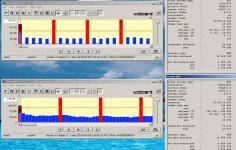
Yeah, let's standardize on terminology then.
1) Pulsing.
2), 3) Rogue/spiked I or P frames

The solution OP was looking for is rogue frames leading to camera freezing. I think their appearance was fairly conclusively linked to 24p/25p Native patch and high bitrates ("high" determined by the card used).

Now, I don't believe I've seen a StreamEye analisys screenshot of "Pulsing" footage yet. I would think that it should consist of a relatively small I frames and relatively large P frames. Can someone post?
 
Yeah, let's standardize on terminology then.
1) Pulsing.
2), 3) Rogue/spiked I or P frames

The solution OP was looking for is rogue frames leading to camera freezing. I think their appearance was fairly conclusively linked to 24p/25p Native patch and high bitrates ("high" determined by the card used).

Now, I don't believe I've seen a StreamEye analisys screenshot of "Pulsing" footage yet. I would think that it should consist of a relatively small I frames and relatively large P frames. Can someone post?

I can post a clip since I recorded about a dozen this morning. But I won't be able to run them through StreamEye until tonight. My bet is that we'll see I frames that are 4-5 times the size of the P frames.
 
My bet is that we'll see I frames that are 4-5 times the size of the P frames.
Oh, so your expectations are exact opposite of mine. Alright, I'm intrigued ... Go ahead and post a clip somewhere and I'll run it through StreamEye.
 
Last edited:
Not quite true that it's related to high bit rates. I've gotten the rogue frame when all I set was the Native 24p patch (the data rates were left at factory defaults). I can get rogue frames no matter how I set anything else as long as Native 24p is checked. I tried all sorts of variations of bitrates, GOP settings, etc....

Here is what I got when I only set Native 24p and nothing else:


Chris
 
Oh, so your expectations are exact opposite of mine. Alright, I'm intrigued ... Go ahead and post a clip somewhere and I'll run it through StreamEye.

I'm uploading two clips to my website now. You can find them here:

http://www.jayandwanda.com/gh13/

00025.mts and 00026.mts

These use the "c" settings (Ptool "c"). One is 1080 24p (no 60i) and the other is a 720p. GOP is 12 for the 1080 24p and 10 for the 720p. The upload should finish by 12:45P Mountain Standard time - about fifteen minutes from now.

Interestingly, it is easier to see the pulsing when watching the clip on my HDTV via an HDMI connection to my camera. When played back on my PC, the pulsing is muck harder to see. I wonder if better playback software does a better job of displaying the image. There's no reason to assume that the camera playback is optimal.
 
Not quite true that it's related to high bit rates. I've gotten the rogue frame when all I set was the Native 24p patch (the data rates were left at factory defaults). I can get rogue frames no matter how I set anything else as long as Native 24p is checked. I tried all sorts of variations of bitrates, GOP settings, etc....

Here is what I got when I only set Native 24p and nothing else:


Chris
Chris you right, what I meant and should have said is that camera freezing is a result of native patch and high bitrates. Because very large rogue P or I frames appear as soon as you apply native patch, it is reasonable to assume that when bitrate is juiced up at the same time they become so monstrous as to cause buffer overflow and we all know how that usually ends ;)
 
I'm uploading two clips to my website now. You can find them here:

http://www.jayandwanda.com/gh13/

00025.mts and 00026.mts

These use the "c" settings (Ptool "c"). One is 1080 24p (no 60i) and the other is a 720p. GOP is 12 for the 1080 24p and 10 for the 720p. The upload should finish by 12:45P Mountain Standard time - about fifteen minutes from now.
You were right (see attachment). Now, I will admit this makes little sense to me.
 

Attachments

  • wturber pulsing footage streameye.jpg
    wturber pulsing footage streameye.jpg
    105.6 KB · Views: 0
I did some more testing. The results are in the AVCHD Research thread in the tester sub-forum. It's pretty depressing - Native 24p mode looks pretty broken. I can manifest all forms of failures now and get write errors easily even when running 50,52,60, 24pN on a class 10 card. It's just a matter of having lots of static detail.

Chris
 
Kinda late to the game to mention this but I noticed the dark-area pulsing when I was running my camera with the Native 24p enabled. Without it, I don't have the dark area pulsing.
 
I did some more testing. The results are in the AVCHD Research thread in the tester sub-forum. It's pretty depressing - Native 24p mode looks pretty broken. I can manifest all forms of failures now and get write errors easily even when running 50,52,60, 24pN on a class 10 card. It's just a matter of having lots of static detail.

Chris

Strange. I have 24pN on mine with a class 6 16GB Patriot card with no troubles. When I used C settings I was getting write errors all the time. I tried lower settings suggested for 720p but was still too high. I then changed to B settings and it worked. I just got back from shooting downtown for 3 hours without one write error. I will go through the stuff tomorrow but my first testing showed good results.
 
Back
Top