Solution for pulsing I-frames?

I try

It was a recording of a theater show. Light is low, gh-1 set on 800 iso, manual 50mm f/1.8 lens set at 1.8, SH (720 50p)**, camera on a tripod

At the back of the actor there were some curtains, and curtains have "waves" (don't know the word,... look at your house curtains, they have "waves") and these waves generate shadows.

So in the backgrounds there were some small shadows... going very near to a 50" fullhd screen I could see these shadows changing from mud/not shown to very detailed in 26/27 frame and then back to mud/not shown in 1 frame..... bigger shadows doesn't show such behaviour... also actors doesn't show this behaviour.

So, to me, it seems a problem with static little defined objects...

If you tell me which software to use, I may try to cut a couple of seconds from the avchd stream but the software should not recompress the stream...

**: I just upped avchd bitrate

I try to attach 2 crops that are about 1 second from each other... I had to use jpg,...

the more detailed is on the right, you can see more shadows... or waves... :-)

In the link to the post below you can see the pulsing (NTSC version), resulting from more bandwidth on p-frames but the same old bandwith on the I frames. Therefore, the p-frames push the IQ up until the next (low bandwidth) I-frame comes up which suddenly degrades the image again (posted a screenshot of this earlier in this post):

http://www.dvxuser.com/V6/showthread...54#post2019854
 
Last edited:
In the link to the post below you can see the pulsing (NTSC version), resulting from more bandwidth on p-frames but the same old bandwith on the I frames. Therefore, the p-frames push the IQ up until the next (low bandwidth) I-frame comes up which suddenly degrades the image again (posted a screenshot of this earlier in this post):

http://www.dvxuser.com/V6/showthread...54#post2019854

Yes, it is the same pulsing I get. My gh.1 is a pal one. I got pulsing also this evening in another theater show, also on background curtains details but this time there was light. No visible pulsing/artifacts on foreground elements, both static or moving...
 
Were you guys changing the GOP settings anyways, or is just an attempt to fix the pulsing? I've been using C settings with native 24p and have never touched the GOP length, haven't seen any pulsing.
 
Were you guys changing the GOP settings anyways, or is just an attempt to fix the pulsing? I've been using C settings with native 24p and have never touched the GOP length, haven't seen any pulsing.

I didn't change the GOP. But Vitaliy says, for native 24p the ptool changes GOP automatically to 12.
 
Does somebody with NTSC model has problem with pulsing?
Thanks for your research jobless. I have noticed pulsing at 24pN, in B and C settings, but only when I hold a shot steady, and at dense foliage. This also sometimes causes my Panasonic Class 10 card to freeze. When I uncheck the Native 24p, I don't get pulsing or card freezing. But the only drawback is that when I remove pulldown in post to get back to progressive frames, the smoothness on edges of objects is not as good as 24pN.

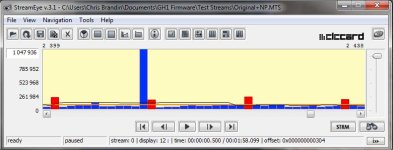
For those that have not seen the phenomenon, pulsing happens once about every second, and if you play frame by frame, you will notice that once every second, a frame is poorly compressed. That poorly compressed frame gives the illusion of pulsing.
 
For the pulsing have you tried a setting without a big difference between mid and high bitrates. Maybe a 50, 55, 60 instead of a 50, 52,60. 60, 65, 70 instead of a 60,65,70 etc
 
I've been testing several modes to see if pulsing can ever be eliminated if Native 24p is checked.

The attached image shows what happens if all you check is Native 24p (nothing else was changed, so otherwise this is factory deault FHD/AVCHD).


I tried different GOP settings, etc... It looks like the pulse is caused by native 24p/25p and that setting alone.

Chris
 

Attachments

  • Native24pOnly.jpg
    Native24pOnly.jpg
    45.2 KB · Views: 0
PULSE...PULSE...PULSE....that's all I see now is PULSE...PULSE...PULSE.

What's the deal!?!? How come I never noticed this before?? I even went back to old footy from months ago- (way PRE-GH13) days- factory firmware 720p60 tripod shot of mountain ...PULSE...PULSE...PULSE...

Has anyone anywhere else in this myriad of hack pages found any resolution to this??

STOP THE PULSE!!!! and please make me stop staring at monitors from 2.75 inches!! PLEASE---
 
I dunno what you guys are doing but I literally scrubbed frame by frame of some static footage and CANNOT locate the pulsing in my footage.
 
I dunno what you guys are doing but I literally scrubbed frame by frame of some static footage and CANNOT locate the pulsing in my footage.

I can't really even see it 'scrubbing' you just have to let it run and see...it's almost like in dark areas- I see what looks like a fine grain- but on closer look... it has a beat to it...a pulse- about every second..

I see it both in QT and in FCP timeline
 
...I'm thinking about making every single one of my pieces....(a house remix)

boom-tis, boom-tis, boom-tis, boom-tis.....
 
I had a hell of a time seeing it too. The guys gave me some screenshots that showed it and then I could see it. It's pretty subtle, though. With testing, however, I've never been able to make it foillow any sort of beat - for me it's been irregular.

Chris
 
I don't understand what the pulsing is. Could someone post an example, maybe frame without and a frame with it?

EDIT: Nevermind. I just saw it in Oedipax's anamorphic video. Interesting. First time I've ever seen it in anything. Some kind of issue with no being able to handle too much detail for a long time.

EDIT 2: This is probably related to 24pN not working properly and causing camera freezes. These could be those frames that are suddenly recorded with too much information causing the camera to stop recording, error out, and/or freeze. Has this "pulsing" occurred with any non 24pN footage?
 
Last edited:
I don't know but some people see lots and lots of mud, others lots and lots of pulsing, others lots and lots of UFOs, a friend of mine lots and lots of ghosts... While others are shooting great stuff with the GH1 AND NOW THE GH13. LOL!
 
Last edited:
Back
Top