
Navigation
Install the app
How to install the app on iOS
Follow along with the video below to see how to install our site as a web app on your home screen.
Note: This feature may not be available in some browsers.
More options
You are using an out of date browser. It may not display this or other websites correctly.
You should upgrade or use an alternative browser.
You should upgrade or use an alternative browser.
smallHD DP6 calibration
- Thread starter jgardner
- Start date
janreichle
Member
I updated to V2.1 last FRI and this was not a good move. The monitor did not display the AF100's signal via HDMI and instead read UN-SUPPORTED on a blue screen and sometimes wold show figital noise. This was not fun at all on set. Between takes I re-downloaded V2.1 and re-updated the firmware from a different USB stick to the initial one. Still the same problem and I had to keep shooting without the DP6. Finally @ lunch I downloaded V2.0 again and updated to the older firmware and presto, the DP6 was displaying the AF100 via HDMI. Wait 'till they fix the bugs!

heavyG
Underwater Giraffe Member
I updated to V2.1 last FRI and this was not a good move. The monitor did not display the AF100's signal via HDMI and instead read UN-SUPPORTED on a blue screen and sometimes wold show figital noise. This was not fun at all on set. Between takes I re-downloaded V2.1 and re-updated the firmware from a different USB stick to the initial one. Still the same problem and I had to keep shooting without the DP6. Finally @ lunch I downloaded V2.0 again and updated to the older firmware and presto, the DP6 was displaying the AF100 via HDMI. Wait 'till they fix the bugs!
So I hope you learned a valuable lesson… Something about taking untested equipment / firmware onto a job?
Hi guys.. I received this on the 24th from Small in reference to the 2.1 firmware issues. Have any of you tried this patch as a solution or was it the 'problem'?
"Hi Folks,
Thanks to a number of you, we have found a few bugs in the DP6 Firmware V2.1 that was just released yesterday. These include problems in both the Canon and Nikon Presets. This latest Update should take care of those issues."
Download:
http://www.smallhd.com/DP6_Firmware/SMALLHD_DP6_OSV2_1.bin
Firmware Update Procedure:
http://www.smallhd.com/s.nl/ctype.KB/it.I/id.1201/KB.747/.f?category=36
Thanks for your understanding!
SmallHD Support
"Hi Folks,
Thanks to a number of you, we have found a few bugs in the DP6 Firmware V2.1 that was just released yesterday. These include problems in both the Canon and Nikon Presets. This latest Update should take care of those issues."
Download:
http://www.smallhd.com/DP6_Firmware/SMALLHD_DP6_OSV2_1.bin
Firmware Update Procedure:
http://www.smallhd.com/s.nl/ctype.KB/it.I/id.1201/KB.747/.f?category=36
Thanks for your understanding!
SmallHD Support

Phenixone
Well-known member
I received the same message. They were very reactive on this bug, but I would have loved to see a version increment in order to distinguish the bad version from the good one. Something like v2.1.1 or SMALLHD_DP6_OSC2_1_1.bin
I downloaded both files and was worried about which version I have. I guess I'll have to re download and do it again.
I downloaded both files and was worried about which version I have. I guess I'll have to re download and do it again.
hi friends,
i have a DP6 aswell. Has anyone calibrated theirs with a spectroradiometer? I plan on trying to calibrate mine tonight to REC709 standards since the new firmware addresses better color performance supposibly. I plan on using 2 sources to the DP6. My camera (canon xh-a1) has built in color bars and from what i remember before the smallhd dp6 clipped below black while the canon lcd showed below black. maybe the new firmware addresses that. Also i was going to use an LG bluray player with component out and hdmi out and use the AVS disk test patterns to check sharpness, color , grey scale , etc.
I should borrow my friends pattern generator but i dont think the smallhd dp6 will show much a difference than using my sources.
Anyone know the percentage of color bars on the canon camera , they use the standard 75% right?
Thanks,
Chris
Ill report tomorrow my findings , and will have a pdf. to view
i have a DP6 aswell. Has anyone calibrated theirs with a spectroradiometer? I plan on trying to calibrate mine tonight to REC709 standards since the new firmware addresses better color performance supposibly. I plan on using 2 sources to the DP6. My camera (canon xh-a1) has built in color bars and from what i remember before the smallhd dp6 clipped below black while the canon lcd showed below black. maybe the new firmware addresses that. Also i was going to use an LG bluray player with component out and hdmi out and use the AVS disk test patterns to check sharpness, color , grey scale , etc.
I should borrow my friends pattern generator but i dont think the smallhd dp6 will show much a difference than using my sources.
Anyone know the percentage of color bars on the canon camera , they use the standard 75% right?
Thanks,
Chris
Ill report tomorrow my findings , and will have a pdf. to view
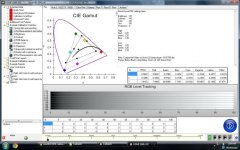
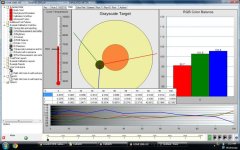
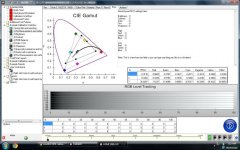
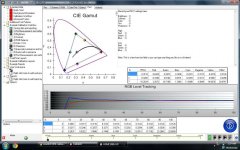
here is the data i measured calibrating the dp6 using my eyeone pro. definitely an improvement on the white balance. I dont have a copy of the prewhite balance but it was really off. This was the best post correction i could get using the gain and offset controls. The pre white balance pushed GREEN alot , i had to use the blue gain controls to get more blue in the higher white range.
The dp6 passed below black using component out from the lg bluray player. i used the avs709 disc. didnt measure anything using hdmi because i dont have an extra cable. i thought i had an extra one lyin around.
i hope they can fix the color range but im having doubts that software will be able to change this. if they do then that would be great. The color gamut isnt very wide. Does anyone feel that being a problem?
i attached 3 calibration sheets of our reference monitor which did alot better tracking REC709
Chris
The dp6 passed below black using component out from the lg bluray player. i used the avs709 disc. didnt measure anything using hdmi because i dont have an extra cable. i thought i had an extra one lyin around.
i hope they can fix the color range but im having doubts that software will be able to change this. if they do then that would be great. The color gamut isnt very wide. Does anyone feel that being a problem?
i attached 3 calibration sheets of our reference monitor which did alot better tracking REC709
Chris
Attachments
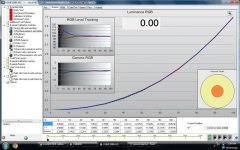
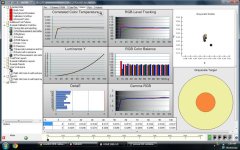
Last edited:
looked at the monitor this morning and i really like how the white balance turned out after calibrating it. i was flipping through the white balance presets on my cam and couldnt believe how much better the whites were , when i set to white balance warm or cool.
some ideas for the next firmware should be some settings for wider color gamuts.
all in all , its still a great piece. and they continue to bring out new firmware very often. Thats a plus!!!
Chris
some ideas for the next firmware should be some settings for wider color gamuts.
all in all , its still a great piece. and they continue to bring out new firmware very often. Thats a plus!!!
Chris

krick
Well-known member
Hi guys,
I got a DP6 recently and I have the same problem with colors too. The colors are way off, on the yellow side. I like the monitor and I tried to let it warm up but nothing. The colors are so off that I need to check on the DSLR LCD. When the client wnats to check the picture, I use the DSLR LCD too because the colors on the DP6 are off.
Any help or new settings would be appreciated.
Thanks!
I got a DP6 recently and I have the same problem with colors too. The colors are way off, on the yellow side. I like the monitor and I tried to let it warm up but nothing. The colors are so off that I need to check on the DSLR LCD. When the client wnats to check the picture, I use the DSLR LCD too because the colors on the DP6 are off.
Any help or new settings would be appreciated.
Thanks!
Brian@202020
Veteran
Look at my settings on the 2nd page of this thread.Hi guys,I got a DP6 recently and I have the same problem with colors too. The colors are way off, on the yellow side. I like the monitor and I tried to let it warm up but nothing. The colors are so off that I need to check on the DSLR LCD. When the client wnats to check the picture, I use the DSLR LCD too because the colors on the DP6 are off.Any help or new settings would be appreciated.Thanks!
krick
Well-known member
Hi Brian,I tried but i still end up with a yellowish picture. I'll try to post pictures to show how off the image is. I understand that it could be something i could fix in the settings, but so far no success.CedLook at my settings on the 2nd page of this thread.
Brian@202020
Veteran
The best way I've found to calibrate the DP6 is to record some footage with lots of colors, put the files on a computer with a color calibrated monitor, put the card back in the camera, bring up the same image paused on both the calibrated computer monitor and the DP6 via the camera, then with the DP6 setting make it look as close as possible to the computer monitor. Spend 30-60 minutes doing this with several different clips, just to be sure, and writing down the DP6 settings when done, just in case they ever get changed, you never tweak the setting again. The setting I wrote on the 2nd page of this thread were created like that, maybe every monitor is different, but for my DP6 those settings are spot on.
Just took delivery of a DP4. I think the color is quite off. Like some have already noticed, it's quite warm to start with and the RGB setting doesn't seem to help much.
I calibrate by using a hdmi out to a TV logic grade 1 monitor and the SmallHD concurrently. The monitor seem to have a problem displaying green properly. A green field is always rendered out with a yellowish tone.
Increasing the Blue gain only helps to cool down the temperature, the leaves and grass is still looking yellowish. I don't think I will ever see green grass shooting with this monitor.
I calibrate by using a hdmi out to a TV logic grade 1 monitor and the SmallHD concurrently. The monitor seem to have a problem displaying green properly. A green field is always rendered out with a yellowish tone.
Increasing the Blue gain only helps to cool down the temperature, the leaves and grass is still looking yellowish. I don't think I will ever see green grass shooting with this monitor.
krick
Well-known member
I shot a greenscreen yesterday so that could be it. We almost didn't use the DP6 because of the colors.Just took delivery of a DP4. I think the color is quite off. Like some have already noticed, it's quite warm to start with and the RGB setting doesn't seem to help much.I calibrate by using a hdmi out to a TV logic grade 1 monitor and the SmallHD concurrently. The monitor seem to have a problem displaying green properly. A green field is always rendered out with a yellowish tone.Increasing the Blue gain only helps to cool down the temperature, the leaves and grass is still looking yellowish. I don't think I will ever see green grass shooting with this monitor.