Shooting greenscreen with my 7D - Any advices ?

Twista

New member
Hello!
Im about to have a greenscrenshooting with my Canon 7D. Im quite skilled with postproduction software like After Effects but unexperienced with greenscreenshootings. Therefore I have a few questions to the community. The first questions concerning the camera:

1. What shuttersettings do you suggest ? I think 1/100 would be fine to reduce motion blurring.
2. What ISO value do you recommend ?
3. Which white balance settings do you suggest? On my last test my impression was that i get better result with a "warmer" WB setting. Could have been a coincidence though.
4. Which pictureprofile should I use ? Most of the time i shoot with neutral picture settings..since i don't want any in-camera picture "improvements" and get more dynamic range when grading the footage in post production. According to some reports about shooting green/bluescreen though..some people get better keying results using i.e. landscape settings where the colors (like green) are more saturaded. What do you think ?

As for the lightning:

Our lighting equimpent consits of 6 Arri 800 W bulbs 3200 K, 4 softboxes, 1 HMI 5600 light and 2 light bouncers. Which lighting setup do you suggest with this gear do get the best keying results ? For me its very importang to avoid shadows in the foot area. The whole body of the subject is being filmed ..and I always had problems with keying when they where shadows below the ankles!

So thats it for now...can't wait to get some tips
icon_smile.gif


Cheers

ps: we will hardly get any other gear for the shooting. so please only give me tips/advices conerning my actual equipment.
 
Last edited:
Having done 2 green screen shoots with the 7d my advice is don't.

The 4:2:0 color space CAN be keyed, but it is a *****.

My .02
 
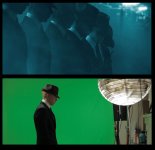
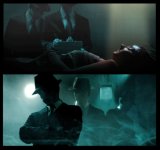
I've done a lot of keying on Rise of the Beast with the Rebel. It's actually very easy to key. Here's some before and afters to help you out
154940_168147006555493_104346386268889_300936_3918494_n.jpg

163490_168146963222164_104346386268889_300935_6309160_n.jpg


74300_159527827417411_104346386268889_261806_7143035_n.jpg

149065_159527814084079_104346386268889_261805_6575057_n.jpg


Both of those were shot with Philip Bloom's picture settings. I think my whitebalance was a little too warm on the second shot. Shutter speed for these was 1/50 and the ISO was less than 800. Hope that helps
 
cool! i'd like to see the actual video but the stills are pretty convincing! so you're suggesting the use of neutral white balance ? what light setup/equipment did you use ?
 
I'll be using those two shots in the trailer, so I'll let you know when that's out.
The car shot was just natural sunlight. The second shot was light with the "Home Depot Kit". I tried running the whitebalance a little warm and didn't like it as much. The car shot was a true manual WB. That's the same greenscreen in both shots, so that should give you an idea how important the WB part is. Just do a manual WB and you should be good
 
Lol, El Director, what AREN'T you doing in LEAP? Your responsibilities list is practically everything except for actor.
 
I've done several long posts here with tips for canon greenscreening. I find it tough to get an edge that doesn't look amateurish.

Here are some tips;

Frame grabs - though frame grabs are pretty meaningless, you really need to see footage in motion to judge it - look at the hard line in the guy's collar a few posts up, that stuff in motion is usually a real giveaway:
grab3.jpggrab2.jpg

And the final video:

 
Excellent video! Really enjoyed. I have found with my 7D that if I use keylight in After Effects it works really well. The thing to watch for is things like thin hair flipping around. The problem with 4:2:0 is that at the edges of different colored items, you get color contamination because of the chroma sub-sampling. However, as you will see with most keying algorithms you can adjust how the edge is handled and do a little to get rid of that color contamination. I've had results that looked good as well, and others that were just not that good. Just make sure you have that greenscreen far enough that you don't get the green lighting on your subject either :)

Experimenting with a setup is going to be your best bet. That way, you can see if your subject is easy to key. With one girls hair I had in one shot, it was SO difficult to do I had to resort to all kinds of tricks to make it look okay.
 
Lol, El Director, what AREN'T you doing in LEAP? Your responsibilities list is practically everything except for actor.
That's pretty accurate. I love doing the jobs and want to get better at them, so I continue do as such.
 
I did some green screen key with the 7d and I ended up shooting with the landscape profile with sharpness off.

This gave me a more contrast between the talent and the Green screen. The subject will pop out of the background.
You can shoot flat but your key will look "flat" .If you still choose to shoot flat it would be a good idea to add some contrast before you key. It's something you can try for yourself....before a paid gig :)
After you have pulled a nice key , you can colorcorrect and grade the subject.

Even though the HMC 150 is 4 2 0 , I find that its does a better job shooting greenscreen footage compared to my 7d.
 
Just entered the same boat - shooting green screen.

Must say that using FCP was close to a disaster. It would clear everything except that what was near them, pixulate, and if they had their hand on their hips, wouldn't key the green inside of them. Using all the adjustment filters didn't make it better ( and the purple outline is almost a joke). I entered the footage into AE and wow, what a difference. It pulled a great key and if there was a little halo left, adding a choker filter took it out. I couldn't imagine pulling a key from FCP alone.

Apple really needs to come strong with an update, they've been resting on their previous achievement for a little to long now.
 
FCP's keyer is really pretty rough (may be great on RED footage for all I know..) But you can get an older version of AE on eBay if funds are tight and have keylight which works pretty well.

Problem with keying canon footage is the crazy aliasing. I'd expect the HMC 150 to be easier to key as the sensor is designed for video, not a stills sensor being crushed down to size.

In the video I posted, some of the shots of the girl were actually footage made from motor-drive stills, shot as small-fine JPEGS, cropped and reduced to 1080, and exported as ProRez. That stuff keyed like buttah. No aliasing or artifacts. Beautiful.
 
4917599921_10081dcc28_b.jpg


Go with Keylight in After Effects. Made this stuff very easy to key and I am by no means an expert at green screen work.
 
Just entered the same boat - shooting green screen.

Must say that using FCP was close to a disaster. It would clear everything except that what was near them, pixulate, and if they had their hand on their hips, wouldn't key the green inside of them. Using all the adjustment filters didn't make it better ( and the purple outline is almost a joke). I entered the footage into AE and wow, what a difference. It pulled a great key and if there was a little halo left, adding a choker filter took it out. I couldn't imagine pulling a key from FCP alone.

Apple really needs to come strong with an update, they've been resting on their previous achievement for a little to long now.

Their keying tools can be better, but FCP is an NLE. You really want a compositing program to handle those tasks.
 
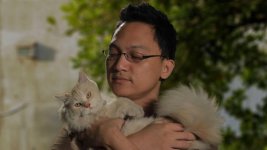
This thread got me to work and do some tests with my 7D and 800 watt redheads last night, so I got my bro and his cat nafnaf to be my test subjects, we didn't get it right the first try and here are some notes,

. Hair and fur is a pain but not impossible.
. 7D native files is keyable.
. Its important to get the right kind of "green' for the key to work. (my 1st try failed due to wrong kind of green, I have several kinds in our studio)
. Light the green well.
. Use a robust compositing program and keyer. (I use ae and primatte.)


key 7d2.jpgkey 7d1.jpg


My work with ads and corporate always involve compositing but lately I haven't tried the 7D's avchd native files for green screen.
Note on the green screen pic theres a portion of a lighter green which is the paint of one side of my studio,
it used to work for me using hdv cameras and flo lights, but in this case, using redheads tungsten lights (the OP's available light) and
avchd it didnt work so i took out a stronger hue of green cloth which i use in the field and it worked.

White balance in camera is Tungsten preset.
I used 60 shutter to match the electricity frequency.
 
Last edited:
I'm trying to green screen a shot of sand "just appearing" out of nowhere for my upcoming occult horror short, not a 7D, but a 550D, but similar probs.
I used a pair of double halogen work-lights reflected off a white ceiling to get an even key. At the moment I'm using spectramatte in MC3, but may try Boris. Also, as the sand is reddish I may try again with a blue screen to get a better spectral separation.
ISO (Strictly EI) was 400, shutter 1/50 and Iris f/8 to place the screen on 50 IRE (I tend to think in terms of zone V).
Dave
 
Back
Top