If the F55 were being used, the matrix menu includes a gamut choice called "sgamut3cine.like" that you can use with slog3 in custom mode, made to order for the LC709A lut that you could drop onto the output in Resolve. The question is why can't the camera use an MLUT to do the same thing for monitoring? There are more than a few reasons why you would want to do this. Listing them just enters into the fray everyone's personal views about the do's and don'ts. I would just make the disclaimer that no animals were harmed, and no one died from doing so.Why would you want a monitor Lut if shooting in custom mode? Aren't you using Paint / Matrix menus to achieve the look you want instead?

Navigation
Install the app
How to install the app on iOS
Follow along with the video below to see how to install our site as a web app on your home screen.
Note: This feature may not be available in some browsers.
More options
You are using an out of date browser. It may not display this or other websites correctly.
You should upgrade or use an alternative browser.
You should upgrade or use an alternative browser.
FS7: Shooting Custom Slog3 can we see a Look on a monitor out of camera?
- Thread starter chrisccw
- Start date
Yes. Got that. But just to be clear... if you are in custom mode - even with slog as your chosen gamma - it's not the same flat image as shooting in EI. (and I certainly don't want to start that debate about CineEI vs. Custom... I'm aware of why you might want custom)
Maybe this is a better question for Mitch with CD... if you were shooting in custom mode and wanting to view (or show ) something a bit different (say, closer to the final grading product ) than what you were essentially "baking" in camera (which is what I feel Custom is doing) - you would need a simple 1D lut to on the Ody 7Q+ ??
To me - this gets a bit too complicated... but I suppose it does allow for those unique things (WB / NR, etc. only available in custom - that one might want in a very specific, unique environment)... but I agree with the mindset of Doug's post #66 here:
"If you want to bake-in a look or only have to do very minor grading: CUSTOM MODE
If you want to shoot neutral and grade in post: CINE EI"
Maybe this is a better question for Mitch with CD... if you were shooting in custom mode and wanting to view (or show ) something a bit different (say, closer to the final grading product ) than what you were essentially "baking" in camera (which is what I feel Custom is doing) - you would need a simple 1D lut to on the Ody 7Q+ ??
To me - this gets a bit too complicated... but I suppose it does allow for those unique things (WB / NR, etc. only available in custom - that one might want in a very specific, unique environment)... but I agree with the mindset of Doug's post #66 here:
"If you want to bake-in a look or only have to do very minor grading: CUSTOM MODE
If you want to shoot neutral and grade in post: CINE EI"

starcentral
Veteran
To replicate the "flat image" look of slog from CineEI mode in Custom mode you need to turn off matrix, turn off detail, and turn off noise reduction. The only thing left then is the difference in color science but for some that is not a huge issue.
The results of my comparison tests were published by Dvinfo.net earlier this year if you or anyone wants to check it out:
http://www.dvinfo.net/article/acqui...ng-cineei-mode-in-custom-mode-on-the-f55.html
Slight color difference when everything is said and done;
slog2 custom mode matrix off
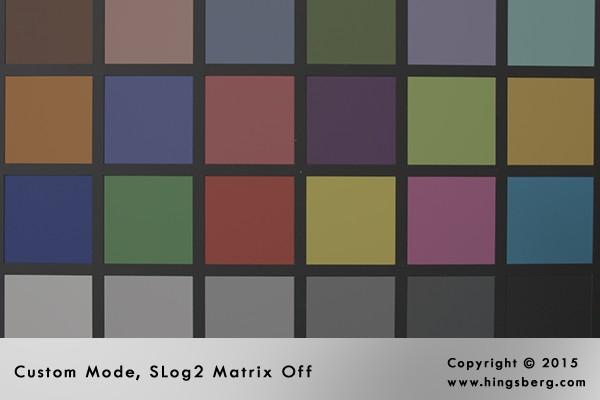
CineEI mode in SLog2/S-Gamut color space
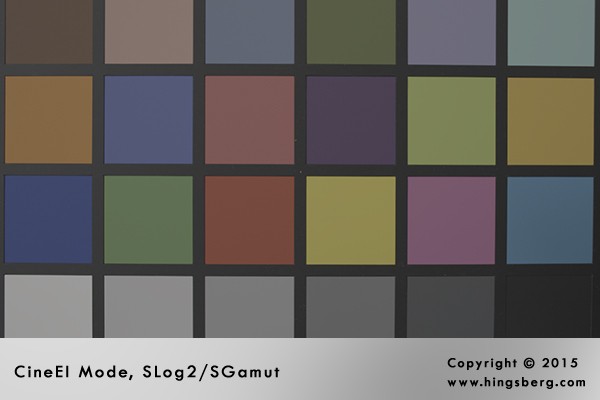
As for post #66 it still dismisses the notion there is a need to use LUTs for on-set monitoring. That is the biggest problem I see with such a generalized statement. It just doesn't apply to all shooting conditions or environments. Period.
The results of my comparison tests were published by Dvinfo.net earlier this year if you or anyone wants to check it out:
http://www.dvinfo.net/article/acqui...ng-cineei-mode-in-custom-mode-on-the-f55.html
Slight color difference when everything is said and done;
slog2 custom mode matrix off
CineEI mode in SLog2/S-Gamut color space
As for post #66 it still dismisses the notion there is a need to use LUTs for on-set monitoring. That is the biggest problem I see with such a generalized statement. It just doesn't apply to all shooting conditions or environments. Period.
Last edited:
Lenilenapi
Carbonite Member
so many confusing voices over a simple question:
"But just to be clear... if you are in custom mode - even with slog as your chosen gamma - it's not the same flat image as shooting in EI."
No incorrect. In Custom mode you have many choices for Gamma - If you choose Slog3 it is exactly the same flat look as in Cine EI, but with different other factors:
In Custom
- you can use Noise reduction and white balance button. Both major Pluses
- You cannot use in camera LUT's, and thus cannot use CINE EI's excellent method of adjusting the LUT's for EI (ISO) choices
and unless you have an F55 you are locked out of "sgamut3cine.like" which is the recommended color space for SLog3 - all major Minuses.
- Just added this : In Custom mode you can turn matrix on or off and adjust it which could cause havoc in Slog3 - so recommendation is often to just turn it off.
If you choose Slog 3 in Custom however you can get 3D viewing LUT's with Odyssey 7Q , Small HD 7, and Small HD 502. The Small HD's have no way to output the LUT to a secondary client monitor however which I think is a big deal otherwise the 502 would be a slam dunk IMHO. They say its coming, but they have a bad track record on that score.
If you use external monitors to obtain your LUT for Custom, you need to switch LUT's to change the EI if you wish ( i.e heavier "negative" at 1000 ISO). In any case you will always be recording Slog 3 at 2000 ISO.
You cannot bake in a LUT in Custom.
To paraphrase the great Hebrew sage Hillel (who predated Jesus with the golden rule) - that's all she wrote and everything else is commentary!
"But just to be clear... if you are in custom mode - even with slog as your chosen gamma - it's not the same flat image as shooting in EI."
No incorrect. In Custom mode you have many choices for Gamma - If you choose Slog3 it is exactly the same flat look as in Cine EI, but with different other factors:
In Custom
- you can use Noise reduction and white balance button. Both major Pluses
- You cannot use in camera LUT's, and thus cannot use CINE EI's excellent method of adjusting the LUT's for EI (ISO) choices
and unless you have an F55 you are locked out of "sgamut3cine.like" which is the recommended color space for SLog3 - all major Minuses.
- Just added this : In Custom mode you can turn matrix on or off and adjust it which could cause havoc in Slog3 - so recommendation is often to just turn it off.
If you choose Slog 3 in Custom however you can get 3D viewing LUT's with Odyssey 7Q , Small HD 7, and Small HD 502. The Small HD's have no way to output the LUT to a secondary client monitor however which I think is a big deal otherwise the 502 would be a slam dunk IMHO. They say its coming, but they have a bad track record on that score.
If you use external monitors to obtain your LUT for Custom, you need to switch LUT's to change the EI if you wish ( i.e heavier "negative" at 1000 ISO). In any case you will always be recording Slog 3 at 2000 ISO.
You cannot bake in a LUT in Custom.
To paraphrase the great Hebrew sage Hillel (who predated Jesus with the golden rule) - that's all she wrote and everything else is commentary!
Last edited:
For me it is the same flat image whether in custom or EI, the difference is I'm basing this on the F55 and slog3 not slog2, and I'm basing it on the matrix being "on" with matrix #10 (sgamut3cine.like) being selected. Shot that way, dropping the LC709A lut onto it in Resolve works the same whether it was shot in EI or Custom, or very close.
starcentral
Veteran
Tom I shot that test too, ie. F55 custom mode with the matrix F55 sgamut3cine "like" set vs cineEI mode sgamut3cine, and they are near identical except saturation of color was slightly lower with the custom mode version but this thread is geared towards the FS7 so unfortunately no such matrix preset exists on the FS7 or F5 camera. So to that effect Mark is somewhat correct that the flat image is not "exactly" the same between modes.
There is currently no NR function availability in CineEI mode on the FS7 which the F5/F55 has had since firmware version v5. There is no telling if Sony will include it given maybe they are trying to keep some differences between the models, or perhaps as suggested there is insufficient processing power to enable it, although I don't buy that.
On the subject of NR one wrench I'd like to throw out there to all the people who like to say they shoot so entirely perfect that they don't need it built in camera, or that they like to rate the camera lower 1 stop so that they can get a cleaner image in post, is that in S&Q mode at around 60fps the camera will start compensating for the light loss by introducing up to 4db in internal gain from what I have seen. I haven't tested the FS7 or F5 yet but I imagine its around the same amount. What it means is that if you don't rate the camera lower when shooting at this higher frame rate you will surely be introducing noise that isn't there at 24p, and I imagine the higher in frame rate you go the worse the noise is going to get. It would be nice if shooting S&Q in CineEI mode on the FS7 to have that NR if you ask me.
There is currently no NR function availability in CineEI mode on the FS7 which the F5/F55 has had since firmware version v5. There is no telling if Sony will include it given maybe they are trying to keep some differences between the models, or perhaps as suggested there is insufficient processing power to enable it, although I don't buy that.
On the subject of NR one wrench I'd like to throw out there to all the people who like to say they shoot so entirely perfect that they don't need it built in camera, or that they like to rate the camera lower 1 stop so that they can get a cleaner image in post, is that in S&Q mode at around 60fps the camera will start compensating for the light loss by introducing up to 4db in internal gain from what I have seen. I haven't tested the FS7 or F5 yet but I imagine its around the same amount. What it means is that if you don't rate the camera lower when shooting at this higher frame rate you will surely be introducing noise that isn't there at 24p, and I imagine the higher in frame rate you go the worse the noise is going to get. It would be nice if shooting S&Q in CineEI mode on the FS7 to have that NR if you ask me.
starcentral
Veteran
I made the constant mistake of leaving Matrix turned on in custom mode on the F3 I use to own, and even recently the F55, even though I know it was discussed here ages ago that turning off the matrix makes all the world of difference. Suddenly those Sony nuclear colours seem to go away.
I'm curious to know if Sam who is mostly shooting in custom mode does it with the matrix turned off or not?
Cheers,
I'm curious to know if Sam who is mostly shooting in custom mode does it with the matrix turned off or not?
Cheers,
On the subject of NR one wrench I'd like to throw out there to all the people who like to say they shoot so entirely perfect that they don't need it built in camera, or that they like to rate the camera lower 1 stop so that they can get a cleaner image in post, is that in S&Q mode at around 60fps the camera will start compensating for the light loss by introducing up to 4db in internal gain from what I have seen. I haven't tested the FS7 or F5 yet but I imagine its around the same amount. What it means is that if you don't rate the camera lower when shooting at this higher frame rate you will surely be introducing noise that isn't there at 24p, and I imagine the higher in frame rate you go the worse the noise is going to get. It would be nice if shooting S&Q in CineEI mode on the FS7 to have that NR if you ask me.
You might have to elaborate in a new topic about how you conclude gain is being added. That doesn't sound right to me, and I assume this is an f55 finding.
morgan_moore
Major Contributor
matrix turned off or not?
OFF.. except it seems to creep on in a 'shutter bug' manner on occasion.
NR on, med, sharpen OFF
--
HFR is one of those situations where a high ISO may be needed as IMO it is super critical to keep the thinner file out of the toe.
S
Last edited:
starcentral
Veteran
Yeah with it off it really ain't so bad.
Sam crazy thread otherwise huh?
Sam crazy thread otherwise huh?
Mitch Gross
Veteran
Wow guys, some active thread! I've been asked to explain what I meant by some of my posts, and honestly my position is quite simple.
I hate partial restrictions. You have a tool during one function but it is not available to you in another. If you shoot this way then it is there but the moment you engage another aspect the tool is removed. This, in a word, sucks. This describes how LUTs are enabled on the FS7. It also describes how some other tools such as certain exposure meters are enabled on the camera.
On the Odyssey7Q+ you can choose to turn on a LUT or not and do so at any time in any mode.
You can use preset LUTs or you can create custom ones and load them into the Odyssey.
You can look at an image on the screen with or without a LUT and SEPARATELY decide whether you want the exposure tools like waveform and histogram to reflect the original signal or one with the LUT applied. You have no idea how incredibly powerful and useful that is as a function -- a window can appear blown out in the LUTted image but the waveform tells you that the recorded signal is retaining the detail, all at a glance.
You can decide individually if the three different video outputs (two SDI and ne HDMI) always show a LUTted image, an unLUTted image or mirror whatever the OLED screen is showing at that time. Picture output 1 going to an onset monitor for you to set lights while stepping away from the camera and therefore the Odyssey (set this to MIRROR OLED), output 2 going to a DIT/engineer who may be analyzing the image, or to an AC monitor with its own LUT box because the AC needs to pump crazy contrast & brightness in order to judge focus (set to LUT OFF), and output 3 going to a client monitor where they just want to see a pretty picture (LUT ON).
That is the kind of power I like. I like that I can switch on/off the LUT on the OLED screen of the Odyssey7Q+ with a single tap of my finger without ever having to block the image. I like that I can turn on and off my waveform, histogram and other tools with a single tap as well, and that they are always available to me. The LUTs and the tools are also available in playback, in high speed, in whatever.
I don't like restrictions. I'm going to find the way that is most effective for me to use my own tools. Go ahead and suggest ways that might be helpful in my work, but don't force me to work your way.
If the FS7 offered all the available controls all the time in Custom mode, then perhaps this wouldn't be an issue. But it doesn't so it is. There are times when it makes sense to shoot in Custom mode even knowing that there may be some minor adjustments to be made in post, and there may in fact be reasons to see the image with a restrictive LUT even though the image is being altered by a matrix anyway.
So really my point is simple. Don't offer a feature that only sometimes works. Either make it work all the time or find another device to deliver that feature.
I hate partial restrictions. You have a tool during one function but it is not available to you in another. If you shoot this way then it is there but the moment you engage another aspect the tool is removed. This, in a word, sucks. This describes how LUTs are enabled on the FS7. It also describes how some other tools such as certain exposure meters are enabled on the camera.
On the Odyssey7Q+ you can choose to turn on a LUT or not and do so at any time in any mode.
You can use preset LUTs or you can create custom ones and load them into the Odyssey.
You can look at an image on the screen with or without a LUT and SEPARATELY decide whether you want the exposure tools like waveform and histogram to reflect the original signal or one with the LUT applied. You have no idea how incredibly powerful and useful that is as a function -- a window can appear blown out in the LUTted image but the waveform tells you that the recorded signal is retaining the detail, all at a glance.
You can decide individually if the three different video outputs (two SDI and ne HDMI) always show a LUTted image, an unLUTted image or mirror whatever the OLED screen is showing at that time. Picture output 1 going to an onset monitor for you to set lights while stepping away from the camera and therefore the Odyssey (set this to MIRROR OLED), output 2 going to a DIT/engineer who may be analyzing the image, or to an AC monitor with its own LUT box because the AC needs to pump crazy contrast & brightness in order to judge focus (set to LUT OFF), and output 3 going to a client monitor where they just want to see a pretty picture (LUT ON).
That is the kind of power I like. I like that I can switch on/off the LUT on the OLED screen of the Odyssey7Q+ with a single tap of my finger without ever having to block the image. I like that I can turn on and off my waveform, histogram and other tools with a single tap as well, and that they are always available to me. The LUTs and the tools are also available in playback, in high speed, in whatever.
I don't like restrictions. I'm going to find the way that is most effective for me to use my own tools. Go ahead and suggest ways that might be helpful in my work, but don't force me to work your way.
If the FS7 offered all the available controls all the time in Custom mode, then perhaps this wouldn't be an issue. But it doesn't so it is. There are times when it makes sense to shoot in Custom mode even knowing that there may be some minor adjustments to be made in post, and there may in fact be reasons to see the image with a restrictive LUT even though the image is being altered by a matrix anyway.
So really my point is simple. Don't offer a feature that only sometimes works. Either make it work all the time or find another device to deliver that feature.
um...thank you?
um...thank you?
I really did not intend to start this storm with what I thought was a simple question from a rental client. I thank you all for your input. Most of you make a great case for CineEI. Doug, I think many of us got confused about Custom because the use of sLog3 on that side of the camera is just for tweaking, apparently not for LUT-ing, which sort of makes my original post a bit moot. Now I know. Mitch, thanks for the Odyssey tips--seems like a great option for true sLog3 shooting.
um...thank you?
I really did not intend to start this storm with what I thought was a simple question from a rental client. I thank you all for your input. Most of you make a great case for CineEI. Doug, I think many of us got confused about Custom because the use of sLog3 on that side of the camera is just for tweaking, apparently not for LUT-ing, which sort of makes my original post a bit moot. Now I know. Mitch, thanks for the Odyssey tips--seems like a great option for true sLog3 shooting.
starcentral
Veteran
Hi Chris, yeah it's been fun.
By the way Sony makes official 3D LUTS for the slog2/sgamut in Custom Mode, and 3D LUTS for slog3/sgamut3.cine from CineEI mode. So if your clients want to shoot in custom mode recording slog2 to cards, and use an external device for adding LUT to monitor they still have a means to use 4 3D LUTS provided by Sony for monitoring or for post, again for the custom mode slog2/sgamut or CineEI mode slog3/sgamut3.cine.
You can get them here : www.starcentral.ca/forums/LUTs
Hey don't look at me, I didn't make the camera.
By the way Sony makes official 3D LUTS for the slog2/sgamut in Custom Mode, and 3D LUTS for slog3/sgamut3.cine from CineEI mode. So if your clients want to shoot in custom mode recording slog2 to cards, and use an external device for adding LUT to monitor they still have a means to use 4 3D LUTS provided by Sony for monitoring or for post, again for the custom mode slog2/sgamut or CineEI mode slog3/sgamut3.cine.
You can get them here : www.starcentral.ca/forums/LUTs
Hey don't look at me, I didn't make the camera.
Last edited:
Mitch Gross
Veteran
Chris, I don't think you should feel bad about it at all. If anything you picked something that is an issue to many. It's not just any question that spurs 100 posts in two days.

OFF.. except it seems to creep on in a 'shutter bug' manner on occasion.
NR on, med, sharpen OFF
--
HFR is one of those situations where a high ISO may be needed as IMO it is super critical to keep the thinner file out of the toe.
S
Final attempt to help you to understand gain.. if you think shooting 8000 ISO would be better than 2000 ISO..(native 0 db ) .. when you could shoot it 2000.. you will be adding 2 stops .. 12 db of noise ! .. you will be putting 2 stops of highlight into clip.. you will be killing your DR.. this is not about taste,other ways to do things.. if Im an Oscar winning DP or a guy shooting weddings.. it makes no difference. its just basic physics .. and a 1st year camera student should know it.. its empirical fact.. no testing is needed.. it is not what a thick/thin neg means .. please read ..
http://www.xdcam-user.com/2013/12/why-gain-is-bad-for-your-dynamic-range/