
Navigation
Install the app
How to install the app on iOS
Follow along with the video below to see how to install our site as a web app on your home screen.
Note: This feature may not be available in some browsers.
More options
You are using an out of date browser. It may not display this or other websites correctly.
You should upgrade or use an alternative browser.
You should upgrade or use an alternative browser.
GH4 SHOGUN And 7Q+ files sizes VS GH4 internal?
- Thread starter wwjd
- Start date
Mitch Gross
Veteran
The file sizes are considerably larger as the compression is much less. But don't let that be the only measure. The GH4's heavier compression also means more computation work to decode the files, so the difference in overall computing speed may not be that much. Yes the 4K ProRes files will take up about 8x more memory, but the GH4 files are harder numbers to crunch. How these two compare for functionality is entirely dependent on your computer's setup.

for h264 there is a lot of hardware acceleration available these days, while prores is usually handled only in software on the main cpu. that's why you can play 1080p 30fps h264 files on very weak plattforms (e.g. raspberry pi), whereas you need fast storage access and a more powerfull processor for most intermediate codecs. but don't worry. most machines that play 4K h264 troublefree, will likewise play 4K intermediate files.
i also would like to compare internal/external recordings from the GH4. it would be very helpful, if somebody could publish some useful samples to download.
i also would like to compare internal/external recordings from the GH4. it would be very helpful, if somebody could publish some useful samples to download.
Last edited:

Ebrahim Saadawi
Carbonite Member
I always found editing ProRes files requires ridiculously low computer power when compared to H.264. In the early DSLR days I was using a very slow laptop so I transcoded the footage to ProRes or DNxHD, the files were exponentially bigger but much faster to edit in all NLEs. The NLE doesn't have to do heavy uncompressing of h.264 in realtime while editing. I assume files will be larger but faster to work with. Higher colour depth will be good too with heavy curve pushing of smooth gradients (skies) and greenscreen work.
Anyway ProRes is a MAC platform codec so it doesn't work for me very well. Can any of these two recorders record to any other format than ProRes from the GH4/A7s/NX1, whether 1080p or 4k 10bit? I would love to avoid the old transcoding process to DNxHD.
Anyway ProRes is a MAC platform codec so it doesn't work for me very well. Can any of these two recorders record to any other format than ProRes from the GH4/A7s/NX1, whether 1080p or 4k 10bit? I would love to avoid the old transcoding process to DNxHD.
I always found editing ProRes files requires ridiculously low computer power when compared to H.264.
dont forget that 4k prores hq is very io-bandwdith demanding! if you want to preview recordings from an usb2 device or a slow spinning notebook disk: no chance at all! -- but the h246 file from your camera will/could work.
when it comes to editing and fast navigation within video files, intermediate codecs are much more efficent. that's exactly the kind of usage they were invented for. but for pure acquisition its often a kind of overkill. AVC and HEVC based codecs using reasonable bandwidth settings would produce just as adequate results.


Thomas Smet
Veteran
View attachment 95290
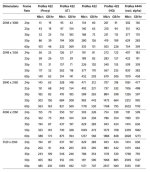
This chart will give you a idea how big the files are for each flavor of ProRes.
1 hour of ProRes HQ in UHD (3840x2160) is 318GB. 480GB SanDisk Extreme Pro would be a good choice.
Time to upgrade those RAID'S boys!
Before somebody freaks out I would like to point out the first value is in megabits and not megabytes while the second value is in gigabytes. So you divide the first value by 8 to get the datarate requirement for the formats. For example 4k 24p ProRes(regular) is 503 / 8 = 62.875 MB/S or still within the limits of a single really good desktop drive which can get up to 150MB/S when empty. Generally not a good idea to mix data like that in a chart.
Mitch Gross
Veteran
I have to say that I find a chart like that confusing. It's a big wall of numbers!
Here's some stats for the Odyssey7Q+ recording in Apple ProRes 422(HQ). Note that since we use our own media, we can optimize the way that the file structure is laid out on the SSDs and how the directory is written. The result is that we get a bit more on each SSD then one might get on others. Also understand that ProRes is a variable bit rate codec, so these numbers are conservative, as a complicated visual scene (leave blowing on trees) takes up more space than a simple static image.
Our smallest SSD is 256G. At 24p it will hold 42 minutes of UHD material in Apple ProRes 422(HQ). The Odyssey7Q can hold two SSDs, so two of these (512G) would be about 82 minutes. Two 512G (1TB) would hold 164 minutes. Two of our new 1TB SSDs (2TB) would hold 328 minutes, or about 5.5 hours.
There's a more complete breakdown for different frame rates and other variables on our website. I did these numbers from memory.
BTW, don't forget that fast memory better be able to read fast as well as write fast. If it doesn't write fast you'll drop frames. If it doesn't read fast then you'll spend untold hours downloading your files. Our SSDs are very fast both for read and write.
For offloading USB3 is good and Thunderbolt is better, but of course your computer and storage drives will be a limiting factor as well. Don't even think about USB2 unless you enjoy six hour downloads. Y'all are dealing with 4K now!
Here's some stats for the Odyssey7Q+ recording in Apple ProRes 422(HQ). Note that since we use our own media, we can optimize the way that the file structure is laid out on the SSDs and how the directory is written. The result is that we get a bit more on each SSD then one might get on others. Also understand that ProRes is a variable bit rate codec, so these numbers are conservative, as a complicated visual scene (leave blowing on trees) takes up more space than a simple static image.
Our smallest SSD is 256G. At 24p it will hold 42 minutes of UHD material in Apple ProRes 422(HQ). The Odyssey7Q can hold two SSDs, so two of these (512G) would be about 82 minutes. Two 512G (1TB) would hold 164 minutes. Two of our new 1TB SSDs (2TB) would hold 328 minutes, or about 5.5 hours.
There's a more complete breakdown for different frame rates and other variables on our website. I did these numbers from memory.
BTW, don't forget that fast memory better be able to read fast as well as write fast. If it doesn't write fast you'll drop frames. If it doesn't read fast then you'll spend untold hours downloading your files. Our SSDs are very fast both for read and write.
For offloading USB3 is good and Thunderbolt is better, but of course your computer and storage drives will be a limiting factor as well. Don't even think about USB2 unless you enjoy six hour downloads. Y'all are dealing with 4K now!
For offloading USB3 is good and Thunderbolt is better, but of course your computer and storage drives will be a limiting factor as well. Don't even think about USB2 unless you enjoy six hour downloads. Y'all are dealing with 4K now!
usb2 may look entirely obsolete in present 4K/UHD days, but it's still used by many people to read their SD-cards from internal recording.
but you are right: dealing with 4K material demands for adequate and efficient storage. 10 times the size is not only a challange to work on, it's also very disadvantageous in archiving. so what are your recomondations for later recompression of this prores sources to more compact long GOP formats without losing all the boost in image quality archieved by external recorders?