SD card advice for AF100

Anyone know of a method to test a SD card and verify it is o.k for use?

eg. Error Check the card and test its transfer speeds etc.

One way...I can record a heap of clips to it and do a little workflow ...but hoping there may be an application or procedure that checks SD cards / media.

I believe Barry said Panasonic has something on the way (as well as more "pro" cards.)
 
SanDisk Extreme HDV and Lexar Pro 133x

SanDisk Extreme HDV and Lexar Pro 133x

Has anyone validated the newer SanDisk Extreme HD Video SDHC and Lexar Professional 133x SDXC cards with the AG-AF100? The SanDisk is Class 6, and the Lexar is Class 10. The minor risk is that both these lines are relatively new, and the Lexar is SDXC for large 64-128GB capacity. Thanks for the confirmation!
 
Has anyone validated the newer SanDisk Extreme HD Video SDHC and Lexar Professional 133x SDXC cards with the AG-AF100? The SanDisk is Class 6, and the Lexar is Class 10. The minor risk is that both these lines are relatively new, and the Lexar is SDXC for large 64-128GB capacity. Thanks for the confirmation!

I have not, but for only a five dollar difference between the 8gig scandisk cards at Adorama and the 8gig panny cards at B and H, and with the Panasonic cards being class 10 compared to class six for the scandisk, the Panasonic Gold Class 10 card seems like a better deal... not to mention I trust panny SD cards more with my AF100... for work my money is riding on, I turn to the cards made by the same people making the camera... worth the extra couple bucks, and a steal when you look back at what we paid for P2.
 
Oliver, I understand what you mean and agree with the general notion that several dollars are not going to make a significant difference. However, my exercise mostly relates to large capacity SDHC and SDXC cards. With increased capacity, Panasonic SDHC C10 prices ramp up very quickly; at the high end, Panasonic is 2.5X~3.7X more expensive than SanDisk and Lexar. It is not "extra couple bucks" any more. On top of that, large capacity Panasonic SDHC cards are in short supply (out of stock) at most e-tailers. To demonstrate the point, here is the listing taken today from both vendors mentioned:

Vendor A
Panasonic SDXC C10 64GB $449
Panasonic SDXC C10 48GB $324
Panasonic SDHC C10 32GB $239
Panasonic SDHC C10 16GB $85
Panasonic SDHC C10 8GB $38
Panasonic SDHC C10 4GB $18
SanDisk Extreme HD Video SDHC C10 32GB $98
SanDisk Extreme HD Video SDHC C6 16GB $49
SanDisk Extreme HD Video SDHC C10 8GB $25
SanDisk Extreme HD Video SDHC C6 4GB $15
Lexar Professional 133x SDXC C10 128GB $249
Lexar Professional 133x SDXC C10 64GB $130

Vendor B
Panasonic SDXC C10 64GB $449 (Temp Unavail)
Panasonic SDXC C10 48GB $??? (Discontinued)
Panasonic SDHC C10 32GB $240 (No Stock)
Panasonic SDHC C10 16GB $80
Panasonic SDHC C10 8GB $30
Panasonic SDHC C10 4GB $19
SanDisk Extreme HD Video SDHC C10 32GB $98
SanDisk Extreme HD Video SDHC C6 16GB $49
SanDisk Extreme HD Video SDHC C10 8GB $25
SanDisk Extreme HD Video SDHC C6 4GB $15
Lexar Professional 133x SDXC C10 128GB $250 (Temp Unavail)
Lexar Professional 133x SDXC C10 64GB $121 (No Stock)

For large capacity, the mentioned SanDisk and Lexar cards may be a viable alternative to the Panasonic cards. Hence my curiosity if anyone can validate these specific cards' proper operation in the AF100.
 
Last edited:
I picked up a SanDisk 32 GB SDHC Extreme Pro card at Amazon a couple of months ago for $150. It's worked fine with my GH2 so far with 1080/24 & 720/60 as well as 720/30 MJPEG. I believe it's a class 10 equivalent (rated at 45 MB/s).
 
hi guys i have one 16gb panny gold card and was thinking of getting a 32gb card however its very expensive and im stretched at the moment. my question is this, if i getsay a 32gb lexar professional card, would it be a problem using two different brands of card (the panny and the lexar) with my af100? I ask as I am knew to this format and I know with mini dv tapes it was highly recommended you use the same brand. Thanks Taras
 
THG just put out an article measuring performance of some SDHC and SDXC cards. No Panasonic in the mix and only a single 64GB card, but an interesting review nonetheless.

10 SDXC/SDHC Memory Cards, Rounded Up And Benchmarked

A point to look after is sequential write performance, especially minimum. This is arguably the single most critical factor in measuring storage fit for digital content acquisition. We can pretty much ignore fastest peak read speeds, as they are only helpful for quick uploads. Interestingly, SanDisk Extreme Pro UHS-I regarded by many dropped to 0.8 MB/s as a minimum write throughput. If this happens while recording footage, it may spell trouble unless a camcorder can buffer/cache or somehow compensate for such blackout.

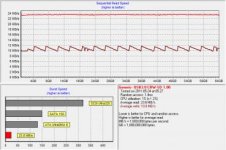
EDIT: I ran a test on the Lexar Professional 133x SDXC C10 64GB in a USB 3.0 card reader. Read is pretty much 23.6 MB/s across the entire medium. Write is 10-12 MB/s, average 10.8 MB/s. Class 10 throughput confirmed. For those interested, I bought it for $121 ($1.89/GB).

lexar_64gb.jpg
 
Last edited:
Had to RMA two of my 16GB Lexars. The casings had failed. Didn't have a problem getting data off them, but they were done. One thing I did _not_ do was store the cards in their cases, so they were in my wallet, in my pocket with a cell phone, etc. (though not change, keys, or anything comparably damaging). Getting an RMA number took about two weeks, which did not bode well. Still, once I sent the cards in, I had two fresh replacements in less than a week (they advertise 4-6 weeks, I think).
 
I mostly use the Pana cards and whilst I didnt test all the cards I have, I tested the different types of card I have. Test was on a mac pro 4,1 using usb2.0 interface using black magic disk speed test. I dont think this would be anywhere near the accuracy of Toms, but I think it shows accuracy in the relative speed differences of the cards. I did them a few times each and result varied by a max of 0.1.

All cards pre formatted on AF102EN

All results in MB/s.

Sandisk Extreme III Class 6 @ 8GB
Read - 19.7
Write - 17.5

Sandisk Extreme (HD VIDEO) Class 6 @ 16GB
Read - 19.8
Write - 15.4

Sandisk Extreme Class 10 @ 16GB
Read - 19.6
Write - 15.7

Panasonic Class 10 @ 16GB (I have a number of these cards but only tested two, results were almost exactly same on both)
Read - 19
Write - 14.2

Those are the exact figures as I tested them. For reference all my Panasonic cards were originally purchased in Japan the Sandisks are a collection Ive bought from reputable stockists for stills camera usage.
 
Failures happen with all kinds of hardware. I do not think any manufacturer can claim failure-free... except, maybe, Apple, but this is due to non-technical reasons. :shocked: Customer service plays critical role in the overall "quality" perception. In a recent study, over 80% of "quality" image is comprised of CS policies and experience. Fancy that!

I deal with CS, including RMA, often as a part of my daily routine. Only premium enterprise-grade (and paid) SLAs have consistent performance. Everything else is a hit-or-miss that requires extra pushing and pulling. The risk and disaster management strategy shall not solely rely on the manufacturer's CS, but have some internal resiliency too. Just recently, I had a partial motherboard failure in a production workstation. It took me 2 weeks to get a replacement from Asus, which is considered a premium vendor. I know CS from within, and, let me tell you, CS is typically a stepchild in many Silicon Valley outfits, big and small. This translates to a variance in service quality, which customers inevitably notice.
 
Last edited:
Apple is NOT failure-free, period. If your warranty runs out, YOU pay for hardware failure, even if it a design flaw (of which they happen). I currently have 5 macs, and in the past, add 7 more to that list! :) So *I* know.

That said, there are 3 areas that matter; testing, quality(and control) and customer service. The quality of each is part of the price you pay. You pay less for a product, one of those areas surely will take a hit. That's the chance to take. People have this misguiding perception that when you buy something, it is only for the materials involved, but there is SO MUCH MORE.
 
Haha :). And yes, I've seen the genius bar memos about malware/viruses on macs.

Luckily I've never had a card go bad yet. My transcends have worked great with the af100.
 
I got my AF100 a couple weeks ago B&H, and got the Pana old 16 gig SD cards. Was thinking of getting a 3rd one... But B&H has them discontinued... :s anybody knows why?
 
Panasonic moves away from SDHC/XC Class 10 to SDHC/XC UHS-I. For example, deprecated p/n RP-SDW32GE1K is being swapped out with p/n RP-SDU32GE1K and RP-SDA32G. The new Gold SD cards comply with SD Card Spec v3.01 (UHS104) for substantial speed boost. The RP-SDA32G is rated at 95 MB/s read and 80 MB/s write. Interestingly, from the Panasonic press release, Super Intelligent Controller (SICS) provides Power Failure Protection to protect data from sudden power failure, Refresh Function to extend the archival life over 10 times, and Smart Data Writing to minimize defect risk caused by intensive writing. They are also equipped with the "Proof 5" feature (water-, shock-, magnet-, X-ray-, temperature-proof) to withstand severe conditions. I am guessing it will take several months for the channel to refill.
 
Last edited:
The memory card comments are rather amusing. There are only so many manufacturers that turn out flash memory. Some companies do it all. I believe SanDisk is the main player here. Some companies buy the flash memory chips from the memory manufactureres then assemble and package them (likely Kingston, Patriot, Transcend and others) while other companies merely buy finished goods with their logos on them from OEM (Original Equipment Manufacturers). As an example I took apart a Verbatim unit and the memory modules were manufactured by SanDisk. The Kodak, Duracell, etc. products likely have that pedigree.

So outside of the purely fraudulent devices out there, I wouldn't get too excited about any specific manufacturer. If you are worried stick with SanDisk, Panasonic or Toshiba (three of the original players in the product line). All three are quite reputable. Everyone else could be hit or miss, but as will all things electronic, most failures should occur when the unit is fairly new. As for being shock-, magnet-, X-ray-, temperature-proof, come on, these are electronic components. They all have those characteristics!
 
Back
Top