GH5 S1H: orangey reds?

I been watching videos and seems like other cameras are truer red than S1H.

I remember similar comments when the GH5 first came out, and when I bought my own GH5 I found that everything had to do with how the footage was handled in post. I am not a fan of GH5 footage straight out of the camera ( often a little too yellow or green ), but it takes all of about 10 seconds in post to tune GH5 footage to produce gorgeous color.

I see this as a problem where you have people who do not know how to properly color correct in post, so they go with the default color straight out of the camera and often it's bad.
 
My GH5 and GH5S have the red issue . Not straightforward to correct all the time as an example an actor walking from one side of stage ( where colour is correct) through the middle where red turns orange and back to red at the other side of stage. For comparison in the same scene the Sony AX100 maintains the same red throughout the stage. So it is camera specific issue to the Panasonic's. WB was set to be the same for all cameras too. If I shoot Vlog it is less pronounced and easier to correct. 8bit 709L is very difficult to correct in that situation. I have created luts to do the base correction that usually needs minor corrections especially as most stage lighting now is LED so setting a fixed white balance is difficult as that changes going across the stage for instance.
 
The only way to make a good call is to take a look at the out of camera high dynamic range footage.

On YouTube, you never know what they did to possibly muck up their footage.
Before you know it their throw in some gee-whiz 'best-since-sliced-bread' all-in-one 'magic' LUT that completely messes up your original and natural colors.
 
two different videos above ended up similar prompting my question for S1H owners.
Can't say orangey reds are a deal breaker, just something of note.
 
Does Panasonic have any kind of picture style software where you can make a custom look for the camera?

The first video is not really a good comparison as who knows what it is supposed to look like. The second video is showing some reds as orangy, but you would need to have the fabrics there to see in real life. Some other in the footage looked deep magenta, so tough to know what is right.
 
Last edited:
I just made a few LUT's in Resolve so that they can be used in any NLE like EDIUS or Vegas. In EDIUS I just use on the clips that have the problem of red looking orange or not a really deep red that the Sony's can deliver. It is the consistency within a clip that causes the real problem when the colour changes within a scene. Resolve is the winner there in being able to track if necessary. Be interesting if the CX350 has a similar problem. Maybe you can comment on the CX350 response to deep reds like old British Post Office red on letter boxes ,telephone kiosks or typical robes of kings etc.
 
The CX350 seems to be fine on reds, but it has a color matrix. You can dial in anything you want so to speak. I have not heard of anything that allows one to adjust the Panny mirrorless cameras. Although I have not searched either.
 
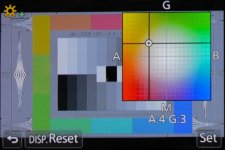
GH4 has this white balance color adjuster shifter thingy that almost no one ever mentions. I can see what it does, just don't know how to adjust it, and lack testing gear, tools, knowledge to do it right. I played with it abit, but still could not remove the orange push in the solid reds on my GH4.

I imagine the S1H has something similar? I don't own S1H

GH4P1020482-600x400.jpg
 
The issue is the sensitivity to material and light source. Sometimes with bright white light it is OK. In sunlight not so good and with led stage lights not good at all especially the case where the red changes as the actors moves across the stage. One would need to find the WB for that and change as the object moved without changing anything else in the scene. I have come to accept that if the problem is too bad I change in Resolve. Use qualifier , change hue vs hue and hue vs sat just a little , done. If the object moves use tracking with the same settings.
 
Ron, your situation is a little different than the basic 'how the camera interprets a certain shade of red'. Color science adjustments are always made under controlled lighting and are meant to create a baseline in perfect conditions. After that it is down to certain uses and workarounds. Imho, this is where the relative low cost of mirrorless cameras rears its ugly head. I would bet more expensive video-only cameras would not behave in the same way for you.
 
If you want a quick solution for the GH5 or P4K the color transform LUTs from Emotive Color do a pretty good job of emulating ARRI LOG color. Makes the GH5 far more usable to me.
 
You may be correct but value for money the GH5's cannot be touched. My goal was the lowest cost way of getting UHD60P 10bit 4:2:2 and the combination of a GH5 and Ninja V is difficult to beat. Combination is about $1000 less than a CX350 for instance including extra batteries a cases etc. With I believe more flexibility in lenses and recording time and media. And even the CX350 will have to use external recorder to get UHD60P 10bit 4:2:2 as internal is 4:2:0 at that spec. UHD 30P is 10 bit 4:2:2 but so are the GH5's . I did look at the options when I changed from my Sony AX1 and NX5U the choice then was an FS7 fully rigged very expensive. That was two years ago so before the latest Panasonic or Sony cameras etc. Just to get deep red when I need it is a little excessive. That is the only small issue I have seen in using the GH5's the last two years and easy to fix when needed. My goal I think is different to yours as I would like to work with fixed cameras and do the edit afterwards and that approach is working just great but I would really like an 8K full stage to give more options in edit. Using three cameras now works just fine though with the AX100 manually controlled to get in really close.
 
I just did a shoot with the S1H as my A cam and the GH5S as my B cam. The GH5S was much more red in skin tones and had to be corrected in post, while I had to do the slightest of tweak to reduce green on the S1H. Both cams were recording in auto white balance.

I have used Emotive, but you must remember that it is designed to mimic the look of an Alexa cam. If that is not what you're going for, the LUT may not be the best option.
 
Both cams were recording in auto white balance.

Why would you ever use auto white balance ?

Pretty much every camera I've used that has AWB universally gets the temperature wrong at some point, and I know I that my own guess at the Kelvin temp is always better.

I would only use auto white balance if I knew that the color balance would be constantly changing, otherwise I either use my color meter and set the Kelvin measured by the meter, or take my best guess at what I think the actual Kelvin temperature is and go with this. ( I can usually guess within a couple of hundred Kelvin of what the true Kelvin temp is )
 
By any chance do you know if those videos are edited in Premiere?
There's an issue where the X-T3 and Premiere aren't getting along in the way color spaces are being interpreted and orange looking reds are the result.
I wonder if that's what's happening on the S1H.
You may want to bring this up to either who ever runs this site: www.colorizer.net or someone else that can make sure the right color matrix is being applied based on white papers from Panasonic, I'm assuming they have released them.
Trying to use luts based on shooting color charts really isn't the best approach to fixing orangey reds if the wrong color matrix being applied is the culprit. Getting the right color matrix interpretation is.
 
In my case of the GH5 I feel it is the way the GH5 responds to light reflecting off particular material. A red costume mainly but not sure how matrix will get it correct on one side of stage but not the other. Clearly a WB shift due to the lights. But at the same time the Sony AX100 does not have this response. However it may explain why Vlog is better since this is V gamut. Will do some more testing between how EDIUS, Resolve and Vegas view the file next time.
 
GH4 has this white balance color adjuster shifter thingy that almost no one ever mentions. I can see what it does, just don't know how to adjust it, and lack testing gear, tools, knowledge to do it right. I played with it abit, but still could not remove the orange push in the solid reds on my GH4.

I imagine the S1H has something similar? I don't own S1H

View attachment 137692

I used Leeming LUT v2.01 to fix this, which worked really well at neutralizing the orange push. He updated the LUT, as others thought it made the footage too blue, and the later versions didn't get the orange out anymore so I stuck with this version. The GH series cameras also are pretty linear in the way they handle color. Film loses color saturation in the shadows and highlights in a non linear way. The GH cameras don't, so the shadows tend to get visibly polluted by this orange push. I use a lum vs sat curve, desaturating at both ends, to correct it.

But I'm moving on from the GH cameras, partially for this reason. I look at stuff from the Z CAM E2, and it seems to have perfect color out of the box.
 
Back
Top