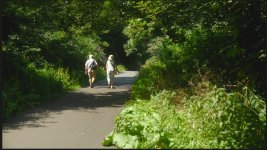
S-CINETONE Booster LUTs for FX6, FX9, etc.

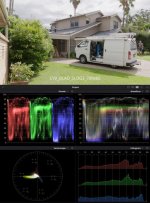
I'm not saying I have an S-LOG3 Cine LUT that does the same. Like you, Doug, I've struggled to find an S-LOG3 Cine LUT that meets my "general look" requirement. Because of that, some time ago I thought I'll build my own S-LOG3 to Rec 709 LUT that is as technically as correct as I can get it but all the while giving me a pleasant look on the majority of LOG footage with the smoothest roll-off and highlight detail retention I could get. Check the hair on the Digital LAD / Scopes image. The best retention I could get was to keep my hottest image levels at no more than 85%.

Chris, would it be possible for me to download your LUT and take if for a spin?
 
Couple of examples of the Alexa MLUT. Straight out of the camera, all very well mannered colours, bags of dynamic range and excellent white roll off. I can't believe Sony gave us this camera for 2k.


image_131719.jpg


Click image for larger version  Name:	MLUT_Alexa.jpg Views:	0 Size:	109.3 KB ID:	5704847
 
My comment on the IMAGES not the poster. To my eyes they are terrible images. Crushed blacks and burnt highlights. I could never submit images like that to anyone, let alone a paying client. YMMV
 
My comment on the IMAGES not the poster. To my eyes they are terrible images. Crushed blacks and burnt highlights. I could never submit images like that to anyone, let alone a paying client. YMMV

I agree about the blown highlights. These images are nowhere near good enough to be considered "final" or given to a client. Not even close.
 
Chris, would it be possible for me to download your LUT and take if for a spin?

Sure Doug. Will PM you. Take it for a spin. Will look forward to any feedback from you or anyone who wants to give it a bash. It's a 65 point grading LUT. If you need a 33 or 17 just load it onto a SLOG image and export a LUT of the size you want.

Upon revisiting my LUT, I have made a minor change to the Black Level. It is now sitting at 3 IRE. I hate crushed black. The clip level is 99 IRE. So remember if using this LUT, work with FULL level video in at 109 IRE. Then it will give you a LEGAL level out at 100 IRE. Clip Level is just inside Broadcast 100 IRE. The data distribution is as follows.

At 3 IRE we have 90 10-bit values
" 44 " " " 445 " " "
" 59 " " " 580 " " "
" 62 " " " 606 " " " Close to Sony's S-LOG3 peak level of 61 IRE
" 76 " " " 731 " " "
" 98 " " " 922 " " "
" 99 " " " 930 " " " Clip Level

So bit distribution is well distributed at those important skin tone levels and on up to the extreme highlights. Which is what I really want to protect. Look at the sample WDR image and scopes. This is the sort of image I get quite often that has a wide dynamic range that needs capturing into the 709 world.

The following image is the type of image where I want to be able to see into the shadows, like inside the van but still protect and roll off subject matter like the hot skies and sun blasted surfaces like the hot wall on the left, the driveway pavers and the top of the van. This image has had ZERO done to it other than the application of the CYV_DLAD_SLOG3_709x65 LUT. It goes without saying that this image needs to be viewed on a true Rec 709 calibrated monitor to see exactly what the image looks like. Viewed on anything else, then obviously your viewing experience will vary.

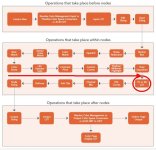
Remember, this is purely a "technical" LUT that I've built from the Kodak Cineon reference image. Any camera LOG format that is based off the Cineon reference data seems to work quite well with this LUT. This includes ARRI, Sony, Canon and numerous other LOG formats. I've used it on numerous LOG formats and had a pretty successful run with it. Of course if you need to modify levels, saturation and white balance this can all be done on previous nodes. Best to leave saturation on the last node prior to the LUT node. Well, that how I cook with it, and all seems to roll out reasonable well.

Chris Young

CYV_DLAD_SLOG3_709x65 comp.jpg
 
That's impressive taming of the highlights, Chris but still retaining some shadow detail.

Thanks. It's working for me so far.

I think that taming comes directly from emulating the dynamics of the Kodak Cineon Image. If you have a good look at that DLAD image, you will see it retains and handles highlights with a smooth and subtle roll into the peak levels. So all I did was to replicate as best I could a technically correct chroma and luminance levels grade. That's why my LUT starts to roll off at peaks of 85 IRE to a clip point of 99 IRE in the legal 709 output. Nothing cunning on my part. The answer lies in the perfectly balanced and exposed Cineon DLAD image. It was just working out how to map that to 709. Resolve's tool set is so good that this wasn't a major issue. Like I was told about most things in life. Know your tools and trade well as a cabinetmaker, and you can make beautiful furniture. I find the more I learn in and about Resolve the better I can use its tools to my advantage.

Chris Young
 
Doug, It was all too big to PM via DVXUser so will upload and PM you the link.

Chris Young

Thanks Chris, I got it.
I'll try to find time today to take a look at it. I'm in the process of migrating to a new M2 MacBook Pro and going through some growing pains getting things setup properly. A new MB UltraStudio Monitor arrived late yesterday because my old one doesn't seem to work with the new system. Hopefully it will be plug & play and I can get back to work. Fingers crossed.
 
Of course if you need to modify levels, saturation and white balance this can all be done on previous nodes. Best to leave saturation on the last node prior to the LUT node. Well, that how I cook with it, and all seems to roll out reasonable well.

Your workflow sounds different from mine. I have one node before the LUT to adjust the exposure only . . . then it flows to the LUT on a second node . . . and all other modifcations come after the LUT on a final node or nodes, depending on what I'm doing. I want to the video to be pure S-LOG (but at the right exposure) when it hits the LUT. If changes are made before the LUT, then it's not really pure S-LOG anymore. That is also how I've seen real colorists do it. Of course, what matters is how the video looks in the end rather than getting caught up in the journey to get there.
 
I don't have a dog in the FX6 hunt, but, knowing that everything presented needs to hit the timeline an get bent, in my view this demonstrates solid reasons to use S-LOG 3. I would really to like to have seen these same van scenes shot with the other profile choices discussed in the thread. Would they fair as well?
 
I would really to like to have seen these same van scenes shot with the other profile choices discussed in the thread. Would they fair as well?

I agree, but obviously, Chris's van scenes won't work with my LUTs because he didn't shoot them with S-CINETONE. But it would be interesting to see how other LUTs mentioned would work.
I'd much rather see real video though on all these examples, grading from stills or judging from stills is not the best way to do this stuff.
 
Doug, It was all too big to PM via DVXUser so will upload and PM you the link.

Chris Young

Chris, you've got a WINNER. I love it. The best S-LOG3 LUT that I've seen so far. The time you spent with scopes and charts has obviously paid off. Very nice.
It's not as saturated as I'd prefer, but that is easy to fix by bumping the SAT up to 70 on a third node. Other than that. the levels fall right where they should.

Do you remember the Durango white water video I posted last month? I really struggled grading that footage and was never happy with the final results. So I dropped your LUT on that footage and it looks great. There's still some fine-tuning that would need to be done on a clip-by-clip basis for exposure and WB, but that is easy. When I have time to go through the clips I might render a new version of the final video.

Nice job.
 
Your workflow sounds different from mine. I have one node before the LUT to adjust the exposure only . . . then it flows to the LUT on a second node . . . and all other modifcations come after the LUT on a final node or nodes... Of course, what matters is how the video looks in the end rather than getting caught up in the journey to get there.

True Doug. I'm totally self-taught on Resolve. Used Resolve before v11 for grading but really started to use it in depth for editing since v11, clunky though it was for editing back then but, I stuck with it. Much of learning was by the true and tested trial and error method. But the basis of my node workflow was based purely on Davinci's own manual, which for me clearly laid out the node workflow when working on the Color page. So basically that's the workflow I've become accustomed to. I didn't know any better back then than to try to second guess the way to do things, so just followed that. But as you say, how the product looks at the end is the defining point.

Chris Young

Resolve LUT workflow +.jpg
 
Chris, you've got a WINNER. I love it. The best S-LOG3 LUT that I've seen so far. The time you spent with scopes and charts has obviously paid off. Very nice.
It's not as saturated as I'd prefer, but that is easy to fix by bumping the SAT up to 70 on a third node. Other than that. the levels fall right where they should.

Do you remember the Durango white water video I posted last month? I really struggled grading that footage and was never happy with the final results. So I dropped your LUT on that footage and it looks great. There's still some fine-tuning that would need to be done on a clip-by-clip basis for exposure and WB, but that is easy. When I have time to go through the clips I might render a new version of the final video.

Nice job.

Don't know about a winner, Doug. I basically look for the easiest way around obstacles these days, so just looked for an easier way to get my work done when working with S-LOG3. Yes, I'd be interested to hear if it works on your Durango footage. I don't shoot a lot of LOG because most of my work is just quick tun around and deliver stuff. For that, my good old 709 scene files do that with minimal additional work.

Chris Young
 
Back
Top