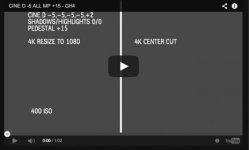
GH4 Rumored Log profile

This camera is absolutely amazing, just, absolutely fantastic from top to bottom in my opinion. I think that this is the general consensus too. While certainly still small areas to improve in, is amazing as is for the price. Anything that makes it better is just... I don't know. Insane, incredible, unbelievable. Not because it can't be done, but because I couldn't have expected more in the package for the price. Panasonic, you have outdone yourself, and are continuing to push it further. Amazing. You have made the kind of splash that is going to win a lot of market share and has taken M4/3 into a new realm of awareness among professionals.
 
Well, here's a poor anology but - your television can accept any signal coming down the cable, and show it instantly. But it takes more electronics to store it (like a DVR) while it's doing this.

Recording the signal is different than passing it along the circuit to an output port. Recording a 10 4/2/2 stream takes far more bandwidth and memory than 8 4/2/0. The GH4 may not have a processor pipeline built to do this perfectly every time with every frame. Of course if it does, and they plan to activate that function with a firmware update, so much the better.

Interesting. I was hopping maybe the hardware is fully capable but maybe they expected memory cards were just not there yet in terms of speed and reliability and hoping maybe that would change in the future as chips get better and better.
 
There will be at least two major video-centric announcements for the GH4 this year, my source could not disclose what those will be exactly, other than they said the video people are going to love them and they are not the rumored Log profile.

A couple of wild, uninformed guesses: video scopes like waveform, vectorscope, parade? Or how about the option to allow the information displays to stay visible indefinitely?
 
Last edited:
A log profile would help a lot. Even Natural Profile does some very strange things to skin...
 
I found these few things lately that helped get a much better image.

Cinelike D:


Don't use any Highlight and Shadow adjustments. This does very strange smearing to the image and it's very noticeable to the skin and hair.

Don't take the contrast down. This also has a strange effect on detail.

In all settings take noise reduction to -5. This is a big one. It's a detail killer at 0 and the image looks so much better with it basically turned off.

CINELIKE V and Natural
Same as above.

Bring the saturation down to a level that is pleasing to you. more if you are grading less if you want to just color correct.

Boosting the master pedestal to +10 or even +15 is very effective to bring the image up. I doubted this but after testing it I didn't find anything negative.

iDynamic set to standard is like a light switch. I found no negative effect on the image like noise.

In either gamma bringing the sharpening down is a good thing.

iResolution is a strange and very hard to really understand exactly what the function does. It has to do with sharpness but not sharpening. I set it to standard and find that it works pretty well. Try it.
 
@erik - thanks for sharing. I've also found turning sharpening down helps hugely - I had terrible aliasing problems down converting in Avid from 4k to 1080, but using -2 sharpening all my problems have disappeared. Beautiful, detailed, organic looking image from 4k UHD
 
Thanks Erik,
skin-tones are terrible in my eyes on the gh4 at my current settings so thanks for posting your findings!
 
I really started having issues with skin. That and the noise past 1600 ISO was becoming a deal breaker, but if you avoid the settings that cause the smoothing the GH4 becomes a wonderful camera that captures people so much better. Getting more DR isnt as important to me as making people look natural. I'm finding if you can capture at 800 ISO the GH4 is an amazing camera.
 
Last edited:
Hi Erik,
I used your settings for Cinelike D and I must say there is a vast improvement in skintones. So once again thanks!

Here is a quick shot of my son graded using Impulz LUTs and FCPx. Lighting was available light only. Can't wait to try it on some interviews this week.
GH4 skintones graded01.jpg
 
I found these few things lately that helped get a much better image.

Cinelike D:


Don't use any Highlight and Shadow adjustments. This does very strange smearing to the image and it's very noticeable to the skin and hair.

Don't take the contrast down. This also has a strange effect on detail.

In all settings take noise reduction to -5. This is a big one. It's a detail killer at 0 and the image looks so much better with it basically turned off.

CINELIKE V and Natural
Same as above.

Bring the saturation down to a level that is pleasing to you. more if you are grading less if you want to just color correct.

Boosting the master pedestal to +10 or even +15 is very effective to bring the image up. I doubted this but after testing it I didn't find anything negative.

iDynamic set to standard is like a light switch. I found no negative effect on the image like noise.

In either gamma bringing the sharpening down is a good thing.

iResolution is a strange and very hard to really understand exactly what the function does. It has to do with sharpness but not sharpening. I set it to standard and find that it works pretty well. Try it.

Erik, I believe you, but how can raising PEDESTAL not help but add noise to darks?
(I have not messed with it yet, just asking)

Are iRes and iDynam "Automagic" autoadjusting at all? Chnaging things on the fly for you?
 
Erik, I believe you, but how can raising PEDESTAL not help but add noise to darks?
(I have not messed with it yet, just asking)

Are iRes and iDynam "Automagic" autoadjusting at all? Chnaging things on the fly for you?

Just try it. I looked at some footage I shot with +10 and +15 and it's a much better way of boosting the shadows than the other options. Contrast and Highlight Shadow.

The image problems cased by lowering the contrast and using the Highlight Shadow settings was smoothing things out so bad detail was getting smeared and I saw very strange noise unlike the normal RGB. All this for a flatter image just didn't make sense. It made skin look awful. That to me is much worse than maybe a little noise or at least the type that is acceptable.

If you only do one thing take the Noise Reduction to -5. I wish it would could go to -10.

I set iDyanmic to function 4 so I can turn it on or off without going into the menu. I like it!
 
cool, thanks for the detail. I liked bringing shadow detail with Pedestal, but worried about noise and reduced luminance amount. I'll do some testing, but thanks for your settings input.
 
Hi Erik...I usually dont participate in forums these days, but just thought I would say, thanks for the posts...very helpfull.
I definitely like some of the footage from the Gh4, and some of it is really amazing.
I dont feel the need 90% of the time to shoot above 800 ISO anyway, so the GH4 is perfect for me (Having used a GH2 for years)
It may be of no use but there is an interesting post about master pedestal and noise here, its not absolute IMO, but it does show some interesting results.
The guy is a 25 year professional broadcast video editor, so he does some interesting tests
http://bkmeditor.wordpress.com/2014/07/16/panasonic-gh4-iso-noise-tests/
I guess one of the challenges with the GH4 is it has soo many settings, that it takes time to find out what works for you, its a kind of double edged sword in that way,
in that some people use settings that pretty much corrupt the image by somehow overdriving the sensor in a bad way, then bag the camera rather than persevere until
they have some really good settings that work well.
Anyways thanks for the posts.
Cheers
 
Hi Erik...I usually dont participate in forums these days, but just thought I would say, thanks for the posts...very helpfull.
I definitely like some of the footage from the Gh4, and some of it is really amazing.
I dont feel the need 90% of the time to shoot above 800 ISO anyway, so the GH4 is perfect for me (Having used a GH2 for years)
It may be of no use but there is an interesting post about master pedestal and noise here, its not absolute IMO, but it does show some interesting results.
The guy is a 25 year professional broadcast video editor, so he does some interesting tests
http://bkmeditor.wordpress.com/2014/07/16/panasonic-gh4-iso-noise-tests/
I guess one of the challenges with the GH4 is it has soo many settings, that it takes time to find out what works for you, its a kind of double edged sword in that way,
in that some people use settings that pretty much corrupt the image by somehow overdriving the sensor in a bad way, then bag the camera rather than persevere until
they have some really good settings that work well.
Anyways thanks for the posts.
Cheers
Interesting read. Thanks for sharing. I feel it's best to test the settings in a real world environment. Noise can hide very nicely in the image. Shooting a test with the lens cap on is a good way to see the noise but how it interacts with an actual scene is totally different. No matter what we will have noise in the image.

Quote from the test.
"I added some text to explain each setting, and then added a Color Correct effect to boost the black levels and contrast a bit to make the noise that is present more visible.
I boosted the black levels and only the black levels via an offset control 200% and increased contrast 200%."

This isnt real world usage. It's interesting. If you hunt you will find. In the video sample the black level looks almost like 18% gray.

Screen Shot 2014-08-04 at 8.52.27 PM.jpg

Thats more than a bit and if he didn't do that the noise would be hidden in the image and probably not be an issue. We all have our tolerance to noise and image quality. Heck we even add noise with FilmConvert and other plugins.

DVXUSER ISO GH4 MP +15.jpg

DVXUSER ISO GH4 MP 0.jpg

Here is basically the same test but no adjustments done.

I care more about how people look. Thats my bread and butter. If skin is plastic I cant fix that but I can remove noise from an image. I think staying in the stock settings and taking the noise reduction to -5 is a safe bet for better skin and would use the MP before Shadow Highlight because that does bad things to skin beyond adding noise.

Sample from NBC.jpg

This is a frame grab from a shoot I had for a new promo from Friday. I shot this during a live news cast. No grade. Straight from the camera. Yes I see noise but I see some nice skin too. :)
 
Last edited:
Back
Top