GH3 Recently started: "...recording was cancelled due to the limitation of the writing.."

salils

Well-known member
Recently started: "...recording was cancelled due to the limitation of the writing.."

UPDATE: I reset all settings via the menu and it seems to be recording for longer now at 72mbps but now it stops recording after about 20 seconds and doesn't display any error message, it just beeps to signal it stopped recording.

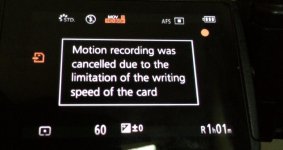
I've been using class 10 A-data micro SD cards in my Panasonic GH3 since I got it two years ago without any issues even at 72mbps...until a month or so ago I started getting this message about 6 seconds after I hit the record button "Motion recording was cancelled due to the limitation of the writing speed of the card".
FullSizeRender (1).jpg

I haven't switched micro SD cards and the cards seem to be fine in other devices and low bitrate record settings in the GH3. From what I understand, class 10 SD cards should be able to handle at the least 80 mega-bits/second and since I never had an issue before this, I thought it would be fine. Does anyone know what's going on here? Any insights are greatly appreciated, yes I'll probably buy faster cards in the future, but I don't understand why this is all of a sudden happening.

PS: My GH3 is running firmware 1.0 (and has always)
 
Last edited:
UPDATE: I reset all settings via the menu and it seems to be recording for longer now at 72mbps but now it stops recording after about 20 seconds and doesn't display any error message, it just beeps to signal it stopped recording.

I've been using class 10 A-data micro SD cards in my Panasonic GH3 since I got it two years ago without any issues even at 72mbps...until a month or so ago I started getting this message about 6 seconds after I hit the record button "Motion recording was cancelled due to the limitation of the writing speed of the card".
View attachment 100931

I haven't switched micro SD cards and the cards seem to be fine in other devices and low bitrate record settings in the GH3. From what I understand, class 10 SD cards should be able to handle at the least 80 mega-bits/second and since I never had an issue before this, I thought it would be fine. Does anyone know what's going on here? Any insights are greatly appreciated, yes I'll probably buy faster cards in the future, but I don't understand why this is all of a sudden happening.

PS: My GH3 is running firmware 1.0 (and has always)

Funny you say this.
I was shooting with a fellow using his GH4 last weekend and he got the same error. We were both using Sandisk 45mb/s cards. I thought it was a weird fluke. Then, the very next day, my GH3 did the same thing! In fact, it basically froze. I had to dismantle my mixer and pop the batter before it would reset...all during a live event shoot! Knock on wood it hasn't happened again, but talk about a cluster!
 
I've had it happen on my GH4, the first day I was shooting with it. Regular SD cards, fast U3, etc etc. Since that day, hasn't happened again (and I still use that same card, and the same settings... just weird, I guess.)
 
Happens with me every once in a blue moon with my GH4. Luckily it happens when i initiate recording... never mid-recording. Transcend (TS64GSDU3).
I do a complete wipe of the card once a week now, and don't have any issues. I think when it last gave me the error I was recording at the lowest 50/Mbit too.
I've had my SanDisk 95/ExtremePro do it to me once as well... but then again I had my Nikon D810 freeze on me when reviewing photos. Probably just a fact of life when using SD cards. Take precautions and prepare for the worst... always.
 
Two things come to mind here:

A-Data cards; used to be some of the worst of the low quality bargain brand cards on the market. I doubt if they've improved that much since 2009-2010 or so.

Low level format; not offered as a choice in Panasonic cameras. Doing this in a PC every few use cycles prevents file fragment debris clutter on the card from degrading performance. Can also be done in a Mac using a special utility only. The format option offered by Panasonic cameras only changes first two characters of each filename and does nothing to clean files and file fragments from the media sectors.

Even SanDisk media will develop problems if not low level formatted periodically.
 
I second the low level format. Add to that that the cells in a SD card can only be written so many times and as they get older, they will get slower. Sandisk have held up the best for me. Transend have done fine. Some off brands just begin to fail at some point. I do a complete write and verify check with H2testw every so often (every couple months or so) on all my cards to make sure everything's working as it should, I'm not getting any errors, and I'm getting the speed I expect. That said, I've never gotten this message on my GH4 even with my medium rate (18MB/s write, 28MB/s read) Transend cards.

Of course, using micro SDs, you're no doubt using an adapter. It could be that, or also the card itself. Use H2testw to get a good reading on what's going on with the card.
 
Two things come to mind here:

A-Data cards; used to be some of the worst of the low quality bargain brand cards on the market. I doubt if they've improved that much since 2009-2010 or so.

Low level format; not offered as a choice in Panasonic cameras. Doing this in a PC every few use cycles prevents file fragment debris clutter on the card from degrading performance. Can also be done in a Mac using a special utility only. The format option offered by Panasonic cameras only changes first two characters of each filename and does nothing to clean files and file fragments from the media sectors.

Even SanDisk media will develop problems if not low level formatted periodically.

Bruce, do you know which special utility should be used on a Mac?
 
Sorry Jase, I don't. This was discussed in one of the Canon forums I believe, and several stated doing a low level format in a Mac directly resulted in their media card being unrecognizable in their camera. Some special Mac utility was required.

You might do a Google search on "low level formatting" and "mac utility" and see if you get something.

In the meantime, you can always do it in a friend's PC and then follow that with a reformat in your Lumix camera.
 
I’ve been aware of the issues with formatting on a Mac since I first got my GH3. I’ve always used my wife’s PC but it would be good not to have to do that. Bruce, I did a search as you suggested and perhaps I gave up too soon but all I found was info on how to use disk utility (the utility one isn’t supposed to use) but to take the added step of going into security options and then changing "a few things”, all said with words of caution. I’m assuming this is the low level formatting to which you refer.

That said, I’ve very recently installed windows/bootcamp on my Mac. Is this a viable option? Does windows on a Mac perform the exactly same way as on a PC? Any input would be appreciated. Thanks.
 
I’ve been aware of the issues with formatting on a Mac since I first got my GH3. I’ve always used my wife’s PC but it would be good not to have to do that. Bruce, I did a search as you suggested and perhaps I gave up too soon but all I found was info on how to use disk utility (the utility one isn’t supposed to use) but to take the added step of going into security options and then changing "a few things”, all said with words of caution. I’m assuming this is the low level formatting to which you refer.

That said, I’ve very recently installed windows/bootcamp on my Mac. Is this a viable option? Does windows on a Mac perform the exactly same way as on a PC? Any input would be appreciated. Thanks.


Someone on another board I frequent mentioned they use SD Formater to do this on their Mac. I also have Access to an old PC, so I just do it their every few months. In any case, perhaps this software will work for you:

https://www.sdcard.org/downloads/formatter_4/
 
I highly recommend testing your cards with the free ATTO Disk Bench software ( I think this is Windows only ) to see what the REAL speed of your SD cards is. Just pop your card into a USB 3 card reader ($7 at B&H), then choose your reader as the drive to test, and in about a minute you will know the real speed of your SD cards.

Free ATTO Disk Benchmarking Software

NOTE: This requires a USB 3 connection, as USB 2 ports are too slow to measure most of today's SD cards.
 
You know, I've watched a few films where recording SHOULD have been cancelled due to limitations of the writing!

:-)

Hywel
 
Hi...can I tell you what I found...I had this same issue all of a sudden and formatted the card, blamed the card etc etc.

Then I noticed it was only happening in ia mode.

Then I found if the card was formatted while in ia mode the issue was resolved
 
FYI folks, I reached out to A-Data to see if I could get the card replaced under their "lifetime warranty" coverage but they claimed the product was counterfeit despite my purchasing it directly from Amazon.com, LLC. I find it really hard to believe Amazon is selling counterfeit micro SD cards. 0 stars for A-Data's "lifetime warranty" service. This is the 2nd A-data product I've had a significant problem with in 4 years.

Free ATTO Disk Benchmarking Software
NOTE: This requires a USB 3 connection, as USB 2 ports are too slow to measure most of today's SD cards.

Really? Even for class 10 cards? Class 10 is only rated for 10 MB/s, while USB 2 is rated for a max transfer rate of 60 MB/s.
 
Last edited:
Really? Even for class 10 cards? Class 10 is only rated for 10 MB/s, while USB 2 is rated for a max transfer rate of 60 MB/s.

In reality most USB 2 connections max out at about 38 MB/sec transfer speed, but some SDXC Class 10 cards can read and write at speeds up to 85 MB/sec or higher.

My Sandisk Extreme Pro 95MB/sec SDXC UHS-1 Class 10 cards show a read/write transfer speed of 38 MB/sec when tested with a USB 2 connection, but move them to a USB 3 connection and you will see read/write speeds 85+ MB/sec.
 
Back
Top