Re: Canon FF Forum

I did a test the other day. A7SII, FS5, F3 and 5DMarkIII.
It was exhaustive, SLOG2 and 3, under/everexposure etc.
What look best for color?
The 5DMarkIII in RAW.
You can't beat 14bit, until you get into much more expensive cameras.
The DR might be greater these days, but it is really impressive how ML has extended the life of this camera.

Once I start fiddling in Resolve I find the Mk3 raw files have more usable dynamic range than either A7s sLog2 or BMMCC raw files. the 14bit files have better highlight recovery and less shadow noise even at high ISOs.
 
I did a test the other day. A7SII, FS5, F3 and 5DMarkIII.
It was exhaustive, SLOG2 and 3, under/everexposure etc.
What look best for color?
The 5DMarkIII in RAW.
You can't beat 14bit, until you get into much more expensive cameras.
The DR might be greater these days, but it is really impressive how ML has extended the life of this camera.

I'd love to see those tests. Not for the color, where I already know the 5D3+RAW is a winner, but for the DR, particularly between a7SII, FS5 and F3 (the recent test by Dave Dugdale was puzzling, and I'm not sure he did everything right so it raised more questions than answers).
 
Is Magic Lantern stable on an older 5DmkII? I'm sure it's got slower throughput, less RAM, etc. in the hardware. I don't hear much about it lately, and I've got one that's underused and it might be worth trying if I have an even chance of success.
 
I'd love to see those tests. Not for the color, where I already know the 5D3+RAW is a winner, but for the DR, .

+1 on that. I have not tried the ML...and wasn't aware that it would add that much more DR to the MkIII...would love to see this verified.
 
Any RAW output from a modern dSLR would add lots of DR. From a stills perspective RAW is all the data captured on the chip, without compression. Any video format less than actual RAW output will remove data and compress.

As a test, take a dSLR, go outside on a noontime day, and shoot an image in RAW and one in JPEG (an 8-bit, compressed format). You'll see blown highlights and crushed blacks on the jpeg images, but open the RAW, and all the data is there (but it's really flat). Of course, most dSLRs can't handle the data throughput of 24 or 30 of those RAW images each second, hence the problem!!

I apologize if you already are aware of all this. I just come from a stills background, and we had all these "discussions" several years ago when shooting in RAW was a new fad.
 
From those grabs, the A7S definitely shows max DR. But you can see how lossy the H.264 frame is.

I guess we really do still need to know how to light a set!!
 
Unprocessed the A7s appears to have more dynamic range, but the 5D Mk3 14bit raw file has more recoverable dynamic range in the grade. I didn't notice any perceivable difference in dynamic range between the Mk3 raw and the A7s once the sLog files were graded, if anything the A7s shots were a bit noisier, and @ 1080p they are definitely softer. Skin tones are horrendous. I gave up using the A7s for video after a couple of weeks, the 8bit sLog files are a PITA to work with in post.
 
In those shots I processed the RAW in Adobe Camera RAW, with minimum contrast and bringing down highlights and lifting shadows, so as to get as much DR as the RAW file would deliver. The problem I got was that the highlights got completely desaturated before blowing up, which may or may not make them unusable depending on what you are shooting (not many people are shooting overexposed color charts in their films). In particular this means that clouds could look great on the 5D3+H.264 because they are white so desaturation doesn't matter, and same for many practical lights and other problematic highlights you may find in real life. The a7S looks better on the chart, worse on the white textured cloth, and better again in the roll of cardboard. It's not easy at all to summarize these things.

Also, with RAW footage, it's even more important than usual to have the best possible workflow, and that probably means using Resolve (which I didn't use here because I just don't understand it).

Bottom line: a single test is not enough for everybody, you should look for the test that most closely matches what your next big project requires, or run one yourself, as squig and I did.
 
ACR is great, better than Resolve IQ wise, but I don't know what's happening with that banding on the cardboard roll.

Samuel that 5D MK3 raw test shot doesn't look like it's been exposed to the right enough; there's a lot of noise in the shadows which you shouldn't get at 100 ISO on a well exposed shot. When Shane Hurlbut tested the 1Dc he said you have to record a hot signal with the Canons to get the most dynamic range. Highlight recovery is really good with the MK3 raw; the BMD Pocket/Micro is nowhere near as good at recovering highlights. ETTR is crucial to get the full 11.7 stops from the 5D. When I tested the 5D raw vs the BMD Micro the 5D had more usable DR in everything I threw at it. The other thing with that test is the Pocket shot is much flatter, and the A7s a little flatter than the 5D raw, which gives them a perceived DR advantage. They're both more exposed too. Overall looking at Samuel's tests I think the 5D raw renders a much better image than the other two, particularly in the cloth and the whites on the chart.

The latitude of a final graded shot varies a lot compared to DR off the sensors. The Sonys record high DR off the sensor but sLog is so flat you lose a lot of that DR when you crush the blacks, and there's a lot of noise in those sLog files, sLog kinda reminds me of cinestyle: not suitable for 8bit. The point I'm trying to make is: the measured dynamic range of the final graded image is ultimately the number that really counts. Audiences aren't going to be looking at flat files saying: "OMG! That sLog shadow detail is awesome!"

It's critical to figure out the optimum settings for each camera (which very few people seem to do when they publish tests) then grade to match the two cameras as closely as possible, and like Samuel said the best workflow is important too. It's a painfully slow and boring process but it's crucial if you want to pick the best tool for the job.
 
Preface to keep me out of trouble here, because I am beyond my technical depth: :)

I just acquired a Canon 5DIII. I haven't had a chance to shoot a single frame of RAW video yet. I am only doing research at this point. I also haven't been particularly concerned with DR with the subjects that I shoot in the past 2-3 years (events stills & video, wildlife stills & video, portraits, groups, people.) Prior to that I worked mostly in a studio with controlled lighting, where DR wasn't much of an issue.

Finally, I am also no expert of the definitions of DR, sensor full well capacity, quantum efficiency, noise, etc. (Roger Clark, cited below, is. He has helped define DR based on various sensor metrics.)

+++

Given all of that, I am never quite sure what to make of various DR claims. JPEG DR metrics in particular are often quite different than RAW metrics.

I am aware that there are some technical details involved in processing Canon RAW files to extract maximum dynamic range. Roger N. Clark in particular has done a lot of technical research over the years on Canon cameras, sensors, and even the definition of DR.

This is an interesting article of his on how to convert Canon RAW files to maximize the DR, from last year:
Processing Canon Raw Image Data to Maximize Dynamic Range


by Roger N. Clark
Introduction​
Raw image data from Canon's cameras have more dynamic range than what people commonly show on the internet. Canon raw data needs to be processed differently than Nikon raw files. Nikon's raw files have no bias (no offset). Canon's do, so that one can do proper statistics at the low end. Thus, to show proper dynamic range the offsets need to be properly managed. In this article I show an example of such processing.​


+++

Roger has also helped define astrophotography image processing techniques that can be applied to other image areas. It is partly his passion, and partly his job, as an imaging team member on NASA missions to Saturn & Mars, etc. (See below for a snip of his bio):
Simpler Modern Methods for Astrophotography Image Processing​
Modern DSLRs, post circa 2008 have on sensor dark current suppression. Modern raw converters have lens profiles that correct for lens aberrations, apply the flat field from a lens model, and ignore hot/dead/stuck pixels during raw conversion. .... Further, during raw conversion, noise suppression on the raw data can be done, further improving the results.....

This should take less than a minute to set up for converting many exposures.​
While some of this may seem tedious, it is also something that can be saved to a process workflow/ preset/ "recipe", depending on the application. You process one image file, apply the results to the remaining files, then repeat with the 2nd preset. As Roger said above: "This should take less than a minute ..."


+++

Here is a snip from Roger's bio, from the "About" section of his web site:

Dr. Roger Clark has been doing professional digital and film imaging since 1976, using some of the first digital cameras then, to state-of-the-art digital imaging systems today.​
Dr. Roger Clark earned his Ph.D. in Planetary Science at MIT in 1980.....​
Dr. Clark is a science team member on the Cassini mission to Saturn, Visual and Infrared Mapping Spectrometer, a Co-Investigator on the Mars Reconnaissance Orbiter, Imaging Spectrometer for Mars team, which is currently orbiting Mars, and a Co-Investigator on the Moon Mineral Mapper.....


​
Cheers!
 
Last edited:
  • Like
Reactions: jcs
DP Review has, unfortunately, completely changed how they measure dynamic range. They used to compare both JPEG and RAW dynamic ranges in reviews. Now they mostly talk about sensor capabilities, which is more pertinent to RAW.

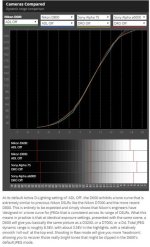
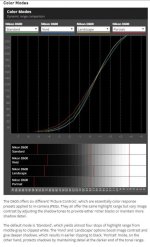
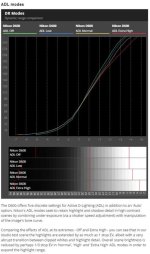
This older, JPEG comparator tools shows the effects of different exposure techniques and camera profiles on JPEG DR. They start by shooting a backlit, 13 stop Stouffer Step Wedge, then comparing the shadow & highlight clipping with different camera processing settings:


These are particularly interesting results for most video, where we are mostly forced to work with the camera's internal JPEG processing. It is really unfortunate that they have abandoned this system for newer cameras. It gives a lot of detail on the curves for the color profiles, etc.

To get the most detail on any specific camera, you need to go to thereview for taht camera. The "Comparator" can then give some details of competing cameras. Here are examples of the Nikon D600 review:
 

Attachments

  • 600-a.jpg
    600-a.jpg
    61.6 KB · Views: 0
  • 600-b.jpg
    600-b.jpg
    53.8 KB · Views: 0
  • 600-c.jpg
    600-c.jpg
    53.2 KB · Views: 0
Last edited:
@unadog Roger's exposed that shot for the highlights. If he exposed to the right there would be less noise in the shadows and the highlights could be recovered in ACR. Magic Lantern have introduced an auto ETTR feature for a reason. Canon sensors aren't ISO invariant like a lot of Nikon sensors are http://www.dpreview.com/news/9402203921/nikon-d5-shows-drop-in-dynamic-range/2 so it's crucial to record the hottest signal you can without blowing the highlights; just like with the A7s and sLog, where the exposure sweet spot is around +1.5 stops. You can lift the shadows without a big noise hit on the D750, not so with the 5D MK3 of 6D. The flat curve he's made performs a similar function to applying the BMD film LUT to ML raw files in Resolve (an essential step to get max DR).

Combining Roger's curves with ETTR would get the most from the 5D sensor. It's not rocket science.

00oqGJx.png
 
Last edited:
^^ Thanks! I appreciate the comments! :)

I have always exposed to teh right on my Canon cameras. Actually all of my cameras- Nikon, Sony & Panasonic too.

I get a little lost in some of the technical sensor discussions, despite 20+ years in photography & video (since undergrad.) And I haven't used Magic Lantern recently- it has been about 7-8 years. Time to get it loaded up and start testing, rather than reading.

+++

I have been shooting a Nikon D750, and now a Nikon D810, alongside my Canon 7DII. I just can't keep up the investment in the 2 competing lens systems any more. Especially with duplicate 24-70 2.8, 70-200 2.8, and 70-200 4.0 zooms and similar, which I really need for event stills.

I just can't give up on my Canon lens kit, I love those too much. So I am slowly throwing in the towel on my Nikon kit. I will keep my Canon lenses and re-purpose those on Canon, Sony, and Panasonic. Because I shoot both stills & video, and demanding stills like events & wildlife, I need the good to great, active auto focus, IS/VR support, and in body aperture control of the newer adapters.

+++

I love the newer, cleaner sensor on the 7DII, compared to earlier Canon sensors. (Roger also gushed about teh lack of banding, etc. on the 7DII when it was first released.) I love the ergonomics of the 7DII even more- the dedicated AF control lever & control toggle, the 65 all cross AF points, the re-programmable "back button" AF settings from the 1DX/5D3 AF system. I am really looking forward to seeing what Canon give us on the 5D4.

Cheers! Hard work getting back up the learning curve.
 
Last edited:
The dual ISO mode in Magic Lantern shoots amazingly high DR photos. Unfortunately ML doesn't work on the 7D MK2.
 
It looks like there is some small hope that ML will start to work on coding for the 7DII. This was posted earlier today in the 7DII Magic Lantern thread here at DVXUser (although I am not holding my breath):

Looks like a1ex is getting started on a ML port for the 7D2. He's looking for help with Thumbs. Man, I'm very excited about this early effort and although it will take time to get an alpha going for this, good things will come of this if the coders can get this working.

http://www.magiclantern.fm/forum/inHdex.php?topic=13746.msg167719#msg167719

Here is a screen shot of the post on the ML forum:

ml.jpg
 
Quick note on my DR test: I wanted to have a measure of usable DR, which I defined as "this shadow area to the right of the spydercheckr must have some detail, and not too much noise". I shot a full exposure ramp with every camera, and chose the exposure level that just barely delivered that result in that shadow. So all shots are equalized on the shadows. Then I looked at where the highlights clip on each camera.

There are many other ways of testing DR, all with their pros and cons. For what I wanted to check at that time, this was the best setup I could think of.

For example, this test doesn't look at textures in the shadows, just the step between the table and the box. If you require that your shadows have discernible textures in order to be considered usable, then everything uncompressed gets a big boost, and everything with nasty compression goes down the drain.

Again: so many ways to test these things...

Regarding the old dpreview DR tests: the problem with those is that settings were awful most of the time. Very common on internet tests: if you're not using good settings and a good workflow, results are meaningless. It also applies to my own tests if you're going to use the camera in a different way, or your workflow will be different.
 
Thanks Samuel! Your comments are much appreciated. :)

+++

I used to work in Digital Imaging/ Computer Systems. I have a Degree in Photography, then went back and got an equivalent of a BS in Computer Science (leess the calculus, physics, etc.), and an MBA in Information Systems.

I remember these DR discussions all the way back to 2002, in the Kodak DSC Pro 14n pre-launch days. I had it on pre-order as soon as it was announced. The design engineers were talking about how many Db / how much DR it would deliver. And how how many Db/ stops would fit in how many bits.

Then it was delayed, then we saw the "real world" results, it was good at 10 ISO to 25 ISO only. So I cancelled my pre-order, and bought a Canon 1DxII instead. :)

After all of the years, I still don't really "get" all of the competing definitions of DR sometimes. Especially real world DR, after all of the "full well capacity", "photon statistics", SNR ratios, ISO Invariance, amplifiers, micro lenses and etc.

Sometimes I understand these things. Sometimes I am totally confused!

+++

**So Much Engineering** these days. :(


Can I please haz make pickture?


+++


Cheers! Thanks again, to all.
 
(You are way too humble: you know much more about these issues than most people posting as if they know it all)
 
Hi, well this thread has moved along since the last time I checked.
Someone asked to post my test, problem is that there are at least 60 clips and it would be very time consuming to put it all up somewhere.
Also you would have to look at me running back and forth between the camera and sitting in a chair with charts around me. (I wouldn't wish that on anyone) :-)
Let's just say that I was more disappointed with the A7SII than I thought I would be. All kinds of chroma noise, no matter what the settings when delogging. Only 4K down converted to HD seems respectably clean.
The FS5, was much more chroma noise free, but the shadows looked horrendous in terms of noise even with the firmware upgrades. Again 4K down converted made a big difference.
It was possible to color correct the Sony cameras to approach the 5DMIII RAW, but it took a lot of work.
Out of the box, the 5DMIII RAW just looks very true to the reality in front of the lens.

In terms of DR, I found the Sony's had a little bit more, but honestly, given the noise in the shadows and the veil of grey fog you have to correct through to get a dynamic looking image, I really think they are all more or less equal.

Lastly, I still love my F3 and frankly, nothing from any Sony cams below the F5 is necessarily better. It does have some chroma noise in Prores 422HQ, but skin tones look damn good in original SLOG and I could definitely intercut it with Dragon or Alexa without a problem.
Found this the other day, which underlines my experience as well:
https://vimeo.com/135498367
(Red Dragon vs Alexa vs F3)

Lastly, the one feature that unites the F3 and 5DMIII ML which is just absolutely useful is the spot meter with percentage values. I cannot underline you how much easier it is to place a grey card at it's appropriate percentage with this single little function. Why Sony did not include it in later cameras is a mystery to me. Once again the ML guys deserve an award for all the great work they have done.
 
Last edited:
Back
Top