Ptool for beginners / Ptool FAQ

I installed the firmware hack and made no changes but now my 720 60P videos play with a strobe effect that 30P is known for and no longer has that "live" smooth look of 60P even though the stats say it is a 60P file. How do I get the firmware back to recording true 720 60P video? I noticed this strobing effect right away even when previewing on the GH1 LCD monitor before shooting anything.

Update: Figured it out, my big hands slipped the shutter down to 1/30th. All better now...

Randy
 
Last edited:
So with about double the bitrate setting now my 8GB card still shows that I have one hour of shooting time when I turn on my GH1. Do we need to sorta guess how much time we can really shoot on an SD card now depending on how high we set the bitrate or will the GH1 ever show an accurate amount of time remaining while recording?

Randy
 
Last edited:
So with about double the bitrate setting now my 8GB card still shows that I have one hour of shooting time when I turn on my GH1. Do we need to sorta guess how much time we can really shoot on an SD card now depending on how high we set the bitrate or will the GH1 ever show an accurate amount of time remaining while recording?

Randy

saw tester13 say he's looking into it.
 
hello

I installed the firmware hack (avchd B) settings) and it works well. Many thanks to tester13!

But now I am trying to increase the bitrate and decided to test the C) settings on my GH1.

Then I noticed in the comment window that, when clicking on
- "Video bitrate adjustment", we can read "do not use values higher than Video buffer setting and Overall bitrate setting"
- "Overall bitrate adjustment", we can read "do not use values higher than Video buffer setting"
- "Limiting bitrate adjustment", we can read "always greater than overall bitrate value"

the proposed values for the C) settings are respectively 50000000, 52000000, 60000000.

But then, if I click in "Video buffer" I see that the default value is 21000000 and the C) setting proposed value in comments is 40000000. According to the aforementioned comments this should be more than 52000000. I assume this is a typo and maybe 60000000 should be proposed ? If yes then there is an issue: the Video buffer value can be selected in a "choice list" only and 60000000 is not proposed. But only the proposed value 84000000 is higher than 52000000 and could match the comments written for the C) settings.

Some people wrote on this forum than the video buffer setting has no effect and I know that this firmware hack is still under development, but it would be nice to change these setting comments in ptool3 (if I am right), because this is confusing...
 
hello

I installed the firmware hack (avchd B) settings) and it works well. Many thanks to tester13!

But now I am trying to increase the bitrate and decided to test the C) settings on my GH1.

Then I noticed in the comment window that, when clicking on
- "Video bitrate adjustment", we can read "do not use values higher than Video buffer setting and Overall bitrate setting"
- "Overall bitrate adjustment", we can read "do not use values higher than Video buffer setting"
- "Limiting bitrate adjustment", we can read "always greater than overall bitrate value"

the proposed values for the C) settings are respectively 50000000, 52000000, 60000000.

But then, if I click in "Video buffer" I see that the default value is 21000000 and the C) setting proposed value in comments is 40000000. According to the aforementioned comments this should be more than 52000000. I assume this is a typo and maybe 60000000 should be proposed ? If yes then there is an issue: the Video buffer value can be selected in a "choice list" only and 60000000 is not proposed. But only the proposed value 84000000 is higher than 52000000 and could match the comments written for the C) settings.

Some people wrote on this forum than the video buffer setting has no effect and I know that this firmware hack is still under development, but it would be nice to change these setting comments in ptool3 (if I am right), because this is confusing...

no, just select 84 in your video buffer. or don't check it at all. test it. that's what we're all doing. but i did see what you mentioned, he may've got something to work.
 
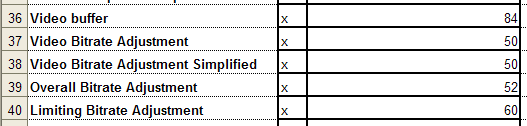
Here is what I used and it's working fine with a Transcend Class 6 8GB card.

Video buffer = 84
Video Bitrate Adjustment = 50
Video Bitrate Adjustment Simplified = 50
Overall Bitrate Adjustment = 52
Limiting Bitrate Adjustment = 60

Randy
 

Attachments

  • 2010-06-13_1822.png
    2010-06-13_1822.png
    9 KB · Views: 0
So with about double the bitrate setting now my 8GB card still shows that I have one hour of shooting time when I turn on my GH1. Do we need to sorta guess how much time we can really shoot on an SD card now depending on how high we set the bitrate or will the GH1 ever show an accurate amount of time remaining while recording? - Randy

FYI: I'm currently using the "double rate" (~mid-30s megabits/sec.) AVCHD settings, and as a test I set my GH1 with a 4GB Fuji Class 6 SDHC card installed in front of a TV (Saturday Night Live & lots & lots of fast-cut commercials).

Anyway, I focused the 20mm pancake lens so the TV scan lines were visible, and purposely tilted the cam slightly to make the alias/moire artifacts really bad. I figured this would be a high-detail scene which would stress the codec to produce near-max. file sizes.

Put the GH1 in record mode and let it run.

Result: The cam's time remaining counter continuously adjusted so that by the time 15 minutes had past, the counter was counting down to the few last remaining seconds. It completed & stopped recording automatically at about 15:10.

Normally these 4GB cards can hold about 31 minutes of "FHD" AVCHD. 15-min. of "double rate" PTool AVCHD seems just about perfect.

So, even though the GH1 counter is essentially sped up, it's still gives an accurate "time remaining" value, but it ain't Earth time. Although it will be great if Tester13 can "fix" this, it's not a priority for me now that I know 4GB = ~15-min. of ~mid-30s mb/s AVCHD.

YMMV.

P.S.: Here's another test I did today. Just trying things out to get accustomed to the new "GH13" reality:
http://www.vimeo.com/12536738
 
Peter, I notice at the end of your video there's noticeable banding in the sky. This has been one of my major disappointments with the GH1. Does this banding exist in your original raw footage or is it a result of the compression to the AppleTV format or Vimeo?

Nice video by the way.
 
can some one explain the AVCHD 1080p24/25->720p24/25 patch? why would you use this?
I'm lost with this...

It is experimental patch.
For example it allowed us to make native 24p playback working :-)
Today it just crops top portion of the 1080p footage.
As soon as we figure out how to scale instead of cropping (like MJPEG) it'll work.
 
Peter, I notice at the end of your video there's noticeable banding in the sky. This has been one of my major disappointments with the GH1. Does this banding exist in your original raw footage or is it a result of the compression to the AppleTV format or Vimeo? Nice video by the way.

Thanks, Mike.

I'm pretty sure all the video-capable DSLRs record 1080p HD @ 4:2:0 color depth. That's what causes the banding in gradients such as in blue skies. In the clip I shot of the top of the tree w. the blue sky, there's some banding visible in the blue sky gradient in the original footage, but as expected Vimeo's compression makes it much worse. It occurs less often in Canon footage because they record at higher bit-rates than a stock GH1.

I believe Barry Green & others have said greatly increasing the GH1's video bit-rate via Tester13's PTool (and which requires a good-quality Class 10 SDHC card) should reduce banding in AVCHD somewhat. I think even the mid-30s mb/s bit-rate settings produce slightly smoother gradients than stock/standard GH1 FHD.

Beyond that, the ideal solution is to record in 4:2:2 or higher color depth. Apparently this is now being tested on the GH1 with MJPEG thanks to PTool, but I don't believe 4:2:2 is available for AVCHD -- yet.

I'm hoping to do some more shooting with the same mid-30s mb/s settings on Monday.
 
Last edited:
Help

Help

This may sound stupid but I am having a problem here. I patched my GH1 and sttarted only with the battery and recording time limit. It worked. Then tweaked the video bit rate and now the camera froze...doesn´t record or change anything not even switches off without taking the battery off. I tried to re-patch with the previous version and doesn´t show the up version when I press play...I changed increments on the version still doesn´t work. Somebody tell me what I am doing wrong?

Thank you
 
I was under the impression that it was best to keep the __132 file name even after hacking the firmware, in case Panasonic were to release an official update with the same file name that would have been used for the new hacked fw (__133, __134), etc. That way there would not be an issue loading the new official firmware, and you would not be locked into the hacked firmware. Is that accurate?
Whether you are able to upgrade directly from GH13 to stock updated firmware depends on what the internal version is (the one that gets incremented in ptool. If Panasonic releases new firmware update tester13 first has to incorporate all the GH13 changes into it first. Supposedly, the new 3.36d ptool allows to load any version of the firmware, so when confirmed this whole discussion is moot.

Edit: Ozpeter took the plunge (thanks) and have verified this capability now http://www.dvxuser.com/V6/showpost.php?p=2018144&postcount=2543 . So at any point one can revert to original Panasonic firmware with original internal version numbers.
 
Last edited:
Since the AVCHD 1080p24/25 -> 720p24/25 patch only crops the image, wouldn't it be possible to have a patch that would purposely crop the picture to 1920x810? Just wondering.
 
I have just been trying the Ptool. (Thanks Tester13 and others for this really impressive work!) I have a question or maybe a feature suggestion. Is it possible for the Ptool to load an already modified firmware file for further modification?

Currently, I get a message stating that a changed firmware file has already been modified and I have to open an unmodified firmware file. The option is to either leave the Ptool open while testing or re-key all previous settings to a clean firmware to test a single change. Is this normal behavior? (To not lose track of my changes I have taken to using a spreadsheet to track iterations of changes.)

If this is normal behavior then I would offer a feature suggestion. Adding the ability to load a modified firmware (or to save previous session settings) would speed testers’ ability to assess incremental changes and reduce the chance of one incorrectly entering values along the way. Thanks!
 
I have not tried hacking the firmware yet but getting VERY tempted. I'm interested in getting native 24p and increased AVCHD bitrate. Following is the setting that I've change in Ptool.

- Version Change
- 24p native
- Video Buffer (set at 40.000.000)
- Video Bitrate Adjustment (set at 32.000.000)
- Video Bitrate Adjustment Simplified (set at 32.000.000)
- Overall Bitrate (set at 34.000.000)
- Limiting Bitrate (set at 60.000.000)

Did I miss anything ?? What is the difference between Video Bitrate Adjustment and Video Bitrate Adjustment Simplified ? Also, with these settings, will I be able to play videos in camera ?
 
I have not tried hacking the firmware yet but getting VERY tempted. I'm interested in getting native 24p and increased AVCHD bitrate. Following is the setting that I've change in Ptool.

- Version Change
- 24p native
- Video Buffer (set at 40.000.000)
- Video Bitrate Adjustment (set at 32.000.000)
- Video Bitrate Adjustment Simplified (set at 32.000.000)
- Overall Bitrate (set at 34.000.000)
- Limiting Bitrate (set at 60.000.000)

Did I miss anything ?? What is the difference between Video Bitrate Adjustment and Video Bitrate Adjustment Simplified ? Also, with these settings, will I be able to play videos in camera ?

Setting are different for almost all cards. Simplied vs Adjustment hasn't been tested thoroughly, we're still learning the differences. However, only one can be checked when applying the patch. And video buffer has been suggested useless.
 
Setting are different for almost all cards. Simplied vs Adjustment hasn't been tested thoroughly, we're still learning the differences. However, only one can be checked when applying the patch. And video buffer has been suggested useless.

In that case, what would be the optimum settings to achieve best possible FHD results with native 24p on a regular Class 6 card (currently using Sandisk 16GB card)
 
Back
Top