Post vs in-camera - grading, NR etc?

I'm probably in the minority but I've found the best method for me is to get as much as possible of the look in camera. And I mean as close as it gets. I find the image to be very very clean. The only thing I like to do in post is slightly adjust a balance of color if needed. IMHO This format wasn't meant to be push and pulled in post no matter what you transcode it to. Especially in the shadow areas. If you look at other peoples footage that shoot flat many times (not all) you will notice noise and banding. Also it's nice to play with what's really going to be scene in terms of shadows, mids and highlights as opposed to shoot flat and not seeing the final result. You can do things on set dramatically with the performance in the areas of S, M, H. This is all just my jibberish opinion though. Thought I'd share from what I've been learning doing tests with the 7d.

Don't forget to view your final result two ways, on an HD set and a compressed final web output. Some people think things don't look that bad on a compressed web movie then go to look at it on an HD monitor and it's all over the place. IMO I would say to make it work for both especially if shooting a feature. Usually a broadcast monitor is best. This is a bit off the subject but I found for a consumer HD monitor, the Panasonic plasmas to be the best.
 
Last edited:
draven4, well put mate! At all costs avoid banding and too may filters at post
Punchy signal in, the most vibrant and pleasing to the eye, the most color info, etc....
Start with the best, End with the Best! Cheers
 
Can you throw out some specific ones you use? Thanks ;)

Well first off, Most are 4x4, Schneider Sunset Grad 2. Tiffen Soft Fx 1, Schneider True Pol
Assorted Promists, and ND 1,2,3,4, You can get them for the lens as well, if u do not have a matte box or if u want to triple stack them, use a 52mm or 72mm round or step rings,( avoiding vignetting on 24 mm) for your NDs and the u can use your other 4x4 as well, its essentially like having a four/five stage mattebox! This filters will help reduce aliasing and moire, UV and overexposure issues.
When have you ever been on a big budget feature and not seen a wall of glass in front of the lens! lol

B/W is for the lower end filters , still work fine, and Cavison makes cheap 4x4s , they work great but rattle in the tray! Cheers , hope this helps!

http://www.schneideroptics.com/
 
Last edited:
Okay,

I'e been playing with the Picture Style editor and have created some custom styles. I see there are some "flat" styles floating around the web for download...is there a particular "gold-standard" for "flat" that people recommend that I can use for this test?

I've created a bleach-bypass style that I will implement in-camera and test that against a "flat" style with the same effect implemented in post. I'm almost certain that the results will be in favour of in-camera due to compression but let's see. Will post to vimeo when I'm done. Hopefully this evening (GMT+2)

mP
 
Okay well as promised here are some test results. Apologies for not doing this sooner but I was in a little car accident yesterday - nothing serious but ruined my plans for the day.

http://www.vimeo.com/11893924

(Note: the vimeo compression seems to soften noise slightly and it becomes more of a large flickering effect than a detailed noise.)

The test was done with the Marvel's Cine "flat" preset available for download off the web vs my own custom "bleach bypass". Cudos to the Marvel's guys, their custom style really has a classic 35mm film look to it (if that's what you want as a final product). My bleach bypass has no post processing and the Marvel's "flat" has been graded in post to match my custom look as much as possible. Bear in mind that this is a 200% crop. Also, this is quite an extreme example, the mid-tones had to be pushed up almost to highlight level which is why we're seeing so much noise there. It proves the point though.

I think the results speak for themselves - the codec just isn't suited to post, so try and get an in-camera look. Shadow noise seems a little better in the post version due to the crushed blacks however highlight / mid noise is really bad.

My opinion would be to veer towards the final look you want but slightly over-saturated and ever so slightly less contrasty - keep a bit of shadow detail. I personally like to crush blacks a little so if you do too then keep a bit of shadows detail there - crushing them in post will REDUCE noise, but try and get highlights and mid-tones close to the final look. You can't recover blown highlights or lost shadow detail so be careful. Pumping up saturation in post is not viable (I can't even pump up saturation by +5 in After Effects without serious artifacts) but bringing it down is fine.

I'd even go as far as saying sharpen in camera but I haven't really tested that adequately yet - in theory you'll be sharpening ISO grain but not sharpening compression artifacts like you would in post.

EDIT: My latest test confirms that in-camera sharpening is better than unsharp mask in post.
 
Last edited:
In addition to Phil's recommendation for mattebox filters, if you're using threaded filters:

Hoya HMC's are what I've been using ritually.

Grab two sets if you can afford it, all one size and convert your lens threads via step-up rings.

Hoya also Sells Circular NDs, a pair of those would suit well.

I say in pairs because sometimes you have to stack and sometimes it's just faster to have more than one of each on hand for multiple lenses.

The other thing you want to search for is a 1.2 so you won't have to stack up to it.
 
Kholi, yes the circular Nds are great ! Modern Primitive, cool, but i hold strongly against adding or using sharpening, the aliasing and moire is a killer. Using manual lenses , older Nikons or Pl mounts lenses or Ziess for Nikon mounts/eos adapter of course are much more of a filmic pretty image
In camera punch with filters as much as possible, and yes never overexpose.
Did u try moving shot tests ?

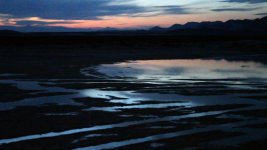
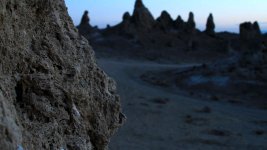
Some stills, compression and noise mainly due to jpeg, low light but all internal color grading straight from the camera, when moving there is grain like film but no big blotches of artifacts visible moving at all,

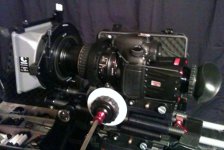
1st shot Nikon 85mm f2, 2nd shot 28mm - 135mm zoom stock lens 3rd shot with iso test 6400 , no light almost pitch dark, 4th shot, 7d with attachments
Cheers Brothers
 

Attachments

  • photo-3.jpg
    photo-3.jpg
    239.8 KB · Views: 0
  • sunset.jpg
    sunset.jpg
    283.5 KB · Views: 0
  • FEBPU1.jpg
    FEBPU1.jpg
    236 KB · Views: 0
  • MVIrock.jpg
    MVIrock.jpg
    255.5 KB · Views: 0
Last edited:
Hey Guys u got me thinking so, here are some graded screenshots, shot with Nikon 24mm f.2, 50mm f1.1.4, 35mm - 85mm zoom f2.8
canon 7d. I see some slight banding in the shadows but i think" Looks" does that even on my F23 stuff! Notice where the Bokeh is heavier the banding is also, so deeper depth of feel will help eliminate that, but for me , hell i want shallow! lol
cheers
 

Attachments

  • amnan.jpg
    amnan.jpg
    380.6 KB · Views: 0
  • amface2.jpg
    amface2.jpg
    299.6 KB · Views: 0
  • aMface.jpg
    aMface.jpg
    351.6 KB · Views: 0
Last edited:
Phil,

Your shots look delectable. I want to eat them - (well perhaps not the horror shots)

Thanks for the sharpening tip. I haven't played with this too much yet but I'm all for a slightly softer look anyway.

I suspect the banding is more of an 8-bit issue than a compression issue. with 8-bit colour, the software can't create nicely interpolated gradations because it's limited to 65,000 odd colours or something to that effect. I've seen this on our Combustion suit (8-bit) while doing prep work for the Flames (16-bit). I've seen this with just about every format using TGA sequences generated by the Flames, so it's not necessarily an SLR issue only - I just think the issue is exaccerbated on SLRs due to the compression.

I love the Looks presets but would also be careful to check how they are processing colour under the hood. There are different ways one can warm up a shot - for example if you use curves - by pumping up the red curve and a the green curve a little OR one can pull down the blue curve and knock back the green slightly. In this case, the latter would be preferable because we're not adding saturation but rather removing it. Same with contrast, there are many ways. It would be useful to experiment and see which methods introduce the least artifacting. An alternate way for doing a bleach bypass for example is to duplicate the layer and apply it to the original in Overlay or soft light mode, then duplicate the layer again on top and apply in colour mode. I haven't tested whether this introduces less artifacting but just mention it. There are ways to do a diffusion filter too using layers rather than using Looks but again I haven't tested these thorougly.

So just to re-iterate for everyone out there:

DO:
Over-saturate a little in camera
Get highlights close to final product (without blowing them out) in-camera
Retain some shadow detail in-camera (with the intention of crushing them in post)
Desaturate in post
Crush in post

AVOID (as far as possible):
Pushing values (up) in post, including saturation and levels, brightness, contrast etc.

That's my recommendation, but as always "subject to change"!
 
Last edited:
Pumping up saturation in post is not viable (I can't even pump up saturation by +5 in After Effects without serious artifacts) but bringing it down is fine.

Have you tried Colorista? from Red Giant Software. After Effects Saturation is a joke, it isn't intellegent at all. Saturation in Photoshop is much more intellegent. Both Colorista and Magic Bullet looks have their own interpretation of Saturation and they work awesomely. You can pump past 50 and not have any problems except maybe an orange colored actor! :Drogar-BigGrin(DBG)

I've played around with the 5D and a pretty neutral Flat look - Saturation all the way down, Sharpness all the way down and contrast all the way down. Looks pretty decent to me and even after a few tests I was able to get a decent final look. I've also done some green screen and compositing work. I do want to play around more because I've seen some grain that I'm trying to reduce, but with Magic Bullet Looks and Colorista I haven't had problems with 90% of my grading.

Also to note, I mainly deal with African-American skin tones (lots of saturation lol)
 
Also to note, I mainly deal with African-American skin tones (lots of saturation lol)
It’s funny you say this because I found it difficult at times to film my wife who is darker skinned and my youngest girl who is light skinned. One comes out good while the other is a task. I usually desaturate in camera but as of lately tried cranking up saturation in cam and desaturating in post. But then there are the highlights…that can be a bit difficult when having them in the same frame.
 
It’s funny you say this because I found it difficult at times to film my wife who is darker skinned and my youngest girl who is light skinned. One comes out good while the other is a task. I usually desaturate in camera but as of lately tried cranking up saturation in cam and desaturating in post. But then there are the highlights…that can be a bit difficult when having them in the same frame.

I always color correct for the most "importaint" person. Got this from photography in weddings. If the shots are only of one person, no big deal just color correct each shot, but when two people are in the same shot then you have to make a decision. For my next movie the lead is dark skinned so the whole movie will be color corrected based on him.
 
modernPrimitive, Cheers on the kind words, yes the overlay does achieve the bleach fx but adds too much moving noise on lower light shots .

8 bit banding is potentially the issue in these shots and 10 bit post processing is much better. The 14 bit sensor from the 7d is decent but the iso introduces noise , so i try and not go over 400 -800 max!
Fast , nice manual lenses for me is the unspoken rule and not a fan of auto focus zooms, they have less blades than the older manual lenses.
Cheers
 
thank you philip for posting these good looking samples.
i've been going too for a while against the much discussed flatter picture styles trying to advocate a more straightforward recording closer in camera to the intended look to maximise bandwidth usage on the codec while preserving detailed punchy midtones and keep post grading to a minimum.
as Ian said about the saturation, it looks often much better to slightly desaturate vibrant colors if needed than trying to pump back some dull greyish footage.
regarding sharpness and contrast, i think those should really be adjusted with each lens change and according to the scene content.
i mean it is not a set value when mixing and matching canon L, zeiss or old manual M42s.
(one thing about your gorgeous images i'd really drop is the faux anamorphic fx making those faint bluish streaks on your hilights look a bit weird)
 
Cheers rhervag, yes slightly different on each lens but i still feel the digital sharpness on the dslrs are toooooooooooooooo sharp for my filmic style. Adding soft fx or diffusion filters on the camera is much more pleasing filmicly speaking and if we diffuse in post - blur or diffusion filters such as Looks , Dfx, etc still adds the artifacts and/or banding issues. 24mm or wider are generally softer lens , iso up and stop down, open up and iso down, these are lens dependent as well. Try, try and test again till it is achieved after all this is what we are reading this forum for, thanks for the kind words brother!
Cheers
 
I always color correct for the most "importaint" person. Got this from photography in weddings. If the shots are only of one person, no big deal just color correct each shot, but when two people are in the same shot then you have to make a decision. For my next movie the lead is dark skinned so the whole movie will be color corrected based on him.

Why not just hire a DP that has experience lighting for ethnic skin????
 
Back
Top