GH4 Possible Fix to this Magenta blocking crap

I have the chroma smearing in 10 bit captured externally too. to a much, much lesser degree of course. it's smaller and finer. but it's there.

8 bit internal

ZxXNGVL.jpg


10 bit external

ayUDZT4.jpg
 
I have the chroma smearing in 10 bit captured externally too. to a much, much lesser degree of course. it's smaller and finer. but it's there.

8 bit internal

ZxXNGVL.jpg


10 bit external

ayUDZT4.jpg

I could totally work with that. But then again, I can totally work with what I'm getting now. My audience isn't going to detect chroma smearing, and I love the skin tones too much to let V-LOG L alone just because I can see some flaws.
 
I agree. I always try to temper my obsession with "would this distract from the story". and I don't think it would. I shot this last night in V-Log and the added dynamic range is welcomed.

 
I agree. I always try to temper my obsession with "would this distract from the story". and I don't think it would. I shot this last night in V-Log and the added dynamic range is welcomed.


Looks solid to me! I mean, the reality is, all of the stuff we're using this camera for is going to end up on Vimeo/YouTube/DVD/maybe Blu-Ray. If I was working on something that was going for theatrical or broadcast release (though broadcast is INSANELY compressed also), then I'd have a proper budget to work with the only camera I'd ever shoot with at that level - an ARRI Alexa. Done and done.

(Man, I really need to figure out that whole anamorphic setting and lenses. Looks sweet!)
 
I agree. I always try to temper my obsession with "would this distract from the story". and I don't think it would. I shot this last night in V-Log and the added dynamic range is welcomed.

Nice looking footage.

I think we all need to step back and realize we are working with a $1400 camera ($1200 in some cases) and then take into account Vlog was/is an after thought. Still, it's an 8bit 420 internal encode and on a camera that was/is not the best in low light situations or high ISO. And yet, Zaks footage looks pretty darn sweet and cinematic to me.

Let's also remind ourselves that the Vlog addition is/was also implemented with external recording in mind for how it was designed to be implemented. Who asked for Vlog in the Gh4? Low budget pros that probably already have a recorder. I will still stand saying that since my reset of the camera I've gotten much better results in 8bit. To the point that I would use it for anything internet destined only and would have no qualms about using it for larger projects with an external recorder.

I've seen some really impressive stuff on the web so far. Zak's is right up there as an example of what this little camera can do.

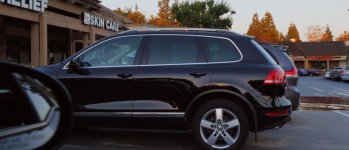
Really haven't gotten to shoot anything substantial with this. But I took it along while picking up dinner during golden hour and shot this car out the window. I'm a guy that likes nice full range images. Deep blacks and clean whites. The Vlog was able to really handle that highlight on the rims very well. This is the Varicam Vlog LUT with minor contrast adjustments. Yeah, the artifacts are there. But in motion and sitting back off my monitor like a human being the image is just fine. Thats one thing to consider guys and gals. Stop pressing your nose against the monitor. You're gonna go blind and get hairy palms.

rim.jpg
 
My first tests with Vlog were in night and imo the issue is harder to see in night footage than in a day footage.
For example if the issue is in the shadows you can just pull down the blacks to be black and hide the green/purple spots.
 
Yeah, the artifacts are there. But in motion and sitting back off my monitor like a human being the image is just fine. Thats one thing to consider guys and gals. Stop pressing your nose against the monitor.
I definitely did not set out to find an issue. I'm generally the sort that is pretty forgiving of artifacts. (They are unavoidable in the compromised systems we use.) This color error jumped out at me on my very first test shot, though.

True, in some shots it's barely noticeable, but in others it's egregious. One of the reasons to shoot with a LOG gamma is to have a more forgiving image that gives more range to manipulate in post. With V-LOG L, I feel like I need to be more careful, and limit myself more, when shooting. That's really the source of my disappointment.

What is doubly maddening is that the "color science" of V-LOG L > VLOG709 is so freaking good. It's spot on. Skin tones actually look...right! That's not something I ever thought I'd get out of this camera.
 
One of the reasons to shoot with a LOG gamma is to have a more forgiving image that gives more range to manipulate in post. With V-LOG L, I feel like I need to be more careful, and limit myself more, when shooting. That's really the source of my disappointment.

That is how I feel too. Did the reset thing work for you?
 
Edit: Ok the restart definately did not work for me as I still see the problem even in the viewfinder.
 
Last edited:
Edit: Ok the restart definately did not work for me as I still see the problem even in the viewfinder.

Be mindful that the viewfinder/LCD doesn't reflect what's being encoded. I fell prey to this on a shoot, thinking I was recording massive macro blocking with V-LOG L, and when I looked at the footage, it was practically non-existant in said shot. So I think we have to discard that from our investigations.

In other news, LUMIX tweeted me that I can reactivate my V-LOG L code if I do a factory reset and V-LOG L disappears. So... I might be brave. We'll see. Seems like it doesn't do much though.
 
Yeah - as Brandon said, ignore the macro blocking in the viewfinder. The GH4 doesn't appear to be using a MLUT.
 
It's not in my nature to accept the argument that it's 'good enough' because the camera only costs $1500.

I love this camera. I use it as my low budget workhorse all the time and I get great images from it! I know its limitations over something like the Epic Dragon, but that should be obvious given the price gulf between the two!

But the thing is, colour science needs to be correct, even within 8 bit 4:2:0 limitations.

V-Log L recorded externally in 10 bit 4:2:2 (and NOT edited in Premiere Pro) looks good, and the colours appear correct. I feel that it shows accurately enough where the limits of the sensor are.

But V-Log L internally is a mess, because it's introducing visually apparent colour shifts due to some sort of mathematical processing error.

Using linear profiles, we can see the faintest examples of these errors too, which means the camera's video encoding chain is somehow messing up the colour science. Why can I say this with certainty? Because the camera is also a stills camera that shoots RAW, so we can see what the full sensor bandwidth can produce and compare it to the video stream.

I'm reminded of my old Canon 5D MkIII and Magic Lantern RAW. When we bypassed the processing chain in that camera, the RAW captures had far more dynamic range and detail. It made me wonder whether Canon had intentionally hobbled the 5D's video chain in order to upsell to their higher end video cameras.

I'm starting to wonder the same thing about Panasonic.

When we record 10 bit 4:2:2 from the HDMI port, ostensibly bypassing any in camera processing, we get an image that seems to give as much as the sensor is able to, dependent only on the profile colour science in play at the time (and V-Log seems designed to maximise this particular path).

But recording internally, there appears to be some dodgy colour science going on as well as dodgy maths, that is not encoding the best possible image for the bandwidth available to it. V-Log internally is just showing up this dodginess more readily because it requires pushing the image much further in post just to get to parity with the linear profiles.

For me the question is whether I feel that Panasonic are doing all they can to get the best from the GH4 sensor.

If V-Log were truly free, then this wouldn't matter quite so much.

I've been happy enough with the linear profiles and any YUV chroma smearing is usually subtle and can be cleaned up easily enough, so not using V-Log internally is a no brainer for me.

But Panasonic is charging $99 for this profile. They are selling a product, and that comes with certain responsibilities.

To me, the primary responsibilities are two-fold.

1. The product needs to work as intended. In the case of V-Log, it clearly does NOT work for internal recording at a level that I would expect, given the ugly YUV smearing artifacts prevalent in most images.

2. Limitations need to be communicated clearly to allow purchasers to make an informed decision. If V-Log is not suitable without using a 10 bit external recorder, then this is a rather important fact to mention when people are making purchasing decisions.

So yes, I'm going to hold Panasonic's feet to the fire in the hope that they do what they should, and either fix the underlying colour science for internal recording (all profiles, but primarily V-Log, since people are paying good money for it), or give it away for free such that we can make our own decisions on its usefulness and take it or leave it.

Ultimately, there are a lot of competitors in this space. Panasonic have already made such a mess of the whole process from first announcement to screwing up their own firmware and apps, followed by spreading FUD about histograms and zebras not working as they should, to try to get people to upgrade to v2.4 when in fact there's zero change.

To me they are in danger of losing their reputation as a good camera company if they don't start paying more attention to what matters most at any level - the quality of the images their cameras produce.

And it's not like they don't have an interest in making the best pictures. Panasonic were the first company to hire my Red One back in the day, to study its colour science and compare it to their own cameras. I know the engineers there.

With Blackmagic, Canon, Sony and now Samsung all creating 4K offerings, colour science and dynamic range are going to be what sets the companies apart.

Panasonic needs to get it right and show that they are interested in doing so, otherwise I and many others are going to start looking around at their competitors for someone who is.

Cheers,

Paul :)
 
Last edited:
Yes, but the nice thing is that it's muted by default, plus noise reduction works well on it as it's much more subtle than pushing the 8 bit VLog space to linear.

I agree - to take advantage of VLog an external 10 bit recorder is basically mandatory, otherwise you'll be dealing with this chroma smearing forever.

Fingers crossed Adobe can sort out the 10 bit ProRes422 colour issue - then at least we won't need any workarounds to get full 10 bit colour from external files in Premiere!

Cheers,

Paul :)

Paul

This Adobe 10 bit ProRes colour issue, can you explain it to me because I do not understand it really?

Is it the same problem with Avid DNxHR codec (in the Quicktime container from Atomos Shogun)?

Regards
Mikael
 
V-Log L internally is a mess, because it's introducing visually apparent colour shifts due to some sort of mathematical processing error.

Using linear profiles, we can see the faintest examples of these errors too, which means the camera's video encoding chain is somehow messing up the colour science. Why can I say this with certainty? Because the camera is also a stills camera that shoots RAW, so we can see what the full sensor bandwidth can produce and compare it to the video stream.
It's not an "error", it's what the GH4's consumer-grade H.264 encoder is designed to do at the extreme limits of digitization. The only "color science" involved is the REC 709 YUV color space that is built into all H.264 encoders and not intended for Panasonic to manipulate. The whole point of lossy compression is to degrade the image in subtle ways that are unnoticeable by most people most of the time. If an encoder's degradations are not subtle enough for your purposes, you need more bitrate and/or a more sophisticated encoder. If nothing short of RAW sensor data will do, you need a different camera.
 
It's not an "error", it's what the GH4's consumer-grade H.264 encoder is designed to do at the extreme limits of digitization. The only "color science" involved is the REC 709 YUV color space that is built into all H.264 encoders and not intended for Panasonic to manipulate. The whole point of lossy compression is to degrade the image in subtle ways that are unnoticeable by most people most of the time. If an encoder's degradations are not subtle enough for your purposes, you need more bitrate and/or a more sophisticated encoder. If nothing short of RAW sensor data will do, you need a different camera.


10 points for Gryffindor
 
Panasonic needs to get it right and show that they are interested in doing so, otherwise I and many others are going to start looking around at their competitors for someone who is.

Panasonic would be foolish not to fix this issue if they could, as it would be a way to recoup whatever sales were lost with the image app screw-up. If they released a firmware that fixed this problem, I and I think a lot of people would happily pay for the activation code. As is, I would not pay for v-log.
 
Back
Top