GH4 Possible Fix to this Magenta blocking crap

Okay, I was able to test this morning. Resetting camera does make a difference...just not necessarily an improvement:

Before reset (VLOG-L, -5, -5, VLOG709 LUT, saturation cranked to exaggerate issue)
http://blog.josephmoore.name/wp-content/uploads/2015/09/before_reset_1080.png

After reset (VLOG-L, -5, -5, VLOG709 LUT, saturation cranked to exaggerate issue)
http://blog.josephmoore.name/wp-content/uploads/2015/09/after_reset_1080.png

I also verified (again) that the exact same errors exist in every profile...it's just that with other profiles you don't need to dramatically alter saturation so you are less likely to notice it.
 
What's curious to me is how similar the GH4's internal encoder's issues are to Adobe Premiere's issues when dealing with 10-bit ProRes HQ files recorded externally.
 
But you don´t get maximum from FC, because they haven´t released the Vlog profile, or have they?

They haven't released a Vlog profile, but to be honest, I'm liking the results I'm getting just by using the CineLike D FC profile. FC often comes across too contrasty for my tastes, and likely a subtler application doesn't exacerbate the problem as much (less contrast, combined with film grain).
 
They haven't released a Vlog profile, but to be honest, I'm liking the results I'm getting just by using the CineLike D FC profile. FC often comes across too contrasty for my tastes, and likely a subtler application doesn't exacerbate the problem as much (less contrast, combined with film grain).
The Ari LOG profile is also a decent match until they release the real deal. They responded to an email and said that they expect to have a profile very shortly after release.
 
Shian - I'll start by saying... yeah, your GF was right. Stop being an asshole. Especially when you KNOW you're doing it.

I can relate. And sympathize. My biz partner probably feels like saying that to me several times a week. After one phonecall with him on Friday, I looked at my GF after I hung up the phone and said "Did I sound like I was trying to just be clear, or did I sound like an asshole?" She said, "Well, to be honest... kind of both."

It's hard for me at times to check my voice tones, especially when I'm trying to make a valid point and feel like the other person is just being dense, in a way that's completely foreign to me. Sometimes I just don't get why someone isn't understanding what's completely obvious to me, and ... yeah... my impatience really makes itself known.

I know you've apologized. Others have too. So I'm not trying to kick anyone around the room. I'm just saying I do it too.

But - here's the thing... on this situation, it's looking to me like his methodology is probably EXACTLY right.

I've just shot 3 quick tests. Internal recording. 1080P (I didn't realize I wasn't in 4K until I imported the footage.)

http://neverwake.com/img/Kitchen.png

http://neverwake.com/img/Drums.png

http://neverwake.com/img/Hall.png


And I'm fraking amazed at the magenta blotches I'm NOT SEEING.

There is the slightest hint of it on the door of the refrigerator... but it's night and day to what I saw with this same shot yesterday.

I completely reset my camera. Re-grabbed vLog with the Android App. "Graded" in Premiere CC.

(FYI: I'm not a colorist. I'm not even that great a shooter compared to other people here.)

I tried the vLog-709 LUT, and it looks utterly terrible. Then i tried NO LUT at all. I just tried to use the scopes for correction. Not trying to be creative in the grade, just looking for this evil magenta crap. Yes, there's some noise... mostly due (i suspect) to just using natural light, not staging anything, and shooting 800 & 1600 ISO to at least get a decent exposure.

This is the first time in a week that I thought vLog looks promising. Even without 10bit 4/2/2 external recording.

I think the next step (for me) is a) determine if I really need to use a LUT? b) if YES, then find one that's going to not bring back the magenta invaders.
 
Last edited:
Yeah, I've not yet got them completely gone - but at least it's not like Christmas lights, as it has been. Trying some 4K outdoors stuff now... the testing continues...

Both shot 4K, 400 ISO, Not using ND filters. The first shot is using an Alexa LogC2Rec709 LUT. The second shot is vLog-V709.

http://neverwake.com/img/cars.png

http://neverwake.com/img/yard.png

Again, I'm just using shots that have large, grey/taupe color areas - the silver car, the garage door. I'm seeing the slightest bit of magenta blocks in the car shot along the frame of the garage door, and the shadowed area under the car spoiler. But it strikes me as manageable, not a shot destoyer.
 
Last edited:
Yeah, I've not yet got them completely gone - but at least it's not like Christmas lights, as it has been. Trying some 4K outdoors stuff now... the testing continues...

Both shot 4K, 400 ISO, Not using ND filters. The first shot is using an Alexa LogC2Rec709 LUT. The second shot is vLog-V709.

http://neverwake.com/img/cars.png

http://neverwake.com/img/yard.png

Again, I'm just using shots that have large, grey/taupe color areas - the silver car, the garage door. I'm seeing the slightest bit of magenta blocks in the car shot along the frame of the garage door, and the shadowed area under the car spoiler. But it strikes me as manageable, not a shot destoyer.
So you're gonna go with the reset of the camera has worked for you?
 
Dusty, I think it's a 2-fold issue:

1. The reset seems to have helped, yeah. Not like bland vs hot & spicy, but like ... bland vs "added some salt and pepper to make the steak edible".

2. Even with the reset, in non-optional conditions (especially indoors with available light) - the vLog-V709 Varicam LUT is utterly, terriblly, awful crap. It seems to just take whatever magenta blocks may be present, and just show them to the EXTREME.
 
So the solution is to avoid the VariCam 35 -> 709 lut that Panasonic put out?

So far, that's what I'm finding.

I've got a couple outdoor daylight shots that VariCam doesn't ruin, but that seems to sort of be the only type of scene I can use them in. For everything else that I'm getting happy results from, I'm not using a LUT.

And again, a real colorist may look at my final results and laugh their ass off - and I'm ok with that; dealing with this vLog situation is very much a learning process for me, but I'm at least trying to go about it in what I believe to be an intelligent manner. ;)
 
Thorn, thanks for all the shots. I'm still seeing the magenta smear, especially in the table shot on the white bottle behind the lighter fluid.

I'm wondering if some of you are hampered by your monitors not showing enough colour difference between subtle shades to notice? Because here and on Facebook, people are saying they can't see anything on a shot, then I take a look and it's clear as day.

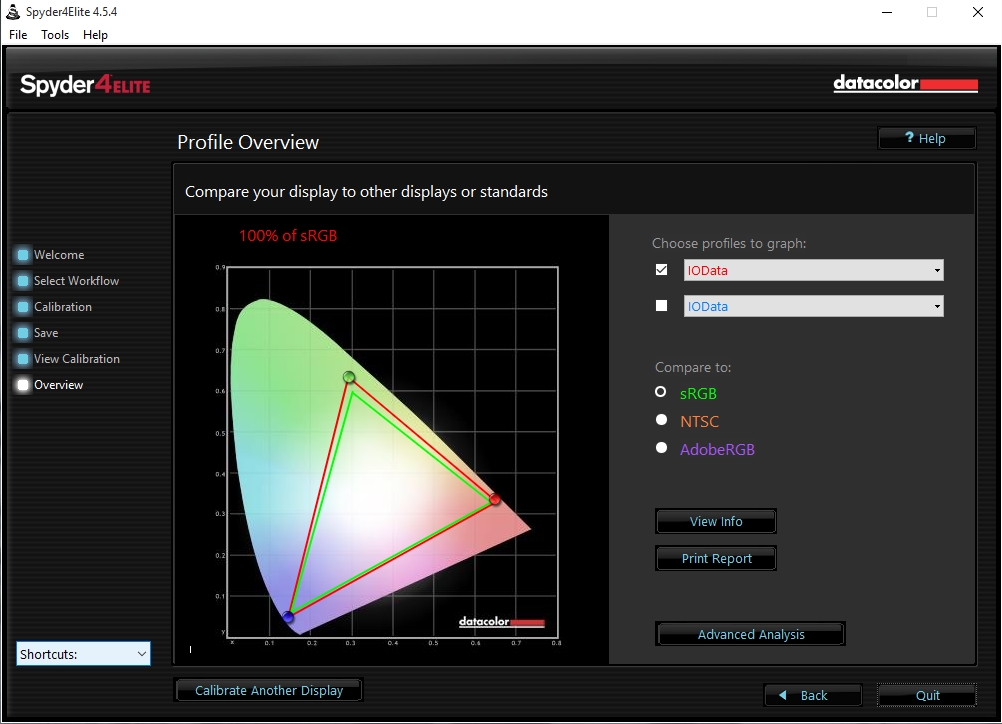
Here's my primary colour grading monitor's profile:

Calibration_Spectrum.jpg


For those of you not seeing the magenta in the last shot, could you let me know if your monitors are calibrated with a Spyder or other hardware? It would help to know that we are looking at the same colours.

In general, even for those shots where the magenta is not standing out in large blocks, I'm seeing the subtle pink hue in many images being posted. Try shooting Natural or Portrait (my own personal favourite with -5 -3 -5 -2 0) with identical settings to Vlog, then grade both to match as closely as possible. When I do that test, quite aside from the obvious blocks of magenta tint, I'm finding there's usually a subtle pink shift to the Vlog stuff that is very hard to dial out without compromising the other colours.

Right now I'm playing with an 8 bit 4:2:0 internal shot I did with Portrait of the street I posted earlier, that makes me much happier using Portrait than using Vlog, with essentially identical dynamic range:

http://www.visceralpsyche.com/misc/web_images/GH4_Portrait_Dynamic_Range_Test.png (14MB)

Good discussion folks - I hope Panasonic is reading and seriously looks into the bug and what they can do to fix it for 8 bit internal recording. Given that lots of people have paid upwards of $99 for it, they have an obligation I think!

Cheers from Berlin,

Paul :)
 
Paul, I'm seeing the same magenta blocking in that picture as we've seen in V-LOG L - look at the street and the sign on the bottom left. I think this is ultimately a camera/encoder issue. Of course now that we've all been obsessing about it I see it everywhere, but it makes it apparent that this issue has actually been with us since the beginning. All the more reason to take advantage of a 10-bit external recorder. Hoping I can get one this spring!
 
Paul, I'm seeing the same magenta blocking in that picture as we've seen in V-LOG L - look at the street and the sign on the bottom left. I think this is ultimately a camera/encoder issue. Of course now that we've all been obsessing about it I see it everywhere, but it makes it apparent that this issue has actually been with us since the beginning. All the more reason to take advantage of a 10-bit external recorder. Hoping I can get one this spring!
Yes, but the nice thing is that it's muted by default, plus noise reduction works well on it as it's much more subtle than pushing the 8 bit VLog space to linear.

I agree - to take advantage of VLog an external 10 bit recorder is basically mandatory, otherwise you'll be dealing with this chroma smearing forever.

Fingers crossed Adobe can sort out the 10 bit ProRes422 colour issue - then at least we won't need any workarounds to get full 10 bit colour from external files in Premiere!

Cheers,

Paul :)
 
Back
Top